1. Вступ
This manual provides essential information for the safe and efficient operation of your Tesvor Robot Vacuum. The Tesvor X500Pro is a versatile 2-in-1 robotic vacuum and mop cleaner designed to provide thorough cleaning on various floor types, from hard floors to low-pile carpets. It features strong suction, smart navigation, and convenient control options via Wi-Fi, app, and voice commands.
Будь ласка, уважно прочитайте цю інструкцію перед використанням виробу та збережіть її для використання в майбутньому.
2. Інформація про безпеку
To reduce the risk of injury or damage, read these safety instructions carefully and keep them at hand when setting up, using, and maintaining your robot vacuum.
- The robot vacuum is for indoor use only. Do not use it outdoors or on commercial surfaces.
- Do not use the robot vacuum in wet environments or on floors with standing water.
- Remove power cords, small objects, and fragile items from the floor before cleaning to prevent entanglement or damage.
- Тримайте волосся, вільний одяг, пальці та всі частини тіла подалі від отворів і рухомих частин.
- Do not operate the robot vacuum near open flames or flammable materials.
- Ensure the charging dock is placed against a wall on a level surface and is not easily moved.
- The robot vacuum is not suitable for high-pile carpets over 0.6 inches, dark-colored rugs, or carpets with black strips/edges, as these may interfere with sensors.
- Використовуйте лише оригінальний адаптер живлення та зарядну док-станцію, надані виробником.
- Supervise children and pets when the robot vacuum is operating.
3. Вміст упаковки
Перевірте наявність та справність усіх компонентів:
- Tesvor Robot Vacuum Unit
- Док-станція для зарядки
- Адаптер живлення
- Бічні щітки (2 пари)
- Основна кисть
- Дастбін
- Water Tank with Mop Cloth
- Інструмент для очищення
- Пульт дистанційного керування
4. Продукт закінчивсяview
Familiarize yourself with the main components of your Tesvor Robot Vacuum.

Image: The Tesvor Robot Vacuum main unit, showing its sleek white design, accompanied by its charging dock, a mop cloth, and the transparent water tank.

Зображення: Тонкий професіоналfile of the Tesvor Robot Vacuum, measuring 75mm in height, allowing it to easily clean under low-clearance furniture like sofas and cabinets.

Image: A close-up of the Tesvor Robot Vacuum's electronic water tank, highlighting its 350ml capacity and water distribution system for mopping.
5. Налаштування
5.1 Початкове заряджання
- Place the charging dock against a wall in an open, uncluttered area. Ensure there are no obstacles within 1 meter (3 feet) to the front and 0.5 meters (1.5 feet) to the sides of the dock.
- Підключіть адаптер живлення до зарядної док-станції, а інший кінець – до розетки.
- Place the robot vacuum onto the charging dock. Ensure the charging contacts on the robot align with those on the dock. The indicator light on the robot will show charging status.
- Fully charge the robot before its first use (approximately 4-5 hours).
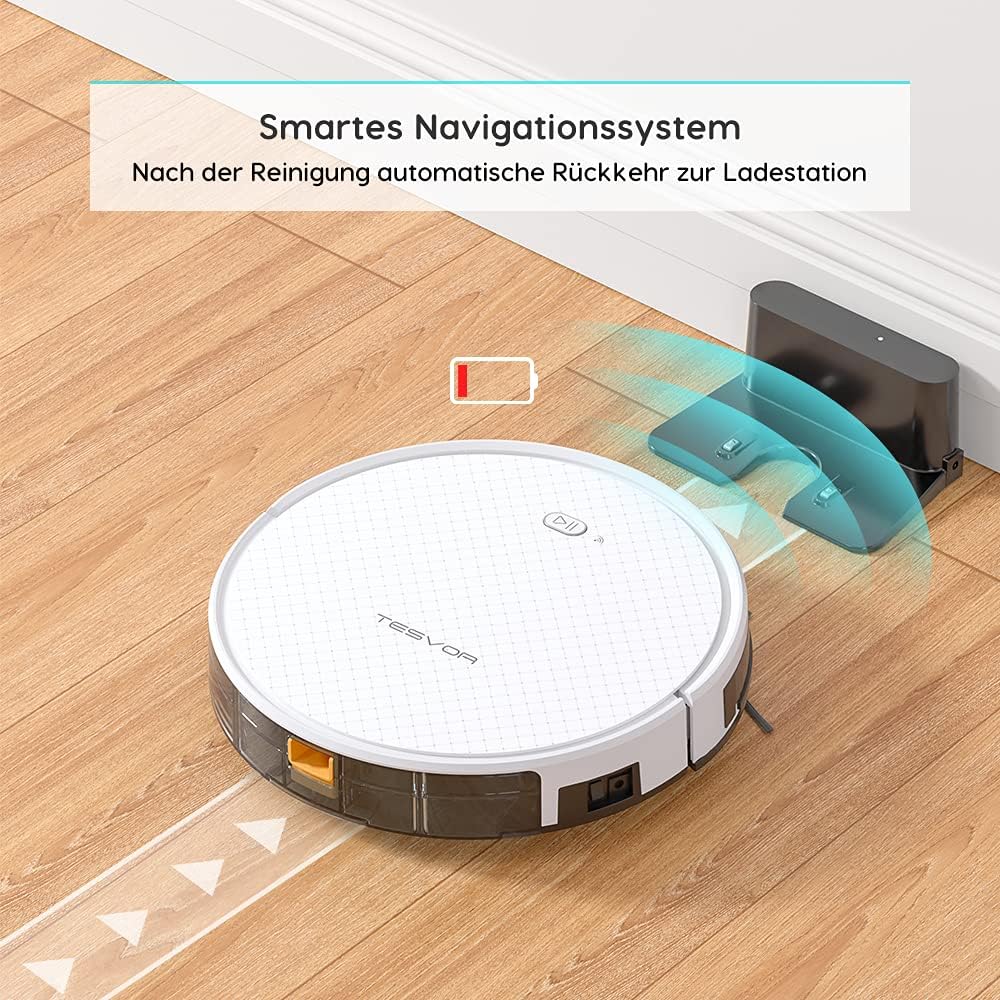
Image: The Tesvor Robot Vacuum intelligently navigating back to its charging station when its battery is low or cleaning is complete, indicated by a battery icon.
5.2 Installing Side Brushes and Dustbin/Water Tank
- Переверніть робот-пилосос догори дном.
- Align the side brushes with the corresponding posts (L and R) and press them down until they click into place.
- For vacuuming, ensure the dustbin is securely inserted into the robot.
- For mopping, fill the water tank with clean water (and a small amount of cleaning fluid if desired, as per manufacturer's guidelines) and attach the mop cloth. Insert the water tank into the robot.
6. Інструкція з експлуатації
6.1 Режими очищення
The Tesvor X500Pro offers various cleaning modes:
- Автоматичне очищення: The robot intelligently navigates in an S-shape path to cover the entire area.
- Точкове прибирання: Зосереджується на певній забрудненій ділянці.
- Очищення краю: Прибирає вздовж стін та країв меблів.
- Планове прибирання: Set a cleaning schedule via the app.

Image: The Tesvor Robot Vacuum demonstrating its systematic S-shaped cleaning path, ensuring comprehensive coverage of the floor area.
The robot provides intense 1800Pa suction, effective for dust, crumbs, and pet hair on hard floors and low-pile carpets.

Image: The Tesvor Robot Vacuum actively cleaning a wooden floor, demonstrating its strong suction power by collecting scattered debris.
6.2 Керування за допомогою додатка та голосового керування
The Tesvor X500Pro can be controlled via the Tesvor Smart App or voice commands through Alexa and Google Assistant.
- Download the "Tesvor Smart" app from your mobile app store.
- Ensure your Wi-Fi network is set to 2.4GHz for connection.
- Follow the in-app instructions to connect your robot vacuum.
- Once connected, you can use the app for scheduling, changing cleaning modes, real-time monitoring of the cleaning path, and direction control.
- For voice control, enable the Tesvor skill in your Alexa or Google Home app and link your Tesvor account.

Image: A smartphone displaying the Tesvor app interface, showing a real-time map of the robot's cleaning progress and various control options, along with icons for 2.4G Wi-Fi, Amazon Alexa, and Google Home compatibility.
7. Технічне обслуговування
Регулярне технічне обслуговування забезпечує оптимальну продуктивність та подовжує термін служби вашого робота-пилососа.
7.1 Очищення пилозбірника та фільтра
- Натисніть кнопку звільнення пилозбірника та витягніть його.
- Відкрийте кришку пилозбірника та висипте його вміст у сміттєвий бак.
- Remove the HEPA filter and foam filter. Tap them gently to remove dust. Do not wash the HEPA filter with water.
- За потреби промийте пилозбірник водою, переконавшись, що він повністю висох, перш ніж вставляти його назад.
- Зберіть фільтри та пилозбірник, а потім вставте їх назад у робота.
7.2 Очищення головної щітки та бічних щіток
- Переверніть робот-пилосос догори дном.
- Зніміть кришку головної щітки та вийміть її. Використовуйте інструмент для чищення, щоб видалити волосся та сміття.
- Pull the side brushes upwards to remove them. Clean any hair or debris wrapped around them.
- Reinstall the main brush and side brushes.
7.3 Очищення резервуара для води та швабри
- Вийміть резервуар для води з робота.
- Злийте залишки води та ретельно промийте резервуар.
- Remove the mop cloth and wash it by hand or machine. Allow it to air dry completely.
- Ensure the water tank is dry before storing or refilling.
8. Вирішення проблем
| проблема | Можлива причина | Рішення |
|---|---|---|
| Робот не вмикається. | Низький заряд батареї; живлення вимкнено. | Зарядіть робота; увімкніть головний вимикач живлення. |
| Робот часто застрягає. | Obstacles (cords, small objects); High-pile carpet. | Clear the area; Avoid using on unsuitable carpets. |
| Погана ефективність очищення. | Повний пилозбірник; засмічений фільтр; заплутані щітки. | Empty dustbin; Clean/replace filter; Clean brushes. |
| Не вдається підключитися до Wi-Fi/додатку. | Incorrect Wi-Fi band (not 2.4GHz); Incorrect password. | Ensure 2.4GHz Wi-Fi; Re-enter password; Restart router/robot. |
| Робот не повертається до зарядної станції. | Док заблоковано; робот знаходиться занадто далеко від доку. | Clear area around dock; Manually place robot closer to dock. |
9. Технічні характеристики
| Особливість | Деталь |
|---|---|
| Бренд | Tesvor |
| Номер моделі | Tesvor X500Pro |
| Потужність всмоктування | 1800 Па |
| Термін служби батареї | До 100 хвилин |
| Ємність смітника | 0.6 літра |
| Ємність резервуара для води | 350 мл |
| Спосіб контролю | Додаток, голосове керування (Alexa, Google Assistant) |
| Розміри продукту | 19.69 x 19.69 x 11.02 дюймів |
| Вага товару | 11 фунта |
| Особливості | 2-in-1 Vacuum & Mop, Anti-Collision Sensors, Smart Navigation |
10. Гарантія та підтримка
For warranty information, technical support, or further assistance, please refer to the official Tesvor webсайт або зверніться безпосередньо до служби підтримки клієнтів.
Ви також можете відвідати Tesvor Brand Store on Amazon для отримання додаткової інформації про продукт та ресурсів підтримки.


