1. Вступ
This manual provides detailed instructions for the installation, operation, and maintenance of your Antec NX210 Mid-Tower ATX Computer Cabinet. Please read this manual thoroughly before beginning assembly or use to ensure proper functionality and safety.
The Antec NX210 is designed to accommodate ATX, Micro-ATX, and ITX motherboards, offering ample space for components and efficient cooling with pre-installed ARGB fans.
2. Інформація про безпеку
Дотримуйтесь наступних запобіжних заходів під час встановлення та експлуатації:
- Always disconnect the power supply from the wall outlet before installing or removing any components to prevent electric shock.
- Handle components with care to avoid damage from static electricity. Consider using an anti-static wrist strap.
- Keep the cabinet away from direct sunlight, heat sources, and moisture.
- Забезпечте належну вентиляцію, щоб запобігти перегріву. Не блокуйте вентиляційні отвори.
- Зберігайте дрібні деталі та інструменти у недоступному для дітей місці.
3. Вміст упаковки
Перевірте наявність усіх елементів в упаковці:
- Antec NX210 Mid-Tower ATX Computer Cabinet
- 4 x 120mm ARGB Fans (3 pre-installed in front, 1 pre-installed in rear)
- Коробка з аксесуарами (гвинти, кабельні стяжки тощо)
- Посібник користувача (цей документ)
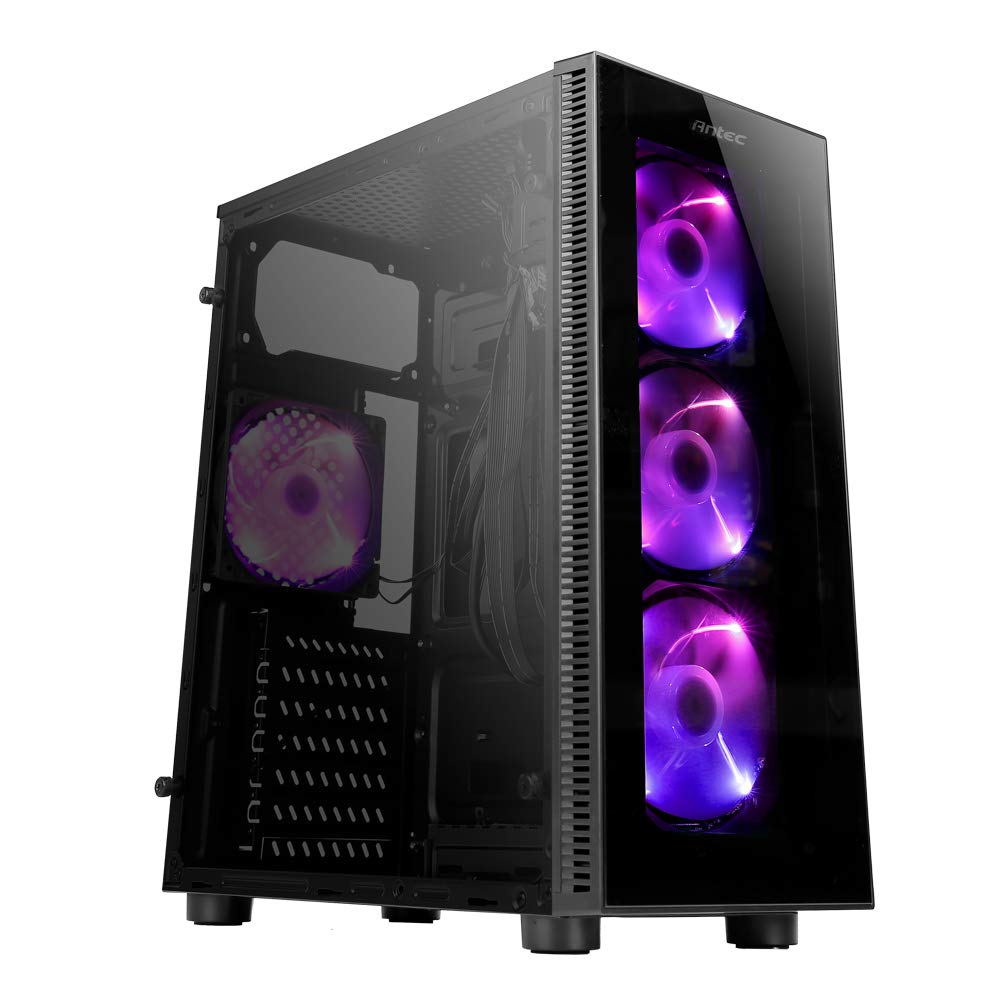
Image: Antec NX210 Mid-Tower ATX Computer Cabinet, showcasing its tempered glass side panel and front ARGB fans.
4. Product Features and Layout
4.1 Зовнішній Views

Зображення: Лицьова та зворотна сторони views of the Antec NX210 cabinet, highlighting the tempered glass front panel with ARGB fans and the rear I/O panel layout.

Image: Left side (tempered glass) and right side (solid panel) views of the Antec NX210 cabinet.
4.2 Top I/O Panel
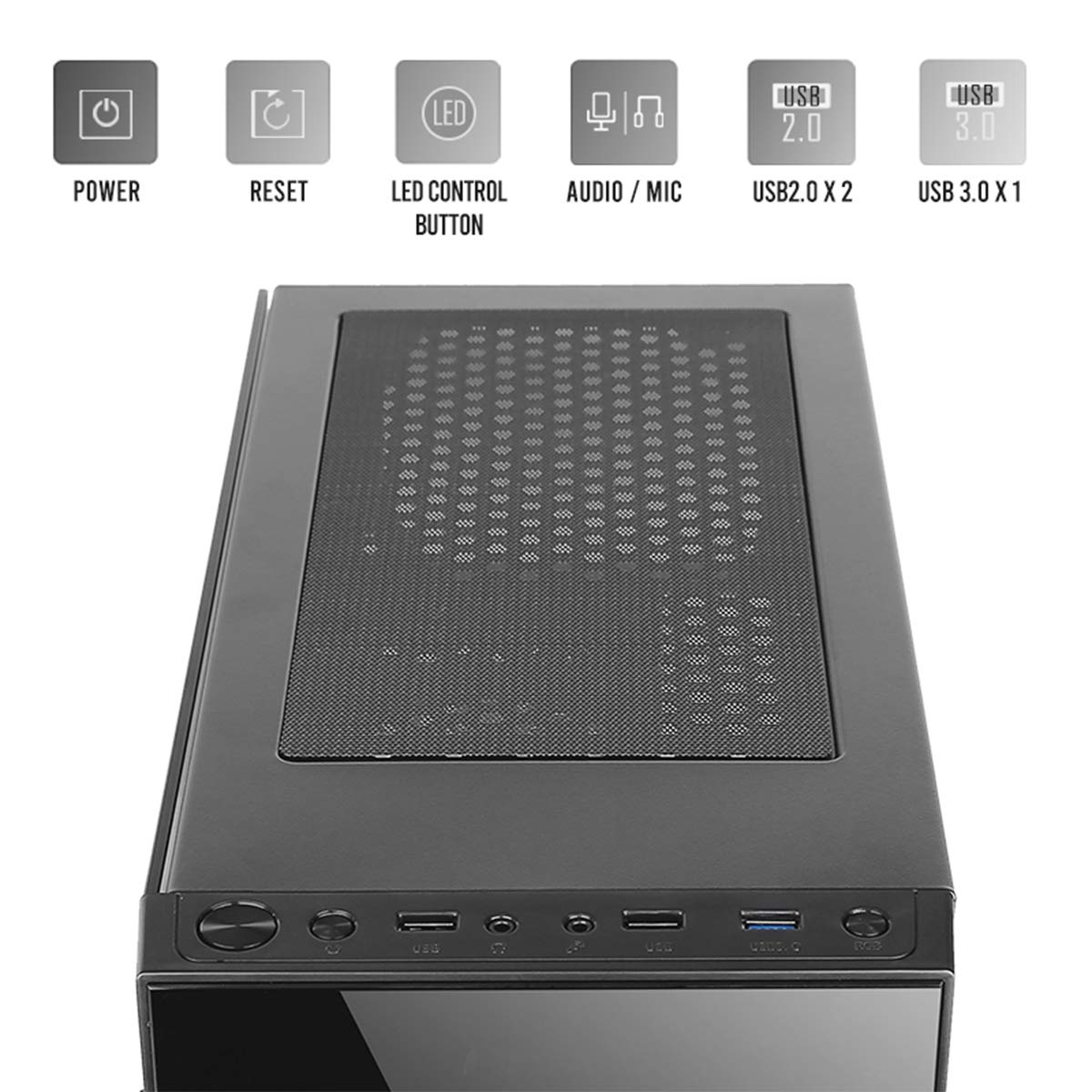
Image: Close-up of the top I/O panel, showing the Power button, Reset button, LED Control button, Audio/Mic jacks, 2x USB 2.0 ports, and 1x USB 3.0 port.
- Кнопка живлення: Щоб увімкнути або вимкнути систему.
- Кнопка скидання: Для перезавантаження системи.
- Кнопка керування світлодіодним дисплеєм: To cycle through ARGB lighting effects for the pre-installed fans.
- Audio / Mic Jacks: Для підключення навушників та мікрофонів.
- Порти USB 2.0 (x2): Для підключення пристроїв USB 2.0.
- Порт USB 3.0 (x1): For connecting USB 3.0 devices, offering faster data transfer speeds.
4.3 Internal Layout and Component Support

Image: Diagram illustrating the internal layout of the Antec NX210, indicating locations for motherboard, SSDs, HDDs, GPU, CPU cooler, and PSU.
- Підтримка материнської плати: Up to ATX (also supports Micro-ATX, ITX).
- 2.5" SSD Support: 3 drive bays.
- 3.5" HDD Support: 1 drive bay.
- Graphics Card Support: Довжина до 310 мм.
- Підтримка процесорного кулера: До 155 мм у висоту.
- Підтримка блоків живлення: Up to 220mm in length (top-mounted).
4.4 Система охолодження

Image: Diagram showing fan and radiator mounting options for the Antec NX210, including pre-installed fans.
- Попередньо встановлені вентилятори: 4 x 120mm ARGB fans (3 in front, 1 in rear).
- Front Fan Support: 3 х 120 мм.
- Rear Fan Support: 1 х 120 мм.
- Підтримка радіатора: Front up to 240mm, Rear up to 120mm.
5. Налаштування та встановлення
Follow these general steps for installing components into your Antec NX210 cabinet. Specific component manuals should be consulted for detailed installation instructions.
5.1 Підготовка кабінету
- Place the cabinet on a stable, flat surface.
- Remove the tempered glass side panel by unscrewing the thumbscrews at the rear and carefully pulling the panel away.
- Remove the right-side metal panel by unscrewing the thumbscrews at the rear.
5.2 Встановлення материнської плати
- Install the I/O shield into the rear opening of the cabinet.
- Align your motherboard with the standoffs inside the cabinet. Ensure the standoffs match your motherboard's form factor (ATX, Micro-ATX, ITX).
- Закріпіть материнську плату за допомогою наданих гвинтів.
5.3 Встановлення блоку живлення (БП)
- The Antec NX210 supports a top-mounted ATX PS2 power supply.
- Slide the PSU into the designated top compartment from the rear of the cabinet.
- Secure the PSU with screws from the rear of the cabinet.
5.4 Встановлення накопичувача (HDD/SSD)
- 3.5-дюймовий жорсткий диск: Locate the 3.5" drive bay. Slide the HDD into the bay and secure it with screws.
- 2.5-дюймовий твердотільний накопичувач: Locate the 2.5" SSD mounting points behind the motherboard tray. Secure the SSDs with screws.
5.5 Встановлення відеокарти (GPU)
- Remove the necessary PCIe slot covers from the rear of the cabinet.
- Вставте відеокарту у відповідний слот PCIe на материнській платі.
- Закріпіть відеокарту гвинтами.
5.6 Організація кабелів
Використовуйте вирізи для прокладання кабелів та точки кріплення за лотком материнської плати для їхнього упорядкування. Це покращує потік повітря та естетику.
5.7 Підключення кабелів передньої панелі
Connect the front panel cables (Power SW, Reset SW, HDD LED, Power LED, USB 2.0, USB 3.0, HD Audio) to the corresponding headers on your motherboard. Refer to your motherboard manual for exact pin layouts.
6. Інструкція з експлуатації
6.1 Увімкнення
After all components are installed and cables connected, close both side panels. Connect the power cable to the PSU and a wall outlet. Press the Power button on the top I/O panel to turn on your system.
6.2 Керування вентилятором ARGB
The pre-installed ARGB fans are connected to an internal controller. Use the Світлодіодна кнопка керування on the top I/O panel to cycle through various lighting modes and effects. The fans will display a default lighting effect upon initial power-up.
7. Технічне обслуговування
Regular maintenance helps ensure optimal performance and longevity of your computer cabinet.
- Пилові фільтри: The Antec NX210 features a dust filter on the top panel. Regularly remove and clean this filter to prevent dust buildup and maintain good airflow.
- Прибирання салону: Periodically open the side panels and use compressed air to remove dust from internal components and fan blades. Ensure the system is powered off and unplugged before cleaning.
- Зовнішнє очищення: Протріть зовнішні поверхні м’якою, damp тканиною. Уникайте абразивних засобів для чищення або розчинників.
8. Вирішення проблем
Якщо у вас виникли проблеми, розгляньте такі основні кроки усунення несправностей:
- Немає живлення:
- Переконайтеся, що блок живлення правильно підключено до розетки, а вимикач живлення на блоці живлення знаходиться в положенні «УВІМК.».
- Verify that the front panel Power button cable is correctly connected to the motherboard header.
- Check all internal power connections (24-pin ATX, 8-pin CPU, PCIe power for GPU).
- Fans Not Spinning / ARGB Not Working:
- Переконайтеся, що всі кабелі живлення вентиляторів надійно підключені до материнської плати або контролера вентиляторів.
- Verify ARGB cables are correctly connected to the internal controller and the controller is powered.
- Try pressing the LED Control Button on the top I/O panel to cycle effects.
- USB-порти не працюють:
- Check that the USB 2.0 and USB 3.0 front panel cables are correctly connected to the corresponding headers on your motherboard.
For more complex issues, consult the manuals for your individual components or seek professional assistance.
9. Технічні характеристики

Image: Diagram showing the physical dimensions of the Antec NX210 cabinet.
| Особливість | Деталь |
|---|---|
| Модель | NX210 |
| Тип корпусу | Середній вежі |
| Розміри (Д x Ш x В) | 43.99 x 38.99 x 21.01 см (приблизно 395 x 210 x 445 мм) |
| матеріал | SPCC, загартоване скло |
| Підтримка материнської плати | ATX, Micro-ATX, ITX |
| Слоти розширення | 7 |
| Привідні відсіки | 1 x 3.5-дюймовий жорсткий диск, 3 x 2.5-дюймовий твердотільний накопичувач |
| Передні порти вводу-виводу | Power, Reset, LED Control Button, MIC/Audio, 2 x USB 2.0, 1 x USB 3.0 |
| Попередньо встановлені вентилятори | 4 x 120mm ARGB fans (3 front, 1 rear) |
| Опора вентилятора (передня) | 3 х 120 мм |
| Опора вентилятора (задня) | 1 х 120 мм |
| Опора радіатора (передня) | До 240 мм |
| Опора радіатора (задня) | До 120 мм |
| Максимальна довжина GPU | 310 мм |
| Максимальна висота процесорного кулера | 155 мм |
| Підтримка БП | ATX PS2 (Top Mounted), Max length 220mm |
| Пиловий фільтр | Топ |
| Вага товару | 4.8 кг |
10. Гарантія та підтримка
The Antec NX210 Computer Cabinet comes with a 1 роки гарантії з дати покупки. Будь ласка, збережіть чек про покупку для гарантійного обслуговування.
For technical support or warranty inquiries, please contact Antec customer service or your local distributor.
Виробник: Antec Inc. 8F, No 107, Jhouzih St, Neihu District, Taipei City 114, Taiwan
Імпортер (Індія): Acro Engineering Company, Khasra No 522/1, Village Jonapur, Delhi - 110 030
Більше інформації та допоміжних ресурсів ви можете знайти на офіційному сайті Магазин Antec на Amazon.


