1. Вступ
This manual provides detailed instructions for the installation, operation, and maintenance of your GAMDIAS Aeolus M2-1204R RGB Fan. This 120mm fan is designed to enhance cooling performance and aesthetics within your computer enclosure. Please read this manual thoroughly before installation and use to ensure proper function and longevity of the product.
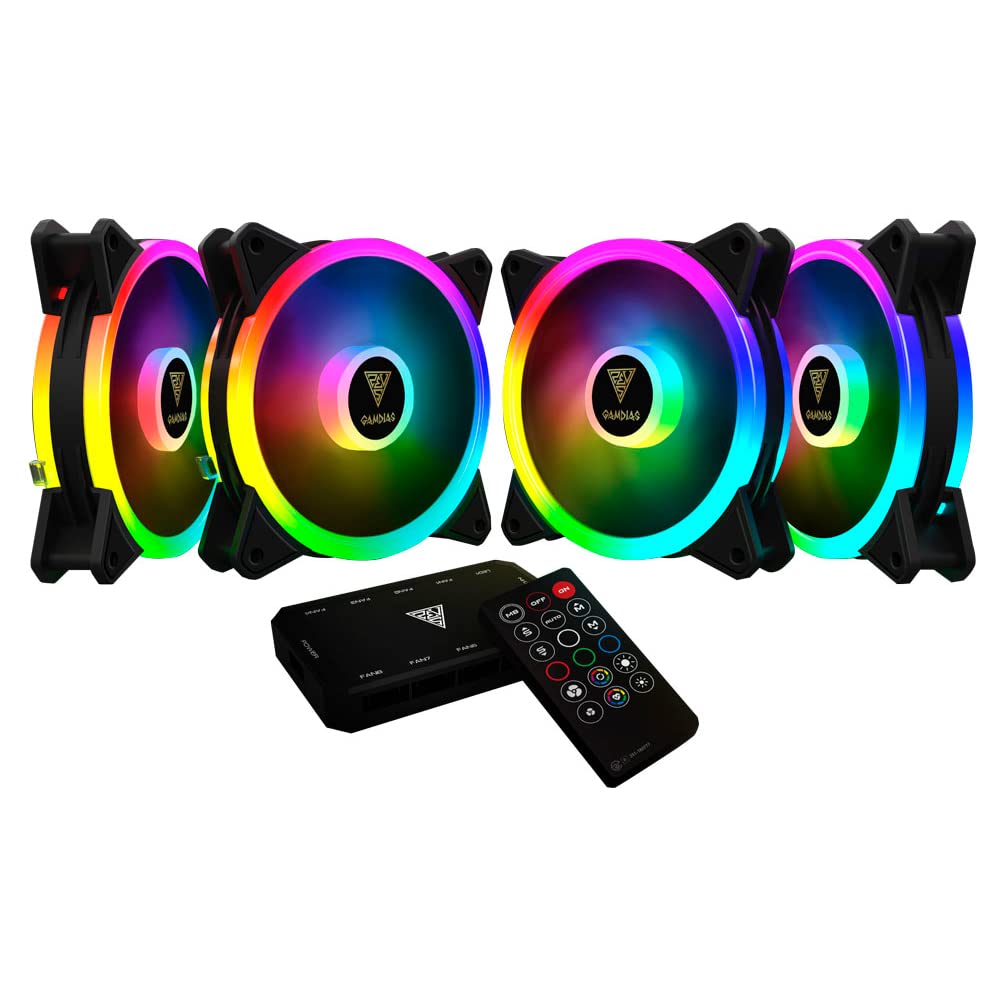
Зображення 1.1: спереду view of the GAMDIAS Aeolus M2-1204R RGB Fan, showcasinйого яскраве RGB-підсвічування.
2. Інформація про безпеку
Observe the following safety guidelines to prevent damage to the product or injury to yourself:
- Перед встановленням або технічним обслуговуванням переконайтеся, що комп'ютер вимкнено та відключено від основного джерела живлення.
- Handle the fan by its frame to avoid touching the blades, which can be delicate.
- Do not attempt to modify the fan or its components. Unauthorized modifications may void the warranty and pose safety risks.
- Тримайте вентилятор подалі від рідин та надмірної вологи.
- Ensure all cables are properly connected and routed to avoid interference with moving parts or other components.
3. Вміст упаковки
Перевірте наявність усіх предметів у вашій упаковці:
- GAMDIAS Aeolus M2-1204R RGB Fan (1 unit)
- Монтажні гвинти
- Посібник користувача (цей документ)
4. Налаштування та встановлення
Follow these steps to properly install your GAMDIAS Aeolus M2-1204R RGB Fan:
4.1 Фізичне встановлення
- Підготуйте свій ПК: Power off your computer and unplug it from the wall outlet. Open your computer case.
- Визначте місце кріплення: Locate an available 120mm fan mounting position in your PC case (e.g., front, rear, top, or bottom).
- Розташування вентилятора: Place the fan in the desired mounting location, ensuring the airflow direction is correct. Typically, fans are installed to draw cool air into the case or exhaust hot air out. Arrows on the fan frame usually indicate airflow direction.
- Secure the fan: Use the provided mounting screws to secure the fan to the case. Tighten screws evenly but do not overtighten to avoid stripping or damaging the fan frame.
4.2 Підключення проводів
- Підключіть живлення: Locate the 4-pin power connector on the fan cable. Connect this to an available 4-pin fan header on your motherboard or a fan controller. Ensure the connector is oriented correctly before pushing it firmly into place.
- Підключіть RGB (якщо застосовується): The Aeolus M2-1204R features RGB lighting. Connect the RGB cable from the fan to a compatible RGB header on your motherboard (e.g., 5V 3-pin addressable RGB header) or to a dedicated GAMDIAS RGB controller. Refer to your motherboard or controller manual for specific RGB connection instructions.
- Управління кабелем: Route all cables neatly to prevent interference with other components and to maintain good airflow within the case.

Зображення 4.1: Різні views of the GAMDIAS Aeolus M2-1204R RGB Fan, illustrating its design and connection points.
5. Інструкція з експлуатації
Once installed, the GAMDIAS Aeolus M2-1204R fan will begin operating when your computer is powered on. Its primary function is to provide airflow for cooling your PC components.
5.1 Регулювання швидкості вентилятора
If connected to a 4-pin PWM (Pulse Width Modulation) fan header on your motherboard, the fan speed can be controlled via your motherboard's BIOS/UEFI settings or through compatible software provided by your motherboard manufacturer. This allows for dynamic adjustment of fan speed based on system temperature, optimizing for either performance or quiet operation.
5.2 Керування RGB-підсвічуванням
The RGB lighting of the Aeolus M2-1204R can be controlled in one of two ways, depending on your setup:
- Програмне забезпечення материнської плати: If connected to a compatible addressable RGB header on your motherboard, you can use your motherboard's RGB synchronization software (e.g., ASUS Aura Sync, MSI Mystic Light Sync, Gigabyte RGB Fusion, ASRock Polychrome Sync) to customize lighting effects and colors.
- Dedicated Controller: If you are using a GAMDIAS RGB controller (often included with multi-fan packs or sold separately), the lighting can be controlled via the controller's buttons or remote control. Refer to the controller's specific manual for detailed instructions.
6. Технічне обслуговування
Регулярне технічне обслуговування допомагає забезпечити оптимальну продуктивність та подовжує термін служби вашого вентилятора.
6.1 Очищення
- Частота: It is recommended to clean your fan every 3-6 months, or more frequently in dusty environments.
- Процедура:
- Power off your computer and disconnect it from the power supply.
- Обережно відкрийте корпус комп'ютера.
- Use compressed air to blow dust off the fan blades and frame. Hold the fan blades gently to prevent them from spinning rapidly during cleaning, which can damage the bearings.
- For stubborn dust, use a soft, dry cloth or a cotton swab to wipe the blades and frame. Do not use liquid cleaners.
- Ensure the fan is completely dry before closing the case and powering on the computer.
6.2 Загальний догляд
- Avoid placing your computer in excessively dusty or humid environments.
- Ensure adequate space around your computer case for proper airflow.
7. Вирішення проблем
If you encounter issues with your GAMDIAS Aeolus M2-1204R fan, refer to the following common problems and solutions:
| проблема | Можлива причина | Рішення |
|---|---|---|
| Вентилятор не обертається | Немає підключення до живлення Несправний роз'єм вентилятора Несправність вентилятора | Check if the 4-pin power connector is securely plugged into the motherboard/controller. Спробуйте підключити вентилятор до іншого роз'єму для вентиляторів на материнській платі. Якщо вентилятор все ще не обертається, можливо, він несправний. |
| Не працює RGB освітлення | Incorrect RGB connection Проблема з програмним забезпеченням Faulty RGB component | Ensure the RGB cable is correctly connected to a compatible 5V 3-pin addressable RGB header or controller. Verify that your motherboard's RGB software or dedicated controller is properly configured and running. Check for any physical damage to the RGB cable or LEDs. |
| Вентилятор видає незвичний шум | обструкція Ослаблені кріпильні гвинти Проблема з підшипником | Power off and check for any cables or objects obstructing the fan blades. Ensure all mounting screws are tightened securely. If the noise persists and there are no obstructions, the fan bearings may be worn. Consider replacement. |
8. Технічні характеристики
Key technical specifications for the GAMDIAS Aeolus M2-1204R RGB Fan:
- модель: AEOLUS M2-1204R
- Розміри вентилятора: 120 мм x 120 мм x 25 мм (4.72 дюйма Д x 2.36 дюйма Ш x 4.72 дюйма В)
- матеріал: Полікарбонат
- Роз'єм живлення: 4-Pin PWM
- томtage: 12 вольт
- Wattage: 13.2 Вт
- Спосіб охолодження: повітря
- Максимальна швидкість обертання: 2000 об / хв
- Потужність повітряного потоку: 56 кубічних футів за хвилину (CFM)
- Рівень шуму: 20 децибелів (дБ)
- Сумісні пристрої: Робочий стіл
- Вага товару: 5.6 унції

Зображення 8.1: Збоку view of the GAMDIAS Aeolus M2-1204R RGB Fan, highlighting its profile.
9. Гарантія та підтримка
9.1 Інформація про гарантію
The GAMDIAS Aeolus M2-1204R RGB Fan comes with a manufacturer's warranty. Please refer to the warranty card included with your product or visit the official GAMDIAS webДетальні умови гарантії див. на сайті. Зберігайте чек про покупку для гарантійних випадків.
9.2 Технічна підтримка
For technical assistance, troubleshooting beyond this manual, or warranty inquiries, please contact GAMDIAS customer support through their official website or the retailer from whom you purchased the product. Provide your product model number (AEOLUS M2-1204R) and a detailed description of the issue when seeking support.


