1. Вступ
This manual provides detailed instructions for the installation, operation, maintenance, and troubleshooting of your TMEZON 4-channel 1080P HD-TVI Digital Video Recorder (DVR) and accompanying 4-camera CCTV security system. This system is designed for both indoor and outdoor surveillance, offering high-definition video recording and remote monitoring capabilities.

Image: Comparison illustrating the enhanced clarity of 1080P resolution over 720P, highlighting the high-definition capability of the system.
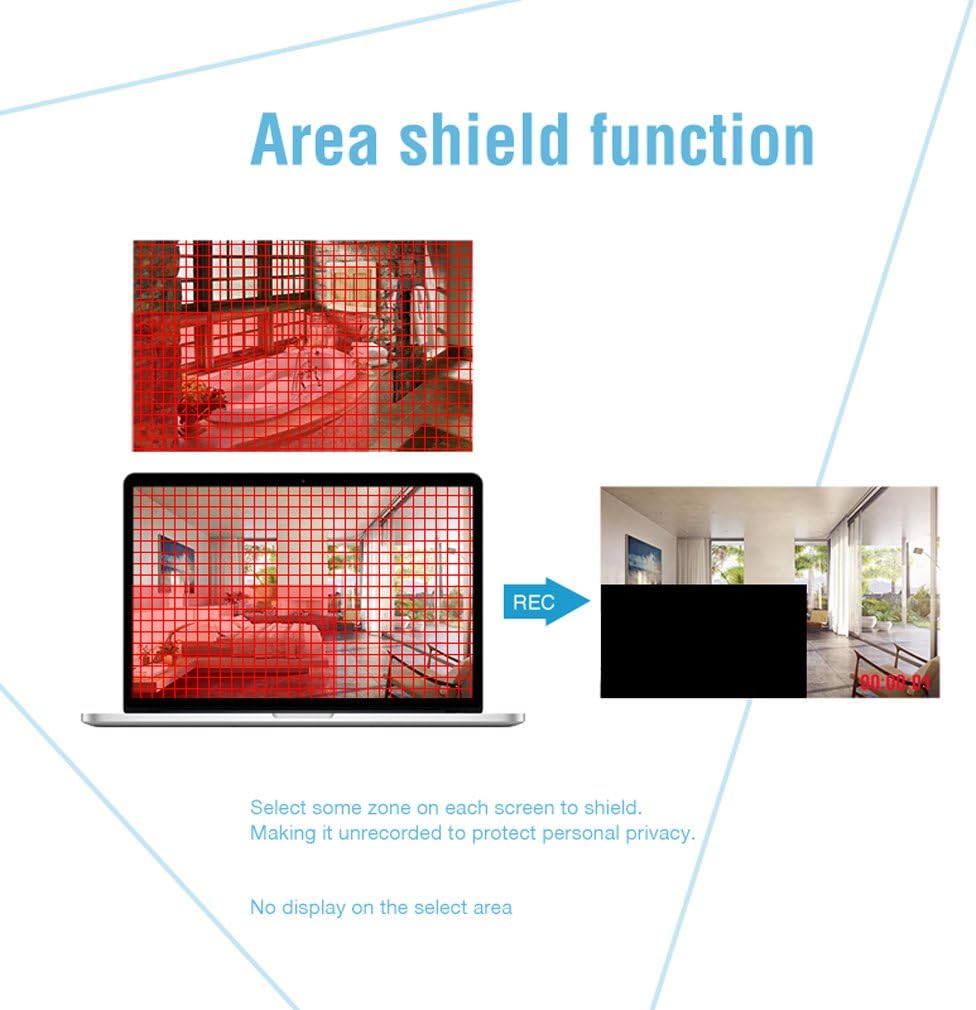
Image: An outdoor camera demonstrating its night vision and rainproof design, suitable for various weather conditions.
2. Вміст упаковки
Перевірте, чи всі перелічені нижче предмети входять до вашої упаковки. Якщо будь-які предмети відсутні або пошкоджені, зверніться до служби підтримки клієнтів.
- 1 x 4-Channel HD-TVI DVR
- 4 x 1080P Weatherproof CCTV Cameras
- 4 x 18.3m BNC Cables
- 1 х USB миша
- 1 x 4-Way Power Splitter Cable
- 1 x адаптер живлення для відеореєстратора
- Монтажні гвинти та дюбелі
- Посібник користувача (цей документ)

Image: Visual representation of the complete package contents, including the DVR, cameras, cables, mouse, and power accessories.
3. Інформація про безпеку
- Уважно прочитайте всі інструкції перед установкою та експлуатацією.
- Use only the power adapters provided with the system.
- Ensure proper ventilation for the DVR to prevent overheating.
- Avoid placing the DVR in direct sunlight, near heat sources, or in areas with high humidity.
- Не намагайтеся розбирати або модифікувати виріб. Це призведе до анулювання гарантії.
- Keep cables organized and secured to prevent tripping hazards and accidental disconnections.
- For outdoor camera installation, ensure all connections are waterproofed and protected from environmental elements.
- Consult a qualified professional for complex installations or wiring.
4. Налаштування
4.1 Hard Disk Drive (HDD) Installation (HDD Not Included)
This system requires a 3.5-inch SATA HDD (500GB to 2TB) for video recording. Follow these steps to install the HDD:
- Від’єднайте відеореєстратор від джерела живлення.
- Remove the top cover of the DVR by unscrewing the screws on the back and sides.
- Підключіть кабель даних SATA та кабель живлення від відеореєстратора до жорсткого диска.
- Secure the HDD to the bottom of the DVR casing using the provided screws.
- Встановіть верхню кришку на місце та закріпіть її гвинтами.
4.2 Connecting the DVR
Connect the DVR to your monitor, power, and network as follows:
- Відеовихід: Connect the DVR to a monitor or TV using an HDMI or VGA cable.
- Мережа: Connect the DVR to your router using an Ethernet cable for remote access.
- USB: Connect the included USB mouse to a USB port on the DVR for navigation.
- Потужність: Connect the power adapter to the DVR and then to a power outlet.

Зображення: Задня частина view of the DVR, detailing connection points for cameras, monitor, network, and peripherals.
4.3 Встановлення камери
Mount the cameras in desired locations, ensuring optimal viewing angles and coverage. The cameras feature a 3-axis mounting bracket for flexible adjustment.
- Монтаж: Cameras can be wall-mounted or ceiling-mounted. Use the provided screws and wall plugs.
- Регулювання кута: Adjust the camera angle using the 3-axis bracket to cover the desired area. Ensure the bracket screws are tightened after adjustment to prevent movement.
- Кабельне підключення: Connect each camera to the DVR using the provided BNC cables. Ensure connections are secure.

Зображення: Прamples of camera mounting options (wall and ceiling) and the flexibility of the 3-axis mounting bracket for precise positioning.
5. Інструкція з експлуатації
5.1 Початкове налаштування
Upon first power-on, the DVR will guide you through an initial setup wizard. This includes setting the language, date/time, and creating a password for the administrator account. It is crucial to set a strong password for security.
5.2 Живий View
After initial setup, the system will display the live feed from all connected cameras on the monitor. You can switch between single-camera view та багатокамерна сітка view using the DVR interface.
5.3 Запис
Відеореєстратор підтримує різні режими запису:
- Безперервне записування: Записи цілодобово.
- Запис виявлення руху: Запис відбувається лише тоді, коли виявляється рух.
- Запланований запис: Записи за певні періоди часу.
Recording settings can be configured in the DVR's menu. The DVR can be set to automatically overwrite older footagе. коли жорсткий диск заповнений.
5.4 Виявлення руху та сповіщення
Configure motion detection to trigger recording and send alerts when unexpected activity occurs. You can customize detection zones to minimize false alarms.
- Налаштовувані зони: Визначте конкретні області в межах камери view where motion detection is active.
- Сповіщення: Receive push notifications on your smartphone via the app or email alerts when motion is detected.
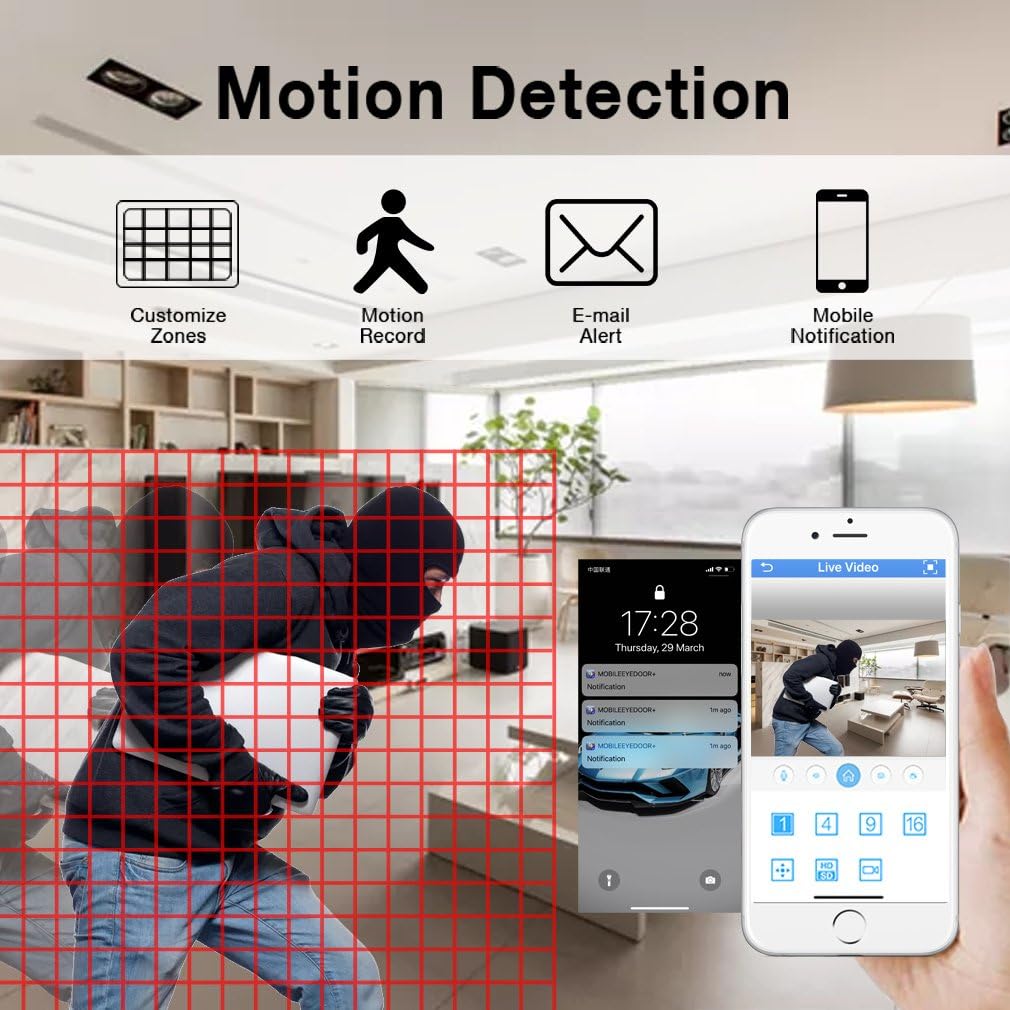
Image: Motion detection interface, demonstrating how to set custom zones and receive alerts on a mobile device.
5.5 Віддалений доступ
Monitor your property from anywhere using the free mobile application "XMEYE" on your smartphone or tablet, or via PC software.
- Мобільний додаток: Download the "XMEYE" app from your device's app store. Register an account and add your DVR using its unique ID.
- PC Access: Install the client software on your computer for remote viewведення та управління.
- Підключення: Ensure your DVR is connected to the internet. Remote access is supported over WiFi, 2G, 3G, or 4G networks.

Image: Remote access capabilities, allowing live viewing and playback on smartphones, tablets, and personal computers.
5.6 Playback and Backup
Доступ до записаного footage and back up important video files.
- Відтворення: Navigate to the playback menu on the DVR to review recorded video by date and time.
- Резервне копіювання: Connect a USB memory stick or external hard drive to the DVR's USB port to transfer and back up video files.
5.7 Privacy Masking (Area Shield Function)
To protect personal privacy, you can define specific areas within the camera's view that will not be recorded or displayed.

Image: The area shield function, showing how to select and mask specific zones to ensure privacy by preventing their recording.
5.8 Day and Night Monitoring
The cameras are equipped with automatic IR-cut filters, providing clear images both day and night.

Image: Day and night monitoring, illustrating the system's ability to capture clear video in varying light conditions.
6. Технічне обслуговування
- Прибирання: Regularly clean camera lenses and DVR surfaces with a soft, dry cloth. Avoid abrasive cleaners.
- Оновлення прошивки: Check the TMEZON website or contact support for available firmware updates to ensure optimal performance and security.
- Перевірка кабелю: Periodically inspect all cables for wear, damage, or loose connections, especially for outdoor installations.
- HDD Health: Monitor the health of your installed HDD through the DVR's system settings. Replace if signs of failure appear.
7. Вирішення проблем
| проблема | Можлива причина | Рішення |
|---|---|---|
| Немає відео на моніторі | Loose video cable connection; Incorrect input source on monitor; DVR not powered on. | Check HDMI/VGA cable connections; Select correct input on monitor; Ensure DVR power adapter is connected and power light is on. |
| Немає запису | No HDD installed; HDD full; Recording schedule not set; HDD not initialized. | Install a compatible HDD; Check HDD status and format if necessary; Configure recording schedule/mode. |
| Віддалений доступ не працює | DVR not connected to network; Incorrect network settings; Firewall blocking connection; App not configured correctly. | Ensure Ethernet cable is connected to router; Check DVR network settings (DHCP enabled); Verify router firewall settings; Reconfigure app with correct DVR ID. |
| Camera angle cannot be adjusted | Mounting screws are too tight or stuck. | Loosen the adjustment screws on the 3-axis bracket. If screws are seized, apply a small amount of penetrating oil carefully. Do not force adjustment as this may damage the bracket. |
| Погана якість зображення | Dirty lens; Low light conditions; Cable interference. | Clean camera lens; Ensure adequate lighting or verify night vision is active; Check BNC cable connections for damage or interference. |
8. Технічні характеристики
| Особливість | Деталь |
|---|---|
| Бренд | ТМЕЗОН |
| Номер моделі | MZ-HD1004M-K4 |
| Канали DVR | 4 каналів |
| Роздільна здатність камери | 1080P (2 мегапікселів) |
| Роздільна здатність захоплення відео | 1080p |
| Тип камери | Outdoor/Indoor Weatherproof CCTV |
| Технологія підключення | Wired (Cameras to DVR), Wireless (Remote Access via App) |
| Джерело живлення | Провідний електричний |
| Підтримка жорстких дисків | 3.5-inch SATA, 500GB to 2TB (HDD not included) |
| DVR Product Dimensions | 30 x 30 x 30 см (приблизно) |
| Вага товару | 3.88 кілограма |
| Колір | чорний |
| Особливості | Motion Alert, Smartphone/PC Remote Monitoring, Night Vision, Weatherproof |
9. Гарантія та підтримка
TMEZON offers comprehensive support for its products:
- Гарантія: На цей продукт надається 2-річна гарантія.
- Політика повернення: Надається 30-денна гарантія повернення грошей.
- Підтримка клієнтів: For any issues or inquiries, please contact TMEZON customer service.
- Підтримка електронною поштою: З нашою службою підтримки можна зв’язатися за адресою tmezoncctvsystem@yahoo.com.
- Bulk Purchase: For purchases of 2 sets or more, please contact us for special discounts.


