1. Вступ
This manual provides comprehensive instructions for the installation, operation, and maintenance of your DIGITUS Wireless Dual Band Mesh Kit (Model DN-7071). Please read this manual carefully before using the device to ensure proper functionality and to prevent damage.
The DIGITUS Wireless Dual Band Mesh Kit is designed to extend and enhance your Wi-Fi coverage, providing a seamless and stable network experience throughout your home or office. It supports dual-band operation (2.4 GHz and 5.8 GHz) with a combined speed of up to 1200 Mbps, and features WPS for easy setup, along with LAN and Wi-Fi connectivity.
2. Вміст упаковки
Перевірте наявність усіх предметів у вашій упаковці:
- 1 x DIGITUS 1200 Mbps Dual Band Mesh System (3 pieces)
- 1 х посібник користувача
3. Продукт закінчивсяview
Familiarize yourself with the components and indicators of your DIGITUS Mesh Kit.
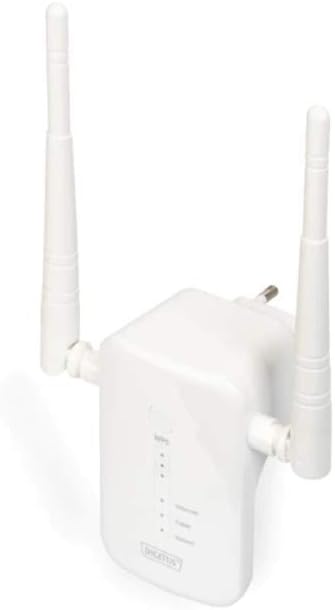
Figure 1: DIGITUS Wireless Dual Band Mesh Kit (DN-7071). This image displays the DIGITUS Wireless Dual Band Mesh Kit, a white rectangular device with two adjustable external antennas. The front panel features LED indicators for status, and a power plug is visible on the back, indicating direct wall-socket integration.
Світлодіодні індикатори:
- Світлодіод живлення: Вказує на стан живлення.
- Світлодіод Wi-Fi: Indicates Wi-Fi activity and connection status.
- Світлодіод LAN: Показує активність порту LAN.
- Індикатор потужності сигналу: Indicates the strength of the mesh connection.
Порти та кнопки:
- Порт LAN: For wired connections.
- Кнопка WPS: For quick and secure connection setup.
- Кнопка скидання: To restore factory default settings (usually a small pinhole button).
4. Налаштування
4.1 Початкове розміщення
Place the main mesh unit (router mode) near your internet modem/router. Subsequent mesh units should be placed strategically to cover dead zones, ensuring they are within range of another mesh unit or the main unit for optimal signal strength.
4.2 Увімкнення
- Plug the main mesh unit into a power outlet.
- Wait for the Power LED to become stable.
- Repeat for the other mesh units.
4.3 Connecting to Your Existing Network
There are two primary methods for connecting the mesh system:
Спосіб 1: WPS (захищене налаштування Wi-Fi)
- Press the WPS button on your existing router.
- Within two minutes, press the WPS button on the main DIGITUS mesh unit.
- The Wi-Fi LED on the mesh unit will blink during connection and become solid when successfully connected.
- Repeat for additional mesh units, pressing WPS on an already connected mesh unit or the main unit, then on the new unit.
Method 2: Manual Setup (via Web Інтерфейс)
- Connect your computer to the LAN port of one of the mesh units using an Ethernet cable, or connect wirelessly to its default Wi-Fi network (SSID and password usually found on a sticker on the device).
- Відкрийте a web браузер і введіть IP-адресу за замовчуванням (наприклад,
192.168.1.1or192.168.0.1) або доменне ім'я (наприклад,http://digitusmesh.net) provided in the quick start guide. - Log in with the default username and password (e.g.,
admin/admin). - Follow the on-screen wizard to configure the mesh system, including network name (SSID), password, and operating mode (e.g., Router, Access Point, Repeater).
- Save your settings and restart the device if prompted.
5. Інструкція з експлуатації
5.1 Підключення пристроїв
- Бездротові пристрої: шукати назву налаштованої мережі Wi-Fi (SSID) і введіть пароль.
- Дротові пристрої: Connect devices like computers, gaming consoles, or smart TVs to the LAN port of any mesh unit using an Ethernet cable.
5.2 Оптимізація продуктивності
- Розміщення: Ensure mesh units are not obstructed by large objects or placed near sources of interference (e.g., microwaves, cordless phones).
- Оновлення прошивки: Регулярно перевіряйте наявність оновлень прошивки та встановлюйте їх через web інтерфейс для забезпечення оптимальної продуктивності та безпеки.
- Дводіапазонний: Utilize the 5 GHz band for devices requiring higher speeds (e.g., streaming, gaming) and the 2.4 GHz band for wider coverage and older devices.
6. Технічне обслуговування
- Прибирання: Використовуйте м’яку суху тканину для очищення пристрою. Не використовуйте рідкі засоби для чищення або аерозолі.
- Вентиляція: Ensure the mesh units have adequate ventilation and are not covered.
- Прошивка: Keep the device firmware updated to the latest version for security and performance improvements.
- Скинути: If the device is not functioning correctly, a factory reset may resolve issues. Press and hold the reset button for 5-10 seconds until the LEDs flash. Note that this will erase all custom settings.
7. Вирішення проблем
- Немає живлення: Ensure the power adapter is securely plugged into the unit and a working power outlet.
- Немає підключення до Інтернету:
- Check the connection between the main mesh unit and your modem/router.
- Verify your modem/router has an active internet connection.
- Restart your modem, router, and mesh units.
- Слабкий сигнал Wi-Fi:
- Relocate mesh units closer to each other or to the main unit.
- Ensure there are no major obstructions.
- Перевірте наявність джерел перешкод.
- Немає доступу Web Інтерфейс:
- Ensure your device is connected to the mesh unit's network.
- Verify the correct IP address or domain name is entered.
- Спробуйте очистити кеш браузера або скористатися іншим браузером.
- Perform a factory reset if necessary (note: this will erase all custom settings).
8. Технічні характеристики
| Особливість | Деталь |
|---|---|
| Бренд | ДИГІТУС |
| Назва моделі | DN-7071 |
| Колір | Білий |
| Технологія підключення | WLAN |
| Стандарт бездротового зв'язку | 802.11a, 802.11ac, 802.11b, 802.11g, 802.11n |
| Клас діапазону частот | Dual Band (2.4 GHz / 5.8 GHz) |
| Особливості | QoS, WPS |
| Сумісні пристрої | Смартфон (та інші пристрої з підтримкою Wi-Fi) |
| Порти | RJ-45 (LAN) |
| Вага товару | 117 грамів |
| Включені компоненти | 1 x 1200 Mbps Dual Band Mesh System (3 pieces), 1 x User Manual |
9. Гарантія та підтримка
For warranty information and technical support, please refer to the official DIGITUS website or contact their customer service. Details are typically available on the product packaging or the manufacturer's official support pages.
You can find more solutions and information on the official DIGITUS webсайт: DIGITUS Solutions


