вступ
Thank you for choosing the NEDIS Wi-Fi Smart Fan Heater. This manual provides essential information for the safe and efficient operation of your new device. Please read these instructions carefully before use and retain them for future reference. Proper use and maintenance will ensure optimal performance and longevity of the product.
Інструкції з техніки безпеки
Щоб зменшити ризик пожежі, ураження електричним струмом або травмування, завжди дотримуйтесь цих основних запобіжних заходів:
- Перед використанням обігрівача прочитайте всі інструкції.
- Не використовуйте цей обігрівач у безпосередній близькості від ванни, душа або басейну.
- Не накривайте обігрівач. Накриття обігрівача може призвести до перегріву та пожежі.
- Keep combustible materials such as furniture, pillows, bedding, papers, clothes, and curtains at least 1 meter (3 feet) from the front of the heater and keep them away from the sides and rear.
- Завжди відключайте обігрівач від мережі, коли він не використовується.
- Не використовуйте нагрівач із пошкодженим шнуром або вилкою або після того, як нагрівач вийшов з ладу, впав або будь-яким чином пошкоджений.
- Не прокладайте шнур під килимовим покриттям. Не накривайте шнур килимками, доріжками або подібними покриттями. Розташуйте шнур подалі від зони руху, де за нього не можна буде спіткнутися.
- Необхідна надзвичайна обережність, коли будь-який обігрівач використовується дітьми або інвалідами, а також коли обігрівач залишається ввімкненим без нагляду.
- This heater is equipped with a tip-over protection switch that automatically shuts off the heater if it is accidentally knocked over.
- Переконайтеся, що обігрівач розміщено на стійкій рівній поверхні.
- Тільки для внутрішнього використання.
Продукт закінченийview
Familiarize yourself with the main components of your NEDIS Wi-Fi Smart Fan Heater.
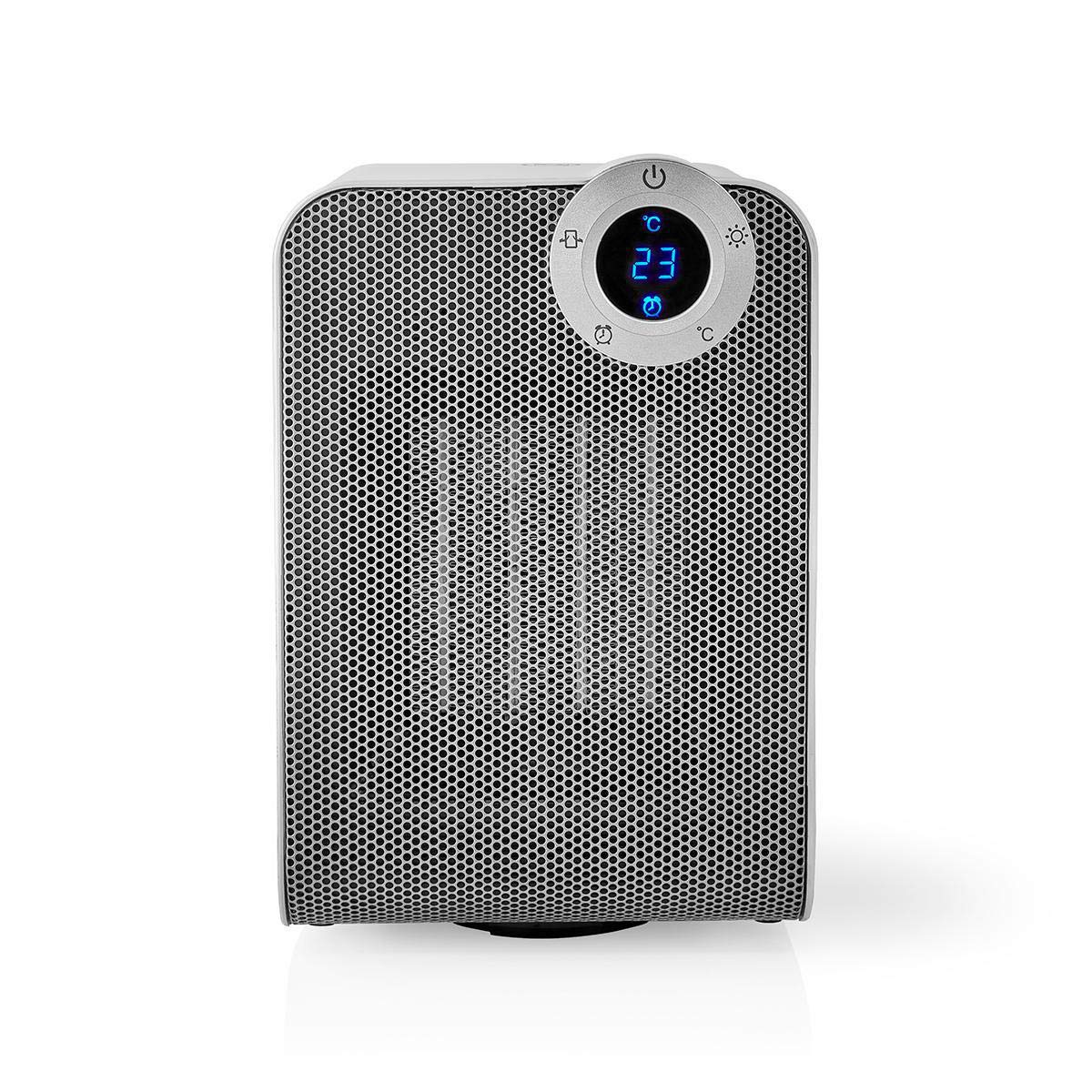
The front panel features a digital display that shows the current temperature and settings. Surrounding the display are touch-sensitive buttons for power, mode selection, oscillation, and timer functions.

The rear of the heater includes the main power switch (often a rocker switch) and the air intake grille. Ensure this area is not obstructed for proper airflow.

The compact design of the heater allows for easy placement in various indoor settings.
Налаштування
Розпакування
- Обережно вийміть обігрівач з упаковки.
- Перевірте наявність пошкоджень під час транспортування. У разі пошкодження не використовуйте пристрій та зверніться до служби підтримки клієнтів.
- Зберігайте упаковку для подальшого зберігання або транспортування.
Розміщення
- Поставте обігрівач на тверду рівну поверхню.
- Ensure there is at least 1 meter (3 feet) of clear space around the heater to allow for proper air circulation and to prevent fire hazards.
- Do not place the heater near curtains, drapes, or other loose fabrics that could block the air intake or outlet.
- Переконайтеся, що шнур живлення не затиснутий і не знаходиться під важкими предметами.
Початкове ввімкнення
- Plug the heater into a suitable electrical outlet (220-240V AC, 50/60Hz).
- Flip the main power switch on the back of the unit to the 'ON' position.
- The digital display on the front will illuminate, indicating the heater is in standby mode.
Wi-Fi Connection & App Setup
The NEDIS Wi-Fi Smart Fan Heater can be controlled via the Nedis SmartLife app, offering advanced features and remote control.
- Завантажити Недіс SmartLife додаток з App Store (iOS) або Google Play Store (Android).
- Зареєструйте новий обліковий запис або увійдіть, якщо у вас вже є обліковий запис.
- Переконайтеся, що ваш смартфон підключено до мережі Wi-Fi 2.4 ГГц.
- У застосунку натисніть значок «+», щоб додати новий пристрій.
- Follow the on-screen instructions in the app to connect your heater to your Wi-Fi network. This usually involves putting the heater into pairing mode (refer to the app for specific instructions, often by pressing and holding a button on the heater).
- Once connected, you can control the heater from anywhere using the app.
Інструкція з експлуатації
Ручне керування
The heater can be operated directly using the touch buttons on the front panel:
- Кнопка живлення: Натисніть, щоб увімкнути або вимкнути обігрівач.
- Кнопка режиму: Cycle through heating modes (e.g., High Heat 1800W, Low Heat 900W, Fan Only).
- Регулювання температури: Use the '+' and '-' buttons (or similar) to set the desired temperature. The heater will operate at 1800W for rapid heating and automatically switch to 900W once the set temperature is approached.
- Кнопка коливання: Press to activate or deactivate the horizontal oscillation feature, distributing heat across a wider area.
- Кнопка таймера: Set a timer for the heater to automatically turn off after a specified duration.
SmartLife App Control
Once connected to the Nedis SmartLife app, you can access advanced control features:
- Дистанційне ввімкнення/вимкнення живлення: Керуйте обігрівачем з будь-якого місця.
- Регулювання температури: Precisely set and monitor the room temperature.
- Вибір режиму: Choose between different heating levels or fan-only mode.
- Контроль коливань: Увімкніть або вимкніть функцію коливань.
- Планування: Create custom heating schedules for different times of the day or week.
- Функція таймера: Set a countdown timer for automatic shutdown.
Голосове керування
The heater supports voice control through popular smart assistants. To enable this, link your Nedis SmartLife account with your preferred voice assistant (Google Home or Amazon Alexa) via their respective apps. Once linked, you can use voice commands such as:
- "Hey Google, turn on the heater."
- "Alexa, set the heater to 22 degrees."
- "Гей, Google, вимкни обігрівач."
Технічне обслуговування
прибирання
Регулярне очищення допомагає підтримувати ефективність обігрівача та подовжує термін його служби.
- Завжди відключайте обігрівач від мережі та дайте йому повністю охолонути перед чищенням.
- Протріть зовнішні поверхні м’якою, damp тканина. Не використовуйте абразивні засоби чи розчинники.
- Використовуйте пилосос зі щіткою-насадкою, щоб видалити пил з решіток впускного та випускного отворів повітря.
- Переконайтеся, що вода не потрапляє всередину обігрівача.
Зберігання
Якщо не використовується протягом тривалого часу:
- Unplug the heater and clean it as described above.
- Зберігайте обігрівач у оригінальній упаковці або відповідній коробці, щоб захистити його від пилу та пошкоджень.
- Keep it in a cool, dry place, away from direct sunlight and moisture.
Усунення несправностей
Якщо у вас виникли проблеми з обігрівачем, зверніться до наступних поширених проблем та способів їх вирішення:
| проблема | Можлива причина | Рішення |
|---|---|---|
| Обігрівач не включається. | No power, main switch off, tip-over switch activated. | Check power outlet, ensure main switch is ON, place heater upright on a stable surface. |
| Відсутня тепловіддача. | Incorrect mode, thermostat setting too low. | Select a heating mode (High/Low), increase the thermostat setting above the current room temperature. |
| Збій підключення до Wi-Fi. | Неправильний пароль Wi-Fi, мережа 5 ГГц, відстань від маршрутизатора. | Verify Wi-Fi password, ensure you are on a 2.4GHz network, move heater closer to the router, try re-pairing. |
| Обігрівач несподівано вимикається. | Overheating protection, tip-over protection, timer activated. | Ensure heater is not covered, clear obstructions, place upright, check timer settings. Allow to cool before restarting. |
Технічні характеристики
| Особливість | Специфікація |
|---|---|
| Номер моделі | WIFIFNH20CWT |
| Джерело живлення | Провідний електричний |
| Вихідна потужність | 1800 Вт (висока), 900 Вт (низька) |
| Спосіб нагрівання | Конвекція |
| Розміри (Д x Ш x В) | 16.5 х 14.5 х 25 см |
| Вага товару | 1.8 кг |
| Колір | Білий / Срібний |
| Особливості | On/Off Timer, Oscillation, Tip-over Protection, Thermostat, Wi-Fi, App Control, Voice Control (Alexa, Google Home) |
| Тип установки | Підлогове кріплення |
| Рекомендоване використання | Indoor, Home, Study Room |
| Потрібні батареї | немає |
Гарантія та підтримка
Your NEDIS Wi-Fi Smart Fan Heater is covered by a manufacturer's warranty. Please refer to the warranty card included with your purchase for specific terms and conditions, including the warranty period and coverage details.
For technical support, troubleshooting assistance, or warranty claims, please contact NEDIS customer service. Contact information can typically be found on the product packaging, the NEDIS webсайт або ваш чек про покупку.


