1. Вступ
Дякуємо за покупкуasing the LUPO Digital Pocket Scale. This precision instrument is designed for accurate weighing of small items up to 200 grams with a 0.01 gram graduation. Its compact and portable design makes it ideal for various applications, including weighing jewelry, food ingredients, herbs, and other small objects. Please read this manual carefully to ensure proper operation and longevity of your scale.
Ключові характеристики:
- Максимальна ємність: 200 г
- Випускний: 0.01 г.
- Multiple Weighing Units: g, gn, oz, ozt, ct, tl, dwt
- Durable Stainless Steel Platform
- РК-дисплей з підсвічуванням
- Функція тари
- Автоматичне відключення
- Індикатор низького заряду батареї
- Захист від перевантаження
2. Вміст упаковки
- 1 x LUPO 200g Digital Pocket Scale
- 2 батареї AAA
- 1 х посібник користувача
3. Налаштування
3.1 Встановлення батареї
The scale requires 2 AAA batteries (included). To install or replace batteries:
- Відкрийте кришку відсіку для батарейок, розташовану на нижній стороні ваг.
- Вставте 2 батарейки типу AAA, дотримуючись правильної полярності (+/-).
- Надійно закрийте кришку батарейного відсіку.
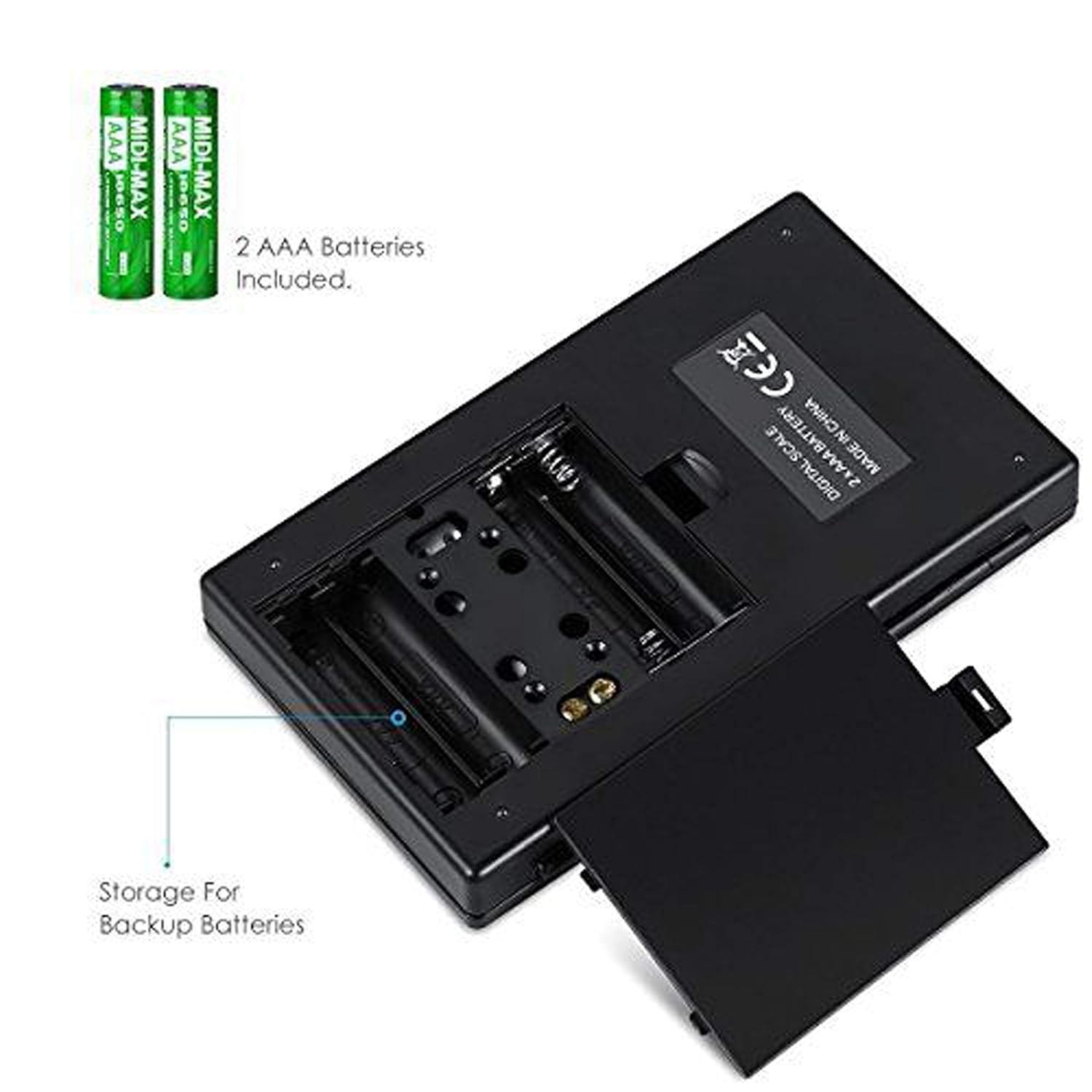
Рисунок 3.1: Відсік для батарейок з батарейками типу AAA.
3.2 Початкове розміщення
For accurate readings, place the scale on a hard, flat, and stable horizontal surface. Avoid placing it on soft or uneven surfaces, or near sources of vibration or electromagnetic interference.
4. Операція
4.1 Базове зважування
- Натисніть УВІМК./ВИМК кнопку, щоб увімкнути ваги.
- Wait for the display to show "0.00" (or "0") before placing any items on the weighing platform.
- Gently place the item(s) you wish to weigh onto the center of the stainless steel weighing platform.
- Вага буде відображатися на РК-екрані.

Figure 4.1: Quick start guide for basic weighing.
4.2 Перетворення одиниць
The scale supports multiple weighing units. To change the unit:
- Коли ваги увімкнені та відображають «0.00», натисніть кнопку РЕЖИМ кнопку кілька разів.
- The display will cycle through the available units: grams (g), grains (gn), ounces (oz), troy ounces (ozt), carats (ct), and pennyweights (dwt).
- Припиніть натискання РЕЖИМ when your desired unit is displayed.
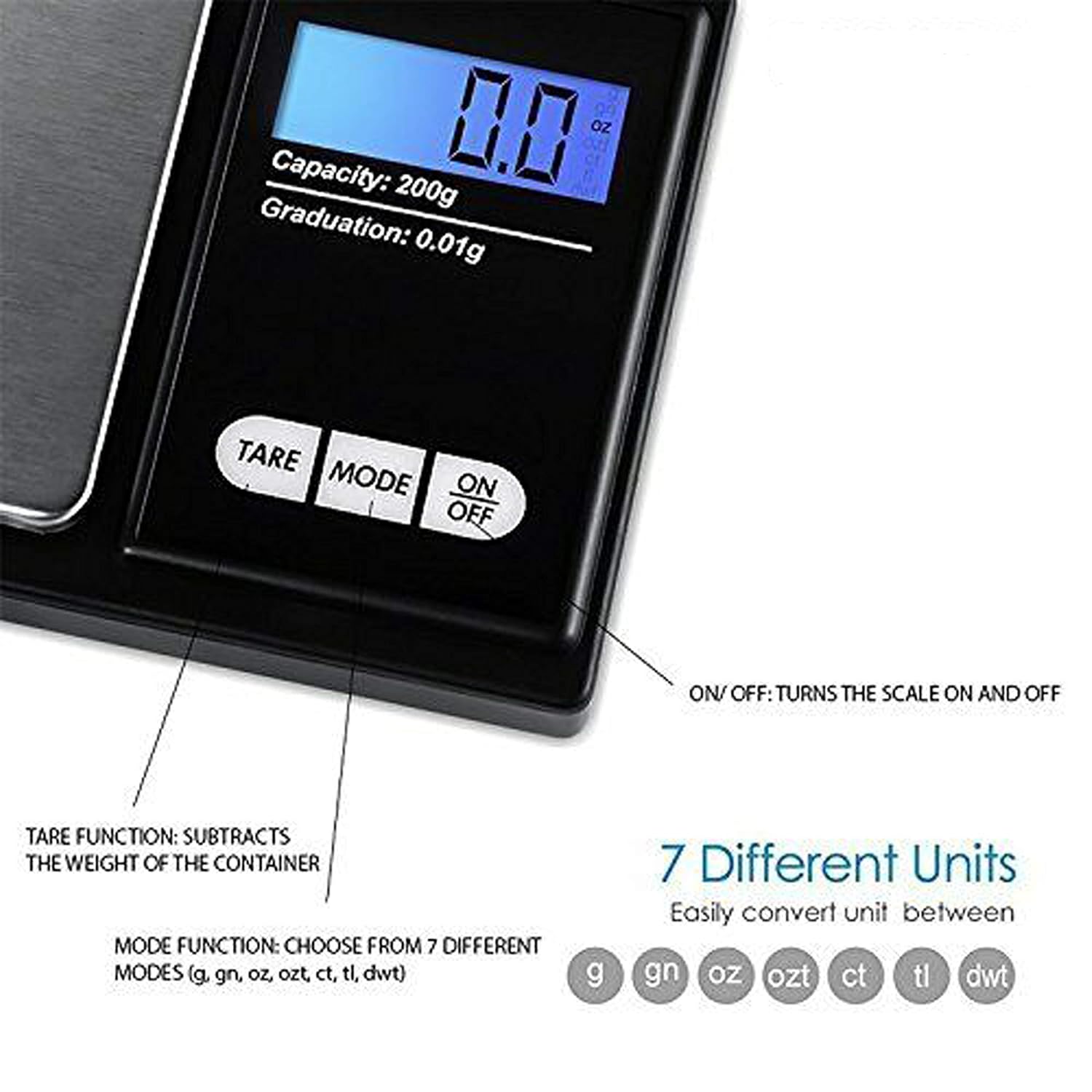
Figure 4.2: Available weighing units and button functions.
4.3 Функція тарування
Функція тари дозволяє віднімати вагу контейнера, таким чином вимірюючи лише вагу нетто його вмісту.
- Поставте порожню ємність на платформу для зважування.
- Натисніть ТАРЕ кнопка. Дисплей скине значення до "0.00".
- Now, place the item(s) you wish to weigh into the container. The display will show only the weight of the item(s).
5. Калібрування
Calibration ensures the accuracy of your scale. It is recommended to calibrate the scale periodically or if you notice inconsistent readings. A 200g calibration weight is required (not included).
- Увімкніть ваги, натиснувши кнопку УВІМК./ВИМК кнопку.
- Зачекайте, поки на дисплеї з’явиться «0.00».
- Натисніть і утримуйте РЕЖИМ button until the display shows "CAL", then release the button.
- Натисніть РЕЖИМ button again. The display will show "CAL" followed by the required calibration weight (e.g., "200.00g").
- Place the exact 200g calibration weight onto the center of the weighing platform.
- The display will show "PASS" and then return to normal weighing mode.
- Remove the calibration weight. Calibration is complete.
Note: If you do not have a 200g calibration weight, you may need to acquire one separately for accurate calibration.
6. Технічне обслуговування
6.1 Очищення
Злегка протріть шкалу damp cloth. Do not immerse the scale in water or use abrasive cleaners. Keep the weighing platform clean and free of debris.
6.2 Зберігання
Store the scale in a clean, dry environment. If the scale will not be used for an extended period, it is recommended to remove the batteries to prevent leakage.
7. Вирішення проблем
If you encounter issues with your scale, consider the following:
- Неточні показання:
- Переконайтеся, що ваги стоять на стійкій рівній поверхні.
- Avoid placing the scale near strong radio frequency interference.
- Keep the scale away from high humidity, air currents (e.g., fans, open windows), and extreme temperatures.
- Minimize vibration during weighing.
- Perform a calibration (refer to Section 5).
- "Lo" or "Low Battery" Display: Замініть батарейки типу ААА.
- "O-Ld" or "Overload" Display: The item on the platform exceeds the maximum capacity of 200g. Remove the item immediately to prevent damage to the scale.
- Ваги не вмикаються: Перевірте встановлення батарейок та переконайтеся, що батарейки не розряджені.

Figure 7.1: Overload and Low Battery indicators.
8. Технічні характеристики
| Особливість | Деталь |
|---|---|
| Бренд | LUPO |
| Номер моделі | BHT2018376_200g_pock |
| Ємність | 0.05-200 г |
| Випускний | 0.01г |
| Одиниці зважування | g, gn, oz, ozt, ct, tl, dwt |
| Тип дисплея | РК -дисплей з підсвічуванням |
| Джерело живлення | 2 батареї AAA (у комплекті) |
| матеріал | Plastic, Stainless Steel Platform |
| Розміри (прибл.) | 14.8 x 9 x 2.4 cm (Package); 5.0 x 3.0 x 0.8 inches (Scale) |
| Вага (прибл.) | 140 грамів (упаковка) |
| Особливості | Backlit display, Auto-off, Tare function, Lightweight, Portable |
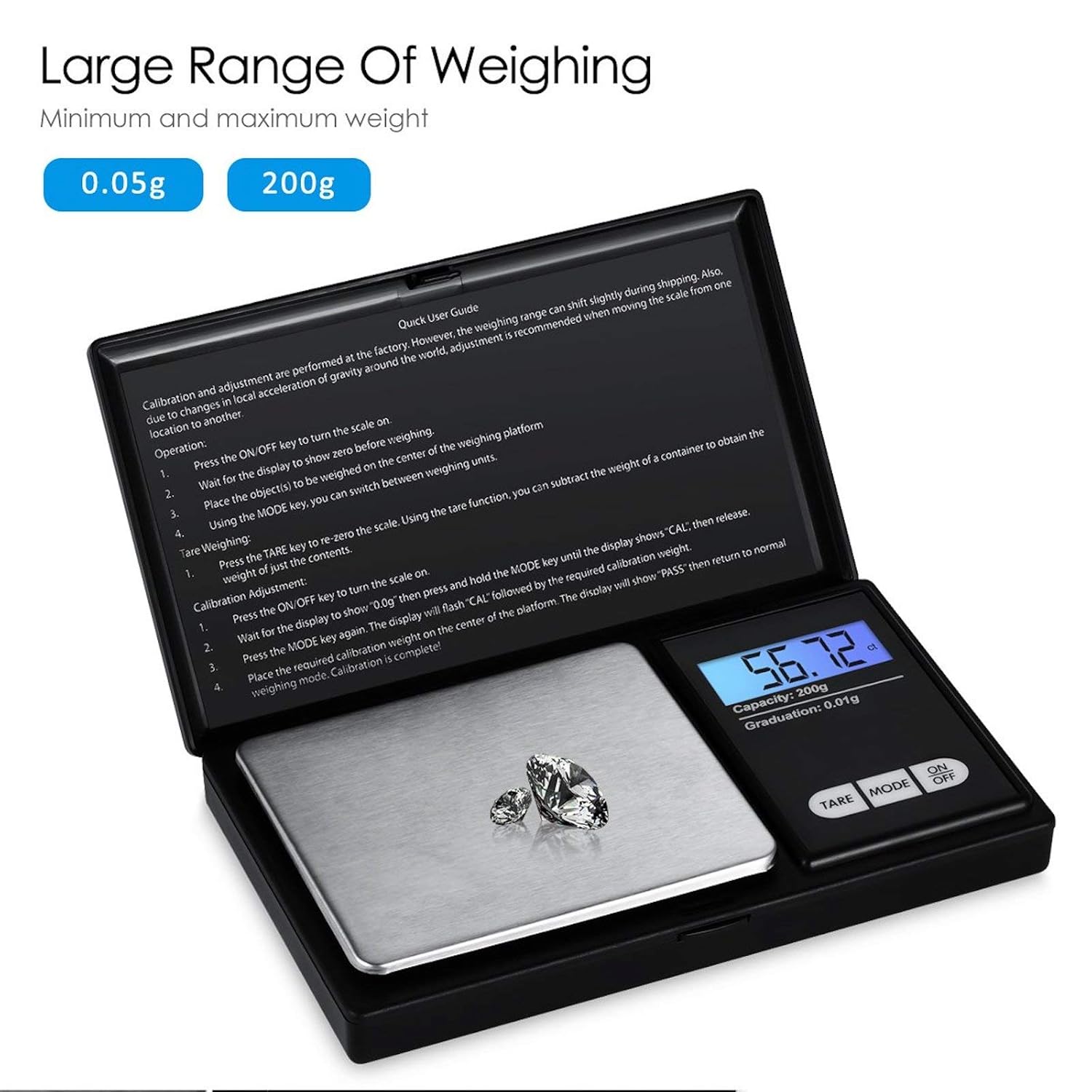
Figure 8.1: Weighing range of the scale.
9. Гарантія та підтримка
Warranty information for this product is not explicitly specified in the provided details. For any support inquiries or warranty claims, please contact the retailer or manufacturer directly.


