1. Вступ
Thank you for choosing the Neewer 100-Inch Portable Green Screen with Tripod Stand. This product is designed to provide a versatile and portable chromakey background for various applications, including live streaming, video production, and virtual meetings. Its wrinkle-resistant fabric and adjustable tripod stand ensure a smooth and stable setup for optimal performance. Please read this manual thoroughly before use to ensure proper setup and operation.
2. Інформація про безпеку
- Always ensure the tripod stand is placed on a stable, level surface to prevent tipping.
- Do not overload the stand with additional equipment not intended for this product.
- Keep the green screen away from open flames, excessive heat, and sharp objects.
- Exercise caution when adjusting the height and retracting the screen to avoid pinching fingers.
- Коли продукт не використовується, зберігайте його в сухому прохолодному місці.
3. Вміст упаковки
Будь ласка, перевірте наявність усіх предметів у вашій упаковці:
- 1 x Neewer 100-Inch Portable Green Screen
- 1 x Integrated Tripod Stand
- 1 х посібник користувача
4. Компоненти продукту
Familiarize yourself with the key components of your green screen system:

Image: Key components of the Neewer Portable Green Screen.
- Convenient Linking Hook: Used for securing the screen at desired heights.
- Retractable/Collapsible Buckle: Mechanism for extending and retracting the screen fabric.
- Stable Tripod Stand Lock Catch: Secures the tripod legs in an open position for stability.
- Підставка для штатива: Provides stable support for the green screen.
- Green Screen Fabric: Wrinkle-resistant chromakey material.
5. Інструкції з налаштування
Follow these steps to set up your portable green screen:

Image: Step-by-step assembly guide for the green screen.
- Крок 1: Place the folded green screen unit on a flat surface.
- Крок 2: Unfold the tripod legs completely until they are fully extended and stable. Ensure the tripod stand lock catch is engaged.
- Крок 3: Locate the screen housing and the vertical support pole.
- Крок 4: Gently pull the green screen fabric upwards from its housing.
- Крок 5: Extend the vertical support pole to the desired height.
- Крок 6: Secure the extended screen to the vertical support pole using the convenient linking hook. Ensure it is firmly attached.
- Крок 7: Adjust the height of the screen by opening the lock catch on the vertical pole, moving the screen to the desired position, and then closing the lock catch to secure it.
- Крок 8: Ensure the screen is taut and wrinkle-free.
- Крок 9: Your green screen is now ready for use.
6. Operating the Green Screen
This section details how to effectively use and adjust your green screen.
6.1 Adjusting Screen Height

Image: Mechanism for flexible height adjustment.
The green screen features a flexible mechanism for height adjustment. To adjust the height:
- Locate the lock catch on the vertical support pole.
- Open the lock catch to release the screen.
- Gently move the screen up or down to your desired position.
- Close the lock catch firmly to secure the screen at the new height.
6.2 Screen Performance

Image: Features contributing to optimal green screen performance.
The Neewer green screen is engineered for optimal chromakey performance:
- Відтворення кольорів: Designed for accurate green color, essential for effective chromakey.
- Light Absorption/Glare Reduction: Minimizes reflections and hot spots for even lighting.
- Vivid Colors: Ensures a bright and consistent green background.
- Clearer and Brighter Background: Provides a uniform surface for digital keying.
- Thicker and Flatter Material: Helps prevent wrinkles and creases, ensuring a smooth backdrop.
7. Технічне обслуговування та догляд
Proper maintenance will extend the life of your green screen:
- Прибирання: If the screen becomes dirty, gently wipe it with a soft, damp тканиною. Уникайте агресивних хімікатів або абразивних засобів для чищення.
- Зберігання: Always retract the screen fully into its housing when not in use. Store the unit upright in a dry, dust-free environment.
- Обробка: Avoid touching the screen fabric with oily hands or sharp objects.
- Профілактика зморшок: The fabric is designed to be wrinkle-resistant. Ensure it is fully extended and taut during use and properly retracted for storage to maintain its smooth surface.
8. Вирішення проблем
Ось рішення поширених проблем, з якими ви можете зіткнутися:
- Screen does not retract smoothly: Ensure the screen is not obstructed. Gently guide the screen back into its housing. Do not force it.
- Screen appears wrinkled: Ensure the screen is fully extended and the linking hook is properly engaged to keep it taut. Minor wrinkles may naturally smooth out over time with proper tension.
- Tripod stand is unstable: Verify that the tripod legs are fully extended and the lock catch is securely engaged. Ensure the stand is on a flat, level surface.
- Poor chromakey results: Check your lighting setup. Even, diffused lighting on the green screen is crucial. Avoid shadows or bright spots. Ensure your subject is adequately lit and positioned a sufficient distance from the screen.
9. Технічні характеристики
Technical details for the Neewer 100-Inch Portable Green Screen with Tripod Stand:
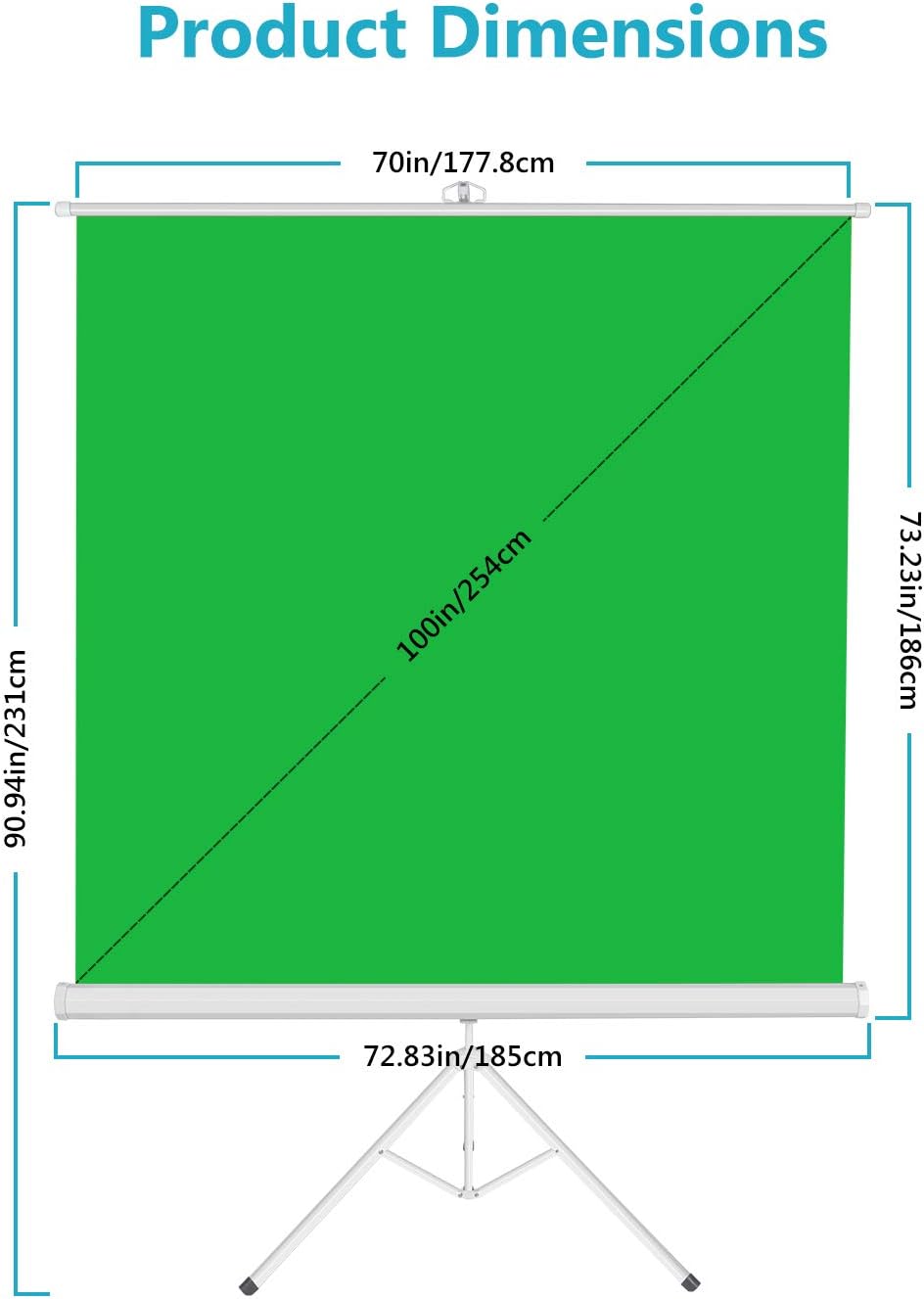
Image: Product dimensions of the green screen.
| Особливість | Деталь |
|---|---|
| Номер моделі | 10095317 |
| Розміри дисплея | 100 дюймів (діагональ) |
| Колір екрану | Зелений |
| Тип монтажу | Кріплення штатива |
| Вага товару | 16.87 фунта (7.65 кг) |
| Розміри упаковки | 77 x 7.5 x 4.25 дюйми (195.6 x 19.1 x 10.8 см) |
| Виробник | Новіше |
10. Гарантія та підтримка
For warranty information and customer support, please refer to the documentation provided at the time of purchase or visit the official Neewer webсайт. Зберігайте чек про покупку як підтвердження покупки для будь-яких гарантійних претензій.
For further assistance, you may contact Neewer customer service through their official channels.


