1. Вступ
The Cooler Master MWE 600 White 230V V2 power supply unit (PSU) provides a reliable and efficient power solution for your computer system. Designed with 80 PLUS White 230V EU efficiency, a DC-to-DC + LLC circuit design, a single +12V rail, active PFC, and a temperature-sensitive HDB fan, this PSU delivers stable and consistent power. This manual will guide you through the installation, operation, maintenance, and troubleshooting of your MWE 600 White 230V V2 PSU.
2. Інформація про безпеку
Please read and understand all safety instructions before installing or operating this product. Failure to do so may result in personal injury or damage to the product and connected components.
- Небезпечний Voltage: Do not open the power supply cover. There are no user-serviceable parts inside. Opening the unit will void the warranty.
- Джерело живлення: Перед встановленням або технічним обслуговуванням переконайтеся, що джерело живлення відключено від розетки змінного струму.
- Вентиляція: Не блокуйте вентиляційні отвори блока живлення. Забезпечте достатню циркуляцію повітря навколо пристрою.
- Середовище: Install the power supply in a dry, well-ventilated area, away from heat sources, moisture, and direct sunlight.
- Заземлення: Ensure the power supply and your computer system are properly grounded.
- Сумісність: Use only the cables provided with this power supply. Ensure all connections are secure and correctly oriented.
3. Вміст упаковки
Перевірте наявність усіх предметів у вашій упаковці:
- Cooler Master MWE 600 White 230V V2 Power Supply Unit
- Шнур живлення змінного струму
- Монтажні гвинти
- Посібник користувача (цей документ)
4. Продукт закінчивсяview
The MWE 600 White 230V V2 is designed for optimal performance and reliability. Key features include:
- 600 Watts Exceptional Efficiency: Exceeds 80 PLUS 230V EU energy efficiency standards, outperforming generic 80 PLUS Bronze competitors at medium load.
- Silent HDB Fan: The integrated 120mm fan utilizes superior hydro-dynamic bearings (HDB) to minimize noise levels (below 35.5 dBA at 1500 RPM max).
- Стабільне живлення: Supports Intel's low power states for motherboard protection and features a DC-DC with LLC circuit for efficient 12V to 3V and 5V conversion without energy loss.
- Одна лінія +12 В: Ensures all system components receive consistent power from a single, stable source.
- Compact Cabling: Non-modular flat black cables save space and offer flexibility, ideal for smaller cases and maintaining internal airflow.

Рисунок 4.1: Загалом view of the Cooler Master MWE 600 White 230V V2 Power Supply Unit.

Figure 4.2: Close-up of the quiet Hydro-Dynamic Bearing (HDB) fan, designed for minimal noise.
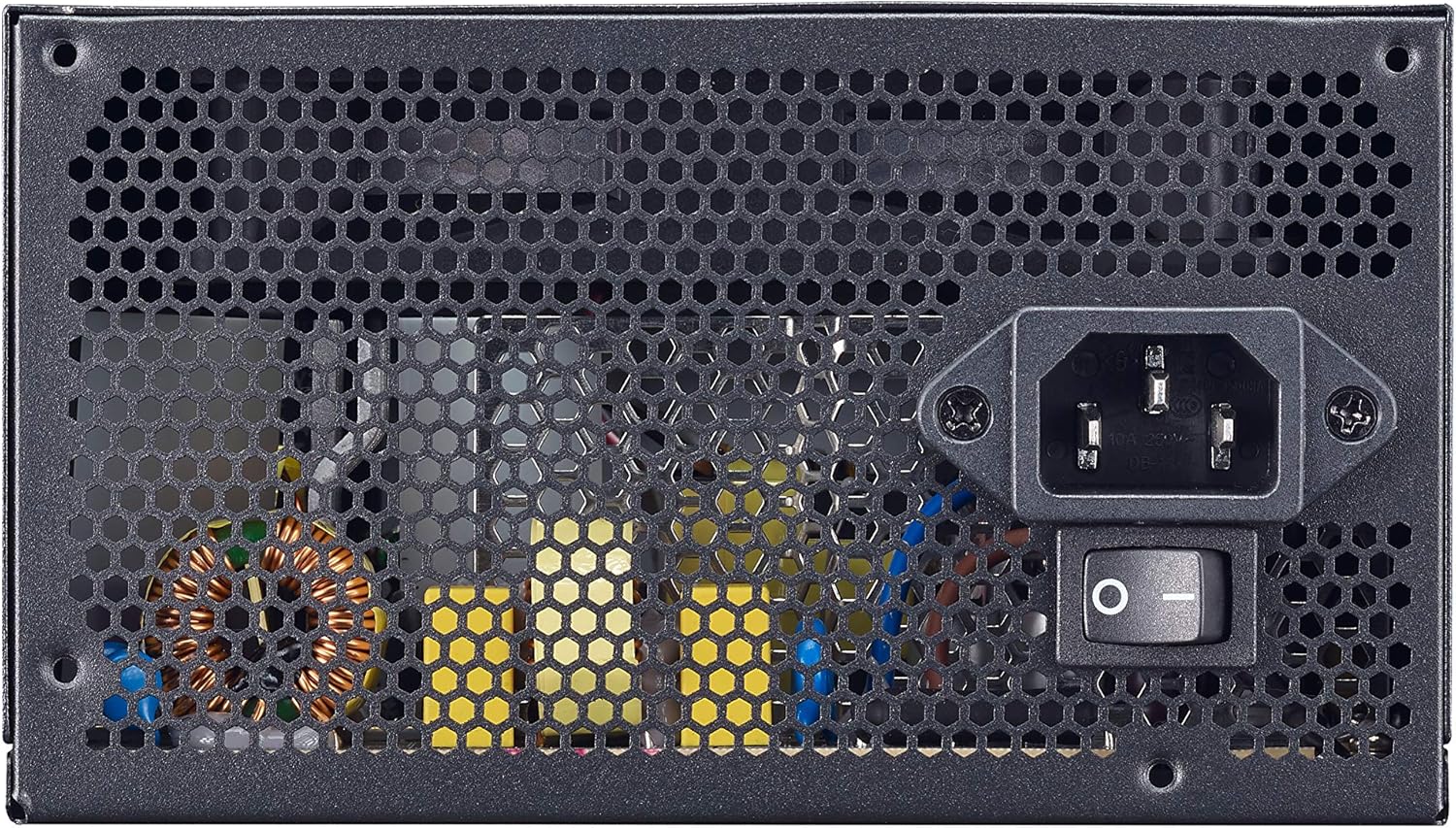
Figure 4.3: Rear panel showing the AC power input and the main power switch.

Малюнок 4.4: Розібраний view illustrating the internal layout and components of the power supply unit.
5. Налаштування та встановлення
Follow these steps to properly install your Cooler Master MWE 600 White 230V V2 power supply:
- Підготуйте свою систему: Переконайтеся, що ваш комп'ютер повністю вимкнено та від'єднано від розетки. Відкрийте корпус комп'ютера.
- Видаліть старий блок живлення (якщо є): Від’єднайте всі кабелі від старого блоку живлення та вийміть його з корпусу.
- Встановлення нового блоку живлення: Carefully place the MWE 600 White 230V V2 into the PSU mounting bay of your computer case. Ensure the fan is oriented correctly (usually facing downwards or upwards, depending on your case design, for optimal airflow). Secure the PSU with the provided mounting screws.
- Підключення живлення материнської плати: Connect the 24-pin ATX power cable to your motherboard's 24-pin connector. Ensure it clicks into place.
- Підключення живлення процесора: Connect the 4+4-pin EPS/ATX 12V cable to your motherboard's CPU power connector.
- Connect Graphics Card Power (PCI-e): If your graphics card requires additional power, connect the appropriate 6+2-pin PCI-e power cables from the PSU to your graphics card.
- Connect SATA/Peripheral Power: Connect SATA power cables to your storage drives (HDDs, SSDs) and other peripherals as needed.
- Управління кабелем: Utilize the flat black cables to manage and route them efficiently within your case to improve airflow and aesthetics.
- Закрийте корпус та підключіть живлення змінного струму: Close your computer case. Connect the AC power cord to the PSU's AC inlet and then plug the other end into a wall outlet.
6. Інструкція з експлуатації
After successful installation, operating your power supply is straightforward:
- Увімкнення: Ensure the main power switch on the back of the PSU (Figure 4.3) is in the "I" (On) position. Then, press the power button on your computer case.
- Вимкнення живлення: To turn off your computer, use the operating system's shutdown procedure. For a complete power cycle, switch the PSU's main power switch to the "O" (Off) position after shutting down the system.
- Нормальна робота: The PSU will automatically regulate power delivery to your components. The HDB fan will operate as needed to maintain optimal temperatures, adjusting its speed based on load and temperature.
7. Технічне обслуговування
Регулярне технічне обслуговування допомагає забезпечити довговічність та оптимальну роботу вашого блоку живлення.
- Очищення від пилу: Periodically (e.g., every 3-6 months), power off and unplug your computer. Use compressed air to gently clean dust from the PSU's fan grille and ventilation openings. Hold the fan blades to prevent them from spinning rapidly during cleaning, which can damage the bearings.
- Перевірка кабелю: Occasionally check all power cable connections to ensure they are secure and free from damage.
- Екологічна перевірка: Ensure the computer's environment remains clean, cool, and dry to prevent dust buildup and overheating.
8. Вирішення проблем
Якщо у вас виникли проблеми з блоком живлення, зверніться до наступних поширених кроків усунення несправностей:
- Немає живлення:
- Переконайтеся, що шнур живлення змінного струму надійно підключений як до блоку живлення, так і до розетки.
- Verify the main power switch on the PSU is in the "I" (On) position.
- Перевірте розетку за допомогою іншого пристрою, щоб переконатися, що вона має живлення.
- Check all internal power connections (24-pin, CPU, PCI-e, SATA) to ensure they are firmly seated.
- Нестабільність системи/випадкові вимкнення:
- This could indicate insufficient power or a faulty component. Ensure your system's power requirements do not exceed the PSU's 600W capacity.
- Check for overheating. Ensure the PSU fan and case fans are operating correctly and are free of dust.
- If possible, test the PSU with a different system or a PSU tester.
- Гучний шум вентилятора:
- While the HDB fan is designed for quiet operation, excessive noise might indicate dust buildup. Clean the fan as described in the Maintenance section.
- Ensure the PSU is not under extreme load, which can cause the fan to spin faster.
If problems persist after trying these steps, please contact Cooler Master support.
9. Технічні характеристики
Detailed technical specifications for the Cooler Master MWE 600 White 230V V2 power supply:
| Особливість | Значення |
|---|---|
| Бренд | Cooler Master |
| Назва моделі | MWE White-v2 |
| Номер моделі | MPE-6001-ACABW-EU |
| Колір | БІЛИЙ V2 |
| Форм-фактор | ATX |
| Вихідна потужність | 600 Вт |
| Спосіб охолодження | Повітря (120-мм вентилятор HDB) |
| Сертифікація ефективності | 80 PLUS 230V EU White |
| Розміри (Д x Ш x В) | 14 х 15 х 8.6 см |
| Вага товару | 1.5 кілограма |
| Сумісні пристрої | Персональний комп'ютер |
| Тип роз'єму | SATA (and other standard ATX connectors) |
DC Output Table

Figure 9.1: Detailed DC output specifications for the MWE 600 White 230V V2.
| Вихід постійного струму | +5В | +3.3В | +12В | -12В | +5Vsb |
|---|---|---|---|---|---|
| Струм (A) | 18А | 18А | 49А | 0.3А | 3A |
| Потужність (Вт) | 120 Вт | 120 Вт | 588 Вт | 3.6 Вт | 15 Вт |
| Загальна потужність | 600 Вт | ||||
10. Гарантія та підтримка
The Cooler Master MWE 600 White 230V V2 power supply comes with a standard limited manufacturer's warranty.
- Гарантійний термін: 3 роки з дати придбання.
- Гарантійне покриття: This warranty covers defects in materials and workmanship under normal use. It does not cover damage resulting from accident, misuse, abuse, improper installation, unauthorized repairs, or modifications.
- Технічна підтримка: For technical assistance, warranty claims, or further information, please visit the official Cooler Master webсайту або зв’яжіться зі службою підтримки клієнтів.
Офіційний представник Cooler Master Webсайт: www.coolermaster.com


