вступ
This manual provides comprehensive instructions for the Antec VSK10 Micro-ATX computer case. Please read this manual carefully before installation to ensure proper setup and optimal performance of your system.
Продукт закінченийview
The Antec VSK10 is a Micro-ATX case designed for efficient system building, offering a balance of functionality and compact design. It supports Micro-ATX and ITX motherboards and provides various features for component installation and cooling.
Ключові характеристики:
- Motherboard Support: Up to Micro-ATX
- Cooling: Supports up to 4 x 140mm fans and 280mm radiator (front), 1 x 120mm fan (rear, included)
- Drive Bays: 2 x 3.5" HDD (compatible with 2 x 2.5" SSD), 2 x 2.5" SSD
- Слоти розширення: 4
- Front I/O: 2 x USB 3.0 Ports
- Material: SPCC + Plastic

Опис зображення: Кутовий фронт view of the Antec VSK10 Micro-ATX computer case, showcasing its sleek black design and front panel.
Налаштування та встановлення
This section details the steps required to install your components into the Antec VSK10 case. Ensure your system is powered off and unplugged before beginning installation.
1. Підготовка справи
Remove the side panels by unscrewing the thumbscrews located at the rear of the case. Gently slide the panels backward and lift them off. This provides access to the interior for component installation.
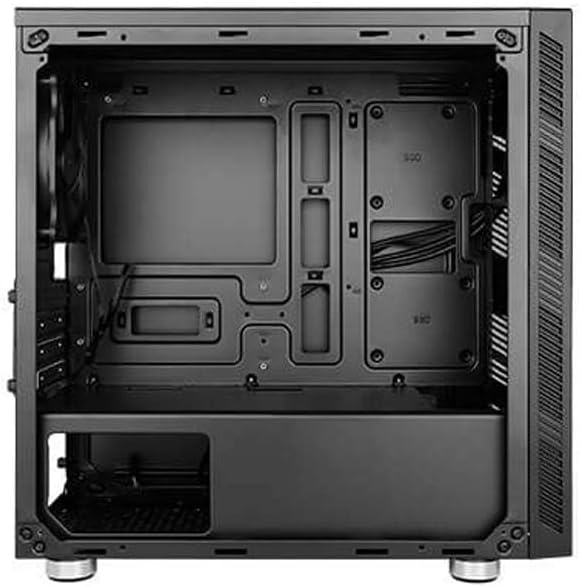
Опис зображення: Внутрішній view of the Antec VSK10 Micro-ATX case, showing the motherboard tray, drive bays, and power supply shroud. Cable routing cutouts are visible.
2. Встановлення материнської плати
Align your Micro-ATX or ITX motherboard with the pre-installed standoffs inside the case. Carefully place the motherboard onto the standoffs and secure it using the provided screws. Ensure the I/O shield is installed in the rear opening before securing the motherboard.
3. Установка джерела живлення
Install the power supply unit (PSU) into the dedicated compartment at the bottom rear of the case. Ensure the PSU fan faces the bottom ventilation opening for optimal airflow. Secure the PSU with screws from the rear of the case.

Опис зображення: Задня сторона view of the Antec VSK10 case, showing the I/O shield cutout, four expansion slots, the rear fan mount, and the power supply mounting area at the bottom.
4. Встановлення диска
The VSK10 case supports both 3.5" HDDs and 2.5" SSDs:
- 3.5" HDD / 2.5" SSD: Install drives into the removable drive cage located beneath the PSU shroud. Follow the instructions for your specific drive type to secure it within the cage.
- 2.5-дюймовий твердотільний накопичувач: Dedicated mounting points are available on the motherboard tray for 2.5" SSDs. Secure these drives directly to the tray using screws.
5. Встановлення плати розширення
Remove the necessary expansion slot covers from the rear of the case corresponding to your expansion card (e.g., graphics card). Insert your expansion card into the motherboard's PCIe slot and secure it with a screw.
6. Встановлення вентилятора та радіатора
The VSK10 offers flexible cooling options:
- Спереду: Supports 2 x 140mm or 3 x 120mm intake fans, or a 280mm radiator.
- задній: Includes 1 x 120mm exhaust fan.
- Вгорі: Підтримує 2 x 120 мм або 2 x 140 мм вентилятори.
Ensure fans are oriented correctly for optimal airflow (typically intake at the front, exhaust at the rear and top).

Опис зображення: Зовнішній фасад view of the Antec VSK10 case, featuring a brushed black finish and a side intake vent for airflow.
7. Кабельний менеджмент
Utilize the cable routing cutouts and tie-down points located behind the motherboard tray to manage and organize your cables. Effective cable management improves airflow and the overall aesthetic of your build.
Інструкція з експлуатації
Введення / виведення на передній панелі
The front panel provides convenient access to essential ports and controls for your system.
- Кнопка живлення: Press to power on or power off the system.
- Кнопка скидання: Натисніть, щоб перезавантажити систему.
- Порти USB 3.0 (x2): Connect USB 3.0 compatible devices for high-speed data transfer.
- Аудіороз'єми: Підключіть навушники та мікрофони.

Опис зображення: Кутовий view of the Antec VSK10 case, highlighting the top panel with front I/O ports including two USB 3.0 ports and audio jacks, alongside the power and reset buttons.
Технічне обслуговування
Regular maintenance helps ensure the longevity and optimal performance of your PC components and the case itself.
- Пилові фільтри: The VSK10 includes dust filters to prevent dust buildup. Regularly clean these filters by removing and washing them with water, or by using compressed air. Ensure they are completely dry before reinstallation.
- Прибирання салону: Periodically open the case and use compressed air to remove dust from internal components such as fans, heatsinks, and graphics cards. Avoid touching components directly.
- Перевірка організації кабелів: Ensure cables remain neatly routed and do not obstruct airflow or interfere with fan operation.
Усунення несправностей
This section addresses common issues you might encounter during or after system assembly.
- Система не вмикається:
- Check all power connections, including the PSU to the wall outlet, PSU to motherboard (24-pin and CPU 8-pin), and front panel power switch header.
- Ensure the PSU switch at the rear is in the 'ON' position.
- Немає виводу на дисплей:
- Verify that the monitor is connected to the graphics card (or motherboard integrated graphics, if applicable) and is powered on.
- Reseat the graphics card and RAM modules firmly into their slots.
- Перегрів:
- Ensure all case fans are spinning and oriented correctly for optimal airflow.
- Clean dust filters and internal components to remove any dust buildup.
- Verify the CPU cooler is properly seated and making good contact with the CPU.
- Порти USB не працюють:
- Check if the front panel USB 3.0 header is correctly connected to the corresponding header on the motherboard.
Технічні характеристики
The following table details the technical specifications of the Antec VSK10 Micro-ATX Case.
| Особливість | Специфікація |
|---|---|
| Назва моделі | VSK10 |
| Тип корпусу | Корпус Micro-ATX |
| Підтримка материнської плати | Micro-ATX, ITX |
| матеріал | SPCC + Пластик |
| Drive Bays (Internal) | 2 x 3.5" HDD (compatible with 2 x 2.5" SSD), 2 x 2.5" SSD |
| Слоти розширення | 4 |
| Підтримка переднього вентилятора | 2 х 140 мм або 3 х 120 мм |
| Підтримка заднього вентилятора | 1 x 120 мм (в комплекті) |
| Підтримка найкращих фанатів | 2 х 120 мм або 2 х 140 мм |
| Опора переднього радіатора | До 280 мм |
| Опора заднього радіатора | До 120 мм |
| Передні порти вводу-виводу | 2 x USB 3.0, аудіовхід/вихід |
| Максимальна довжина GPU | 350 мм |
| Максимальна висота процесорного кулера | 160 мм |
| Максимальна довжина блоку живлення | 160 мм |
| Розміри продукту (ДxШxВ) | 17 x 10 x 9 дюйма (приблизно 432 x 254 x 229 мм) |
| Вага товару | 8.14 фунта (приблизно 3.7 кг) |
Гарантія та підтримка
For detailed warranty information, terms, and conditions, please refer to the official Antec website or the warranty card included with your product. For technical support or further assistance, please visit the Antec support page or contact their customer service department. Keep your proof of purchase for any warranty claims.


