1. Вступ
This manual provides comprehensive instructions for the operation and maintenance of your Fetcus Universal Remote Control, designed for various Hitachi Air Conditioner models. Please read this manual thoroughly before using the remote control to ensure proper function and longevity.
This remote control is a direct replacement or compatible alternative for original Hitachi air conditioner remote models including RAS-D10EX, RAR-5E1, RAS-10XH1, RAR-5E2, RAR-5E3, RAR-5E4, RAR-5E5, RAR-5E6, and RAS-D14EX2.
2. Особливості продукту
- Універсальна сумісність: Designed to work with a wide range of Hitachi air conditioner models.
- Інфрачервоний зв'язок: Utilizes standard infrared signals for reliable communication with your AC unit.
- Dedicated AC Functions: Includes specific buttons for common air conditioner operations such as power, mode selection, temperature adjustment, fan speed, and more.
- Компактний дизайн: Ergonomic and easy to handle.
- No App Support: Operates independently without the need for a smartphone application.
- Частота: Operates at 433 MHz for signal transmission.
3. Налаштування
3.1 Встановлення батареї
The remote control requires appropriate batteries for operation. Follow these steps to install or replace batteries:
- Знайдіть батарейний відсік на задній панелі пульта дистанційного керування.
- Slide the battery compartment cover downwards or press the latch to open it.
- Insert new batteries, ensuring the positive (+) and negative (-) terminals align correctly with the markings inside the compartment. Typically, two AAA batteries are required, though specific battery type should be confirmed by checking the compartment markings.
- Щільно закривайте кришку відсіку для батарейок, доки вона не зафіксується почутим клацанням.

малюнок 3.1: Задня view of the Fetcus remote control with the battery compartment open, revealing the two battery slots and a label with battery safety warnings. This image illustrates the correct orientation for battery insertion.
Важливо: Вийміть батарейки, якщо пульт дистанційного керування не використовуватиметься протягом тривалого часу, щоб запобігти протіканню та пошкодженню.
4. Інструкція з експлуатації
Familiarize yourself with the buttons on your remote control. The remote features a main display and various control buttons for your air conditioner.
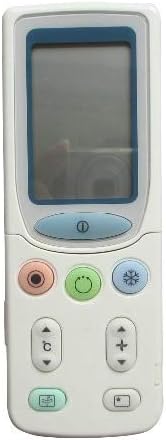
малюнок 4.1: Фронт view of the Fetcus remote control, highlighting the LCD screen and the primary control buttons for power, mode, and temperature adjustment.
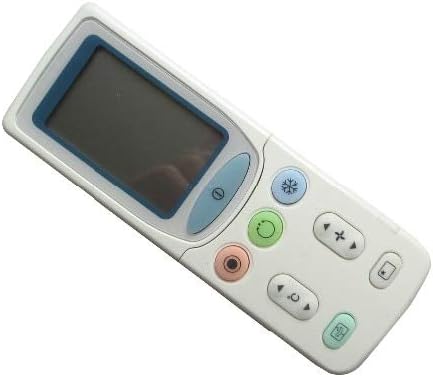
малюнок 4.2: Під кутом view of the Fetcus remote control, showing the main display and primary function buttons including power, mode, and fan speed controls.
4.1 Основні функції
- Кнопка живлення (①): Натисніть, щоб увімкнути або вимкнути кондиціонер.
- Кнопка режиму (↻): Press repeatedly to cycle through operating modes: Auto, Cool, Dry, Fan, Heat (if applicable to your AC unit).
- Кнопки регулювання температури (+ / -): Натисніть, щоб збільшити або зменшити потрібне налаштування температури.
- Кнопка швидкості вентилятора (❄): Press to adjust the fan speed (e.g., Auto, Low, Medium, High).
4.2 Розширені функції (під розсувною кришкою)
Some advanced functions are accessible by sliding down the cover on the remote control. This reveals additional buttons for more specific controls.

малюнок 4.3: Під кутом view of the Fetcus remote control with the sliding cover open, exposing additional advanced function buttons beneath the main display.
- Керування гойдалкою/жалюзі: Adjusts the direction of the airflow (vertical or horizontal swing).
- Timer/Sleep Mode: Sets a timer for the AC unit to turn on or off, or activates a sleep-friendly operating mode.
- C/F Switch (℃): Перемикає відображення температури між Цельсієм і Фаренгейтом.
- Кнопка скидання: Used to reset the remote control settings or clear certain functions. Consult your AC unit's manual for specific reset procedures if needed.
- Other Specific Buttons: Depending on your specific Hitachi AC model, other buttons may control functions like Quiet mode, Turbo mode, or Health functions. Refer to your AC unit's original manual for detailed explanations of these specific icons.
5. Технічне обслуговування
- Прибирання: Протирайте пульт дистанційного керування м’якою сухою тканиною. Не використовуйте рідкі засоби для чищення або абразивні матеріали, оскільки вони можуть пошкодити поверхню або внутрішні компоненти.
- Заміна батареї: Replace batteries when the remote's range decreases or the display becomes dim. Always replace all batteries at the same time with new ones of the same type.
- Зберігання: Зберігайте пульт дистанційного керування в прохолодному сухому місці подалі від прямих сонячних променів і екстремальних температур.
6. Вирішення проблем
| проблема | Можлива причина | Рішення |
|---|---|---|
| Пульт не відповідає. | Розряджені або неправильно встановлені батареї. | Замініть батарейки, дотримуючись правильної полярності (+/-). |
| Дистанційний радіус дії поганий. | Weak batteries; Obstruction between remote and AC unit. | Replace batteries. Ensure a clear line of sight to the AC unit's infrared receiver. |
| AC unit not responding to specific functions. | Remote not fully compatible with all AC unit features; AC unit does not support the function. | Verify the function exists on your specific AC model. This remote is a universal replacement and may not support all obscure functions of every original remote. |
| Дисплей тьмяний або порожній. | Низький заряд батареї. | Замініть батареї. |
7. Технічні характеристики
| Особливість | Деталь |
|---|---|
| Бренд | лисини |
| Номер моделі (внутрішній) | CLS-D41D8CD98F00B204E9800998ECF8427E |
| Сумісні пристрої | Air Conditioner (Hitachi RAS-D10EX, RAR-5E1, RAS-10XH1, RAR-5E2, RAR-5E3, RAR-5E4, RAR-5E5, RAR-5E6, RAS-D14EX2) |
| Технологія підключення | Інфрачервоний |
| Частота | 433 МГц |
| Максимальна кількість підтримуваних пристроїв | 1 |
| матеріал | Other (Durable Plastic) |
| Опис батареї | Lithium (Typically uses AAA batteries, please check compartment) |
| Особливості | Universal, Wireless |
| Кількість товару в упаковці | 1 |
| Дата першої доступності | 8 травня 2019 р |
8. Гарантія та підтримка
This Fetcus Remote Control comes with a Гарантія 90 днів з дати покупки. Ця гарантія поширюється на виробничі дефекти та гарантує належне функціонування виробу за умови нормального використання.
For warranty claims or technical support, please contact your retailer or the manufacturer with your purchase details. Please retain your proof of purchase for warranty validation.


