1. Вступ
This manual provides comprehensive instructions for the setup, operation, maintenance, and troubleshooting of your Canyon CNS-SW71SS Smartwatch. Please read this manual carefully before using your device to ensure proper function and longevity.
The Canyon CNS-SW71SS Smartwatch is designed to help you monitor your fitness activities and stay connected. It features a 1.22-inch color screen, multi-sport modes, heart rate monitoring, sleep tracking, and notification alerts. Its IP68 water resistance makes it suitable for various environments.
2. Продукт закінчивсяview
2.1 Основні характеристики
- 1.22-inch color touch screen display.
- Multi-sport mode for tracking various activities.
- Daily activity monitoring: calories, steps, heart rate, and sleep.
- Notifications for incoming calls, SMS, emails, calendar events, and social media.
- Music control and remote camera function.
- Smart alarm and weather data display.
- До 7 днів автономної роботи.
- IP68 water resistance (submersible up to 1 meter for 30 minutes).
- Підключення через Bluetooth 4.0.
- Compatible with iOS and Android operating systems.
- Comes with two interchangeable wristbands: metal and TPU.
2.2 Компоненти
The Canyon CNS-SW71SS Smartwatch consists of the main watch unit, interchangeable wristbands, and a charging cable.

Малюнок 1: Спереду view of the Canyon CNS-SW71SS Smartwatch, showing the display with steps, distance, calories, and heart rate data.

Рисунок 2: Кутовий view of the Canyon CNS-SW71SS Smartwatch, featuring a silver metal mesh strap and a round display.
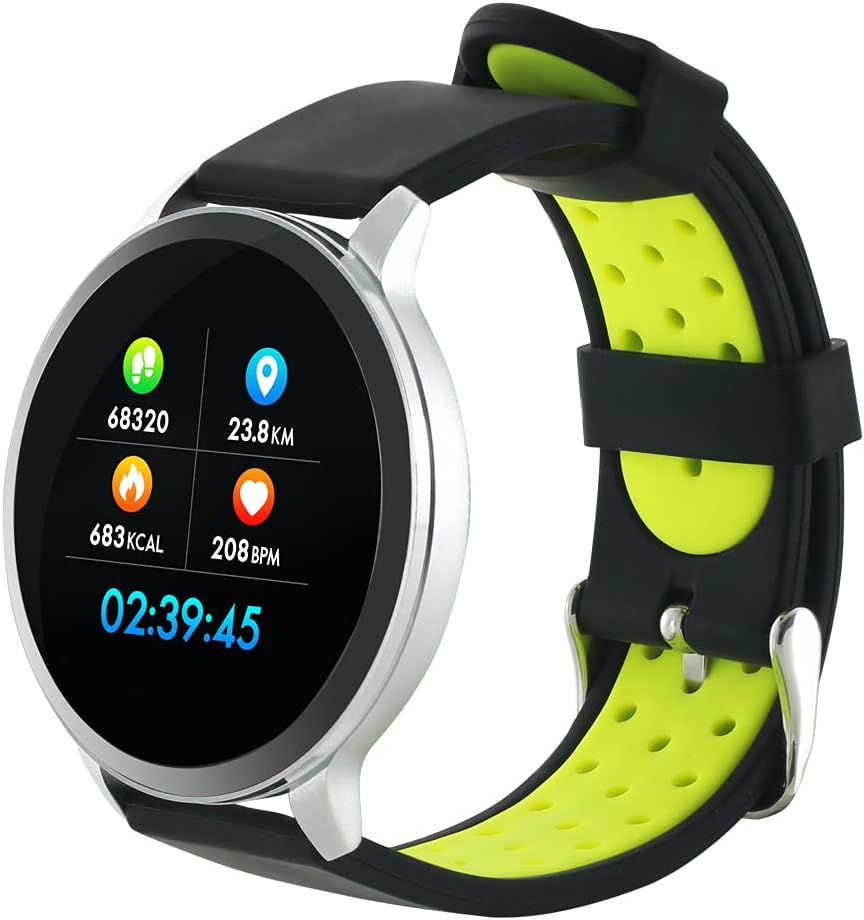
Figure 3: The Canyon CNS-SW71SS Smartwatch shown with an alternative black and lime green TPU strap, highlighting its interchangeable design.

Малюнок 4: Задня частина view of the Canyon CNS-SW71SS Smartwatch, displaying the optical heart rate sensor and magnetic charging contacts.

Figure 5: The retail packaging for the Canyon CNS-SW71SS Smartwatch, illustrating key features and the included two straps.
3. Налаштування
3.1 Заряджання смарт-годинника
- Підключіть зарядний кабель до USB-адаптера живлення (не входить до комплекту) або USB-порту комп’ютера.
- Align the magnetic charging pins of the cable with the charging contacts on the back of the smartwatch. The watch will vibrate and display a charging icon.
- Allow approximately 2-3 hours for a full charge. A full charge provides up to 7 days of usage.
3.2 Installing the Canyon Fit Application
- Scan the QR code provided in the packaging or search for "Canyon Fit" in your smartphone's app store (Google Play Store for Android, Apple App Store for iOS).
- Завантажте та встановіть програму.
- Open the Canyon Fit app and follow the on-screen instructions to create an account and set up your profile.
3.3 Сполучення зі смартфоном
- Переконайтеся, що ваш смарт-годинник заряджений та увімкнений.
- Увімкніть Bluetooth на своєму смартфоні.
- Open the Canyon Fit application.
- Navigate to the device pairing section within the app (usually found under 'Device' or 'Profile').
- Select your smartwatch (e.g., "CNS-SW71SS") from the list of available devices.
- Підтвердьте запит на сполучення як на смартфоні, так і на смарт-годиннику, якщо буде запропоновано.
3.4 Attaching/Changing Wristbands
The smartwatch comes with two wristbands (metal and TPU) that can be interchanged. To attach or change a wristband, locate the quick-release pins on the underside of the strap. Slide the pin to detach the current strap and then align and slide the pin of the new strap into the corresponding holes on the watch body until it clicks into place.
4. Інструкція з експлуатації
4.1 Основна навігація
- Сенсорний екран: Swipe left/right to navigate through different functions and menus. Swipe up/down to view сповіщення або швидкі налаштування.
- Бічна кнопка: Press the side button to return to the main watch face or to wake up the screen. A long press may access power options or specific features depending on the context.
4.2 Відстеження фізичної активності
- Мультиспортивний режим: Access the 'Workout' or 'Sport' menu on your watch. Select your desired activity (e.g., running, cycling, walking) to start tracking. The watch will record duration, distance, calories burned, and heart rate.
- Щоденна активність: The watch automatically tracks your steps, distance, and calories burned throughout the day. View these statistics on the watch face or in the Canyon Fit app.
- Монітор серцевого ритму: The watch continuously monitors your heart rate. You can also manually initiate a heart rate measurement from the heart rate interface.
- Відстеження сну: Wear the smartwatch to bed, and it will automatically track your sleep patterns, including deep sleep, light sleep, and wake times. View detailed sleep analysis in the Canyon Fit app.
4.3 Сповіщення
Once paired with your smartphone and with notification permissions granted in the Canyon Fit app, your smartwatch will display alerts for:
- Вхідні дзвінки
- SMS-повідомлення
- електронні листи
- Календар подій
- Social Media Apps (e.g., WhatsApp, Facebook, InstagОЗП)
Проведіть пальцем вгору по циферблату годинника, щоб view recent notifications. You can dismiss notifications from the watch.
4.4 Додаткові функції
- Керування музикою: While music is playing on your phone, you can use the watch to play/pause, skip tracks, and adjust volume.
- Віддалена камера: Open the camera function in the Canyon Fit app. Use your smartwatch as a remote shutter button to take photos on your phone.
- Розумна сигналізація: Set alarms through the Canyon Fit app. The watch will vibrate to wake you up gently.
- Дані про погоду: Once connected to your phone, the watch will display current weather conditions and forecasts for your location.
5. Технічне обслуговування
5.1 Очищення
- Протріть екран та корпус годинника м’якою ганчіркоюamp тканина.
- For the metal strap, use a soft brush to gently clean any debris. For the TPU strap, wash with mild soap and water.
- Перед заряджанням переконайтеся, що зарядні контакти чисті та сухі.
- Уникайте використання агресивних хімікатів або абразивних матеріалів для очищення.
5.2 Водостійкість (IP68)
The Canyon CNS-SW71SS Smartwatch is IP68 rated, meaning it is resistant to dust and can be immersed in water up to 1 meter deep for a maximum of 30 minutes. While it can withstand splashes, rain, and brief immersion, it is not recommended for hot showers, saunas, or diving, as steam and high water pressure can compromise the seals.
- Do not press any buttons while the watch is submerged.
- Ретельно висушіть годинник після контакту з водою.
5.3 Догляд за акумулятором
- Уникайте частого повного розряджання акумулятора.
- Регулярно заряджайте пристрій, навіть якщо він не використовується, щоб підтримувати справність акумулятора.
- Зберігайте годинник у прохолодному, сухому місці, якщо він не використовується протягом тривалого часу.
6. Вирішення проблем
- Годинник не вмикається: Переконайтеся, що годинник повністю заряджений. Підключіть його до зарядного пристрою щонайменше на 30 хвилин.
- Не вдається з’єднати пристрій зі смартфоном:
- Переконайтеся, що на вашому телефоні ввімкнено Bluetooth.
- Ensure the Canyon Fit app has necessary permissions.
- Перезавантажте телефон і смарт-годинник.
- Спробуйте розірвати та повторно підключити пристрій через додаток.
- Сповіщення не відображаються:
- Check notification settings in the Canyon Fit app and your phone's system settings.
- Переконайтеся, що годинник підключено через Bluetooth.
- Неточні дані про частоту серцевих скорочень/активність:
- Переконайтеся, що годинник щільно прилягає до зап'ястя, не надто туго і не надто вільно.
- Очистіть датчик на задній панелі годинника.
- Environmental factors or certain movements can affect accuracy.
- Екран не реагує: Try restarting the smartwatch by holding down the side button. If unresponsive, allow the battery to fully drain and then recharge.
7. Технічні характеристики
| Назва моделі | CNS-SW71SS |
| Бренд | CANYON |
| Розмір дисплея | 1.22 дюймів |
| Сумісність операційної системи | Android, iOS |
| Технологія підключення | Bluetooth 4.0 |
| Рейтинг водонепроникності | IP68 |
| Особливості | Wireless Charging (implied by product data), Multi-Sport Mode, Heart Rate Monitor, Sleep Tracker, Notifications |
| Сумісні пристрої | Смартфон |
| Акумулятор | Rechargeable (1 included) |
| Параметри кольору | Black, Lime Green, Silver |
8. Гарантія та підтримка
For warranty information and technical support, please refer to the documentation included with your purchase or visit the official Canyon website. You can also contact Canyon customer service for assistance with product issues or inquiries.
Інтернет-підтримка: https://canyon.eu/support/ (Вихampпосилання, будь ласка, перевірте офіційну сторінку підтримки)


