1. Вступ
This manual provides comprehensive instructions for the installation, operation, and maintenance of the Chacon DI-O 54515 Universal Dimmer White. This device allows you to wirelessly control your lighting, integrating seamlessly with existing light switches and the DiO 1.0 ecosystem.
The DI-O 54515 micro-module is designed to be installed behind your existing light switch, enabling wireless ON-OFF control of your lights. It supports control via the physical switch, a remote control, or automatically through compatible motion or opening sensors. When connected to a LiteBox or DiO Home+ hub, it offers smartphone app control, timers, and scenario programming, including voice control via Amazon Echo or Google Home.
2. Інформація про безпеку
Будь ласка, уважно прочитайте всі інструкції з безпеки перед встановленням та використанням. Недотримання цих інструкцій може призвести до ураження електричним струмом, пожежі або інших небезпек.
- Встановлення має виконувати кваліфікований електрик або відповідно до місцевих електротехнічних норм.
- Завжди відключайте живлення за допомогою автоматичного вимикача перед встановленням або обслуговуванням пристрою.
- Do not exceed the maximum load ratings specified in the technical specifications.
- Цей пристрій призначений лише для використання в приміщенні.
- Тримайте пристрій подалі від води, вологи та екстремальних температур.
- Переконайтеся, що всі з’єднання надійні та належним чином ізольовані.
3. Вміст упаковки
Пакет повинен містити такі предмети:
- Chacon DI-O 54515 Universal Dimmer White Module
- Інструкція з експлуатації (цей документ)

Image 1: The Chacon DI-O 54515 Universal Dimmer White module, showing its compact design and wiring terminals.
4. Особливості продукту
- Бездротове управління: Enables wireless ON-OFF control of lights when installed behind an existing switch.
- Multi-Control Options: Compatible with existing physical switches, DiO 1.0 remote controls, wireless switches, motion sensors, and opening sensors.
- Інтеграція розумного будинку: Connects to LiteBox or DiO Home+ for smartphone app control, timers, and scenario programming.
- Голосове керування: Supports voice commands via Amazon Echo or Google Home when integrated with DiO Home+.
- Легка установка: Designed for simple connection behind an existing light switch, requiring no neutral wire.
- Компактний дизайн: Dimensions (L x W x H): 41 x 42 x 13 mm, allowing it to fit into standard electrical boxes.
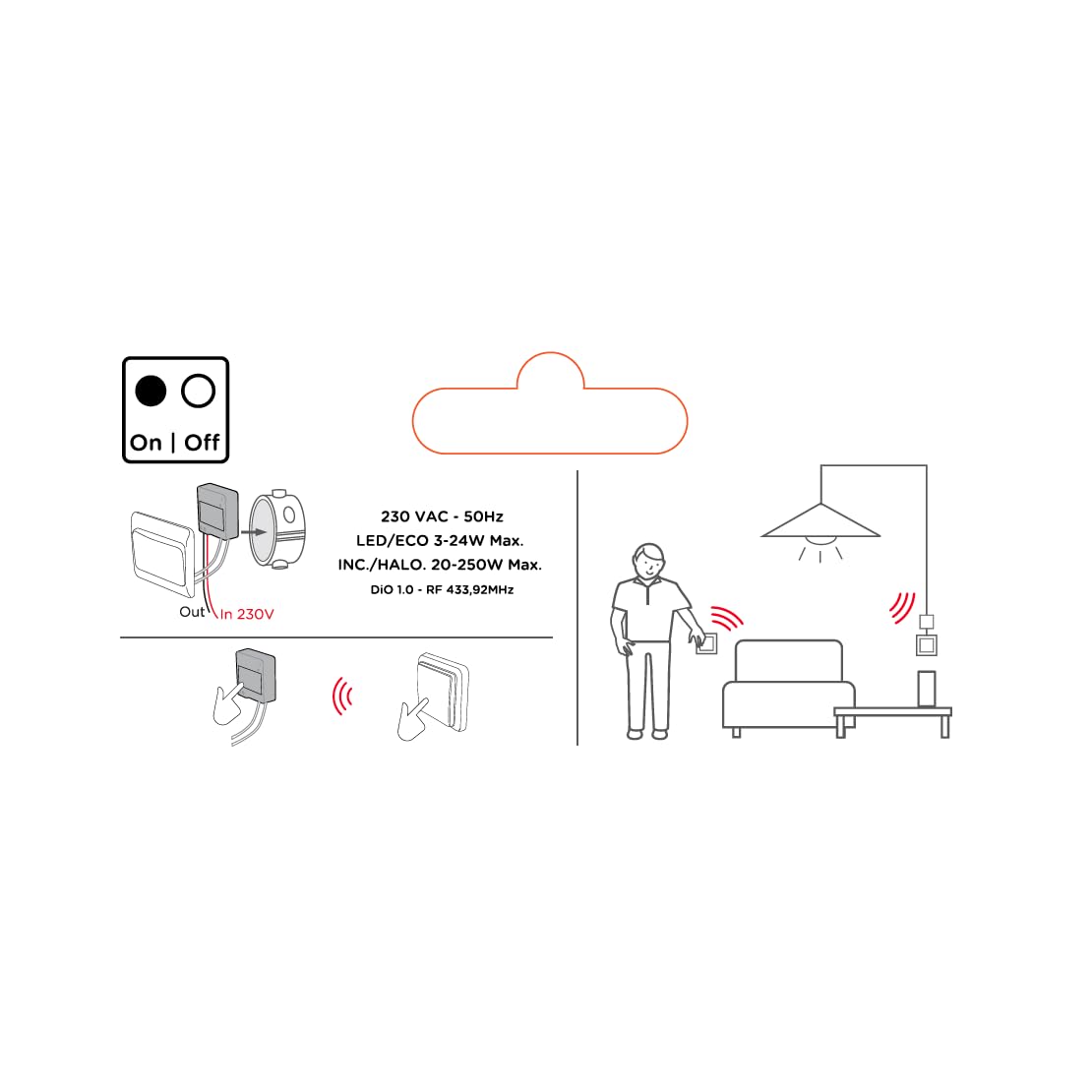
Image 2: An illustrative diagram detailing the wireless control capabilities and key electrical specifications of the module.
5. Налаштування та встановлення
The installation of the Chacon DI-O 54515 module is designed to be straightforward. However, if you are unsure, consult a qualified electrician.
5.1 Інструкції з підключення
- Відключити живлення: Before starting any electrical work, ensure the power supply to the circuit is turned off at the main circuit breaker.
- Блок перемикача доступу: Carefully remove your existing light switch from the wall box.
- Модуль підключення:
- Connect the Live (L) wire from your electrical supply to the 'L' terminal on the DiO module.
- Connect the wire going to your light fixture to the output terminal (often marked with a wave symbol or 'OUT') on the DiO module.
- Connect the two wires from your existing light switch to the designated switch input terminals on the DiO module. This module does not require a neutral wire for operation.
- Position Module: Carefully place the DiO module into the wall box behind your existing light switch. Ensure wires are not pinched.
- Перевстановіть перемикач: Reattach your existing light switch to the wall box.
- Відновлення живлення: Знову увімкніть живлення на автоматичному вимикачі.

Image 3: A visual representation of the DiO module being installed within a standard electrical wall box, positioned behind an existing light switch.

Зображення 4: Детальний view of the Chacon DI-O 54515 module, highlighting its wiring terminals for proper connection.
5.2 Pairing with DiO 1.0 Controls
To enable wireless control, you need to pair the module with a compatible DiO 1.0 remote control, wireless switch, or sensor.
- Увійдіть у режим сполучення: Refer to the specific instructions for your DiO 1.0 control device to put it into pairing mode. Typically, this involves pressing a pairing button on the module or performing a specific sequence with the existing switch.
- Активувати керування: Once the module is in pairing mode, activate your DiO 1.0 control (e.g., press the 'ON' button on a remote or wireless switch).
- Підтвердження: The light connected to the module should flash or turn on/off to confirm successful pairing.
- Repeat for Multiple Controls: You can pair multiple DiO 1.0 controls to the same module if desired.
6. Інструкція з експлуатації
Once installed and paired, the Chacon DI-O 54515 module offers several ways to control your lighting:
- Existing Light Switch: You can continue to use your traditional wall switch to turn the lights on and off.
- DiO 1.0 Remote Control/Wireless Switch: Use any paired DiO 1.0 remote control or wireless switch to toggle the lights.
- DiO 1.0 Sensors: If paired with a DiO motion or opening sensor, the lights can be triggered automatically based on detected activity.
- Smartphone App (via DiO Home+ / LiteBox):
- Connect your DiO module to a DiO Home+ or LiteBox hub (sold separately).
- Download the free DiO smartphone app.
- Follow the app's instructions to add and configure your module.
- From the app, you can turn lights on/off, set timers, and create custom scenarios.
- Voice Control (via DiO Home+ and Smart Speaker):
- Ensure your DiO Home+ hub is integrated with Amazon Echo or Google Home.
- Use voice commands such as "Alexa, turn on the living room light" or "Hey Google, turn off the kitchen light."
7. Технічне обслуговування
The Chacon DI-O 54515 module requires minimal maintenance. Follow these guidelines to ensure optimal performance:
- Прибирання: If necessary, gently wipe the module with a dry, soft cloth. Do not use liquid cleaners or solvents.
- Огляд: Periodically check the wiring connections to ensure they remain secure. Always disconnect power before inspection.
- Оновлення прошивки: If using with a DiO Home+ or LiteBox, ensure your hub's firmware and the smartphone app are kept up to date for the best performance and security.
8. Вирішення проблем
| проблема | Можлива причина | Рішення |
|---|---|---|
| Світло не вмикається/вимикається. | No power to the module, incorrect wiring, module not paired, faulty bulb. | Check circuit breaker. Verify wiring according to Section 5.1. Re-pair the module with the control device (Section 5.2). Test with a known working bulb. |
| Бездротове керування не працює. | Module not paired, control device out of range, battery low in remote/sensor. | Ensure module is correctly paired (Section 5.2). Move control device closer to the module. Replace batteries in remote/sensor. |
| Module indicator light flashing red. | Overload or short circuit detected. | Immediately disconnect power. Check the connected load does not exceed specifications. Inspect wiring for any short circuits. Consult a qualified electrician if the problem persists. |
| Голосове керування не реагує. | DiO Home+ hub not connected, incorrect voice command, smart speaker issue. | Ensure DiO Home+ is online and linked to your smart speaker account. Verify the correct device name is used in commands. Check smart speaker's internet connection. |
9. Технічні характеристики
| Особливість | Деталь |
|---|---|
| Номер моделі | 54515 |
| Бренд | Dio |
| Режим роботи | УВІМКНЕНО ВИМКНЕНО |
| Поточний рейтинг | 10 Amps |
| Тип перемикача | Диммер |
| Тип монтажу | Настінне кріплення |
| Тип приводу | Пульт дистанційного керування |
| Міжнародний захист рейтингу | IP44 |
| Тип контролера | Amazon Alexa |
| Спосіб контролю | Дистанційний |
| колір | Білий |
| Розміри (Д x Ш x В) | 41 x 42 x 13 мм |
| Гарантія | 2 роки |
Note on Dimming Functionality: While the product title includes "Dimmer" and "Switch Type" is listed as "Dimmer Switch", the official specifications list "Operation mode: ON-OFF". Some user reviews also indicate that newer versions of this module function as a simple ON/OFF switch rather than a dimmer. Please verify the specific functionality of your module upon receipt.
10. Гарантія та підтримка
This Chacon DI-O 54515 Universal Dimmer White module comes with a Гарантія 2 рік з дати покупки, що покриває виробничі дефекти.
For technical support, troubleshooting assistance, or warranty claims, please contact your retailer or visit the official Dio website for contact information. Please have your proof of purchase and model number (54515) ready when contacting support.


