1. Вступ
This manual provides essential instructions for the installation, operation, and maintenance of your FSP iFP600 Uninterruptible Power Supply (UPS). Please read this manual thoroughly before installing or operating the unit to ensure proper function and safety. The FSP iFP600 is designed to provide reliable power backup and surge protection for your electronic devices.

Зображення 1.1: спереду view of the FSP iFP600 UPS, showcasinзавдяки компактному дизайну та вбудованому РК-дисплею.
2. Техніка безпеки
Please adhere to these important safety guidelines during installation, operation, and maintenance of the UPS:
- Не відкривайте ДБЖasing. Усередині немає деталей, які може обслуговувати користувач. Звертайтеся до кваліфікованого сервісного персоналу з усіх питань щодо обслуговування.
- Do not connect appliances that could overload the UPS, such as laser printers, vacuum cleaners, or heaters.
- Переконайтеся, що ДБЖ підключено до заземленої розетки змінного струму.
- Avoid placing the UPS in direct sunlight, near heat sources, or in environments with excessive dust, humidity, or corrosive substances.
- Position the UPS in a well-ventilated area to prevent overheating.
- In case of fire, use a dry chemical extinguisher. Water can be hazardous.
- The battery inside the UPS is not user-replaceable. Battery replacement should only be performed by qualified personnel.
3. Продукт закінчивсяview
The FSP iFP600 UPS provides reliable power protection for your critical electronics. It features a compact design and an intuitive LCD display for monitoring status.
3.1 Вміст упаковки
Після відкриття упаковки переконайтеся, що всі компоненти є в наявності та не пошкоджені:
- FSP iFP600 UPS Unit
- Посібник користувача (цей документ)
- Шнур живлення
- Кабель зв'язку USB
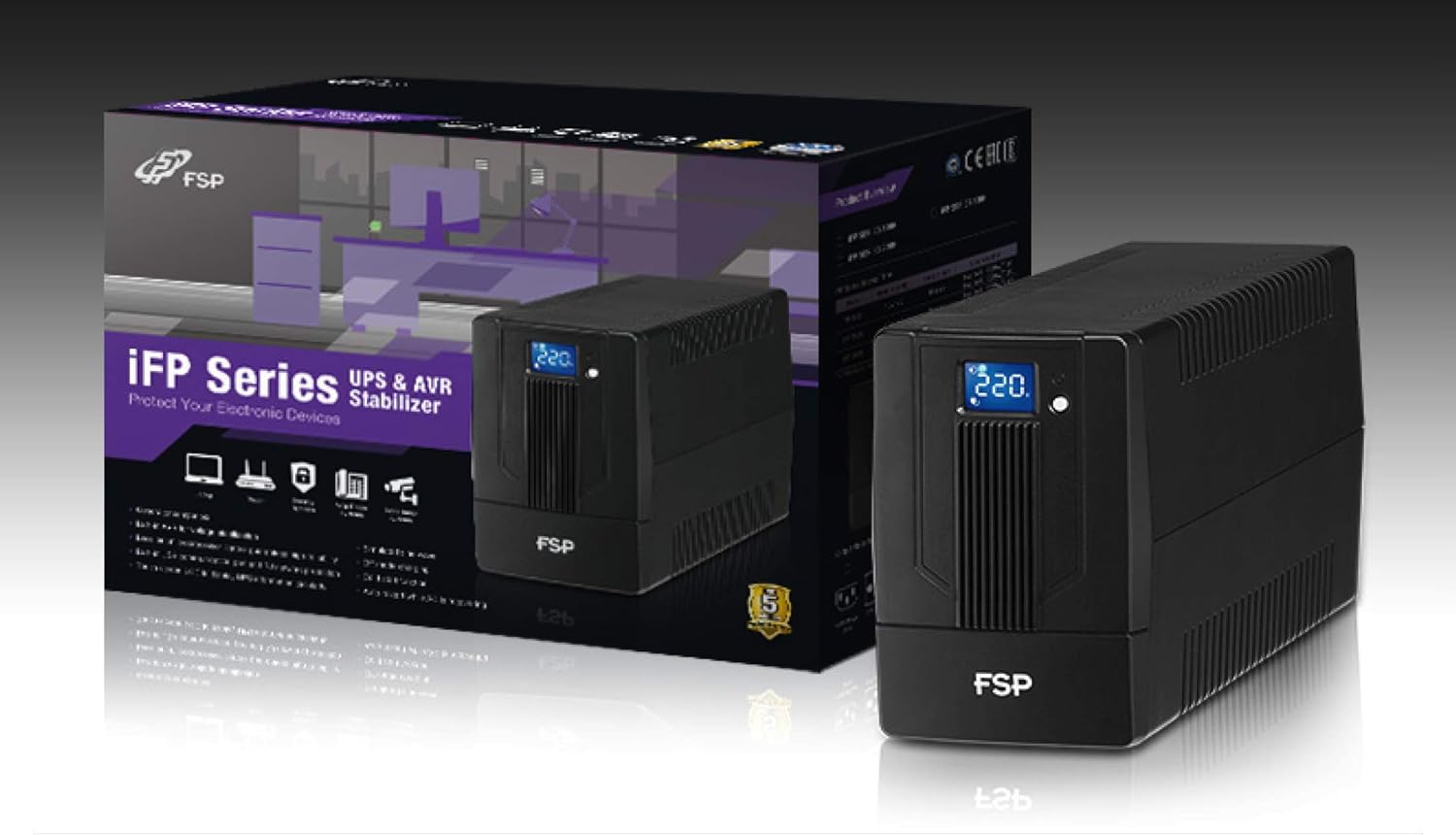
Image 3.1: The FSP iFP600 UPS shown alongside its retail packaging, illustrating the product's presentation.
3.2 Компоненти задньої панелі
Familiarize yourself with the connections on the rear panel of the UPS:

Зображення 3.2: Детальний опис view of the FSP iFP600 UPS rear panel, highlighting connection points.
- Розетки: Two SCHUKO type outlets for connecting protected equipment.
- Вхід змінного струму: Підключає ДБЖ до основної мережі електроживлення.
- Fuse/Breaker: Overcurrent protection for the UPS.
- USB-зв'язок: Port for connecting to a computer for monitoring and management.
- Combo RJ11/RJ45 Surge Protection: Забезпечує захист від перенапруги для телефонних/мережевих ліній.
4. Налаштування та встановлення
Follow these steps to set up your FSP iFP600 UPS:
- Розпакування: Обережно вийміть ДБЖ з упаковки. Перевірте на наявність пошкоджень під час транспортування.
- Розміщення: Place the UPS on a flat, stable surface in a clean, cool, and well-ventilated area. Ensure adequate clearance around the unit for airflow.
- Початкова зарядка: Connect the UPS to a standard grounded AC outlet using the provided power cord. Allow the unit to charge for at least 4-6 hours before initial use to ensure optimal battery performance. The UPS will charge whether it is turned on or off.
- З'єднувальне обладнання: Plug your computer, monitor, and other critical electronic devices into the UPS outlets (A). Do not connect surge suppressors or power strips to the UPS outlets.
- USB-зв'язок (додатково): Connect the USB cable from the UPS USB port (D) to your computer's USB port to enable power management software features (software not included, typically downloaded from manufacturer's webсайт).
- RJ11/RJ45 Protection (Optional): For surge protection of your telephone or network line, connect the incoming line to the 'IN' port of the Combo RJ11/RJ45 (E) and connect the 'OUT' port to your device.
5. Інструкція з експлуатації
5.1 Увімкнення/вимкнення
- Щоб увімкнути: Натисніть і утримуйте кнопку живлення на передній панелі приблизно 2 секунди, доки не почуєте звуковий сигнал і не засвітиться РК-дисплей.
- Щоб вимкнути: Натисніть і утримуйте кнопку живлення приблизно 2 секунди, доки не почуєте звуковий сигнал і РК-дисплей не вимкнеться.
5.2 Інформація про РК-дисплей
The FSP iFP600 features an LCD display that provides real-time status information. The display is touch-sensitive for navigating information.

Image 5.1: The LCD display of the FSP iFP600 UPS, indicating voltage output and its touch-screen functionality.
The LCD display typically shows:
- Вхідний об'ємtage
- Вихідний випtage
- Рівень заряду акумулятора
- Рівень навантаження
- Operating Mode (e.g., AC mode, Battery mode)
- Warning/Fault Indicators
5.3 Робота в режимі батареї
When the utility power fails or fluctuates outside acceptable limits, the UPS will automatically switch to battery mode. During battery mode, the UPS will provide power to connected equipment from its internal battery. An audible alarm will sound to indicate battery operation.
6. Технічне обслуговування
Proper maintenance ensures the longevity and reliability of your UPS.
- Прибирання: Використовуйте м’яку суху тканину для очищення зовнішньої поверхні ДБЖ. Не використовуйте рідкі або аерозольні засоби для чищення.
- Догляд за акумулятором: To maximize battery life, ensure the UPS is connected to AC power and fully charged. If the UPS is stored for an extended period, recharge it every three months to prevent battery degradation.
- Заміна батареї: The internal battery (12V / 7Ah x1) is not user-serviceable. Battery replacement should only be performed by FSP-certified service personnel or a qualified technician. Incorrect battery replacement can pose a risk of explosion or injury.
- Зберігання: Store the UPS in a cool, dry place with adequate ventilation. Ensure the battery is fully charged before storage.
7. Вирішення проблем
Refer to the following table for common issues and their solutions. If the problem persists, contact FSP support.
| Симптом | Звукова сигналізація | Можлива причина | Рішення |
|---|---|---|---|
| UPS operating on battery power | Звуковий сигнал кожні 10 секунд | Utility power failure or fluctuation | Save work and shut down equipment if power outage is prolonged. UPS will return to AC mode when power is restored. |
| Попередження про низький заряд батареї | Звуковий сигнал щосекунди | Заряд акумулятора критично низький | Immediately save work and shut down connected equipment. |
| Стан перевантаження | Звуковий сигнал кожні 0.5 секунду | Connected equipment exceeds UPS capacity | Disconnect non-essential equipment until the alarm stops. Ensure total load is within UPS capacity. |
| Несправність ДБЖ | Безперервний звуковий сигнал | Внутрішня несправність або несправність | Turn off the UPS and disconnect it from the AC outlet. Contact FSP technical support. |
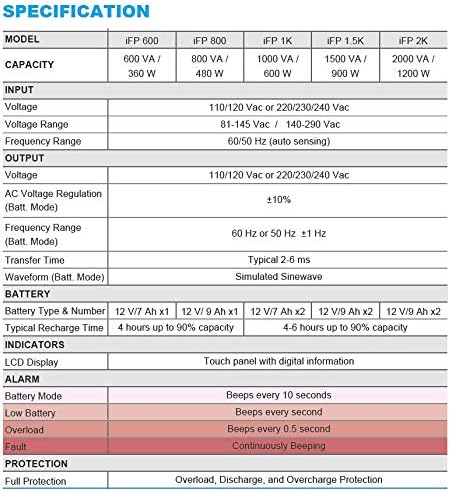
Image 7.1: Excerpt from the FSP iFP series specification table, detailing alarm indicators and their meanings.
8. Технічні характеристики
Detailed technical specifications for the FSP iFP600 UPS:
| Особливість | Специфікація |
|---|---|
| Модель | iFP 600 |
| Ємність | 600 ВА / 360 Вт |
| Вхідний об'ємtage | 110/120 Vac or 220/230/240 Vac |
| Вхідний об'ємtage Дальність | 81-145 Vac / 140-290 Vac |
| Діапазон вхідних частот | 60/50 Гц (автоматичне визначення) |
| Вихідний випtage | 110/120 Vac or 220/230/240 Vac |
| AC Voltage Regulation (Batt Mode) | ±10% |
| Output Frequency Range (Batt. Mode) | 60 Hz or 50 Hz ±1 Hz |
| Час передачі | Звичайні 2-6 мс |
| Форма хвилі (режим Batt.) | Імітація синусоїди |
| Тип і номер батареї | 12V / 7Ah x1 |
| Типовий час перезарядки | 4 години до 90% потужності |
| Індикатори | LCD Display (Touch panel with digital information) |
| захист | Overload, Discharge, and Overcharge Protection |
| Вага товару | 9.24 фунта (4.2 кг) |
| Розміри продукту (ДxШxВ) | 11.81 x 3.98 x 5.59 дюймів |
| Колір | чорний |
| матеріал | метал |
9. Гарантія та підтримка
FSP products are designed for reliability and performance. For warranty information, please refer to the warranty card included with your product or visit the official FSP website. For technical support, troubleshooting assistance, or service inquiries, please contact FSP customer service through their official channels.
Більше інформації та допоміжних ресурсів ви можете знайти на FSP Store on Amazon.