1. Вступ
This manual provides essential information for the safe and efficient operation of your Muse M-1990 DJ Bluetooth Party Speaker. Please read these instructions thoroughly before using the device and retain them for future reference.
The Muse M-1990 DJ is a powerful party speaker designed to deliver high-quality audio with dynamic light effects. It features multiple connectivity options including Bluetooth, CD player, USB, and AUX inputs, making it versatile for various audio sources.

Image 1.1: The Muse M-1990 DJ Bluetooth Party Speaker showcasing its integrated light effects.
2. Інформація про безпеку
Дотримуйтесь наступних запобіжних заходів, щоб запобігти ураженню електричним струмом, пожежі або пошкодженню пристрою:
- Не піддавайте пристрій впливу дощу або вологи.
- Не відкривайте casing. Звертайтеся до кваліфікованого персоналу з усіх питань технічного обслуговування.
- Переконайтеся, що блок живлення обtage відповідає етикетці з характеристиками на пристрої.
- Тримайте пристрій подалі від прямих сонячних променів, джерел тепла та надмірного запилення.
- Забезпечте належну вентиляцію навколо пристрою.
- Не кладіть на пристрій важкі предмети.
- Відключайте пристрій від мережі під час грози або якщо він не використовується протягом тривалого часу.
3. Вміст упаковки
Перевірте наявність усіх елементів в упаковці:
- Muse M-1990 DJ Party Speaker Unit
- Пульт дистанційного керування (потрібні 2 батарейки типу АА, в комплекті)
- Дротовий мікрофон
- AUX IN Cable (3.5mm jack)
- Кабель живлення (AC 100-240V, 50/60Hz)

Image 3.1: Included accessories: remote control, wired microphone, and AUX cable.
4. Продукт закінчивсяview
Familiarize yourself with the main components and controls of your M-1990 DJ speaker.
4.1 Верхня панель керування
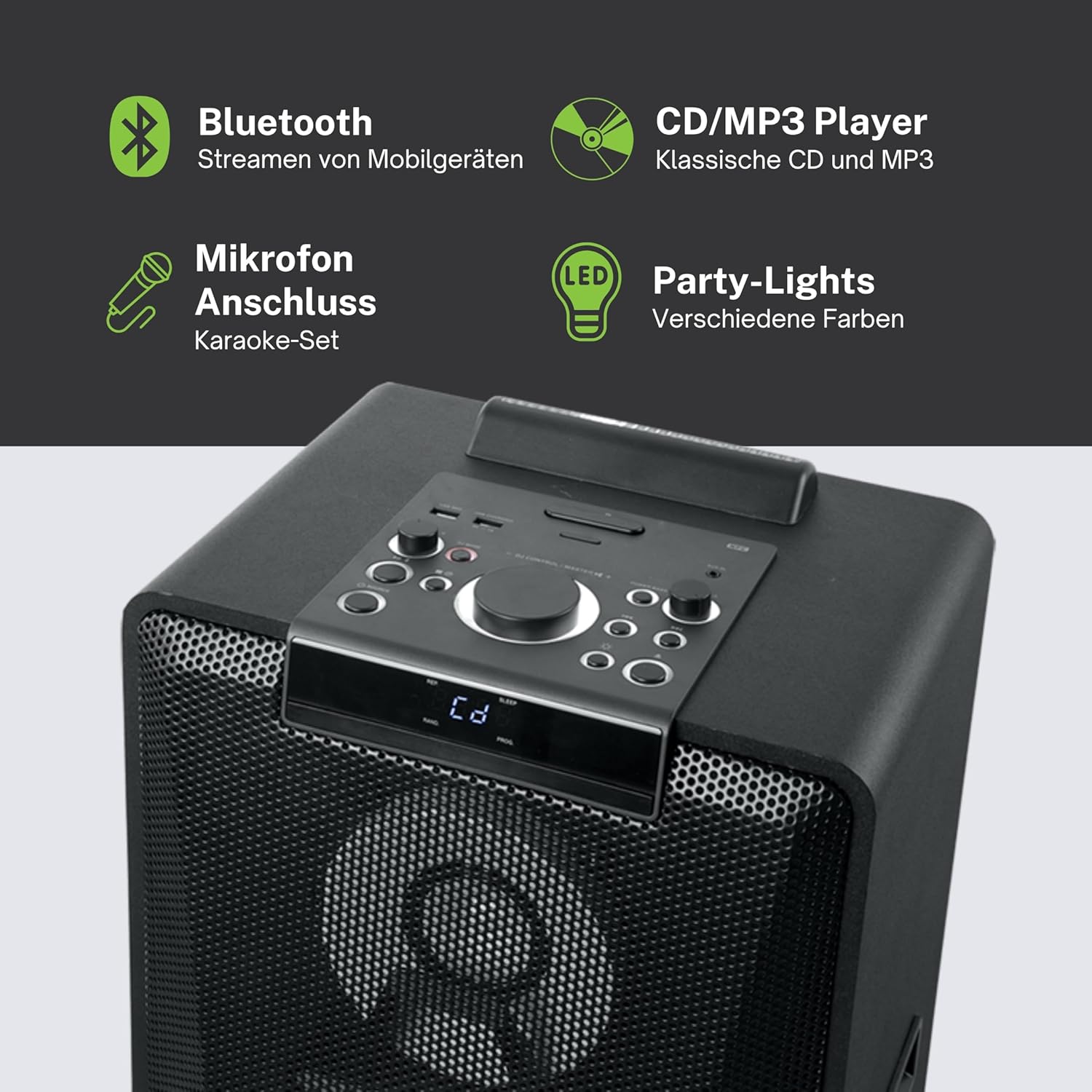
Зображення 4.1: Детальний опис view of the top control panel, showing various buttons and the LED display.
The top panel features controls for power, volume, source selection, playback, light effects, and a white LED display. It also includes a built-in cradle for a tablet or smartphone.
4.2 Rear Connectivity Ports
The rear panel provides various input and output options:
- USB 2.0 Port (for MP3 playback and charging)
- AUX IN 1 (2 x RCA jacks)
- AUX IN 2 (3.5mm jack)
- Microphone Inputs (2 jacks)
- Guitar Input (1 jack)
- AC Power Input (100-240V, 50/60Hz)
5. Налаштування
5.1 Розміщення
Place the speaker on a stable, flat surface. Ensure there is adequate space around the unit for ventilation. The unit is designed for floor mounting.
5.2 Підключення живлення
- Connect the supplied power cable to the AC power input on the rear of the speaker.
- Plug the other end of the power cable into a standard wall outlet (AC 100-240V, 50/60Hz).
- The unit does not contain a rechargeable battery and must be connected to a power source for operation.
6. Інструкція з експлуатації
6.1 Увімкнення/вимкнення живлення
Press the Power button on the top control panel or the remote control to turn the unit on or off.
6.2 Створення пари Bluetooth
- Press the Source button to select Bluetooth mode. The LED display will show 'BT' and the Bluetooth indicator will flash.
- Увімкніть Bluetooth на своєму смартфоні, планшеті або іншому сумісному пристрої.
- шукати 'M-1990 DJ' in your device's Bluetooth list and select it to pair.
- Once paired, the Bluetooth indicator will stop flashing, and you can begin streaming audio.
- For NFC-enabled devices, simply tap your device on the NFC area of the speaker for automatic pairing.
6.3 Відтворення CD
- Натисніть кнопку Джерело, щоб вибрати режим CD.
- Open the CD tray and place a CD (CD, CD-R/RW, MP3 compatible) with the label side up.
- Close the CD tray. Playback will start automatically or can be initiated using the Play/Pause button.
6.4 Відтворення з USB
- Вставте флеш-накопичувач USB з MP3 files into the USB 2.0 port.
- Press the Source button to select USB mode.
- Playback will start automatically or can be controlled using the playback buttons.
- The USB port also functions as a charging port for external devices.
6.5 Вхід AUX
- Connect your external audio device to either the AUX IN 1 (RCA jacks) or AUX IN 2 (3.5mm jack) using the appropriate cable.
- Press the Source button to select the corresponding AUX input.
- Керуйте відтворенням з підключеного пристрою.
6.6 Входи для мікрофона та гітари
- Plug your microphone(s) into the Microphone input jacks.
- Plug your guitar into the Guitar input jack.
- Adjust the microphone/guitar volume using the dedicated controls on the top panel.
6.7 Світлові ефекти
The M-1990 DJ features color-changing lights and strobe effects. Use the dedicated Light Effects button on the control panel or remote to cycle through different modes or turn the lights off.
6.8 Stereo Pairing (Dual Bluetooth)
If you have two M-1990 DJ units, you can pair them wirelessly for a stereo sound experience. Refer to the specific instructions for stereo pairing in the full manual (if provided by manufacturer) or on the manufacturer's webсайт.
7. Технічне обслуговування
7.1 Очищення
- Завжди відключайте пристрій від розетки перед очищенням.
- Для очищення зовнішніх поверхонь використовуйте м’яку суху тканину.
- Не використовуйте абразивні засоби для чищення, віск або розчинники, оскільки вони можуть пошкодити покриття.
7.2 Зберігання
Якщо динамік не використовується протягом тривалого часу, зберігайте його в прохолодному, сухому місці, подалі від прямих сонячних променів та екстремальних температур.
8. Вирішення проблем
If you encounter issues with your M-1990 DJ speaker, refer to the following common problems and solutions:
| проблема | Можлива причина | Рішення |
|---|---|---|
| Немає живлення | Кабель живлення не підключено; розетка неактивна | Переконайтеся, що кабель живлення надійно підключений; спробуйте іншу розетку |
| Ні звуку | Volume too low; Incorrect source selected; Audio cable not connected | Increase volume; Select correct input source; Check audio cable connections |
| Bluetooth не з’єднується | Динамік не в режимі сполучення; Bluetooth пристрою вимкнено; Пристрій занадто далеко | Ensure speaker is in BT mode and flashing; Enable Bluetooth on device; Move device closer (within 10m) |
| Компакт-диск не відтворюється | CD inserted incorrectly; CD scratched/dirty; Incorrect format | Reinsert CD correctly; Clean CD; Ensure CD is audio CD or MP3 compatible |
| USB не відтворюється | USB drive not inserted correctly; Files not MP3 format; USB drive corrupted | Знову вставте USB-накопичувач; переконайтеся files are MP3; Try a different USB drive |
Якщо проблема не зникає після спроби цих рішень, зверніться до служби підтримки клієнтів.
9. Технічні характеристики
Detailed technical specifications for the Muse M-1990 DJ Party Speaker:
- Номер моделі: М-1990 Діджей
- Бренд: МУЗА
- Вихідна потужність: 1000 Вт
- Кількість каналів: 2
- Технологія підключення: Bluetooth V4.2
- Сумісні пристрої: Смартфон, планшет
- Аудіо входи: 2 x Microphone jacks, 1 x Guitar jack, 2 x RCA AUX IN, 1 x 3.5mm AUX IN
- Порт USB: 1 x USB 2.0 (for MP3 playback and charging)
- CD плеєр: Сумісний з CD, CD-R/RW, MP3
- світлові ефекти: Color changing lights, Strobe effects, Light projection
- Джерело живлення: AC 100-240V, 50/60Hz (Electric Cable)
- Акумуляторна батарея: немає
- матеріал: Wood (cabinet)
- колір: чорний
- Вага товару: 17.9 кілограма
- Розміри (Д x Ш x В): 35.6 х 34.8 х 105.7 сантиметрів
- Рекомендоване використання: Party and entertainment
- Тип монтажу: Підлогове кріплення
- Батареї в комплекті: 2 батареї типу АА (для пульта дистанційного керування)

Image 9.1: Dimensional drawing of the Muse M-1990 DJ speaker.
10. Гарантія та підтримка
10.1 Інформація про гарантію
Warranty terms and conditions for the Muse M-1990 DJ speaker are typically provided with the product packaging or can be found on the official Muse webсайт. Будь ласка, збережіть підтвердження покупки для будь-яких гарантійних претензій.
10.2 Підтримка клієнтів
For further assistance, technical support, or service inquiries, please refer to the contact information provided in your product documentation or visit the official Muse customer support webсайт.


