1. Вступ
This user manual provides detailed instructions for the safe and efficient operation of your Veidoo 10-inch Android Tablet PC. Please read this manual thoroughly before using the device and retain it for future reference. This tablet is designed for various uses, including communication, entertainment, and productivity.

This image shows the Veidoo 10-inch Android Tablet PC. The front of the tablet displays the home screen with the current time, date, and various application icons such as Camera, Gallery, Settings, and Music. The rear of the tablet, visible behind the front, is black with a subtle textured design and features the rear camera module.
2. Інформація про безпеку
- Не піддавайте пристрій впливу екстремальних температур, прямих сонячних променів або високої вологості.
- Уникайте падіння та сильних ударів пристрою.
- Використовуйте лише схвалені виробником зарядні пристрої та аксесуари.
- Не намагайтеся розбирати або ремонтувати пристрій самостійно. Зверніться до кваліфікованого сервісного персоналу.
- Тримайте пристрій подалі від дітей і домашніх тварин.
- Утилізуйте пристрій та його батарею відповідально згідно з місцевими правилами.
3. Продукт закінчивсяview
3.1 Фізичні особливості
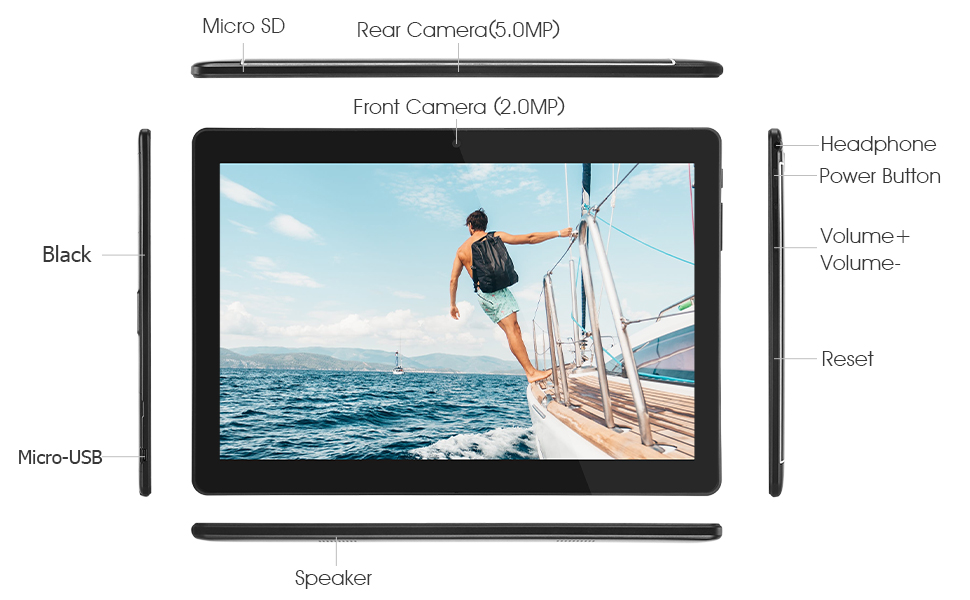
Familiarize yourself with the various ports and buttons on your Veidoo Tablet PC:

This diagram illustrates the various physical components and ports of the Veidoo 10-inch Android Tablet PC. It clearly labels the Micro SD card slot, the 5.0MP rear camera, the 2.0MP front camera, the headphone jack, the power button, the volume up and down buttons, the reset pinhole, the Micro-USB charging port, and the speaker.
- Слот Micro SD: Для розширюваного сховища.
- Задня камера (5.0 МП): Для зйомки фотографій та відео.
- Фронтальна камера (2.0 МП): Для відеодзвінків та селфі.
- Роз'єм для навушників: Підключіть навушники 3.5 мм.
- Кнопка живлення: Press and hold to power on/off, short press to sleep/wake.
- Кнопки гучності: Налаштуйте гучність звуку.
- Скинути пінхол: Use a thin object to reset the device if unresponsive.
- Порт Micro-USB: Для зарядки та передачі даних.
- Доповідач: Аудіовихід.
3.2 Вміст упаковки
Переконайтеся, що всі елементи присутні в коробці з вашим товаром:

This image displays the items typically found inside the Veidoo 10-inch Android Tablet PC product box. It includes the tablet itself, a black protective case, a power adapter (wall charger), a USB charging and data cable, a service warranty card, and a leaflet containing frequently asked questions and support information.
- Veidoo 10-inch Android Tablet PC
- Адаптер живлення
- USB кабель
- Protective Case (optional, may vary by package)
- Посібник користувача (цей документ)
- Сервісний гарантійний талон
- FAQ Leaflet
4. Налаштування
4.1 Заряджання батареї
Before first use, fully charge the tablet. Connect the USB cable to the tablet's Micro-USB port and the other end to the power adapter. Plug the adapter into a wall outlet. The charging indicator will show the charging status. A full charge typically takes 3-4 hours.

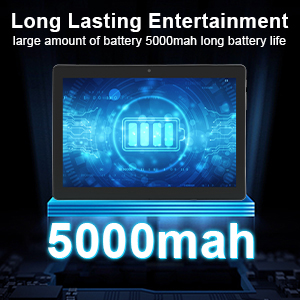
This image focuses on the Veidoo 10-inch Android Tablet PC's battery capacity, prominently displaying a battery icon and '5000mAh'. This signifies the tablet's 5000mAh battery, designed to provide extended usage time for entertainment and productivity.
4.2 Увімкнення/вимкнення
- Щоб увімкнути: Press and hold the Power button until the Veidoo logo appears on the screen.
- Щоб вимкнути: Натисніть і утримуйте кнопку живлення, доки не з’явиться меню. Виберіть «Вимкнути живлення» та підтвердіть.
- Режим сну/пробудження: Коротко натисніть кнопку живлення, щоб перевести планшет у режим сну або розбудити його.
4.3 Inserting SIM and Micro SD Cards
The tablet supports dual SIM cards for 3G phone calls and a Micro SD card for expandable storage.
- Locate the SIM/SD card slot on the side of the tablet.
- Обережно відкрийте кришку слота.
- Insert the SIM card(s) and/or Micro SD card into the designated slots with the gold contacts facing down. Ensure they are correctly seated.
- Щільно закрийте кришку слота.
This image demonstrates the storage capabilities of the Veidoo 10-inch Android Tablet PC, showing multiple applications and content open. It highlights the device's 16GB internal storage (ROM) and its ability to expand storage up to 32GB via a Micro SD card, allowing for ampбільше місця для програм, фотографій та відео.
4.4 Початкове налаштування
Після першого ввімкнення планшет проведе вас через процес початкового налаштування:
- Виберіть потрібну мову.
- Підключіться до мережі Wi-Fi.
- Увійдіть, використовуючи свій обліковий запис Google, або створіть новий. Це необхідно для завантаження програм із магазину Google Play.
- Налаштуйте блокування екрана (PIN-код, графічний ключ, пароль).
- Review та прийняти умови та положення.
5. Керування планшетом
5.1 Основна навігація
- Торкніться: Виберіть елемент або відкрийте програму.
- Натисніть і утримуйте: Access context menus or move icons.
- Проведіть пальцем: Прокручуйте екрани або списки.
- Масштабування за допомогою розведення пальців: Збільшення або зменшення масштабу зображень та web сторінки.
5.2 Підключення (Wi-Fi та Bluetooth)
- Wi-Fi: Перейти до Налаштування > Мережа та інтернет > Wi-Fi. Turn Wi-Fi on, select your network, and enter the password.
- Bluetooth: Перейти до Налаштування > Підключені пристрої > Bluetooth. Turn Bluetooth on, scan for devices, and pair with your desired accessory.
5.3 Making Phone Calls (3G)
With a valid SIM card inserted, you can make and receive 3G phone calls:

This image shows a group of four individuals participating in a video call using the Veidoo 10-inch Android Tablet PC. This illustrates the tablet's capability for video conferencing and its 3G phone call functionality, allowing users to connect with others remotely.
- Відкрийте Телефон додаток
- Dial the number using the keypad or select a contact.
- Натисніть кнопку виклику, щоб розпочати виклик.
5.4 Використання камер
The tablet is equipped with a front and rear camera for photos and videos.
- Відкрийте Камера додаток
- Перемикайтеся між передньою та задньою камерами за допомогою значка камери.
- Натисніть кнопку спуску затвора, щоб зробити фотографію або розпочати/зупинити відеозапис.
5.5 Керування сховищем
Ви можете view and manage your tablet's internal and external storage:
- Перейти до Налаштування > Зберігання.
- Here you can see storage usage and free up space by deleting unnecessary files or uninstalling apps.
5.6 Installing and Uninstalling Apps
This image features the Veidoo 10-inch Android Tablet PC showcasing its Android 10 operating system with a multitude of application icons. This highlights that the device is GMS (Google Mobile Services) certified, ensuring access to Google Play Store and other Google services.
- встановити: Відкрийте Google Play Store додаток, знайдіть потрібний додаток і натисніть встановити.
- Видалити: Перейти до Налаштування > Програми та сповіщення > Переглянути всі програми. Select the app you wish to uninstall and tap Видалити.
6. Технічне обслуговування
- Прибирання: Використовуйте м’яку тканину без ворсу для очищення екрана та корпусу. Уникайте абразивних засобів для чищення або розчинників.
- Оновлення програмного забезпечення: Регулярно перевіряйте наявність оновлень системи в Налаштування > Система > Оновлення системи щоб забезпечити оптимальну продуктивність та безпеку.
- Догляд за акумулятором: To prolong battery life, avoid fully discharging the battery frequently. Store the tablet in a cool, dry place when not in use for extended periods.
- Резервне копіювання даних: Регулярно створюйте резервні копії важливих даних у хмарний сервіс або на зовнішній накопичувач, щоб запобігти їх втраті.
7. Вирішення проблем
| проблема | Можливе рішення |
|---|---|
| Планшет не вмикається | Ensure the battery is charged. Connect the charger and wait a few minutes before attempting to power on. If unresponsive, try pressing the reset pinhole. |
| Екран не реагує | Restart the tablet by holding the Power button. If that doesn't work, use the reset pinhole. Ensure the screen is clean and dry. |
| Неможливо підключитися до Wi-Fi | Check if Wi-Fi is enabled in settings. Ensure the Wi-Fi password is correct. Restart your router and the tablet. |
| Програми зависають або аварійно завершують роботу | Close and reopen the app. Clear the app's cache in Налаштування> Програми та сповіщення. Update the app or uninstall and reinstall it. Ensure sufficient storage space. |
| Низький час автономної роботи | Reduce screen brightness. Close unused apps running in the background. Turn off Wi-Fi, Bluetooth, and GPS when not in use. Limit background data usage. |
8. Технічні характеристики
Key technical specifications for the Veidoo 10-inch Android Tablet PC (Model T10):

This image provides a visual summary of the Veidoo Tablet PC's key specifications. It highlights features such as 1GB RAM, a 2MP front and 5MP rear camera setup, a 10.1-inch IPS HD display with 1280x800 resolution, 16GB of internal storage, Android 10 operating system, Wi-Fi connectivity, a Quad-Core CPU, and dual SIM card support.
| Особливість | Деталь |
|---|---|
| Назва моделі | Touch (T10) |
| Розмір дисплея стоячого екрана | 10.1 дюймів |
| Роздільна здатність екрана | 800 x 1280 (IPS) |
| ОЗУ | 1 ГБ (DDR3 SDRAM) |
| Hard Drive / Flash Memory Size | 16 ГБ (з можливістю розширення до 32 ГБ за допомогою Micro SD) |
| Бездротовий тип | 802.11b, 802.11b/g (Wi-Fi), Bluetooth |
| Середній термін служби батареї | 6 Hours (5000mAh Lithium Polymer) |
| Апаратна платформа | Android |
| Операційна система | Android 6.0 Marshmallow (GMS Certified) |
| Вага товару | 2.86 фунта |
| Розміри продукту | 9.49 x 6.69 x 0.37 дюймів |
| Задня WebРоздільна здатність камери | 5 Мп |
| Фронт WebРоздільна здатність камери | 2 Мп |
| Кількість процесорів | 4 (Quad-Core) |
| Джерело живлення | Працює від батареї, електричний |
9. Гарантія та підтримка
Your Veidoo Tablet PC comes with a service warranty. Please refer to the included Service Warranty Card for specific terms and conditions, including warranty period and coverage details.
For technical support, troubleshooting assistance, or warranty claims, please contact Veidoo customer service. Contact information can typically be found on the warranty card or the official Veidoo website. When contacting support, please have your model number (T10) and purchase information ready.
You can also visit the official Veidoo store on Amazon for more information and support resources: Veidoo Store


