закінченоview
The Marantz NR1510 is a slim 5.2 channel 4K Ultra HD AV receiver designed to deliver exceptional audio performance and high-fidelity surround sound from a compact chassis. It features advanced HDMI connectivity, support for Dolby TrueHD and DTS-HD Master Audio, and integrates seamlessly with modern smart home systems. Enjoy versatile music streaming options via Wi-Fi, Bluetooth, and HEOS Built-in, along with convenient voice control compatibility.
Що в коробці
- Marantz NR1510 AV Receiver
- Короткий посібник
- Пульт дистанційного керування
- Налаштування мікрофона (для калібрування Audyssey)
- 2 батарейки АА
Ключові характеристики
- Компактний дизайн: At just 4-inches tall, this 5.2 channel stereo receiver offers a complete home entertainment solution in a slim profile.
- 4K Ultra HD Compatibility: Supports 60Hz full-rate content, pure color sub-sampling, BT.2020, HDR, HLG, eARC, and Dolby Vision for an impactful home theater experience.
- Потужний Ampзвільнення: Features a 5 channel discrete power amplifier (50W per channel) for robust audio delivery.
- Широкі можливості підключення: Equipped with 6 HDMI inputs (including one on the front panel) and 1 output, all with full HDCP 2.2 support.
- Голосове керування: Compatible with Amazon Alexa, Google Assistant, and Apple Siri for hands-free operation and music streaming.
- Бездротове потокове передавання: Stream music from popular online sources via Built-in HEOS, Bluetooth, or Wi-Fi.
- Зручне налаштування: An easy-to-understand setup assistant with an advanced graphical user interface guides you through the connection process.
- Інтеграція розумного будинку: Seamlessly integrates with smart home automation systems like Josh or Control4, allowing for remote monitoring.
- Multi-Room Audio: Utilize the HEOS Home Entertainment App to play the same song in every room or different songs in various rooms with connected HEOS speakers.
- Вхід Phono: Connect your analog turntable to the built-in MM phono preamp to enjoy your vinyl collection.
Продукт Views

Фронт view of the Marantz NR1510 AV Receiver, showcasing its slim design, central display, and control knobs.
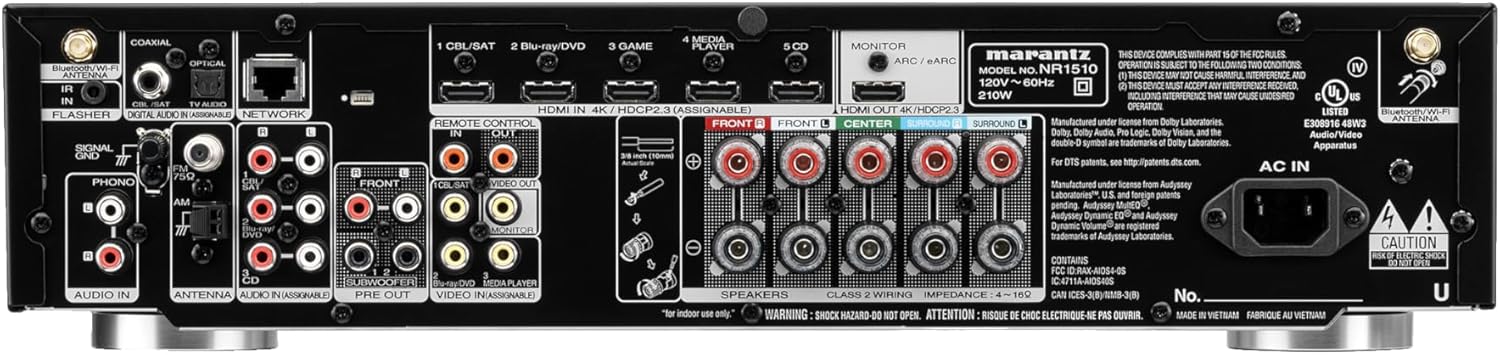
Rear panel of the Marantz NR1510, displaying various input and output ports including HDMI, optical, coaxial, and speaker terminals.
Посібник із налаштування
Setting up your Marantz NR1510 is made easy with the included Setup Assistant. Follow these general steps:
- Розміщення: Position the receiver in a well-ventilated area, ensuring adequate space around it for heat dissipation.
- Підключення динаміка: Connect your speakers to the appropriate terminals on the rear panel. The NR1510 supports a 5.2 channel configuration. Ensure correct polarity (+ to + and - to -).
- Підключення HDMI: Connect your video sources (e.g., Blu-ray player, gaming console, cable/satellite box) to the HDMI IN ports. Connect your TV to the HDMI OUT (ARC/eARC) port.
- Аудіопідключення: For non-HDMI audio sources, use the optical, coaxial, or analog audio inputs. The dedicated PHONO input is available for turntables.
- Підключення до мережі: Connect the receiver to your home network via Ethernet cable or Wi-Fi for streaming and firmware updates.
- Power On & Initial Setup: Connect the power cord and turn on the receiver. The Setup Assistant will appear on your TV screen, guiding you through speaker calibration using the supplied setup microphone, input assignment, and network configuration.
Для отримання детальних покрокових інструкцій зверніться до офіційного Marantz NR1510 User Guide (PDF).
Керування приймачем
Основна операція
- Потужність: Use the power button on the front panel or remote control to turn the unit on/off.
- Вибір входу: Use the INPUT SELECTOR knob or dedicated buttons on the remote to switch between connected sources (e.g., CBL/SAT, Blu-ray/DVD, Game, CD).
- Регулювання гучності: Adjust the master volume using the large VOLUME knob on the front or the +/- buttons on the remote.
- Режими звуку: Select various sound modes (e.g., Stereo, Multi-Channel Stereo, Dolby TrueHD, DTS-HD Master Audio) to optimize your listening experience for different content.
Music Streaming & Connectivity
The NR1510 offers multiple ways to enjoy your music:
- Вбудований HEOS: Access popular music services like Spotify, TuneIn, and more. Create a multi-room audio system by grouping with other HEOS-enabled devices. Control via the HEOS app.
- Bluetooth: Easily pair your smartphone, tablet, or other Bluetooth-enabled devices to stream audio wirelessly.
- Wi-Fi & AirPlay 2: Connect to your home Wi-Fi network for stable streaming and use Apple AirPlay 2 for seamless audio playback from Apple devices.
- USB: Відтворити аудіо files directly from a USB drive connected to the front or rear USB ports.
Голосове керування
Control your Marantz NR1510 with your voice using compatible smart assistants:
- Amazon Alexa: Enable the Marantz HEOS skill in the Alexa app to control power, volume, input, and music playback.
- Google Assistant: Link your Marantz account in the Google Home app to use voice commands for basic functions and streaming.
- Apple Siri: Utilize AirPlay 2 for Siri voice control over music playback from your Apple devices.
Офіційне відео продукту
Це відео забезпечує завершенняview of the Marantz NR1510 UHD AV Receiver, highlighting its slim design, 5.2 channel home theater capabilities, and support for Dolby TrueHD. It showcases the unit's features and connectivity options.
Технічне обслуговування
To ensure the longevity and optimal performance of your Marantz NR1510, follow these maintenance guidelines:
- Прибирання: Gently wipe the exterior with a soft, dry cloth. Avoid using abrasive cleaners, solvents, or chemical sprays.
- Вентиляція: Переконайтеся, що вентиляційні отвори зверху та з боків приймача не заблоковані. Належна циркуляція повітря є надзвичайно важливою для запобігання перегріву.
- Шнур живлення: Periodically check the power cord for any damage. Disconnect the power cord from the wall outlet if the unit will not be used for an extended period.
- Оновлення прошивки: Regularly check for and install firmware updates to ensure your receiver has the latest features and performance enhancements. This can usually be done through the receiver's network settings.
Усунення несправностей
If you encounter issues with your Marantz NR1510, try the following basic troubleshooting steps:
- Немає живлення: Перевірте, чи шнур живлення надійно підключено до розетки та приймача. Переконайтеся, що розетка справна.
- Немає звуку: Verify that the correct input source is selected. Check speaker connections and ensure speaker wires are securely attached. Confirm that the volume is not muted or set too low.
- Немає зображення: Ensure HDMI cables are securely connected to both the receiver and the TV/source device. Confirm the correct HDMI input is selected on your TV.
- Проблеми з мережею: If experiencing problems with Wi-Fi or streaming, check your home network connection. Restart your router and the receiver.
- Пульт дистанційного керування не працює: Перевірте та замініть батарейки в пульті дистанційного керування. Переконайтеся, що між пультом дистанційного керування та ІЧ-датчиком приймача немає перешкод.
For more comprehensive troubleshooting and advanced solutions, please consult the detailed Marantz NR1510 User Guide (PDF).
Технічні характеристики
| Особливість | Специфікація |
|---|---|
| Розміри продукту | 14.5 x 17.3 x 4.1 дюймів |
| Вага товару | 22.8 фунта |
| Номер моделі товару | NR1510 |
| Акумулятори | Потрібна 2 батарея типу АА (у комплекті) |
| Виробник | Marantz |
| Технологія підключення | Wi-Fi, Bluetooth |
| Тип контролера | Amazon Alexa, Google Assistant, Apple Siri |
| Особливість | Голосове керування |
| Сумісні пристрої | Television, Speakers |
| Загальна кількість портів HDMI | 7 (6 входи / 1 вихід) |
| Тип роз'єму | USB, HDMI, Optical, Coaxial, RCA |
| Кодування звуку | Dolby TrueHD, DTS-HD Master Audio |
| Режим аудіовиходу | Stereo, Surround Sound |
| Конфігурація каналу об’ємного звуку | 5.2 канал |
| Дата першої доступності | 14 травня 2019 р |
Гарантія та підтримка
Marantz products are designed for reliability and performance. For information regarding your product's warranty, please refer to the warranty card included in the product packaging or the official Marantz webсайт.
For comprehensive support, including detailed operating instructions, advanced troubleshooting, and service information, please download the full user guide:
Завантажити повний посібник користувача (PDF)
Ви також можете відвідати офіційну Магазин Marantz на Amazon для отримання додаткової інформації про продукт та аксесуари.


