1. Вступ
This manual provides instructions for the installation, setup, and operation of your Lepro Smart GU10 LED Bulbs. These bulbs offer advanced features including tunable white light, dimming capabilities, and smart control via app or voice assistants.
Ключові характеристики:
- Регульоване біле світло: Adjust color temperature from warm white (2700K) to cool white (6500K).
- затемнення: Adjust brightness via the app or voice control. Note: Do not use with external dimmer switches.
- Голосове керування: Сумісний з Amazon Alexa та Google Assistant для керування без використання рук.
- Контроль програми: Manage lights from anywhere using the 'Smart Life' app.
- Планування: Set timers and schedules for automatic light control.
- Не потрібно концентратора: Підключається безпосередньо до вашої мережі Wi-Fi 2.4 ГГц.

Зображення 1.1: закінченоview of Lepro Smart GU10 LED Bulb capabilities, including dimming, tunable white light, scheduling, and smart control options.
2. Важлива інформація з безпеки
Please read and follow all safety instructions carefully before installation and use. Failure to do so may result in electric shock, fire, or other injuries.
- Електрична безпека: Always turn off power at the circuit breaker before installing or removing the bulb.
- Сумісність з диммером: These smart bulbs are not compatible with traditional dimmer switches. Using them with a dimmer switch will cause flickering and may damage the bulb. Control dimming exclusively through the 'Smart Life' app or voice commands.
- Тільки для використання в приміщенні: This product is designed for indoor use in dry locations.
- Робочий випtage: Ensure your fixture provides 120 Volts, 60 Hertz.
- Правильна установка: Install the bulb securely into a GU10 base fixture.
- Уникайте перегріву: Do not enclose the bulb in fixtures that restrict airflow excessively, as this can lead to overheating and reduced lifespan.
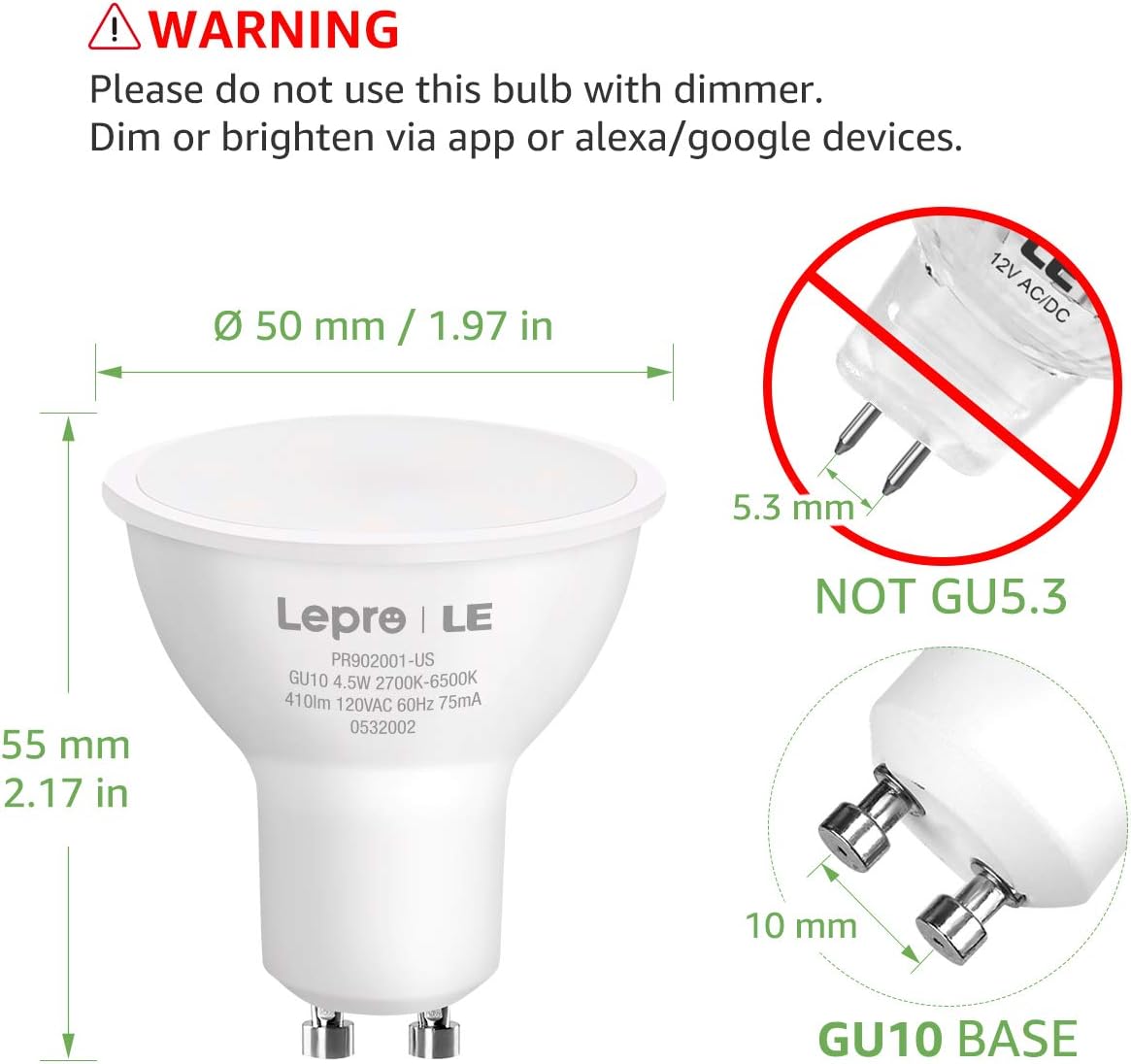
Image 2.1: Important warning regarding dimmer switch incompatibility and correct GU10 base identification.
3. Вміст упаковки
Перевірте наявність усіх предметів у вашій упаковці:
- Lepro Smart GU10 LED Bulb(s) (Quantity as purchased, e.g., 2-pack)
- Посібник користувача (цей документ)

Image 3.1: Lepro Smart GU10 LED Bulbs and packaging.
4. Технічні характеристики продукту
| Специфікація | Деталь |
|---|---|
| Бренд | Лепро |
| Назва моделі | LampUX GU10 WiFi Smart Light Bulbs |
| Тип світла | LED |
| Основа лампи | GU10 |
| Wattage | 4.5 Вт |
| Еквівалент лампи розжарювання | 50 Вт |
| Яскравість | 350 люменів |
| Колірна температура | 2700K - 6500K (регульований білий) |
| томtage | 120 вольт |
| Частота | 60 герц |
| Підключення | 2.4GHz Wi-Fi Only |
| Спосіб контролю | App (Smart Life), Voice (Alexa, Google Assistant) |
| Середнє життя | 25,000 години |
| Розміри продукту | 1.97 см (Ш) x 2.17 см (В) |
| матеріал | Алюміній, Пластик |
| Атестація | FCC |
5. Посібник із налаштування
5.1 Фізичне встановлення
- Вимкніть живлення: Before installation, ensure the power to the light fixture is turned off at the circuit breaker to prevent electric shock.
- Видалити стару лампочку: Carefully remove the existing GU10 bulb from the fixture.
- Встановлення розумної лампочки: Insert the Lepro Smart GU10 LED Bulb into the GU10 base. Push and twist clockwise until it is securely seated.
- Відновлення живлення: Turn the power back on at the circuit breaker. The bulb should flash, indicating it is in pairing mode. If it does not flash, turn the light switch off and on 3-5 times until it begins to flash rapidly.
5.2 Завантаження програми та створення облікового запису
- Завантажити додаток: Scan the QR code provided in the packaging or search for 'Smart Life' in your smartphone's app store (iOS or Android).
- Реєстрація/Увійти: Open the 'Smart Life' app and register for a new account or log in if you already have one.
5.3 Підключення до Wi-Fi
Переконайтеся, що ваша мережа Wi-Fi 2.4 ГГц. These bulbs do not support 5GHz Wi-Fi networks.
- Додати пристрій: In the 'Smart Life' app, tap the '+' icon in the top right corner to add a device.
- Виберіть освітлення: Choose 'Lighting' or 'Light Source (Wi-Fi)' from the device list.
- Підтвердити миготіння: Confirm that the bulb is flashing rapidly. If not, cycle the power (off-on 3-5 times) until it flashes.
- Введіть дані Wi-Fi: Виберіть мережу Wi-Fi 2.4 ГГц і введіть пароль.
- Сполучення: The app will begin connecting to the bulb. Once connected, the bulb will stop flashing and glow steadily.
- Перейменувати пристрій: You can rename the bulb for easier control (e.g., "Living Room Spotlight 1").

Image 5.1: Illustration of easy setup, highlighting physical installation and 2.4GHz Wi-Fi requirement.
6. Інструкція з експлуатації
6.1 Керування програмами
Once connected, you can control your bulb(s) through the 'Smart Life' app:
- Увімкнення/вимкнення: Торкніться значка живлення, щоб увімкнути або вимкнути лампочку.
- Затемнення: Use the brightness slider to adjust the light intensity.
- Колірна температура: Select the 'White' mode and use the slider or color wheel to choose any shade from warm white (2700K) to cool white (6500K).
- Сцени: The app offers pre-set scenes for different moods or activities. You can also create custom scenes.

Image 6.1: Adjusting color temperature via the 'Smart Life' app, showing warm, natural, and cool white light exampлес.
6.2 Голосове керування (Alexa/Google Асистент)
Щоб увімкнути голосове керування:
- Зв'язати обліковий запис: In your Amazon Alexa or Google Home app, enable the 'Smart Life' skill/action and link your 'Smart Life' account.
- Відкрийте для себе пристрої: Ask your voice assistant to "Discover devices."
- Голосові команди: Використовуйте такі команди, як:
"Alexa, turn on Living Room Spotlight."
"Hey Google, dim the kitchen light to 50%."
"Alexa, set the bedroom light to warm white."
6.3 Планування та таймери
Set up automated schedules for your lights:
- In the 'Smart Life' app, select your bulb and navigate to the 'Schedule' or 'Timer' section.
- Set desired times for turning lights on/off, or for activating specific scenes.
- Repeat for specific days of the week as needed.
6.4 Груповий контроль
Control multiple bulbs simultaneously:
- In the 'Smart Life' app, select one of your bulbs.
- Tap the pencil icon (edit) or 'Settings' and look for 'Create Group'.
- Select all bulbs you wish to include in the group and confirm.
- You can now control the entire group with a single command or app action.

Зображення 6.2: Наприкладamples of scheduling and group control features.
7. Технічне обслуговування
To ensure optimal performance and longevity of your Lepro Smart GU10 LED Bulbs:
- Прибирання: Перед чищенням переконайтеся, що лампочка вимкнена та охолонула. Протріть м’якою сухою тканиною. Не використовуйте рідкі або абразивні засоби для чищення.
- Зберігання: If storing the bulbs for an extended period, keep them in a cool, dry place away from direct sunlight.
- Уникайте суворого середовища: Do not expose the bulbs to extreme temperatures, high humidity, or corrosive substances.
8. Посібник з усунення несправностей
If you encounter issues with your Lepro Smart GU10 LED Bulbs, refer to the following common problems and solutions:
| проблема | Можлива причина | Рішення |
|---|---|---|
| Лампочка не підключається до Wi-Fi | Incorrect Wi-Fi band (5GHz), incorrect password, bulb not in pairing mode, weak Wi-Fi signal. | Ensure your router is broadcasting a 2.4GHz network. Confirm Wi-Fi password. Cycle power to the bulb (off-on 3-5 times) until it flashes rapidly to enter pairing mode. Move closer to the router. |
| Bulb flickering or not working correctly | Використовується зі звичайним димером. | Remove the bulb from any fixture connected to a traditional dimmer switch. These bulbs require a constant power supply and are dimmed via the app or voice control. |
| Bulb appears "Offline" in the app | Loss of Wi-Fi connection, power outage, router issues. | Check your Wi-Fi router and internet connection. Ensure the bulb has constant power. Try restarting the bulb by turning its power off and on at the switch. If the issue persists, re-pair the bulb. |
| Голосове керування не реагує | 'Smart Life' skill/action not enabled or linked, incorrect device name, internet connectivity issues. | Verify that the 'Smart Life' skill/action is enabled and linked in your Alexa/Google Home app. Ensure the device name used in voice commands matches the name in the app. Check your internet connection. |
| Multiple bulbs not working together in a group | One or more bulbs are offline, group not properly configured. | Check individual bulb status in the app. Ensure all bulbs are online. Recreate the group in the 'Smart Life' app. |
9. Гарантія та підтримка
9.1 Інформація про гарантію
Lepro Smart GU10 LED Bulbs come with a Гарантія 2 рік from the date of purchase. This warranty covers manufacturing defects and malfunctions under normal use. It does not cover damage caused by misuse, improper installation, or external factors.
9.2 Підтримка клієнтів
For technical assistance, warranty claims, or further inquiries, please contact Lepro customer support through their official website or the contact information provided with your purchase. Please have your product model and purchase details ready when contacting support.


