вступ
Welcome to the Ipega PG-9033 Bluetooth Gamepad user manual. This guide provides detailed instructions for setting up, operating, maintaining, and troubleshooting your new wireless controller. Please read this manual carefully before use to ensure optimal performance and longevity of your device.
Продукт закінченийview
The Ipega PG-9033 is a versatile Bluetooth gamepad designed for an enhanced gaming experience across multiple platforms, including Android, iOS, and PC. It features an adjustable phone holder, dual analog sticks, a D-pad, and action buttons.

Figure 1: The Ipega PG-9033 Bluetooth Gamepad with a smartphone securely mounted in its adjustable holder, actively displaying a racing game. This illustrates the controller's primary use for mobile gaming.
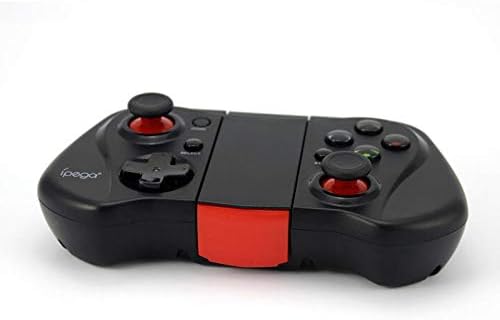
Рисунок 2: Сторона А view of the Ipega PG-9033 Bluetooth Gamepad, showcasing its ergonomic design and compact form factor when not in use. The red accent on the central hinge is visible.
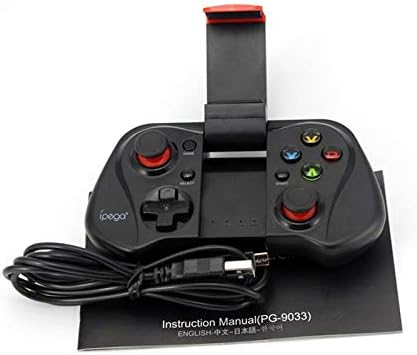
Figure 3: The Ipega PG-9033 Bluetooth Gamepad displayed alongside its USB charging cable and the included instruction manual, which clearly indicates the model number PG-9033.

Рисунок 4: Задня частина view of the Ipega PG-9033 Bluetooth Gamepad, featuring a label with technical details such as "BLUETOOTH CONTROLLER," working voltage, working current, and input specifications.
Налаштування
Зарядка геймпада
Before first use, fully charge the gamepad using the provided USB cable.
- Connect the micro-USB end of the charging cable to the gamepad's charging port.
- Connect the USB-A end to a USB power source (e.g., computer, USB wall adapter).
- The charging indicator light will illuminate. It will typically turn off or change color when fully charged.
Сполучення з пристроєм
The PG-9033 supports different pairing modes for various operating systems.
Android Pairing
- Ensure the gamepad is off.
- Натисніть і утримуйте ДІМ кнопку та X button simultaneously until the indicator light flashes rapidly. This puts the gamepad into Android pairing mode.
- On your Android device, go to Bluetooth settings and search for available devices.
- Select "PG-9033" from the list to pair. The indicator light will become solid when connected.
iOS Pairing (iCade Mode)
- Ensure the gamepad is off.
- Натисніть і утримуйте ДІМ кнопку та B button simultaneously until the indicator light flashes rapidly. This puts the gamepad into iOS iCade pairing mode.
- On your iOS device, go to Bluetooth settings and search for available devices.
- Select "PG-9033" from the list to pair. The indicator light will become solid when connected.
Note: iCade mode has limited game compatibility. For broader iOS compatibility, check specific game requirements.
Підключення до ПК
- Ensure the gamepad is off.
- Натисніть і утримуйте ДІМ кнопку та A button simultaneously until the indicator light flashes rapidly. This puts the gamepad into PC pairing mode.
- On your PC, go to Bluetooth settings and search for available devices.
- Select "PG-9033" from the list to pair. The indicator light will become solid when connected.
Note: A Bluetooth adapter may be required for PCs without built-in Bluetooth.
Інструкція з експлуатації
Підключення смартфона
- Gently extend the adjustable phone holder located on the top of the gamepad.
- Carefully place your smartphone into the holder, ensuring it is securely gripped and centered.
- Відрегулюйте оптимальний кут viewінж.
Game Mode Selection
The gamepad automatically enters the last used mode upon reconnection. To switch modes, disconnect the gamepad and re-pair using the desired mode's button combination (HOME + X for Android, HOME + B for iOS, HOME + A for PC).
Увімкнення/вимкнення живлення
Щоб увімкнути, натисніть кнопку ДІМ кнопку. Щоб вимкнути живлення, натисніть і утримуйте ДІМ button for approximately 5 seconds until the indicator light turns off. The gamepad will automatically power off after a period of inactivity.
Технічне обслуговування
To ensure the longevity and proper functioning of your Ipega PG-9033 gamepad, follow these maintenance guidelines:
- Тримайте пристрій сухим. Уникайте контакту з вологою або рідинами.
- Clean the gamepad with a soft, dry cloth. Do not use harsh chemicals or abrasive cleaners.
- Зберігайте геймпад у прохолодному, сухому місці, подалі від прямих сонячних променів та екстремальних температур.
- Уникайте падіння та сильних ударів геймпада.
- Регулярно заряджайте акумулятор, навіть якщо він не використовується, щоб підтримувати його в робочому стані.
Do not attempt to disassemble the gamepad. This will void the warranty and may cause damage.
Усунення несправностей
Gamepad not connecting or pairing:
- Переконайтеся, що геймпад повністю заряджений.
- Переконайтеся, що на вашому пристрої ввімкнено Bluetooth.
- Make sure the gamepad is in the correct pairing mode for your device (Android, iOS, or PC).
- Try forgetting the device in your Bluetooth settings and re-pairing.
- Перезавантажте і геймпад, і пристрій.
Кнопки або джойстики не реагують:
- Перевірте, чи геймпад правильно підключено.
- Переконайтеся, що гра, в яку ви граєте, підтримує зовнішні контролери.
- Some games may require specific controller mapping or settings adjustments within the game.
- If the issue persists, try resetting the gamepad (if a reset button is available, typically a small pinhole).
Затримка або затримка введення:
- Ensure your device is not too far from the gamepad. Maintain a clear line of sight.
- Зменште перешкоди від інших бездротових пристроїв.
- Закрийте непотрібні фонові програми на вашому пристрої.
Телефон не поміщається в тримач:
- The holder is designed for most smartphones. Ensure your phone's dimensions are within the supported range.
- Зніміть будь-які громіздкі чохли для телефону, які можуть перешкоджати надійній фіксації.
Технічні характеристики
| Особливість | Деталь |
|---|---|
| Модель | ПГ-9033 |
| Бренд | Іпега |
| Підключення | Bluetooth |
| Сумісність | Android, iOS (iCade), PC |
| Робочий випtage | 3.7 В постійного струму |
| Робочий струм | 30 мА |
| Вхідний об'ємtage | Постійний струм 5 В 500 мА |
| ASIN | B07P52YH7M |
Гарантія та підтримка
For warranty information and technical support, please refer to the official Ipega webсайт або зверніться до продавця. Зберігайте чек про покупку як підтвердження покупки.
Цей посібник призначений лише для ознайомлення. Технічні характеристики можуть бути змінені без попередження.