1. Вступ
The Donner Dark Mouse Distortion Pedal is an effect unit designed for electric guitar, providing a range of distortion tones. It features two distinct distortion modes and a true bypass design to maintain signal integrity when the effect is disengaged. This manual provides essential information for setting up, operating, and maintaining your pedal.

Figure 1: The Donner Dark Mouse Distortion Pedal, designed to deliver classic distortion sounds.
2. Продукт закінчивсяview
The Dark Mouse pedal features intuitive controls for shaping your sound. Understanding these controls is key to utilizing the pedal's full potential.

Figure 2: Control layout of the Dark Mouse Distortion Pedal.
Елементи керування:
- 1. DC 9V Jack: Вхід живлення для адаптера постійного струму 9 В (центральний негативний полюс).
- 2. Mode Switch (CLASSIC/HYPER): Перемикає між двома різними характеристиками спотворення.
- 3. LEVEL Knob: Adjusts the overall output volume of the effect.
- 4. FILTER Knob: Controls the tone or brightness of the distortion. Turning clockwise increases treble.
- 5. DIST Knob: Adjusts the amount of distortion or gain.
- 6. Input Jack: Connect your guitar or previous effect pedal here.
- 7. Output Jack: Підключіться до свого ampпедаль ефекту lifier або next.
- 8. Світлодіодний індикатор: Світиться, коли ефект активний.
- 9. Ножний перемикач: Engages or disengages the effect.
3. Налаштування
Follow these steps to connect your Donner Dark Mouse Distortion Pedal:
- Забезпечте свій ampперед будь-якими підключеннями переконайтеся, що ліфтер вимкнено.
- Підключіть свою електрогітару до Вхідний гніздо (6) of the pedal using a standard 1/4-inch instrument cable.
- Підключіть Вихідний роз'єм (7) of the pedal to your amplifier's input using another standard 1/4-inch instrument cable.
- Connect a 9V DC power adapter (center negative, 500mA minimum) to the Джек постійного струму 9 В (1). Note: The power supply is not included. Using an incorrect power supply may damage the pedal.
- Once all connections are secure, you may turn on your ampліфірник.

Figure 3: Proper connection of the pedal to power and instrument cables.
4. Інструкція з експлуатації
The Dark Mouse pedal offers two distinct distortion modes and flexible controls to tailor your sound.
Залучення ефекту:
Натисніть Ножний перемикач (9) to toggle the effect on or off. The Світлодіодний індикатор (8) will illuminate when the effect is active.
Selecting Distortion Modes:
Використовуйте Перемикач режимів (2) to select between the two distortion modes:
- КЛАСИКА: Виробляє теплий, винtage distortion sound with a subtle fuzz characteristic.
- HYPER: Offers a more powerful and aggressive sound with enhanced edges and low-end response.

Figure 4: The mode switch allows selection between Classic and Hyper distortion.
Adjusting Tone and Gain:
Utilize the three control knobs to fine-tune your distortion sound:
- LEVEL Knob (3): Adjust this to set the overall output volume of the pedal. Start with it at a moderate level and adjust to match your bypassed signal volume.
- DIST Knob (5): Turn this knob clockwise to increase the amount of distortion, from subtle crunch to heavy saturation.
- FILTER Knob (4): This control acts as a tone shaping filter. Turning it clockwise will increase the brightness and treble content of the distortion, while turning it counter-clockwise will result in a darker tone.
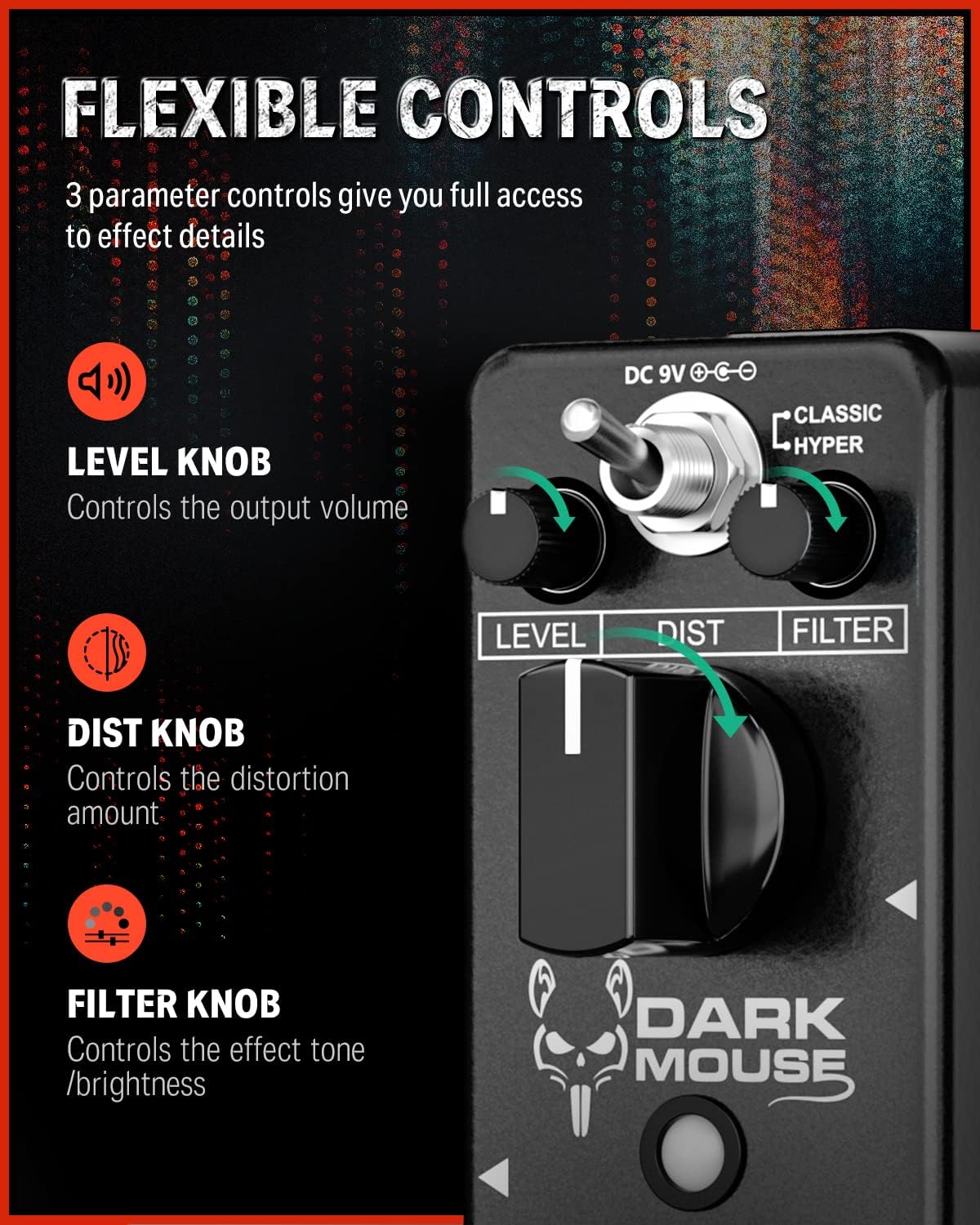
Figure 5: The Level, Dist, and Filter knobs provide flexible control over the effect.
Справжній обхід:
The pedal features true bypass circuitry. This means that when the effect is disengaged, your guitar signal passes directly through the pedal without any electronic interference, preserving your original tone. The LED indicator will be off when in true bypass mode.

Figure 6: True bypass ensures a clean signal when the effect is off.
5. Технічне обслуговування
- Прибирання: Використовуйте м’яку суху тканину для очищення зовнішньої поверхні педалі. Уникайте використання абразивних засобів для чищення або розчинників.
- Зберігання: Зберігайте педаль у сухому місці, подалі від екстремальних температур та прямих сонячних променів.
- Джерело живлення: Always use a 9V DC center-negative power adapter with a minimum of 500mA current. Disconnect the power supply when the pedal is not in use for extended periods.
- Фізичний догляд: The pedal features a durable aluminum alloy casing. Avoid dropping the pedal or subjecting it to excessive force.
6. Вирішення проблем
- Немає звуку:
- Перевірте всі кабельні з'єднання (гітара до входу, вихід до amp).
- Ensure the power adapter is correctly connected and providing power.
- Перевірте, чи ваша гітара та ampрятувальні пристрої функціонують належним чином.
- If the LED is off, press the footswitch to engage the effect.
- Weak or Distorted Sound (when bypassed):
- This pedal features true bypass, so a weak or distorted bypassed signal usually indicates an issue with cables or other equipment in your signal chain, not the pedal itself.
- Небажаний шум/гул:
- Ensure you are using a regulated 9V DC center-negative power supply. Unregulated power supplies can introduce noise.
- Перевірте наявність несправних кабелів.
- Move the pedal away from power transformers or other electronic devices that may cause interference.
7. Технічні характеристики
| Особливість | Специфікація |
|---|---|
| Номер моделі | EC1178-FBA-US |
| Вага товару | 8.8 унцій (0.25 кілограма) |
| Розміри продукту | 3.7 x 1.69 x 2.01 дюйми (3.7 дюймів Д x 1.7 дюймів Ш x 2 дюйми В) |
| Матеріал корпусу | Алюмінієвий сплав |
| Джерело живлення | Перехідник електричний |
| томtage | 9 Volts DC (Center Negative) |
| Тип роз'єму | Моноджек 1/4 дюйма (6.35 мм) |
| Формат сигналу | Аналоговий |
8. Що в коробці
- 1 x Donner Dark Mouse pedal
9. Гарантія та підтримка
For warranty information or technical support, please refer to the official Donner website or contact Donner customer service directly. Keep your purchase receipt for warranty claims.


