1. Вступ
Дякуємо за покупкуasing the Mersoco Portable Bluetooth Turntable. This manual provides essential information for the safe and efficient operation of your new device. Please read it thoroughly before use and retain it for future reference.
This turntable allows you to enjoy your vinyl record collection with its 3-speed playback capability (33 1/3, 45, and 78 RPM). It also features built-in stereo speakers, Bluetooth connectivity for streaming music from external devices, and AUX-IN/RCA OUT ports for versatile audio connections.
2. Інформація про безпеку
- Джерело живлення: Використовуйте лише зазначений адаптер живлення. Переконайтеся, що гучністьtage відповідає вашому місцевому джерелу живлення.
- Вода і вологість: Не піддавайте пристрій впливу дощу, вологи або рідин. Не ставте на пристрій предмети, наповнені рідинами, такі як вази.
- Джерела тепла: Тримайте пристрій подалі від джерел тепла, таких як радіатори, обігрівачі, печі чи інші прилади (включаючи ampліфікатори), які виробляють тепло.
- Вентиляція: Забезпечте належну вентиляцію. Не блокуйте вентиляційні отвори.
- Прибирання: Перед чищенням від’єднайте пристрій від розетки. Використовуйте м’яку суху тканину. Не використовуйте рідкі або аерозольні засоби для чищення.
- Обслуговування: Не намагайтеся самостійно обслуговувати цей виріб. Зверніть усі послуги до кваліфікованого обслуговуючого персоналу.
- Догляд за стилусом: The stylus is delicate. Handle with care to avoid damage. Keep the stylus guard on when not in use.
3. Вміст упаковки
Будь ласка, перевірте, чи всі перелічені нижче предмети входять до вашої упаковки:
- Mersoco Portable Bluetooth Turntable
- Адаптер живлення
- Адаптер на 45 об / хв
- Посібник користувача
- AUX Input Cable (3.5mm)
- RCA Output Cable
4. Продукт закінчивсяview
Familiarize yourself with the components of your turntable:

Figure 4.1: Turntable Components
This diagram illustrates the main parts of the turntable, including the platter, tone arm, stylus, speed selector, and control knobs.
- Блюдо: Де лежить вінілова платівка.
- Шпиндель: Holds the record in place on the platter.
- 45 RPM адаптер: Used for playing 7-inch records with a large center hole.
- Тонарм: Утримує картридж і стилус.
- Tone Arm Lifter: Raises and lowers the tone arm gently.
- Cartridge/Stylus: Reads the grooves of the record.
- Перемикач швидкості: Дозволяє вибрати 33 1/3, 45 або 78 об/хв.
- Автоматичний вимикач зупинки: Enables or disables the auto-stop function.
- Ручка живлення/гучності: Turns the unit on/off and adjusts the volume.
- Роз'єм для навушників: Для приватного прослуховування.
- Порт AUX-IN: Для підключення зовнішніх аудіопристроїв.
- RCA OUT Ports (L/R): Для підключення до зовнішніх ampпідсилювачі або потужні динаміки.
- Гніздо DC IN: Для підключення адаптера живлення.
5. Налаштування
5.1 Розпакування
- Обережно вийміть програвач з упаковки.
- Розташуйте пристрій на стійкій рівній поверхні.
- Remove any protective materials, including the stylus guard.
5.2 Підключення живлення
- Connect the power adapter to the DC IN jack on the back of the turntable.
- Підключіть адаптер живлення до настінної розетки.
5.3 Пилозахисна кришка
The turntable includes a removable dust cover to protect the platter and tone arm when not in use. Simply place it over the unit.
6. Інструкція з експлуатації
6.1 Відтворення вінілової платівки

Figure 6.1: Turntable in Operation
The turntable is shown playing a vinyl record with the dust cover open.
- Turn the Power/Volume knob clockwise to power on the unit.
- Покладіть вінілову платівку на тарілку.
- Select the appropriate speed (33 1/3, 45, or 78 RPM) using the speed selector switch. For 7-inch records with a large center hole, place the 45 RPM adapter on the spindle before placing the record.
- Lift the tone arm using the tone arm lifter.
- Move the tone arm over the desired track on the record.
- Gently lower the tone arm onto the record using the tone arm lifter. The music will begin to play.
- Відрегулюйте гучність за допомогою ручки живлення/гучності.
- When the record finishes, the tone arm will automatically return to its rest position if the auto-stop function is enabled. If disabled, manually lift the tone arm and return it to its rest.


Figure 6.2: Speed Selector and 45 RPM Adapter
Ensure the correct playback speed is selected for your record, and use the adapter for 7-inch singles.

Figure 6.3: Tone Arm Lifter
Use the lifter to gently raise and lower the tone arm.

Figure 6.4: Auto Stop Switch
The auto stop switch controls whether the platter stops automatically at the end of a record.
6.2 Відтворення через Bluetooth
This turntable can receive audio wirelessly from Bluetooth-enabled devices.
- Turn the Power/Volume knob clockwise to power on the unit. The Bluetooth indicator light will flash, indicating it's in pairing mode.
- Enable Bluetooth on your external device (e.g., smartphone, tablet, computer).
- шукати "Mersoco" or a similar device name in your device's Bluetooth settings and select it to pair.
- Once paired, the Bluetooth indicator light will stop flashing and remain solid. You can now play music from your device through the turntable's speakers.
- Adjust the volume using the Power/Volume knob on the turntable and/or your external device.

Figure 6.5: Bluetooth Pairing
The image shows a smartphone successfully paired with the turntable via Bluetooth for wireless audio streaming.
6.3 AUX-IN Connection
Connect external audio sources to the turntable using the 3.5mm AUX-IN port.
- Connect one end of the 3.5mm AUX cable (included) to the AUX-IN port on the back of the turntable.
- Connect the other end of the AUX cable to the headphone jack or audio output of your external device (e.g., CD player, MP3 player).
- The turntable will automatically switch to AUX-IN mode.
- Відтворюйте музику із зовнішнього пристрою.
- Adjust the volume using the Power/Volume knob on the turntable and/or your external device.
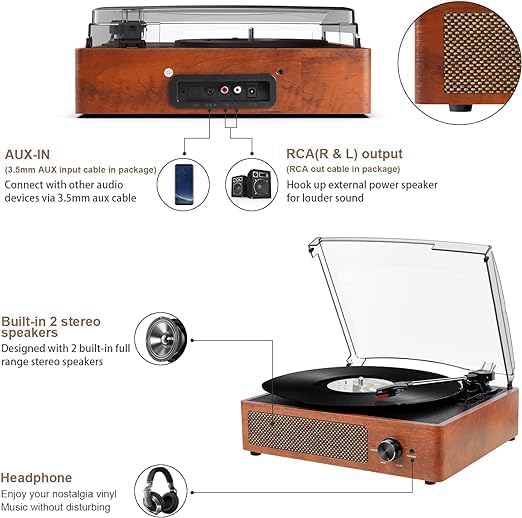
Figure 6.6: AUX-IN and RCA OUT Ports
The rear panel illustrates the connectivity options for AUX-IN and RCA OUT.
6.4 Підключення виходу RCA
For enhanced sound or to connect to a larger audio system, use the RCA output ports.
- Connect the RCA output cable (included) to the RCA OUT ports (red for right, white for left) on the back of the turntable.
- Connect the other end of the RCA cable to the audio input (e.g., AUX IN, LINE IN) of your external amplifier або активні колонки.
- Ensure your external audio system is powered on and set to the correct input source.
- Play a record or stream via Bluetooth. The audio will be routed through your external system.
- Adjust the volume primarily on your external amplifier або активні колонки.
6.5 Використання навушників
For private listening, connect headphones to the 3.5mm headphone jack on the front of the unit.
- Plug your headphones into the HEADPHONE jack.
- Відрегулюйте гучність за допомогою ручки живлення/гучності.
- The built-in speakers will automatically mute when headphones are connected.
7. Технічне обслуговування
7.1 Очищення пристрою
- Завжди відключайте пристрій від розетки перед очищенням.
- Використовуйте м’яку, суху тканину для протирання зовнішніх поверхонь.
- Не використовуйте абразивні засоби для чищення, віск або розчинники, оскільки вони можуть пошкодити покриття.
7.2 Догляд за стилусом
The stylus is a delicate component and requires careful handling to ensure optimal sound quality and longevity.

Figure 7.1: Stylus
The stylus is the delicate needle that reads the record grooves.
- Уникайте дотику до стилуса пальцями.
- Періодично очищуйте стилус м’якою щіткою, обережно розчісуючи його ззаду вперед.
- Замініть стилус, якщо ви помітили зниження якості звуку або видимі пошкодження.
- Always place the stylus guard back on when the turntable is not in use or being moved.
7.3 Dust Cover Care
The dust cover helps protect your turntable from dust and debris.
- Wipe the dust cover with a soft, damp тканина.
- Do not use harsh chemicals or abrasive materials, as they can scratch the surface.
8. Вирішення проблем
If you experience issues with your turntable, please consult the following table before contacting support.
| проблема | Можлива причина | Рішення |
|---|---|---|
| Немає живлення | Power adapter not connected; Power outlet not working; Unit not turned on. | Ensure power adapter is securely connected. Try a different outlet. Turn the Power/Volume knob clockwise. |
| Немає звуку з динаміків | Volume too low; Headphones connected; External speakers not connected/powered on (if using RCA OUT); Stylus damaged. | Increase volume. Disconnect headphones. Check external speaker connections and power. Inspect stylus for damage. |
| Пропуск запису | Record is dirty or scratched; Turntable not level; Stylus is dirty or worn. | Clean the record. Ensure the turntable is on a level surface. Clean or replace the stylus. |
| Bluetooth не з’єднується | Turntable not in pairing mode; Device too far; Bluetooth disabled on external device. | Ensure turntable is powered on and indicator is flashing. Move device closer. Enable Bluetooth on your device and search again. |
| Неправильна швидкість відтворення | Вибрана неправильна швидкість. | Adjust the speed selector to match the record's RPM (33 1/3, 45, or 78). |
9. Технічні характеристики
| Особливість | Деталь |
|---|---|
| Бренд | Мерсоко |
| Назва моделі | M49Orange-DE_SML |
| Колір | Помаранчевий |
| Підключення | Bluetooth |
| Особливість | Портативний |
| Сумісні пристрої | Speaker, Personal Computer, Smartphone, Tablet |
| Максимальна швидкість обертання | 78 об/хв (підтримує 33 1/3, 45, 78 об/хв) |
| Включені компоненти | Вбудовані динаміки |
| матеріал | Vinyl (referring to vinyl records, unit material is wood/plastic) |
| Вага товару | 4.76 фунта (приблизно 2.16 кг) |
| Стиль | Ретро, Вінtage |
10. Гарантія та підтримка
Mersoco products are designed for reliability and performance. For specific warranty details, please refer to the warranty card included with your purchase or contact Mersoco customer support.
If you encounter any issues not covered in the troubleshooting section, or require further assistance, please contact our customer support team through the retailer where you purchased the product or visit the official Mersoco webсайт для контактної інформації.