1. Вступ
Thank you for choosing the X Printer XP-Q600 Thermal Receipt Printer. This manual provides detailed instructions to help you set up, operate, and maintain your printer effectively. Please read this manual thoroughly before using the product to ensure proper function and longevity.
2. Інформація про безпеку
- Always use the power adapter supplied with the printer.
- Не піддавайте принтер впливу води або надмірної вологості.
- Уникайте розміщення принтера під прямими сонячними променями або поблизу джерел тепла.
- Забезпечте належну вентиляцію навколо принтера.
- Не намагайтеся розбирати або ремонтувати принтер самостійно. Зверніться до кваліфікованого сервісного персоналу.
- Зберігати в недоступному для дітей місці.
3. Вміст упаковки
Please check the package contents upon unpacking. If any items are missing or damaged, contact your vendor.
- X Printer XP-Q600 Thermal Receipt Printer
- Адаптер живлення
- USB кабель
- Thermal Paper Roll (starter)
- Посібник користувача (цей документ)
- Driver CD (or download link)
4. Продукт закінчивсяview
The X Printer XP-Q600 is a high-speed thermal receipt printer designed for various applications. It features multiple connectivity options and supports different operating systems.
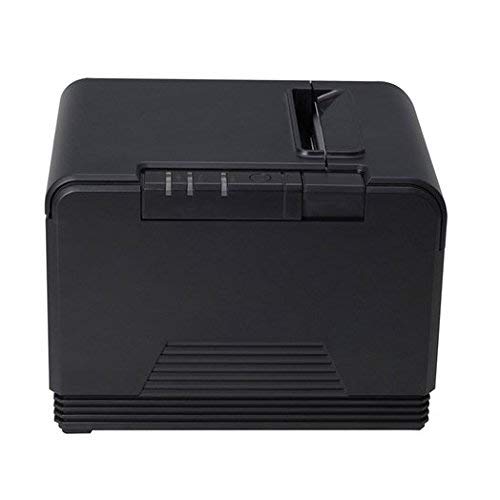
Малюнок 4.1: спереду та збоку view of the X Printer XP-Q600 Thermal Receipt Printer, highlighting the power switch and Xprinter logo.
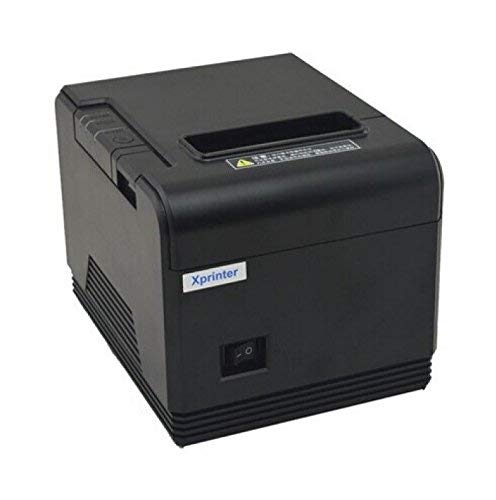
Рисунок 4.2: Задня та бічна частини view of the X Printer XP-Q600 Thermal Receipt Printer, illustrating the various connectivity ports.
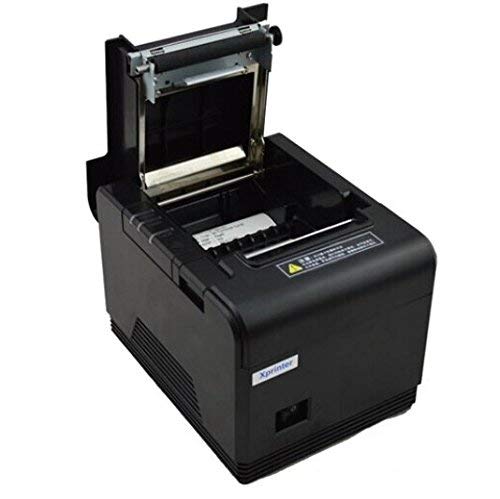
Малюнок 4.3: Верх view of the X Printer XP-Q600 Thermal Receipt Printer with the cover open, revealing the thermal paper roll compartment and loading mechanism.
Ключові характеристики:
- Метод друку: Direct thermal printing.
- Високошвидкісний друк: Up to 300mm/s.
- Інтерфейси: USB and Bluetooth connectivity.
- Конфігурація мережі: Ability to change IP through Web or Serial port.
- Підтримка операційної системи: Compatible with Linux and Windows 8.1 systems.
- Вихід на принтер: Монохромний.
- Особливе використання: Optimized for receipt printing.
5. Налаштування
5.1 Підключення принтера
- Підключення живлення: Connect the power adapter to the printer's power port and then plug it into a power outlet.
- Підключення USB: For USB connectivity, connect one end of the USB cable to the printer's USB port and the other end to your computer.
- Підключення Bluetooth: For Bluetooth connectivity, ensure the printer is powered on. Refer to your device's Bluetooth settings to pair with the printer. The printer's Bluetooth name typically includes "XP-Q600".
5.2 Завантаження термопаперу
- Open the printer cover by pressing the release latch (refer to Figure 4.3).
- Insert a new thermal paper roll into the compartment, ensuring the paper feeds from the bottom and the leading edge is straight.
- Витягніть невеликий шматок паперу повз різак.
- Щільно закрийте кришку принтера, доки вона не зафіксується на місці.
5.3 Встановлення драйвера
- For Windows systems (including Windows 8.1), insert the driver CD or download the latest drivers from the X Printer official webсайт. Дотримуйтесь інструкцій на екрані для встановлення.
- For Linux systems, drivers are typically available through package managers or can be downloaded from the X Printer official website. Consult your Linux distribution's documentation for specific installation procedures.
5.4 Network Configuration (for Ethernet models, if applicable)
The XP-Q600 supports changing its IP address via Web interface or Serial port. Refer to the advanced configuration guide on the X Printer website for detailed instructions on network setup.
6. Інструкція з експлуатації
6.1 Базовий друк
- Ensure the printer is powered on and connected to your device (via USB or Bluetooth).
- Verify that thermal paper is correctly loaded.
- From your application (e.g., POS software, text editor), select the "X Printer XP-Q600" as your printer.
- Initiate the print command. The printer will automatically print the receipt.
6.2 Світлові індикатори
The printer features indicator lights to show its status. Common indicators include:
- Індикатор живлення: Lit when the printer is on.
- Індикатор помилки: Flashes or lights up to indicate an error (e.g., paper out, cover open, print head overheat).
- Індикатор відсутності паперу: Lit when the paper roll is empty or nearly empty.
7. Технічне обслуговування
7.1 Очищення друкуючої головки
Regular cleaning of the print head ensures optimal print quality and extends the printer's lifespan.
- Вимкніть принтер і від’єднайте кабель живлення.
- Відкрийте кришку принтера.
- Використовуйте ватний тампон, злегка промокнітьampened with isopropyl alcohol to gently wipe the thermal print head surface.
- Дайте друкуючій голівці повністю висохнути, перш ніж закривати кришку та знову підключати живлення.
7.2 Очищення тракту подачі паперу
Видаліть паперовий пил або сміття зі шляху проходження паперу за допомогою м’якої щітки або стисненого повітря.
8. Вирішення проблем
| проблема | Можлива причина | Рішення |
|---|---|---|
| Принтер не вмикається. | Кабель живлення відключено; розетка несправна. | Перевірте підключення кабелю живлення; спробуйте іншу розетку. |
| Без друку. | Paper out; cover open; incorrect driver; printer not selected. | Load paper; close cover; install correct driver; select printer in software. |
| Погана якість друку. | Dirty print head; low quality thermal paper. | Clean print head (Section 7.1); use recommended thermal paper. |
| Збій підключення Bluetooth. | Printer not in pairing mode; incorrect pairing code; interference. | Ensure printer is discoverable; re-enter pairing code; reduce interference. |
Якщо проблема не зникає після спроби цих рішень, зверніться до служби підтримки клієнтів.
9. Технічні характеристики
| Особливість | Деталь |
|---|---|
| Модель | XP-Q600 |
| Метод друку | Прямий термічний |
| Швидкість друку | 300 мм/с |
| Інтерфейси | USB, Bluetooth |
| Підтримка операційної системи | Linux, Windows 8.1 (and compatible versions) |
| Особливе використання | Друк чеків |
| Вихід на принтер | Монохромний |
| Апаратний інтерфейс | USB |
| Виробник | X Printer |
10. Гарантія та підтримка
For warranty information and technical support, please refer to the warranty card included with your product or visit the official X Printer webсайт. Зберігайте чек про покупку як підтвердження покупки.
X Printer Official Webсайт: www.xprinter.net (Це посилання тимчасове, будь ласка, перевірте фактичне офіційне website for X Printer)


