1. Вступ
Thank you for choosing the Antec P101S Silent Performance Mid-Tower PC Case. This manual provides essential information for the proper installation, operation, and maintenance of your new computer case. Please read this manual thoroughly before beginning assembly to ensure optimal performance and longevity of your system.
The Antec P101S is engineered for quiet computing, featuring sound-dampening panels and efficient cooling solutions, making it ideal for users who prioritize a silent and high-performance computing environment.
2. Ключові характеристики
- Безшумна робота: Equipped with sound-dampening top, front, and side panels for quiet computing.
- Extensive Drive Bays: Supports 11 drive bays, including 1 x 5.25" ODD bay, 8 x 3.5" HDD/2.5" SSD removable bays, and 2 x dedicated 2.5" SSD bays.
- Покращене охолодження: Includes 4 pre-installed 120/140mm cooling fans (3 front, 1 rear). Supports up to 4 fan mounts with a maximum of 360mm radiator support for enhanced cooling.
- Зручна панель вводу/виводу: Features power/reset buttons, a fan speed controller (High/Stop/Low), Audio/Mic ports, 2 x USB 2.0, and 2 x USB 3.0 ports with white LED lighting.
- Широка сумісність з материнськими платами: Supports E-ATX, ATX, Micro-ATX, and ITX motherboards.
- Generous Component Clearance: Accommodates CPU coolers up to 180mm, graphics cards up to 450mm, and PSUs up to 290mm in length.
3. Вміст упаковки
Будь ласка, перевірте наявність усіх предметів у вашій упаковці:
- Antec P101S Mid-Tower PC Case
- 3 x 120mm Front Fans (Pre-installed)
- 1 x 140mm Rear Fan (Pre-installed)
- Коробка з аксесуарами (гвинти, кабельні стяжки, інструкція користувача)
4. Компонент Завершеноview
Familiarize yourself with the various parts of your Antec P101S case.

Figure 1: Front, Back, Left, and Right views of the Antec P101S case, illustrating its external design and panel layout.

Рисунок 2: Інтер'єр view of the Antec P101S, showing the spacious layout, drive bays, and fan mounts.

Figure 3: Close-up of the top I/O panel, highlighting the power, reset, fan speed controller, audio, USB 2.0, and USB 3.0 ports.
5. Налаштування та встановлення
Follow these steps to install your components into the Antec P101S case.
5.1 Підготовка справи
- Зняти бічні панелі: Unscrew the thumbscrews on the rear of the side panels and slide them backward to remove.
- Доступ до інтер'єру: The interior is now accessible for component installation.
5.2 Встановлення материнської плати
- Встановити Standoffs: Ensure the correct motherboard standoffs are installed for your motherboard form factor (ATX, Micro-ATX, ITX, E-ATX).
- Розміщення материнської плати: Обережно вирівняйте материнську плату з виступами та отвором для екрану вводу/виводу.
- Безпечна материнська плата: Fasten the motherboard with the provided screws.
5.3 Встановлення приводу
The P101S offers versatile drive mounting options.
5.3.1 3.5" HDD / 2.5" SSD Removable Bays

Figure 4: Illustration of the various drive bay locations within the Antec P101S case.
- Remove Drive Tray: Pull out an empty 3.5" drive tray from the drive cage.
- Встановлення диска: For a 3.5" HDD, flex the tray and insert the drive. For a 2.5" SSD, secure it to the bottom of the tray with screws.
- Вставте лоток назад: Slide the loaded tray back into the drive cage until it clicks into place.
5.3.2 Dedicated 2.5" SSD Bays
Two dedicated 2.5" SSD mounts are located behind the motherboard tray.
- Безпечний SSD-накопичувач: Attach your 2.5" SSD to the dedicated mounting bracket using screws.
- Кронштейн для кріплення: Secure the bracket with the SSD to the chassis behind the motherboard tray.
5.3.3 5.25" ODD Bay
- Remove Front Bezel: Gently remove the 5.25" bay cover from the front bezel.
- Insert ODD: Slide your optical disc drive into the bay from the front until it aligns with the screw holes.
- Secure ODD: Fasten the ODD with screws.
5.4 Встановлення відеокарти та плати розширення
- Зніміть кришки слотів PCIe: Unscrew and remove the necessary PCIe slot covers from the rear of the case.
- Вставте картку: Carefully insert your graphics card or other expansion card into the appropriate PCIe slot on the motherboard.
- Безпечна картка: Fasten the card with screws.
5.5 Встановлення блоку живлення (БП)
- Посада блоку живлення: Вставте блок живлення у відведений для нього відсік у нижній задній частині корпусу.
- Безпечний блок живлення: Fasten the PSU to the rear of the chassis with screws.
5.6 Організація кабелів
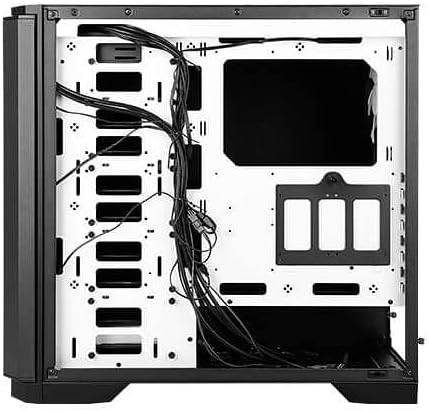
Малюнок 5: Задня частина view of the motherboard tray, showing cable routing channels and tie-down points for organized cable management.
Utilize the cable routing holes and tie-down points behind the motherboard tray to organize cables for improved airflow and aesthetics.
6. Експлуатація корпусу ПК
6.1 Увімкнення/вимкнення живлення
Press the large power button on the top I/O panel to turn your system on or off.
6.2 Регулювання швидкості вентилятора
Use the fan speed controller switch on the top I/O panel to adjust the speed of the pre-installed fans:
- Високий: Maximum fan speed for optimal cooling.
- Низький: Reduced fan speed for quieter operation.
- Стій: Fans are turned off.
7. Технічне обслуговування
7.1 Очищення пилових фільтрів
Regularly clean the dust filters located at the front, top, and bottom of the case to maintain optimal airflow and prevent dust buildup. The front filter is easily removable for cleaning.
7.2 Генеральне прибирання
Use a soft, dry cloth to clean the exterior of the case. For stubborn marks, a slightly damp Можна використовувати тканину, а потім висушити. Уникайте абразивних засобів для чищення або розчинників.
8. Вирішення проблем
- Система не вмикається: Double-check all power connections, including the 24-pin ATX, 8-pin CPU, and GPU power cables. Ensure the PSU switch is in the 'On' position.
- Вентилятори не обертаються: Verify that the fan speed controller on the I/O panel is not set to 'Stop'. Check fan connections to the motherboard or fan hub.
- Перегрів: Ensure all fans are spinning correctly and dust filters are clean. Verify proper component installation and thermal paste application.
- Порти USB не працюють: Check the internal USB header connections from the I/O panel to the motherboard.
9. Технічні характеристики
| Особливість | Деталь |
|---|---|
| Назва моделі | P101S Silent |
| Тип корпусу | Середня вежа |
| Сумісність материнської плати | E-ATX, ATX, Micro-ATX, ITX |
| Розміри (ДxШxВ) | 20.74 x 9.13 x 19.92 дюймів |
| Вага товару | 26.1 фунта |
| матеріал | легована сталь |
| Привідні відсіки | 1 x 5.25" ODD, 8 x 3.5" HDD/2.5" SSD, 2 x 2.5" SSD |
| Попередньо встановлені вентилятори | 3 x 120mm Front, 1 x 140mm Rear |
| Опора радіатора | Front: Up to 360mm, Rear: Up to 140mm |
| Максимальна висота процесорного кулера | 180 мм |
| Максимальна довжина GPU | 450 мм |
| Максимальна довжина блоку живлення | 290 мм |
| Передні порти вводу-виводу | 2 x USB 2.0, 2 x USB 3.0, Audio/Mic, Power, Reset, Fan Speed Controller |
10. Гарантія та підтримка
Щоб отримати інформацію про гарантію та технічну підтримку, зверніться до офіційного представника Antec. website or contact your local Antec distributor. Keep your proof of purchase for warranty claims.
Офіційний представник Antec Webсайт: www.antec.com


