1. Вступ
This manual provides detailed instructions for the installation, setup, and operation of your MOES WiFi Smart Wall Touch Light Switch. Please read this manual thoroughly before installation and use to ensure proper function and safety.

Figure 1: MOES WiFi Smart Wall Touch Light Switch (1 Gang, Black)
2. Інформація про безпеку
- Електромонтаж: Монтаж повинен виконувати лише кваліфікований електрик або людина, яка добре розуміється на електропроводці.
- Відключення живлення: Always disconnect power at the circuit breaker before installing, removing, or servicing the switch. Failure to do so may result in serious injury or death.
- Необхідний нейтральний дріт: This smart switch requires a neutral wire in your switch box to operate correctly. If you do not have a neutral wire, this switch is not compatible.
- Мережа Wi-Fi: Requires a 2.4GHz Wi-Fi network connection. It is not compatible with 5GHz Wi-Fi networks.
- Сумісність: Only compatible with 1 gang switch boxes. Not compatible with standard US 2/3/4 gang switch plates. This switch is not designed for 3-way switch configurations or as a dimmer switch.
- Тільки для використання в приміщенні: Цей пристрій призначений для використання всередині приміщень у сухих приміщеннях.
- Робочий випtage: Ensure your electrical system operates within the specified voltagдіапазон (240 вольт).

Figure 2: Key compatibility and wiring considerations.
3. Вміст упаковки
- MOES WiFi Smart Wall Touch Light Switch (1 Gang)
- Посібник користувача
- Монтажні гвинти
4. Особливості продукту
- Сенсорне керування: Features a toughened glass surface for touch operation.
- Голосове керування: Compatible with Amazon Alexa (Amazon Echo/Dot/Tap) and Google Assistant for hands-free operation.
- Пульт дистанційного керування Wi-Fi: Control the wall switch wirelessly from anywhere using the 'Smart Life' app on your smartphone via Wi-Fi or 4G network. No separate hub is required.
- Функція синхронізації: Schedule lights and appliances to turn on/off automatically at specific times.

Figure 3: Smart Switch in a home environment.
5. Технічні характеристики
| Специфікація | Значення |
|---|---|
| Режим роботи | Автоматично, Вимкнено, Smart Switch |
| Поточний рейтинг | 10 Amps |
| Робочий випtage | 240 вольт |
| Тип контакту | Нормально відкритий |
| Тип роз'єму | Бездротовий |
| Термінал | Гвинт |
| Розміри предмета (Д x Ш x В) | 4.7 x 2.9 x 1.5 дюймів |
| Тип схеми | 1-сторонній |
| Тип приводу | Дотик |
| Контактний матеріал | Латунь |
| Міжнародний захист рейтингу | IPX4 |
| Кількість позицій | 3 |
| Тип контролера | Amazon Alexa, Google Assistant |
| Спосіб контролю | Дистанційний |
| Протокол підключення | Wi-Fi (лише 2.4 ГГц) |
| Wattage | 1000 Вт |
| Вага товару | 7.4 унції |

Figure 4: Product dimensions and wiring terminals.
6. Посібник із встановлення
Перш ніж почати:
- Переконайтеся, що живлення ВИМКНЕНО автоматичним вимикачем.
- Confirm your switch box has a neutral wire. This is essential for the smart switch to function.
- Перевірте, чи ваша мережа Wi-Fi працює на частоті 2.4 ГГц.
- This switch is for 1-gang setups only and is not a dimmer or 3-way switch.
Кроки підключення:
- Turn off power at the circuit breaker for the light switch you are replacing.
- Зніміть наявну настінну пластину та вимикач.
- Identify the wires: Live (usually black), Neutral (usually white), and Load (to the light fixture). A Ground wire (usually green or bare copper) may also be present.
- Connect the wires from your wall box to the corresponding terminals on the MOES Smart Switch:
- N: Connect the Neutral wire (usually white).
- L: Connect the Live wire (incoming power, usually black).
- L1: Connect the Load wire (to the light fixture). For 1-gang switches, only L1 is typically used.
- земля: If present, connect the ground wire to the switch's ground terminal (if available) or safely cap it.
- Secure the switch into the wall box using the provided screws.
- Attach the glass panel.
- Відновіть живлення вимикача.
After installation, the indicator lights on the switch should blink quickly, indicating it is ready for Wi-Fi connection in Default Normal Mode.

Figure 5: Replacing a traditional switch with the smart touch switch.
7. Налаштування та сполучення застосунку
To control your smart switch via smartphone, download the 'Smart Life' app from the App Store (iOS) or Google Play (Android).
- Завантажити та зареєструватися: Install the 'Smart Life' app and register an account.
- Додати пристрій: Open the app, tap '+' or 'Add Device', and select 'Light Switch' or 'Electrical Switch'.
- Confirm Indicator Status: Ensure the indicator light on your switch is blinking quickly. If not, you may need to reset the device.
- Підключіться до Wi-Fi: Follow the in-app instructions to connect the switch to your 2.4GHz Wi-Fi network. Enter your Wi-Fi password when prompted.
- Перейменування пристрою: Once connected, you can rename the switch for easier identification (e.g., "Living Room Light").
Скидання пристрою:
If the indicator lights are not blinking quickly, or if you need to reset the switch for any reason:
- Press and hold any button on the switch for approximately 20 seconds until the indicator light blinks quickly. This puts the device into Default Normal Mode for Wi-Fi connection.
- If the indicator light blinks very slowly after holding for 20 seconds, it is in AP (Access Point) mode. This is an alternative pairing mode if Default Normal Mode fails.
Video 1: Demonstrates how to reset or unlock the device by pressing and holding a button for 20 seconds, showing the indicator light changes for different pairing modes.
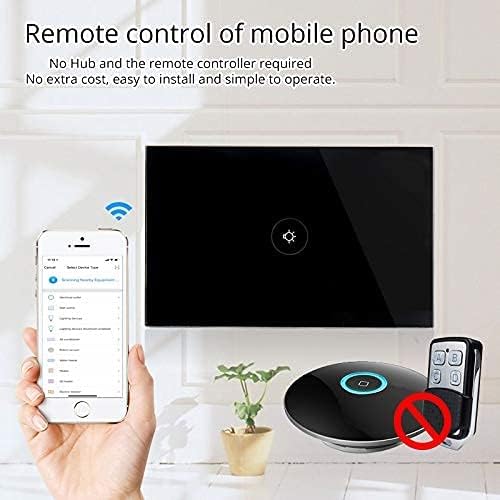
Figure 6: Remote control via mobile application.
8. Операція
Once installed and paired with the 'Smart Life' app, you can operate your switch in several ways:
- Manual Touch: Simply touch the glass panel to turn the connected light or appliance on or off.
- Контроль програми: Use the 'Smart Life' app on your smartphone to remotely turn the switch on or off from anywhere with an internet connection.
9. Інтеграція голосового керування
The MOES Smart Switch is compatible with Amazon Alexa and Google Assistant for convenient voice control.
- Link 'Smart Life' Account: In your Amazon Alexa or Google Home app, search for the 'Smart Life' skill/action and enable it.
- Увійти: Log in with your 'Smart Life' account credentials.
- Відкрийте для себе пристрої: Once linked, ask Alexa or Google Assistant to "Discover devices" or manually initiate device discovery in their respective apps.
- Голосові команди: You can now use voice commands such as "Alexa, turn on [device name]" or "Hey Google, turn off [device name]". Use the names you assigned in the 'Smart Life' app.

Рисунок 7: Голосове керування за допомогою Alexa та Google Home.
10. Функція синхронізації
The 'Smart Life' app allows you to set schedules and timers for your smart switch, automating your lighting or appliances.
- Створення розкладів: In the 'Smart Life' app, navigate to the device settings and select 'Schedule' or 'Timer'.
- Set On/Off Times: Configure specific times for the switch to turn on or off. You can set daily, weekly, or custom schedules.
- Sunrise/Sunset Automation: Some app versions allow for automation based on local sunrise and sunset times.

Figure 8: Setting schedules via the Smart Life app.
11. Вирішення проблем
| проблема | Можлива причина | Рішення |
|---|---|---|
| Перемикач не реагує на дотик. | No power, incorrect wiring, or device locked. | Check circuit breaker. Verify wiring (Live, Neutral, Load). Perform a device reset (hold button for 20 seconds). |
| Неможливо підключитися до Wi-Fi. | Incorrect Wi-Fi band (5GHz), weak signal, incorrect password, or device not in pairing mode. | Ensure your router is broadcasting a 2.4GHz signal. Move closer to the router. Double-check Wi-Fi password. Reset the switch to enter pairing mode (blinking indicator). Try AP mode if normal mode fails. |
| Голосове керування не працює. | 'Smart Life' skill not enabled, incorrect device name, or no internet connection. | Ensure the 'Smart Life' skill is enabled and linked in your Alexa/Google Home app. Verify device names match. Check internet connectivity. |
| Switch goes offline frequently. | Weak Wi-Fi signal, network congestion, or router issues. | Improve Wi-Fi signal strength (e.g., Wi-Fi extender). Reduce network congestion. Restart your router. |
12. Технічне обслуговування
- Прибирання: Gently wipe the glass panel with a soft, dry cloth. Avoid abrasive cleaners or solvents.
- Оновлення прошивки: Періодично перевіряйте додаток «Smart Life» на наявність оновлень прошивки, щоб забезпечити оптимальну продуктивність і безпеку.
13. Гарантія та підтримка
For warranty information or technical support, please refer to the documentation provided with your purchase or contact MOES customer service directly. Contact details can typically be found on the MOES official website or within the 'Smart Life' app's support section.
Відео 2: Кінецьview of MOES smart home products and their integration, demonstrating various smart life features like color temperature control, music sync lighting, and smart automation based on environmental sensors.


