вступ
This manual provides instructions for the proper installation, operation, and maintenance of your Esperanza ERW019 Monitor Desk Mount. Please read this manual thoroughly before installation and retain it for future reference. Ensure all components are present and undamaged before proceeding.
Інформація про безпеку
УВАГА: Failure to read, understand, and follow all instructions can result in serious personal injury, property damage, or voiding of the warranty. Improper installation may cause damage to the monitor or desk.
- Не перевищуйте максимальну вантажопідйомність 6 кг (13.2 фунтів).
- Ensure the mounting surface (desk) can safely support the combined weight of the mount and the monitor.
- Використовуйте лише надане обладнання.
- Тримайте дрібні деталі подалі від дітей.
- If you have any doubts about the installation, consult a qualified professional.
Вміст упаковки
Verify that all parts are included in your package. If any parts are missing or damaged, do not attempt to install. Contact customer support for assistance.
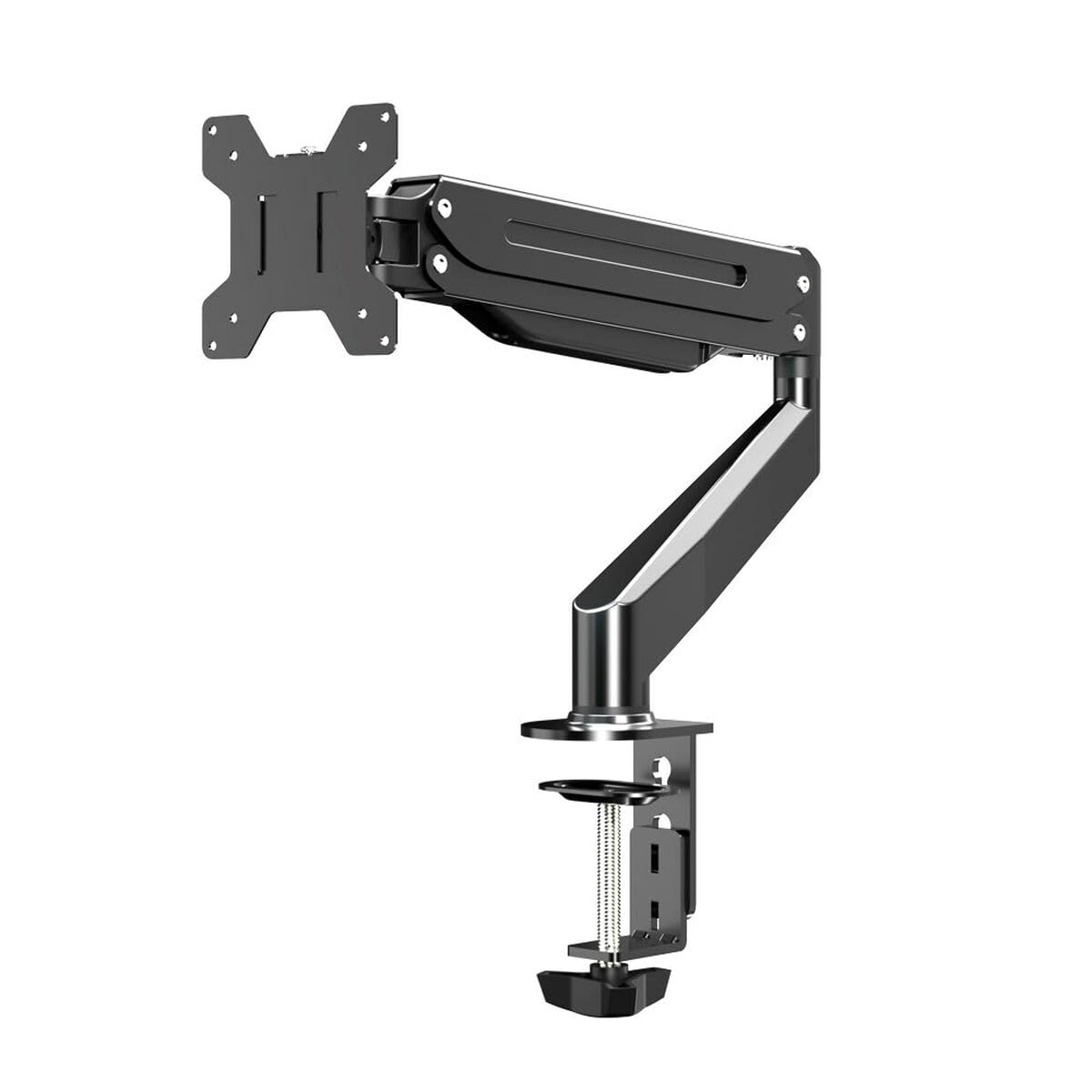
Image: An illustration of the Esperanza ERW019 Monitor Desk Mount and its components.
- Monitor Mount Base
- Монітор Arm
- Пластина VESA
- Кріпильні елементи (гвинти, шайби, проставки)
- Аллен Кіз
- Інструкція з експлуатації
Налаштування та встановлення
Follow these steps carefully to install your monitor desk mount.
Step 1: Attach the Mount Base to the Desk
Place the mount base on the desired position on your desk. Secure it using the integrated clamp mechanism. Tighten the clamp screw until the mount is firmly attached to the desk and does not wobble.
Image: Illustration of securing the desk clamp. Забезпечити пamp is fully tightened for stability.
Крок 2: Прикріпіть пластину VESA до монітора
Locate the VESA mounting holes on the back of your monitor. These are typically 75x75mm or 100x100mm apart. Align the VESA plate with these holes and secure it using the appropriate screws (M4 or M5) and washers provided. Do not overtighten.
Image: The VESA plate being attached to the rear of a monitor using screws.
Step 3: Mount the Monitor to the Arm
Carefully lift the monitor with the attached VESA plate and slide it onto the monitor arm's mounting head. Ensure it clicks into place or is secured with the provided locking mechanism. Double-check that the monitor is securely attached before releasing це.
Image: A monitor being carefully placed onto the desk mount arm.
Operating and Adjusting Your Monitor Mount
The Esperanza ERW019 mount allows for various adjustments to achieve optimal viewкути.
- Регулювання висоти: Loosen the adjustment knob on the arm, move the monitor to the desired height, and then retighten the knob firmly.
- Регулювання нахилу: The monitor can be tilted up or down. Loosen the tilt screw, adjust the angle, and retighten.
- Регулювання повороту: The monitor arm can swivel left or right at the base.
- Обертання: The VESA plate allows for 360-degree rotation, enabling portrait or landscape orientation.
Image: Demonstrating the various adjustment capabilities of the monitor mount, including height, tilt, and swivel.
Технічне обслуговування
Регулярне технічне обслуговування забезпечує довговічність та безпечну роботу вашого кріплення для монітора.
- Періодично перевіряйте всі гвинти та з'єднання, щоб переконатися, що вони міцно затягнуті. За потреби підтягніть.
- Очистіть кріплення м’якою губкоюamp тканиною. Уникайте абразивних засобів для чищення або розчинників.
- Do not lubricate any parts of the mount unless specifically instructed.
Усунення несправностей
| проблема | Можлива причина | Рішення |
|---|---|---|
| Монітор провисає або не тримає положення. | Adjustment screws are loose. | Tighten the relevant adjustment screws (e.g., tilt, height). |
| Маунт відчувається нестабільним. | Письмовий стіл клamp недостатньо щільно. | Переконайтеся, що стіл клamp is fully tightened to the desk surface. |
| Monitor cannot be attached. | Incorrect VESA pattern or screw size. | Verify your monitor's VESA pattern (75x75mm or 100x100mm) and use the correct screws. |
Технічні характеристики
- модель: Esperanza ERW019 (S91103024)
- тип: Настільне кріплення для монітора
- матеріал: метал
- колір: чорний
- Сумісність з розміром екрана: 17" - 27"
- Сумісність з VESA: 75х75 мм, 100х100 мм
- Максимальна вантажопідйомність: 6 кг (13.2 фунта)
- Розміри (приблизні): 8.5 x 41 x 24.5 cm (Base and Arm)
Гарантія та підтримка
For warranty information or technical support, please refer to the documentation provided with your purchase or visit the official Esperanza webсайт. Зберігайте чек про покупку для гарантійних претензій.
Виробник: Esperanza


