1. Продукт закінчивсяview
The MIFA A20 is a portable Bluetooth speaker designed to deliver high-quality audio with powerful bass and True Wireless Stereo (TWS) capabilities. Its robust aluminum alloy housing ensures durability and a premium aesthetic. This manual will guide you through its features, setup, and operation.


2. особливості
- Exceptional Wireless Stereo: Connect two A20 speakers via a single device for huge stereo sound and double the volume; two exposed radiators let you see the sound.
- Impressive Bass: Dual drivers, triple radiators and Class-D chips ensure distortion-free crystal loud sound and strong bass with 30W peak power output.
- Тривале відтворення: 4000 mAh rechargeable Li-ion battery offers 12 hours playtime at 70% volume; LED indicators to tell you the battery remaining; can play while charging.
- Endless Audio Options: Aux capability for non-Bluetooth devices; 32GB Micro SD card supported to save your phone's battery; built-in microphone for HD hands-free calls.
- Bluetooth 4.2: Instantly pairs with your Smartphone, Tablet, Laptop, iPhone, Samsung, etc.; auto-reconnects to the last used device within 66 feets away.
3. Вміст упаковки
Будь ласка, поставте позначку у відповідному полі для наступних пунктів:
- MIFA A20 Bluetooth Speaker
- USB-кабель для зарядки
- 3.5-мм аудіокабель (AUX)
- Посібник користувача
4. Схема виробу та елементи керування
Familiarize yourself with the speaker's layout and control buttons.
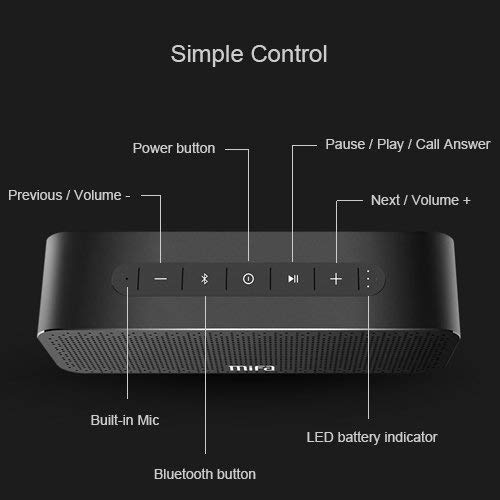
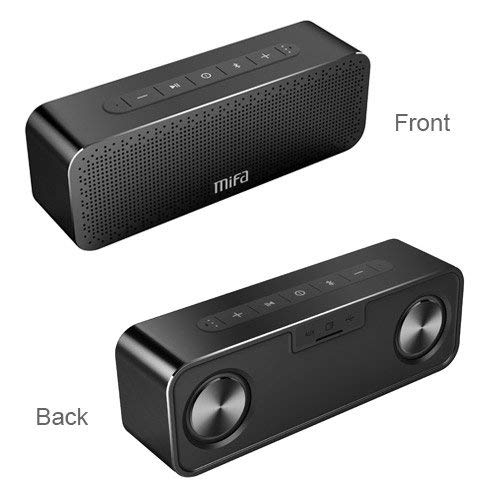
Кнопки управління:
- Кнопка живлення: Натисніть і утримуйте, щоб увімкнути/вимкнути.
- Кнопка Bluetooth: Натисніть, щоб увійти в режим сполучення Bluetooth.
- Play/Pause / Call Answer Button: Press to play/pause music; press to answer/end calls.
- Previous / Volume - Button: Press to go to previous track; press and hold to decrease volume.
- Next / Volume + Button: Press to go to next track; press and hold to increase volume.
Indicators and Ports:
- Вбудований мікрофон: Для дзвінків у режимі hands-free.
- Світлодіодний індикатор батареї: Показує стан батареї.
- Порт зарядки: USB порт для зарядки.
- Вхід AUX: 3.5-мм роз'єм для дротового аудіопідключення.
- Слот для карти Micro SD: For playing music directly from a Micro SD card (up to 32GB).
5. Налаштування
5.1 Заряджання динаміка
Перед першим використанням повністю зарядіть динамік. Підключіть наданий USB-кабель для заряджання до порту заряджання динаміка, а інший кінець – до USB-адаптера живлення (не входить до комплекту) або USB-порту комп’ютера. Світлодіодний індикатор показуватиме стан заряджання та вимкнеться після повного заряджання.
5.2 Створення пари Bluetooth
- Turn on the MIFA A20 speaker by pressing and holding the Power button.
- Колонка автоматично перейде в режим сполучення Bluetooth, що буде позначено миготливим синім світлодіодом. Якщо ні, натисніть кнопку Bluetooth.
- На вашому пристрої (смартфоні, планшеті, ноутбуці) увімкніть Bluetooth та знайдіть доступні пристрої.
- Select "MIFA A20" from the list of devices.
- Once paired, the LED indicator will turn solid blue, and you will hear a confirmation sound.
- The speaker will automatically reconnect to the last paired device when turned on, if within range.
5.3 Сполучення справжнього бездротового стерео (TWS)
Для досягнення ширшого стереозвукуtage, you can pair two MIFA A20 speakers together.
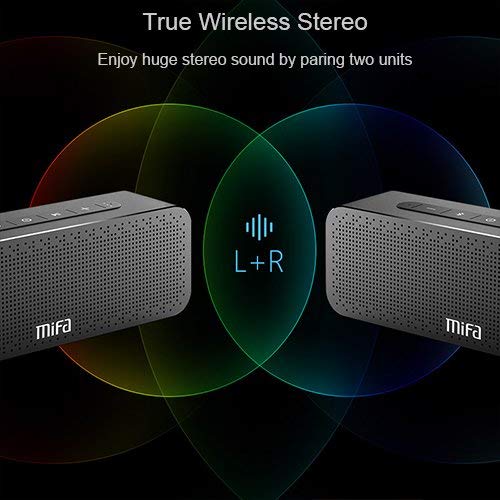
- Ensure both MIFA A20 speakers are turned on and not connected to any Bluetooth device.
- On one speaker (this will be the primary speaker), press and hold the Bluetooth button until you hear a prompt indicating TWS pairing mode.
- The two speakers will automatically search for and connect to each other. This may take a few seconds.
- Once connected, you will hear a confirmation sound, and the LED indicators on both speakers will change to reflect the TWS connection.
- Тепер підключіть свій пристрій до основного динаміка через Bluetooth, як описано в розділі 5.2. Аудіо відтворюватиметься через обидва динаміки в стереозвукі.
5.4 Using Micro SD Card
Insert a Micro SD card (up to 32GB, formatted to FAT32) with your music files into the Micro SD card slot. The speaker will automatically switch to Micro SD card mode and begin playing music.
5.5 Використання AUX-входу
Connect one end of the 3.5mm audio cable to the AUX input port on the speaker and the other end to the audio output jack of your non-Bluetooth device. The speaker will automatically switch to AUX mode.
6. Керування динаміком
6.1 Відтворення музики
- Відтворення/пауза: Натисніть кнопку Відтворення/Пауза.
- Збільшення гучності: Натисніть і утримуйте кнопку «Гучність +».
- Зменшення гучності: Натисніть і утримуйте кнопку гучності -.
- Наступний трек: Short press the Next / Volume + button.
- Попередній трек: Short press the Previous / Volume - button.
6.2 Дзвінки в режимі «вільні руки»
При підключенні через Bluetooth, динамік можна використовувати для здійснення дзвінків у режимі hands-free.
- Відповісти на дзвінок: Press the Play/Pause / Call Answer button.
- Завершити виклик: Press the Play/Pause / Call Answer button during a call.
- Відхилити виклик: Press and hold the Play/Pause / Call Answer button when a call comes in.
7. Технічне обслуговування
- Прибирання: Використовуйте м’яку суху тканину для очищення динаміка. Не використовуйте абразивні засоби для чищення або розчинники.
- Догляд за акумулятором: Щоб продовжити термін служби акумулятора, уникайте частого повного розряджання динаміка. Регулярно заряджайте його, навіть якщо він не використовується протягом тривалого часу.
- Зберігання: Зберігайте динамік у прохолодному, сухому місці, подалі від прямих сонячних променів та екстремальних температур.
- Водонепроникність: The speaker is designed to be waterproof (as per specifications). However, avoid submerging it in water for extended periods or exposing it to high-pressure water jets. Ensure charging port cover is securely closed when near water.
8. Вирішення проблем
| проблема | Можлива причина | Рішення |
|---|---|---|
| Динамік не вмикається | Низький заряд батареї | Повністю зарядіть динамік. |
| Ні звуку | Занадто низька гучність; Пристрій не підключено; Неправильний режим введення | Increase volume on speaker and device; Ensure successful Bluetooth pairing or AUX connection; Check if correct input mode (Bluetooth/AUX/SD card) is selected. |
| Не вдається підключити пристрій через Bluetooth | Speaker not in pairing mode; Device Bluetooth off; Too far from speaker; Interference | Ensure speaker is in pairing mode (flashing blue LED); Turn on Bluetooth on your device; Move device closer to speaker; Turn off other Bluetooth devices nearby. |
| Спотворений звук | Volume too high; Low battery; Device too far | Reduce volume; Charge speaker; Move device closer to speaker. |
| Не вдається створити пару TWS | Speakers already connected to a device; Not in TWS pairing mode | Disconnect both speakers from any Bluetooth devices; Ensure both speakers are in TWS pairing mode. |
9. Технічні характеристики

| Особливість | Деталь |
|---|---|
| Назва моделі | A20 |
| матеріал | Алюміній |
| Тип динаміка | НЧ динамік |
| Технологія підключення | Bluetooth, Auxiliary, Wireless |
| Версія Bluetooth | 4.2 |
| Дальність бездротового зв'язку | До 66 футів (20 метрів) |
| Максимальна вихідна потужність динаміка | 30 Вт |
| Режим аудіовиходу | Стерео |
| Конфігурація каналу об’ємного звуку | 2.0 |
| Ємність акумулятора | 4000 мАг |
| Термін служби батареї | До 12 годин (з гучністю 70%) |
| Підтримка карт Micro SD | До 32 ГБ |
| Вбудований мікрофон | так |
| Є водонепроникним | так |
| колір | чорний |
10. Гарантія та підтримка
Інформація про гарантію
The MIFA A20 Bluetooth Speaker comes with a Гарантія 30 днів з дати покупки, що покриває виробничі дефекти. Будь ласка, збережіть підтвердження покупки для пред'явлення гарантійних претензій.
Підтримка клієнтів
For any questions, technical assistance, or warranty inquiries, please contact MIFA customer support through the retailer's platform or the official MIFA webсайт. Будь ласка, підготуйте модель вашого продукту та інформацію про покупку, коли звертаєтесь до служби підтримки.


