1. Вступ
This manual provides essential information for the safe and efficient operation of your Xerox VersaLink C8000/DT Color Printer. It covers setup, daily use, maintenance, and troubleshooting. Please read this manual thoroughly before using the printer and retain it for future reference.
2. Що в коробці
Verify that all items are present in the packaging.
- Xerox VersaLink C8000/DT Color Printer
- Шнур живлення
- Документація (цей посібник, інформація з техніки безпеки)
- Initial Toner Cartridges (Black, Cyan, Magenta, Yellow)
3. Налаштування
3.1 Розпакування
- Обережно вийміть принтер з упаковки.
- Зніміть усі захисні стрічки та пакувальні матеріали із зовнішньої та внутрішньої частин принтера. Щоб дізнатися про конкретні місця, зверніться до посібника зі швидкого налаштування.
3.2 Фізичне розміщення
Place the printer on a sturdy, level surface capable of supporting its weight (approximately 178 pounds). Ensure adequate ventilation around the printer.

малюнок 3.2.1: Фронт view of the Xerox VersaLink C8000/DT Color Printer, showing its overall design and paper trays.
3.3 Підключення живлення
- Connect the power cord to the printer's power inlet.
- Підключіть інший кінець шнура живлення до заземленої електричної розетки.
- Натисніть кнопку живлення, щоб увімкнути принтер.
3.4 Initial Configuration and Network Setup
Upon first power-on, the printer's user interface will guide you through initial setup steps, including language selection, date/time, and network configuration. The printer supports Ethernet connectivity.

малюнок 3.4.1: Close-up of the printer's control panel, displaying the touch screen interface with various application icons.
For network connection, connect an Ethernet cable from your network router or switch to the Ethernet port on the printer. Follow the on-screen prompts to complete network settings.
4. Інструкція з експлуатації
4.1 Базовий друк
- Переконайтеся, що принтер увімкнено та підключено до вашої мережі.
- Load paper into the paper trays. The printer supports standard paper sizes up to 8.5 x 14 inches.
- From your computer or mobile device, select the Xerox VersaLink C8000/DT as your printer.
- Adjust print settings (e.g., color, duplex, paper type) as needed.
- Розпочніть завдання друку.
4.2 Мобільне та хмарне підключення
The VersaLink C8000/DT offers instant connectivity to cloud services and mobile devices directly from its user interface. Access pre-loaded, cloud-hosted services to manage documents and print from various platforms. Compatible with smartphones and controlled via an app.
4.3 Двосторонній друк
The printer supports automatic dual-sided (duplex) printing. This feature can be enabled through the print settings on your computer or directly from the printer's control panel for supported functions.
5. Технічне обслуговування
5.1 Заміна картриджа з тонером
When a toner cartridge is low or empty, the printer's control panel will display a notification.
- Відкрийте передню кришку принтера.
- Locate the toner cartridge that needs replacement (Black, Cyan, Magenta, or Yellow).
- Grasp the handle of the cartridge and pull it straight out.
- Розпакуйте новий картридж із тонером і обережно струсіть його, щоб розподілити тонер.
- Вставте новий картридж у відповідний слот до клацання.
- Закрийте передню кришку.
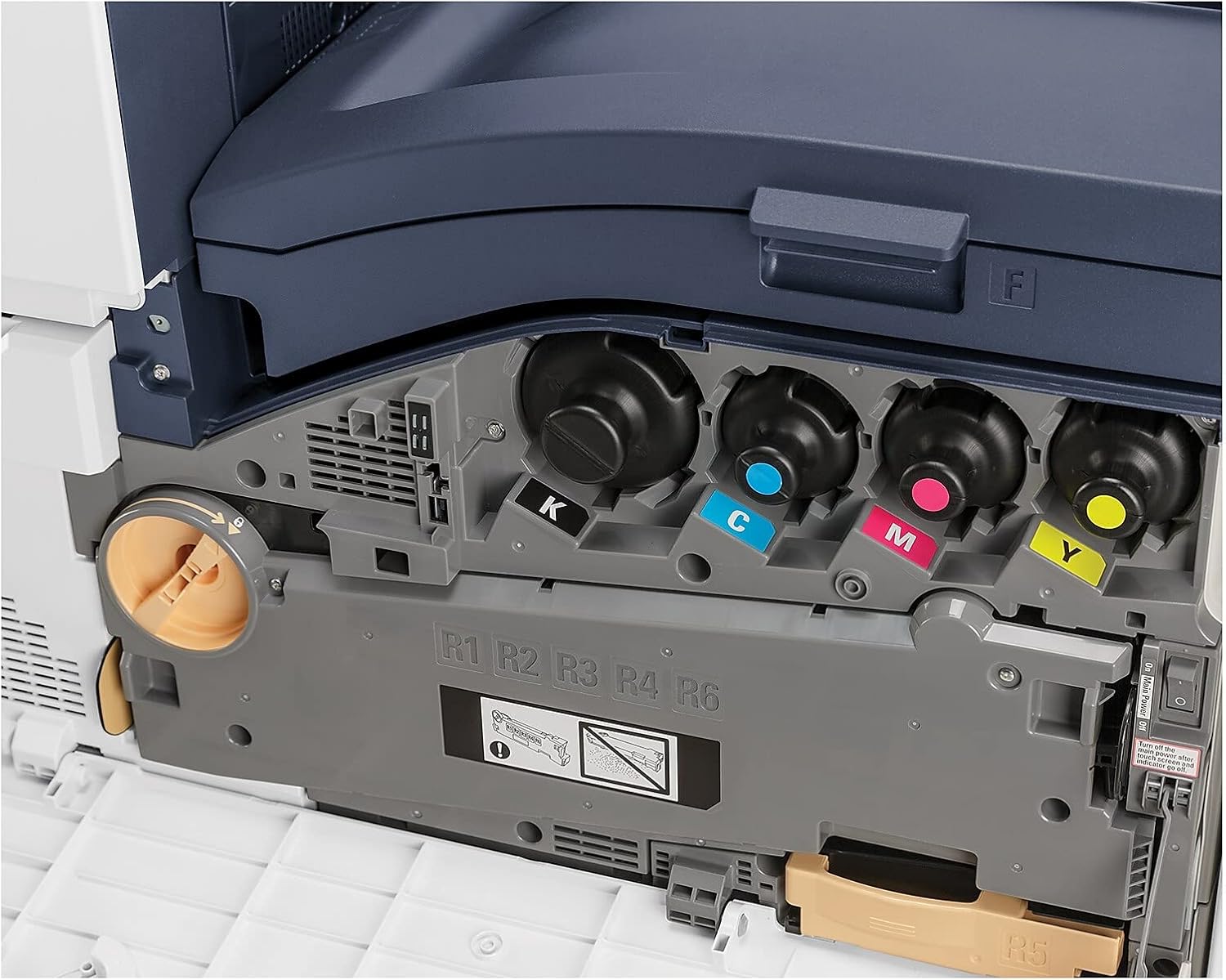
малюнок 5.1.1: View of the toner cartridge compartment, showing the slots for Black (K), Cyan (C), Magenta (M), and Yellow (Y) toner.
5.2 Очищення
Regularly clean the exterior of the printer with a soft, lint-free cloth. Do not use abrasive cleaners or solvents. Refer to the printer's internal cleaning procedures via the control panel for specific instructions on cleaning internal components.
6. Вирішення проблем
This section provides solutions to common issues. For more complex problems, refer to the online support resources or contact Xerox customer service.
- Принтер не відповідає: Check power connection, network cable, and ensure the printer is powered on. Restart the printer and the connected device.
- Проблеми з якістю друку: Check toner levels. Perform a print quality calibration from the printer's control panel. Ensure correct paper type settings.
- Зминання паперу: Follow the on-screen instructions or refer to the printer's internal guides for clearing paper jams from specific areas.
- Проблеми з підключенням до мережі: Verify Ethernet cable connection. Check network settings on the printer and your computer. Restart network devices.
7. Технічні характеристики
| Особливість | Деталь |
|---|---|
| Бренд | Xerox |
| Номер моделі | C8000/DT |
| Технологія друку | Лазерна |
| Вихід на принтер | Колір |
| Максимальна швидкість друку (кольоровий) | 42 ppm |
| Максимальна швидкість друку (монохромний) | 42 ppm |
| Максимальна роздільна здатність кольорового друку | 1200 x 2400 dpi |
| Максимальна роздільна здатність чорно-білого друку | 1200 x 2400 dpi |
| Двосторонній друк | Автоматичний |
| Технологія підключення | Ethernet |
| Апаратний інтерфейс | Ethernet |
| Сумісні пристрої | Смартфони |
| Спосіб контролю | додаток |
| Максимальний розмір носія | 8.5 x 14 дюймів |
| Типи друкованих носіїв | Конверти, папір (звичайний) |
| Максимальна ємність вхідного аркуша | 45 |
| Кількість лотків | 2 |
| Вага товару | 178 фунта |
| Розміри продукту | 28.5 x 24.4 x 31.9 дюймів |
| Ємність пам'яті | 4096 Мб |
| Wattage | 2300 Вт |
| Тип сканера | Планшетний |
| Додаткові функції принтера | Все в одному |
8. Гарантія та підтримка
8.1 Гарантія на виріб
The Xerox VersaLink C8000/DT Color Printer comes with a standard one-year warranty. For detailed terms and conditions, please refer to the warranty documentation included with your product or visit the official Xerox support webсайт.
8.2 Підтримка клієнтів
For technical assistance, troubleshooting, or service requests, please contact Xerox customer support. Support contact information can typically be found on the Xerox webсайті або в документації, що додається до вашого принтера.


