1. Вступ
Дякуємо за покупкуasing the MIFA A30 Bluetooth Speaker. This manual provides essential information for setting up, operating, and maintaining your device. Please read it thoroughly before use to ensure optimal performance and longevity of your speaker.
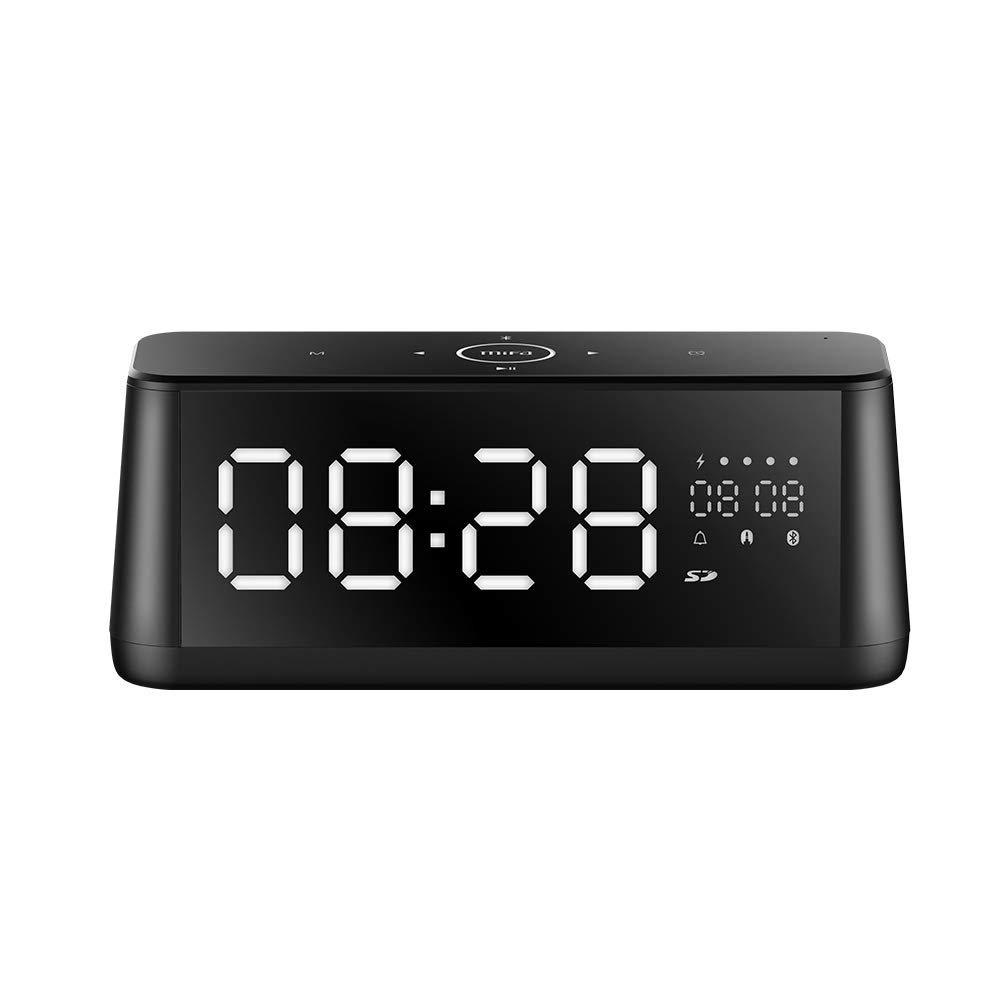
Зображення 1.1: спереду view of the MIFA A30 Bluetooth Speaker, displaying the time on its large LED screen.
2. Інформація про безпеку
- Не піддавайте динамік впливу екстремальних температур, прямих сонячних променів або високої вологості.
- Уникайте падіння та сильних ударів динаміка.
- Не розбирайте, не ремонтуйте та не модифікуйте пристрій самостійно. Зверніться до уповноваженого сервісного персоналу для будь-якого ремонту.
- Keep the speaker away from water and other liquids, despite its waterproof rating, to prevent damage to ports when open.
- Використовуйте лише зазначений зарядний кабель та адаптер.
- Протирайте динамік м’якою сухою тканиною. Не використовуйте абразивні засоби для чищення.
3. Вміст упаковки
Будь ласка, перевірте упаковку на наявність наступних предметів:
- MIFA A30 Bluetooth Speaker
- USB-кабель для зарядки
- Аудіокабель 3.5 мм
- Посібник користувача (цей документ)
4. Продукт закінчивсяview
4.1. Компоненти
The MIFA A30 speaker features a robust design with advanced audio components for high-quality sound reproduction.

Зображення 4.1: Розгорнуто view illustrating the internal components of the MIFA A30, including two 15-watt drivers and two low-frequency passive radiators.
4.2. Панель керування та порти
The speaker's top panel features capacitive touch controls, and the rear panel houses various connectivity ports.
Зображення 4.2: Зверху вниз view of the MIFA A30 control panel, indicating the functions of each touch button for mode, playback, volume, and clock adjustment.
- Кнопка M (режим): Short press to switch between Bluetooth, TF Card, and AUX modes.
- Управління Bluetooth: Long press to turn off Bluetooth, short press to turn on.
- Кнопка попереднього треку: Коротко натисніть, щоб перейти до попередньої доріжки.
- Play/Pause/Hands-Free Button: Коротке натискання для відтворення/паузи музики. Коротке натискання для відповіді/завершення дзвінків. Тривале натискання для відхилення дзвінків.
- Кнопка наступного треку: Коротко натисніть, щоб перейти до наступної доріжки.
- Кнопка годинника: Long press for clock adjustment.
- Збільшення гучності: Поверніть за годинниковою стрілкою, щоб збільшити гучність.
- Зменшення гучності: Поверніть проти годинникової стрілки, щоб зменшити гучність.
- Мікрофон: Вбудований мікрофон для дзвінків у режимі hands-free.
- Світлодіодний дисплей: Shows time, date, battery level, and current mode.
5. Налаштування
5.1. Заряджання динаміка
Before first use, fully charge the speaker. Connect the provided USB charging cable to the speaker's charging port and the other end to a USB power adapter (not included) or a computer's USB port. The LED display will indicate charging status.
5.2. Увімкнення/вимкнення живлення
- Щоб увімкнути: Press and hold the Play/Pause button until the LED display lights up.
- Щоб вимкнути: Press and hold the Play/Pause button until the LED display turns off. The speaker will automatically screen out and power off to save battery after a period of inactivity.
6. Інструкція з експлуатації
6.1. Підключення Bluetooth
- Ensure the speaker is powered on and in Bluetooth mode (indicated by the Bluetooth icon on the LED display). If not, short press the 'M' button to switch to Bluetooth mode.
- На смартфоні або планшеті увімкніть Bluetooth і знайдіть доступні пристрої.
- Select "MIFA A30" from the list of devices.
- Після сполучення динамік видасть звуковий сигнал підтвердження, а значок Bluetooth на дисплеї перестане блимати.
- The speaker will automatically re-connect to the last paired device when powered on, if the device is within range.
6.2. Відтворення аудіо
- Відтворення/пауза: Короткочасно натисніть кнопку відтворення/пауза.
- Наступний трек: Коротко натисніть кнопку «Наступний трек».
- Попередній трек: Коротко натисніть кнопку «Попередній трек».
- Регулювання гучності: Поверніть регулятор гучності за годинниковою стрілкою, щоб збільшити гучність, і проти годинникової стрілки, щоб зменшити гучність.
6.3. Дзвінки в режимі Hands-Free
Під час підключення до смартфона через Bluetooth:
- Відповісти на дзвінок: Короткочасно натисніть кнопку відтворення/пауза.
- Завершити виклик: Коротко натисніть кнопку відтворення/паузи під час дзвінка.
- Відхилити виклик: Довго натисніть кнопку відтворення/паузи, коли надходить дзвінок.
6.4. Відтворення з TF-картки
- Insert a Micro-SD (TF) card with supported audio files (FLAC/APE/MP3/WMA/WAV) into the TF card slot.
- Short press the 'M' button to switch to TF Card mode. The speaker will automatically begin playing music from the card.
6.5. Вхід AUX
- Connect one end of the 3.5mm audio cable to the speaker's AUX input port and the other end to the audio output of your device (e.g., MP3 player, computer).
- Short press the 'M' button to switch to AUX mode.
- Тепер аудіо відтворюватиметься через динамік з підключеного пристрою.
6.6. Clock and Display Settings
- Регулювання годинника: Long press the Clock button to enter time setting mode. Use the Next/Previous buttons to adjust values and the Play/Pause button to confirm.
- Display Luminance: The LED display has 7 adjustable luminance levels. Refer to the full product documentation for specific adjustment steps, typically involving short presses of the Clock button or a combination with volume controls.
7. Технічне обслуговування
- Прибирання: Протріть поверхню динаміка м’якою, сухою тканиною без ворсу. Не використовуйте рідкі або аерозольні засоби для чищення.
- Зберігання: Якщо динамік не використовується протягом тривалого часу, зберігайте його в прохолодному, сухому місці, подалі від прямих сонячних променів та екстремальних температур.
- Догляд за акумулятором: Щоб подовжити термін служби акумулятора, уникайте частого повного розряджання акумулятора. Регулярно заряджайте динамік, навіть якщо він не використовується.
8. Вирішення проблем
| проблема | Можлива причина | Рішення |
|---|---|---|
| Динамік не вмикається. | Низький заряд батареї. | Заряджайте динамік щонайменше 2 години. |
| Ні звуку. | Занадто низька гучність; неправильний режим; пристрій не підключено. | Increase speaker and device volume. Ensure correct mode (Bluetooth/AUX/TF Card). Re-pair Bluetooth device or check AUX cable connection. |
| Не вдається з'єднати Bluetooth. | Динамік не в режимі сполучення; пристрій занадто далеко; перешкоди. | Ensure speaker is in Bluetooth mode. Move device closer to speaker. Turn off other Bluetooth devices. Try forgetting "MIFA A30" on your device and re-pairing. |
| TF Card not playing. | Неправильний режим; не підтримується file format; card error. | Switch to TF Card mode. Ensure files are FLAC/APE/MP3/WMA/WAV. Reinsert TF card or try a different card. |
9. Технічні характеристики
| Особливість | Деталь |
|---|---|
| Назва моделі | A30 |
| Тип динаміка | Книжкова полиця |
| Технологія підключення | Bluetooth 4.2, Auxiliary (3.5mm), Micro-SD (TF Card) |
| Режим аудіовиходу | Стерео |
| Максимальна вихідна потужність динаміка | 30 Watts (2 x 15W drivers) |
| Посилення басів | Two low-frequency boosters |
| Ємність акумулятора | 4000 мАг |
| Час відтворення | Up to 10-12 hours (depending on volume and content) |
| Спосіб контролю | Ємнісна сенсорна панель |
| Дисплей | 7.2" x 2.8" Mirror LED Screen with 106 LEDs, 7-level adjustable luminance |
| Підтримувані аудіоформати | FLAC/APE/MP3/WMA/WAV |
| Вбудований мікрофон | Так, для дзвінків у режимі hands-free |
| Водостійкий | Yes (Note: Ensure ports are covered for water resistance) |
| Колір | чорний |
| Тип монтажу | Настільне кріплення |
10. Гарантія та підтримка
The MIFA A30 Bluetooth Speaker typically comes with a 30-day warranty from the date of purchase, covering manufacturing defects. Please retain your proof of purchase for warranty claims.
For technical support, troubleshooting assistance beyond this manual, or warranty inquiries, please contact MIFA customer service through their official website or the retailer where the product was purchased. Provide your product model (A30) and purchase details when seeking support.


