1. Вступ
This manual provides detailed instructions for the installation, operation, maintenance, and troubleshooting of your EVERSECU 2K 4MP Light-Bulb Security Camera. Please read this manual thoroughly before using the product to ensure proper functionality and safety. Keep this manual for future reference.

Image 1.1: The EVERSECU Light-Bulb Security Camera is suitable for various indoor and outdoor environments such as offices, warehouses, shops, and homes.
2. Продукт закінчивсяview
The EVERSECU Light-Bulb Security Camera is a versatile surveillance device designed for easy installation and comprehensive monitoring. It features high-definition video, night vision, two-way audio, and smart motion detection capabilities.
Ключові характеристики:
- 2K 4MP Ultra HD Video Resolution: Забезпечує чітке та детальне відео footage (2560×1440).
- Бездротове та просте встановлення: Screws directly into standard E26/E27 light sockets (110V~240V) without drilling or complex wiring.
- Нічне бачення під зоряним світлом: Equipped with 4 IR LEDs and 6 white LEDs for up to 31ft black/white and 65.6ft full-color night vision.
- 360° View (Pan/Tilt/Zoom): Offers 355° pan, 110° tilt, and 4x digital zoom, controllable via the ICSEE app.
- Двостороннє аудіо: Вбудований мікрофон і динамік для зв'язку в режимі реального часу.
- Виявлення руху та автоматичне відстеження: Detects movement, tracks subjects, and sends real-time alerts.
- IP66 Weather-Proof: Міцний ABS-пластик casing suitable for indoor and outdoor use (-4℉~+140℉).
- Сумісність Alexa: Supports voice control through Amazon Alexa.
- Варіанти зберігання: Підтримує локальне сховище через SD-карту та хмарне сховище.

Image 2.1: The EVERSECU Light-Bulb Security Camera shown alongside its mobile application interface.

Image 2.2: Visual representation of the camera's core functionalities including motion detection, PTZ, color night vision, 2.4Ghz/5Ghz WiFi, two-way audio, sound alarm, SD card support, and cloud storage.
3. Налаштування
3.1 Вміст упаковки
Перевірте наявність усіх компонентів:
- EVERSECU Light-Bulb Security Camera
- Посібник користувача (цей документ)
- Монтажні аксесуари (якщо є, перевірте упаковку)
3.2 Встановлення
- Перед встановленням переконайтеся, що живлення розетки вимкнено.
- Screw the EVERSECU Light-Bulb Security Camera into a standard E26 or E27 light socket (110V~240V). No drilling or additional wiring is required.
- Увімкніть живлення розетки світильника. Камера увімкнеться та розпочне послідовність запуску.
3.3 Встановлення та підключення програми
- Завантажити МКСЄЕ app from the App Store (iOS), Google Play Store (Android), or the official website for Windows.
- Зареєструйте обліковий запис і увійдіть.
- Follow the in-app instructions to add your camera. This typically involves scanning a QR code on the camera or connecting to the camera's temporary Wi-Fi hotspot.
- Connect the camera to your 2.4Ghz Wi-Fi network. Ensure your Wi-Fi password is correct.
- Once connected, you can access the live feed and control the camera remotely.

Image 3.1: The ICSEE application is available for Android, iOS, and Windows platforms, allowing remote access and control of the camera.
4. Інструкція з експлуатації
4.1 Живий View та керування PTZ
Open the ICSEE app to view the live feed from your camera. Use the on-screen controls to:
- Пан: Поверніть камеру горизонтально до 355°.
- Нахил: Налаштуйте камеру вертикально до 110°.
- Масштаб: Use 4x digital zoom to magnify areas of interest.

Image 4.1: The camera offers extensive pan and tilt functionality for comprehensive area coverage.
4.2 Режими нічного бачення
The camera supports two night vision modes:
- Інфрачервоне нічне бачення: Utilizes IR LEDs for clear black and white video in low-light conditions (up to 31ft).
- Повнокольорове нічне бачення: Activates white LEDs to provide full-color video even in darkness (up to 65.6ft). This mode can also deter intruders.
You can switch between these modes or set them to automatic activation within the app settings.
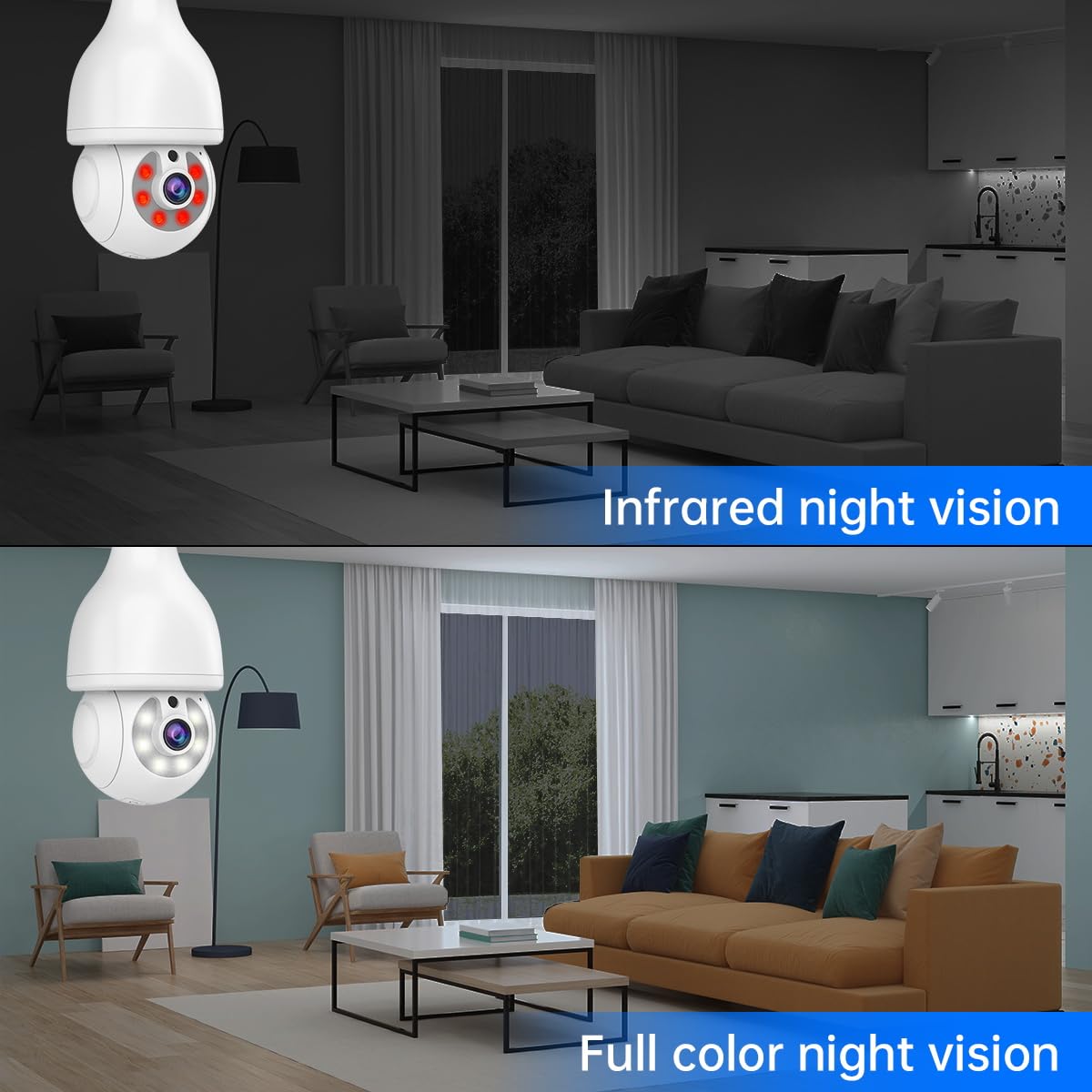
Image 4.2: A visual comparison demonstrating the clarity and detail provided by both infrared and full-color night vision capabilities.
4.3 Двосторонній аудіозв'язок
Use the two-way audio feature to communicate through the camera. Tap the microphone icon in the app to speak, and the camera's built-in speaker will broadcast your voice. You can also hear audio from the camera's location.

Image 4.3: The two-way audio function allows for interactive communication between the camera's location and the user's mobile device.
4.4 Виявлення руху та автоматичне відстеження
Enable motion detection in the app to receive real-time alerts on your phone when movement is detected. The camera can automatically track the detected subject, ensuring continuous monitoring of suspicious activity. A sound alarm can also be configured to deter intruders.

Image 4.4: The camera's motion detection system triggers real-time alerts and automatically tracks moving objects, enhancing security.
4.5 Інтеграція з Alexa
The camera is compatible with Amazon Alexa. Follow the instructions in the ICSEE app or your Alexa app to link your camera and enable voice commands for viewing the camera feed on compatible Alexa devices.
5. Технічне обслуговування
5.1 Очищення
To maintain optimal performance, periodically clean the camera lens and exterior casing with a soft, dry cloth. Avoid using harsh chemicals or abrasive materials that could damage the camera.
5.2 оновлень мікропрограми
Regularly check for and apply firmware updates through the ICSEE app. Firmware updates often include performance improvements, new features, and security enhancements. Ensure a stable internet connection during updates to prevent interruption.
5.3 Захист від погодних умов
While the camera is IP66 weather-proof, it is important to protect the light screw connector from direct water exposure, especially in outdoor installations, to prevent damage.
6. Вирішення проблем
Якщо у вас виникли проблеми з камерою, зверніться до наступних поширених проблем та способів їх вирішення:
| проблема | Можлива причина | Рішення |
|---|---|---|
| Camera fails to connect to Wi-Fi or frequently disconnects. | Weak Wi-Fi signal, incorrect Wi-Fi password, 5Ghz Wi-Fi network used. | Ensure the camera is within range of a 2.4Ghz Wi-Fi network. Verify the Wi-Fi password. Try resetting the camera and re-pairing it with the app. |
| Не вдалося оновити прошивку. | Unstable internet connection, corrupted download. | Ensure a strong and stable internet connection. Restart the app and camera, then attempt the update again. |
| У додатку немає відеотрансляції. | Camera offline, app issue, network problem. | Check if the camera is powered on and connected to Wi-Fi. Restart the ICSEE app. Verify your internet connection. |
| Сповіщення про виявлення руху не надходять. | Motion detection disabled, app notifications turned off, incorrect sensitivity settings. | Enable motion detection and push notifications in the ICSEE app. Adjust motion sensitivity settings. Check phone notification settings. |
| Двосторонній аудіозв'язок не працює. | Мікрофон/динамік вимкнено в додатку, занадто низька гучність, затримка мережі. | Ensure microphone and speaker functions are enabled and volume is adjusted in the app. Check network stability. |
For further assistance, please contact EVERSECU customer support.
7. Технічні характеристики
- модель: B07HT73LV1
- Роздільна здатність відео: 2560×1440 (4 Megapixel Ultra HD)
- Підключення: Wireless 2.4Ghz WiFi
- Нічне бачення: 4 IR LEDs + 6 white LEDs; 31ft B/W, 65.6ft Full-Color
- Діапазон панорамування/нахилу: Панорамування 355°, нахил 110°
- Цифрове збільшення: 4x
- Аудіо: Двосторонній аудіозв'язок (вбудований мікрофон і динамік)
- Стійкість до погодних умов: IP66
- Джерело живлення: E26 / E27 light socket (110V~240V)
- Розміри: 4 x 4 x 8.7 дюймів
- вага: 1.48 фунта
- Сумісність: ICSEE App (Android, iOS, Windows), Amazon Alexa
- Зберігання: SD Card (not included), Cloud Storage (subscription may be required)
- Особливості: Motion Detection, Auto Tracking, RTSP Stream, ONVIF-conformant
8. Гарантія та підтримка
For warranty information, please refer to the documentation provided at the time of purchase or visit the official EVERSECU website. For technical support or further inquiries, please contact EVERSECU customer service through their official channels.
