1. Вступ
The AKAI Professional MPK Mini Play is a versatile, ultra-portable MIDI keyboard controller designed for musicians and producers. It features 25 velocity-sensitive mini keys, 8 backlit MPC drum pads, and a built-in sound module with 128 instrument sounds and 10 drum kits. This manual provides detailed instructions for setting up, operating, and maintaining your MPK Mini Play.

Figure 1: AKAI Professional MPK Mini Play Overview
2. Налаштування
2.1 Живлення пристрою
The MPK Mini Play can be powered in two ways:
- Потужність батареї: For portable use, insert three (3) AA batteries (not included) into the battery compartment on the underside of the unit. Ensure the power switch on the rear panel is set to 'BATT'.
- Потужність USB: Connect the MPK Mini Play to a computer using the included USB cable. The unit will draw power directly from the USB connection. Ensure the power switch on the rear panel is set to 'USB'.
- Connect one end of the USB cable to the USB port on the rear of the MPK Mini Play.
- Під’єднайте інший кінець кабелю USB до вільного порту USB на комп’ютері.
- The MPK Mini Play is class-compliant and does not require special drivers for basic MIDI functionality. Your computer should recognize it automatically.
- Навушники: Connect 1/8-inch (3.5mm) headphones to the headphone output jack on the rear panel.
- Зовнішній динамік/Ampліфтер: Connect the 1/8-inch (3.5mm) audio output to an external speaker, amplifier, or mixer using an appropriate cable.
2.2 Підключення до комп’ютера
To use the MPK Mini Play as a MIDI controller with your computer:
2.3 Аудіовихід
For enhanced sound or private practice:

Рисунок 2: З’єднання на задній панелі
3. Інструкція з експлуатації
3.1 Keyboard Keys
The MPK Mini Play features 25 velocity-sensitive mini keys. Use the ОКТАВА Вгору і ОКТАВА ВНИЗ buttons to shift the keyboard's octave range, allowing access to the full melodic spectrum.
3.2 барабанних педів
The 8 backlit MPC-style drum pads are velocity-sensitive and can be used to trigger drum sounds or samples. The pads are organized into two banks (A/B), providing access to 16 different sounds. Use the PAD BANK A/B button to switch between banks.
- Примітка Повторіть: Натисніть і утримуйте ПРИМІТКА ПОВТОР button while striking a pad to repeatedly trigger its sound. The rate of repetition is determined by the current tempo and time division settings.
- Повний рівень: Натисніть ПОВНИЙ РІВЕНЬ button to make all pad strikes trigger at maximum velocity, regardless of how hard you hit them.

Figure 3: Drum Pads and Arpeggiator Controls
3.3 Controls (Knobs & Joystick)
The MPK Mini Play includes several controls for sound manipulation:
- 4-позиційний джойстик: This joystick provides dynamic control over pitch bend and modulation, allowing for expressive performance.
- Призначені ручки: There are four assignable knobs (organized into two banks, A/B) that can be used to tweak internal sounds or control software parameters. Use the KNOB BANK A/B button to switch between banks.
- Dedicated Sound Controls: In standalone mode, dedicated knobs control Filter, Resonance, Reverb Amount, Chorus Amount, and Volume.
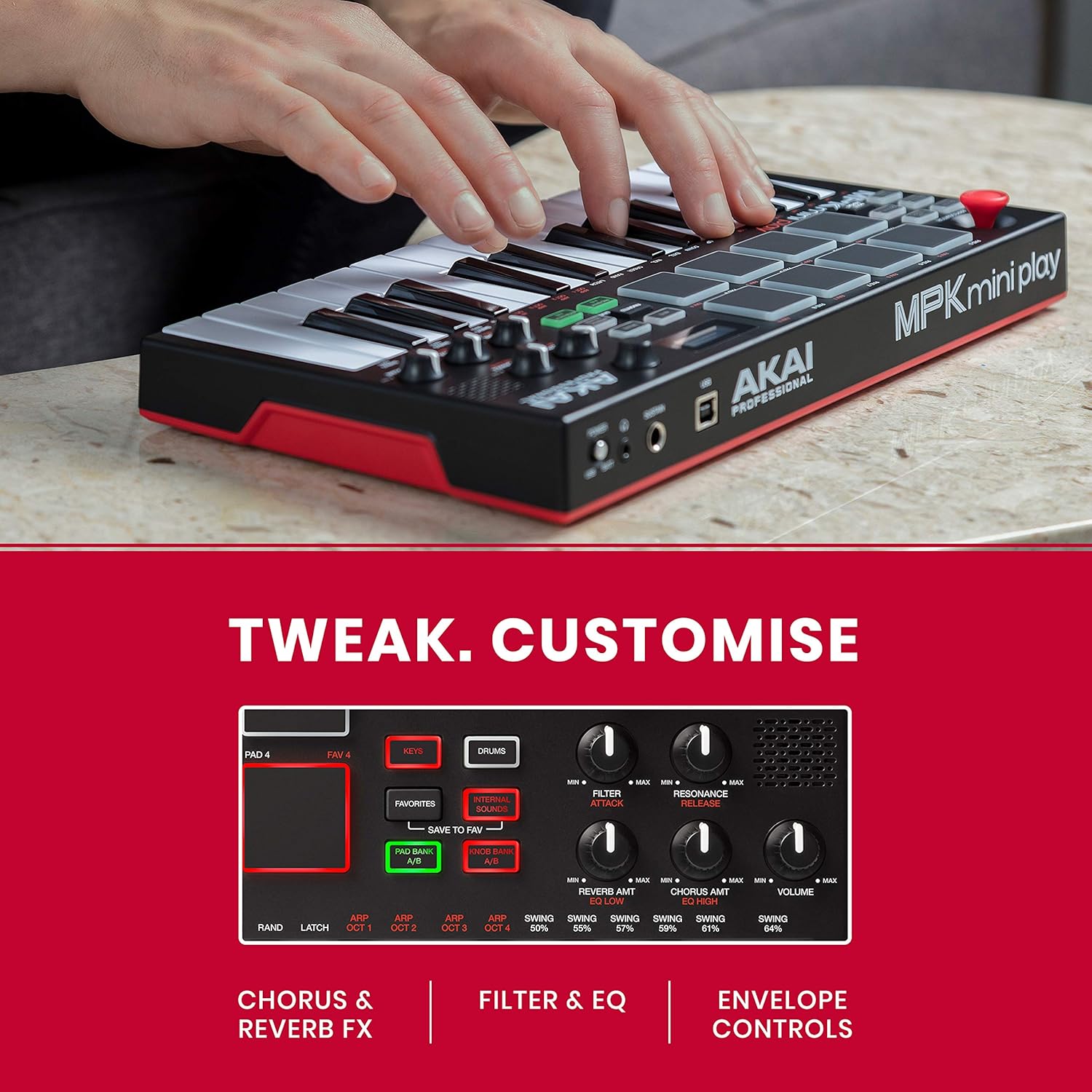
Figure 4: Sound Control Knobs
3.4 Internal Sounds
The MPK Mini Play comes with 128 internal instrument sounds and 10 drum kits. Use the КЛЮЧІ і БАРАБАНИ buttons to switch between instrument and drum modes. The OLED display will show the currently selected sound. You can save your favorite sounds using the SAVE TO FAV функція.
3.5 Арпеджіатор
The built-in arpeggiator can automatically play a sequence of notes based on the keys you hold down. Use the УВІМК./ВИМК button to activate/deactivate the arpeggiator and the TAP TEMPO button to set the tempo. Various arpeggiator modes and settings can be adjusted for creative effects.
4. Інтеграція програмного забезпечення
The MPK Mini Play is designed to integrate seamlessly with Digital Audio Workstations (DAWs) and music production software. It includes a software suite to enhance your music creation experience.
4.1 MPC Beats Software
The MPK Mini Play comes with MPC Beats, a comprehensive beat-making software based on the legendary MPC workflow. This software allows you to program drum patterns, chop and edit samples, record melodic instruments, and utilize various instrument/plugin tracks and audio tracks. It also includes 3 MPC plugins (Bassline, Electric, Tube Synth) and over 80 Air Audio FX.
Video 1: Introducing MPC Beats Software
Це відео забезпечує завершенняview of the MPC Beats software, demonstrating its capabilities for beat making, sample editing, and instrument recording, highlighting its compatibility with MIDI controllers like the MPK Mini Play.

Figure 5: MPK Mini Play with MPC Beats
5. Технічні характеристики
| Особливість | опис |
|---|---|
| Назва моделі | MPK MINI Play |
| Ключі | 25 міні-клавіша, чутлива до швидкості натиснення |
| колодки | 8 backlit, velocity-sensitive MPC-style pads (2 banks) |
| Ручки | 4 assignable Q-Link knobs (2 banks) |
| Джойстик | 4-way joystick for pitch bend and modulation control |
| Внутрішні звуки | 128 instrument sounds, 10 drum kits |
| Спікер | Вбудований динамік |
| Виходи | 1/8-inch (3.5mm) headphone output |
| Вхідні дані | 1/4-inch (6.35mm) TS input for sustain pedal |
| Підключення | USB-B port for MIDI and power |
| потужність | USB bus powered or 3 x AA batteries |
| Розміри (Ш x Г x В) | 12.29 x 6.8 x 1.83 дюйми (31.2 x 17.3 x 4.6 см) |
| вага | 1.64 фунти (0.74 кг) |
6. Вирішення проблем
- No Sound from Built-in Speaker: Ensure the volume knob is turned up and the power switch is set to 'BATT' (if using batteries) or 'USB' (if connected to computer). Check if headphones are plugged in, as this will mute the internal speaker.
- No MIDI Signal to Computer: Verify the USB cable is securely connected to both the MPK Mini Play and your computer. Ensure the power switch is set to 'USB'. Check your DAW's MIDI settings to confirm the MPK Mini Play is recognized and enabled as an input device.
- Keys/Pads Not Responding: Check if the unit is powered on. If using batteries, ensure they are fresh and correctly inserted. If connected via USB, confirm the connection is stable.
- Software Not Recognizing MPK Mini Play: Ensure your DAW or software is up-to-date. Consult the software's documentation for specific MIDI controller setup instructions.
7. Технічне обслуговування
- Прибирання: Use a soft, dry cloth to clean the surface of the MPK Mini Play. Do not use abrasive cleaners, solvents, or harsh chemicals.
- Зберігання: Store the unit in a cool, dry place away from direct sunlight and extreme temperatures. If storing for an extended period, remove batteries to prevent leakage.
- Обробка: Уникайте падіння пристрою та сильних ударів. Не ставте на нього важкі предмети.
8. Гарантія та підтримка
For warranty information and technical support, please visit the official Akai Professional webсайт або зверніться до служби підтримки клієнтів. Зберігайте чек про покупку як підтвердження покупки для гарантійних претензій.
Akai Professional Webсайт: www.akaipro.com


