вступ
This manual provides detailed instructions for the installation, setup, and operation of your JVC KD-X260BT Digital Media Receiver. This unit is designed to provide high-quality audio playback and hands-free communication in your vehicle, featuring Bluetooth connectivity, USB input, and a 13-band equalizer. Please note, this unit does not play CDs. Read this manual thoroughly before use to ensure proper operation and to prevent damage.

Зображення: спереду view of the JVC KD-X260BT Digital Media Receiver, showing the display and control buttons.
Інформація про безпеку
- Do not operate the unit in a way that distracts you from driving. Always keep your attention on the road.
- Ensure proper wiring connections to prevent short circuits or damage to the vehicle's electrical system.
- Уникайте впливу вологи або екстремальних температур на пристрій.
- Не намагайтеся розбирати або модифікувати пристрій. Звертайтеся до кваліфікованого персоналу для проведення будь-яких технічних робіт.
- Use only accessories specified by JVC.
Вміст упаковки
Перевірте наявність усіх елементів в упаковці:
- Цифровий медіа-ресивер JVC KD-X260BT
- Джгут
- External Wired Microphone
- Монтажне обладнання
- Інструкція з експлуатації (цей документ)
монтаж
Professional installation is recommended for this product. Incorrect installation can lead to damage to the unit or vehicle. The KD-X260BT features a short body design, which facilitates easier installation in various vehicle dashboards.
Підключення проводів:
- Connect the wiring harness according to your vehicle's wiring diagram.
- Переконайтеся, що всі з’єднання надійні та ізольовані, щоб запобігти короткому замиканню.
- Connect the external microphone to the designated input for hands-free calling. Position the microphone in a location that provides clear voice pickup.
- Підключіть кабель антени.
- Якщо використовується зовнішній amplifiers, connect the 2.5V preamp outputs (rear/subwoofer selectable).
Монтаж:
- Встановіть монтажну втулку в отвір приладової панелі.
- Вставте приймач у монтажну гільзу, доки він не зафіксується на місці.
- Прикріпіть обрізне кільце.
Налаштування
Початкове ввімкнення:
After installation, turn on your vehicle's ignition. The unit should power on. Follow any on-screen prompts for initial setup, such as language selection.
Парування Bluetooth:
The KD-X260BT supports Bluetooth 3.0+EDR and allows for two phones to be connected full-time. This enables receiving calls from either phone with a push of a key.
- On the receiver, navigate to the Bluetooth menu.
- Виберіть «Спів’єднання» або «Пошук пристроїв».
- На смартфоні увімкніть Bluetooth та знайдіть доступні пристрої.
- Select "KD-X260BT" from the list on your phone.
- Підтвердьте код сполучення на обох пристроях, якщо буде запропоновано.
- Once paired, the unit will display a confirmation.
The unit supports Bluetooth profiles HFP (Hands-Free Profile 1.6 for wideband speech), HSP (Headset Profile), PBAP (Phone Book Access Profile), A2DP (Advanced Audio Distribution Profile) і AVRCP (Audio/Video Remote Control Profile 1.5).
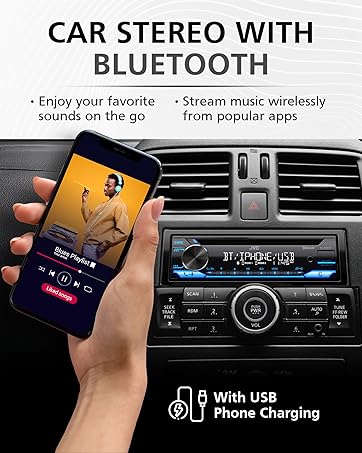
Image: JVC KD-X260BT display indicating Bluetooth connection, with a smartphone showing music playback, illustrating wireless audio streaming.
JVC Remote App:
Download the "JVC Remote" app (available for iOS and Android) to control the receiver's source directly from your smartphone using simple finger gestures.
Інструкція з експлуатації
Основні елементи керування:
- Кнопка живлення: Натисніть, щоб увімкнути/вимкнути пристрій.
- Регулятор гучності: Rotate to adjust the volume level. Press to access menu options.
- Кнопка джерела: Press to cycle through available audio sources (Tuner, USB, Bluetooth Audio, AUX).
- Кнопка дисплея: Changes display information (e.g., clock, track title).
Радіо тюнер:
- Press the Source button to select "Tuner" (AM/FM).
- Використовуйте кнопки пошуку, щоб знайти радіостанції.
- Press and hold a preset button (1-6) to store a station.
Відтворення через USB:
Connect a USB device to the front USB port. The unit supports MP3/WMA/WAV/FLAC playback. The USB port also provides high current 1.5A charging for smartphones.
- Insert the USB device. The unit will automatically switch to USB source and begin playback.
- Use the track buttons to skip tracks.
- Use the folder buttons to navigate through folders.
- MP3 ID3 Tag Display (title/artist/album) is supported.
- Android music playback (AOA 2.0) is supported for Android phones (version 4.1 or later).
Потокове передавання аудіо через Bluetooth:
Once a Bluetooth device is paired, select "Bluetooth Audio" as the source to stream music wirelessly. Use the receiver's controls or the paired device to manage playback (play, pause, skip, search via AVRCP 1.5).
Дзвінки в режимі Hands-Free:
When a call comes in on a paired phone, the unit will display the caller ID. Press the call button to answer, and the end call button to hang up. The external microphone ensures clear communication.
Audio Settings (Equalizer):
The unit features a 13-Band Graphic Equalizer with 10 preset EQ settings and 1 user-customizable setting. Access the audio menu to adjust:
- Еквалайзер: Select from preset curves or customize your own.
- Підсилення басів: Підсилює низькі частоти.
- Гучність: Compensates for perceived loss of bass and treble at low volumes.
- Баланс/фейдер: Adjusts sound distribution between left/right and front/rear speakers.
- Управління сабвуфером: Adjust subwoofer output level and frequency if connected.
Internet Radio/Digital Radio Control:
Control Pandora, iHeartRadio, and Spotify directly from the receiver when connected to a compatible Android device via Bluetooth.
Steering Wheel Remote Control:
Factory steering wheel control functions can be retained with a third-party adapter (sold separately).
Технічне обслуговування
- Очищення пристрою: Використовуйте м’яку суху тканину для протирання передньої панелі. Не використовуйте абразивні засоби для чищення або розчинники.
- Порт USB: Тримайте USB-порт чистим від пилу та сміття.
- Оновлення прошивки: Check the JVC website periodically for any available firmware updates for improved performance and features.
Усунення несправностей
| проблема | Рішення |
|---|---|
| Немає живлення | Check vehicle's fuse. Ensure wiring harness is correctly connected. |
| Ні звуку | Check speaker connections. Verify volume level. Ensure correct source is selected. |
| Bluetooth не підключається | Ensure Bluetooth is enabled on both devices. Delete previous pairing and re-pair. Move devices closer. |
| USB-пристрій не розпізнано | Ensure USB device is formatted correctly (FAT16/32). Check for compatible file типи. Спробуйте інший USB-пристрій. |
| Поганий радіоприйом | Check antenna connection. Ensure antenna is fully extended (if applicable). |
Технічні характеристики
| Особливість | Деталь |
|---|---|
| Номер моделі | KD-X260BT |
| Вихідна потужність (пікова) | 50 Вт x 4 канали |
| Вихідна потужність (середньоквадратичне значення) | 22 Вт x 4 канали |
| Дисплей | VA LCD Display, Spanish Text Display |
| USB-вхід | Front USB, 1.5A Charging, MP3/WMA/WAV/FLAC Playback, Android AOA 2.0 |
| Допоміжний вхід | 3.5mm Front Audio Auxiliary Input |
| Версія Bluetooth | 3.0+EDR Certified |
| Bluetooth Profiles | HFP 1.6, HSP, PBAP, A2DP, AVRCP 1.5 |
| Еквалайзер | 13-Band Graphic Equalizer (10 Preset x 1 User) |
| попередньоamp Виходи | 1 Set of 2.5V (Rear/Subwoofer Selectable) |
| Керування інтернет-радіо | Pandora, Spotify, iHeartRadio (for Android) |
| Розміри (продукт) | 4 x 9 x 8 дюймів |
| Вага товару | 1.79 фунта |
Гарантія та підтримка
This JVC KD-X260BT Digital Media Receiver comes with a 1-Year Manufacturer's Warranty. For warranty claims, technical support, or service inquiries, please contact JVC customer support or visit the official JVC webсайт. Зберігайте підтвердження покупки для підтвердження гарантії.
Підтримка клієнтів JVC: Refer to the contact information provided with your product packaging or on the official JVC webсайт.


