1. Вступ
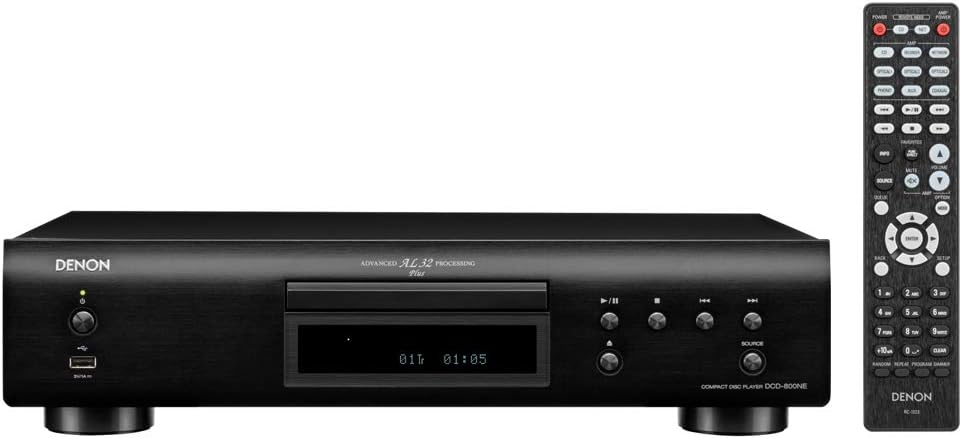
The Denon DCD-800NE is a single-disk CD player designed for high-resolution audio playback. It features an integrated USB port for playing various digital file formats. The player incorporates Advanced AL32 Processing Plus and an innovative circuitry structure to ensure accurate and interference-free sound reproduction, faithful to the original recording. It supports hi-res playback up to PCM192/24 and DSD 2.8 MHz/5.6 MHz via its USB port. The Pure Direct Mode allows for direct sound output to amplifiers, bypassing additional processing for clean and detailed audio. Its vibration-resistant design minimizes adverse audio effects, maintaining Denon's sound quality standards.

малюнок 1: Фронт view of the Denon DCD-800NE CD Player with its remote control. The display shows track information and playback status.
2. Налаштування
2.1 Розпакування
Обережно вийміть усі компоненти з упаковки. Переконайтеся, що є такі предмети:
- CD-програвач Denon DCD-800NE
- Пульт дистанційного керування (RC-1223)
- Two "AAA" batteries for the remote
- 47" Stereo RCA cable
- Owner's Manual on CD-ROM (for detailed instructions)
- Короткий посібник
- Інформація про гарантію
- Інструкції з техніки безпеки
2.2 Розміщення
Place the DCD-800NE on a stable, level surface away from direct sunlight, heat sources, and excessive vibration. Ensure adequate ventilation around the unit.
2.3 Підключення
Connect the DCD-800NE to your amplifier or receiver using the provided RCA cable or a digital audio cable (optical or coaxial, not included). For optimal sound quality, ensure all connections are secure.
малюнок 2: Rear panel connections of the DCD-800NE, including analog audio out (RCA), digital audio out (optical and coaxial), and IR control ports.
- Аналоговий аудіовихід: Connect the RCA cables from the "AUDIO OUT" jacks on the DCD-800NE to the corresponding analog input jacks on your amplifier (e.g., "CD IN").
- Цифровий аудіовихід: For digital connection, use an optical or coaxial digital cable (not supplied) to connect the "DIGITAL AUDIO OUT" (OPTICAL or COAXIAL) jack on the DCD-800NE to a digital input on your amplifier або DAC.
- Підключення живлення: Once all audio connections are made, connect the power cord to the DCD-800NE and then to an AC power outlet.
2.4 Встановлення батарейок пульта дистанційного керування
Open the battery compartment on the back of the remote control and insert the two "AAA" batteries, ensuring correct polarity (+/-). Close the compartment.
3. Операція
3.1 Увімкнення/вимкнення живлення
Натисніть кнопку живлення на передній панелі або на пульті дистанційного керування, щоб увімкнути або вимкнути пристрій.
3.2 Відтворення CD
- Натисніть ВІДКРИТИ/ЗАКРИТИ , щоб відкрити лоток для диска.
- Place a CD with the label side up into the disc tray.
- Натисніть ВІДКРИТИ/ЗАКРИТИ знову натисніть кнопку, щоб закрити лоток. Програвач зчитає диск.
- Натисніть ГРАТИ , щоб розпочати відтворення.
- Використовуйте ПРОПУСТИТИ buttons to navigate between tracks and the ПАУЗА or СТІЙ кнопки для керування відтворенням.
3.3 Відтворення з USB
The DCD-800NE features a front USB-A port for playing audio files from USB storage devices (e.g., USB flash drives, external hard drives).
- Вставте USB-накопичувач у USB-порт на передній панелі.
- Натисніть USB button on the front panel or remote to select the USB input.
- Use the navigation buttons on the remote to browse folders and select desired audio files.
- Прес ГРАТИ to begin playback. The player supports hi-res formats like PCM192/24 and DSD 2.8 MHz/5.6 MHz, as well as MP3, WMA, and FLAC.
3.4 Чисто прямий режим
Activate Pure Direct Mode to bypass digital processing circuits that can color the audio signal. This provides a cleaner, more direct sound path, ideal for critical listening. Refer to the full Owner's Manual for instructions on enabling this mode.
3.5 Integration with Denon 800NE Series
The DCD-800NE is designed to integrate seamlessly with other Denon 800NE series components, such as the PMA-800NE Integrated Amplifier and DNP-800NE Network Audio Player, for a complete high-fidelity system. A single remote control can operate the entire 800NE series.
Відео 1: Оверview of the Denon 800NE series, demonstrating the DCD-800NE CD player's features, including its integration with the PMA-800NE amplifier and DNP-800NE network player, advanced processing, and vibration-resistant design. It highlights CD and USB playback capabilities.
4. Технічне обслуговування
4.1 Очищення пристрою
Wipe the exterior of the unit with a soft, dry cloth. Do not use abrasive cleaners, waxes, or solvents as they may damage the finish. Avoid spraying liquids directly onto the unit.
4.2 Очищення дисків
Handle CDs by their edges. If a disc is dirty, wipe it gently from the center outwards with a soft, lint-free cloth. Do not use harsh chemicals or abrasive materials, as these can scratch the disc surface and affect playback quality.
4.3 Вентиляція
Ensure that the ventilation openings on the unit are not blocked. Proper airflow is essential to prevent overheating and maintain optimal performance.
5. Вирішення проблем
If you experience issues with your DCD-800NE, consult the following common troubleshooting steps before seeking professional service.
- Немає живлення:
- Check if the power cord is securely plugged into the unit and the AC outlet.
- Переконайтеся, що розетка працює.
- Немає звуку:
- Verify that the audio cables are correctly connected between the DCD-800NE and your ampліфтер/приймач.
- Переконайтеся, що на вашому пристрої вибрано правильне джерело вхідного сигналу. ampліфтер/приймач.
- Check the volume level on both the DCD-800NE and your ampліфтер/приймач.
- Disc Does Not Play / Disc Error:
- Переконайтеся, що диск чистий і не має подряпин або плям.
- Make sure the disc is inserted correctly with the label side up.
- Спробуйте відтворити інший диск, щоб визначити, чи проблема в програвачі, чи в диску.
- Some discs may not be compatible (e.g., certain recordable CD-R/RW formats).
- USB Device Not Recognized / FileНе відтворюється:
- Ensure the USB device is formatted correctly (FAT16/FAT32).
- Перевірте аудіо files are in a supported format (MP3, WMA, FLAC, WAV, DSD).
- The player supports up to 255 folders on a USB drive.
- Some USB devices may require external power or may not be compatible.
- Пульт дистанційного керування не працює:
- Check if the batteries are inserted correctly and are not depleted.
- Переконайтеся, що між пультом дистанційного керування та ІЧ-датчиком пристрою немає перешкод.
- Направте пульт прямо на пристрій.
For more detailed troubleshooting, refer to the Owner's Manual on CD-ROM.
6. Технічні характеристики
| Особливість | Деталь |
|---|---|
| Розміри продукту | 10.5 x 17.12 x 4.5 дюймів |
| Вага товару | 9.48 фунта |
| Номер моделі | DCD-800NE |
| Технологія підключення | USB |
| Включені компоненти | CD player, Remote control (RC-1223), Two "AAA" batteries, 47" Stereo RCA cable, Owner's Manual on CD-ROM, Quick Start Guide, Warranty Information, Safety Instructions |
| Дата першої доступності | 13 вересня 2018 р |
Примітка: Технічні характеристики можуть бути змінені без попередження.
7. Інформація про гарантію
Denon products are manufactured to the highest quality standards. This product is covered by a limited warranty. Please refer to the "Warranty Information" document included in your product packaging or on the Owner's Manual CD-ROM for specific terms, conditions, and duration of the warranty applicable to your region. Keep your proof of purchase for warranty service.
8. Підтримка клієнтів
For technical assistance, product inquiries, or service requests, please contact Denon customer support. You can find contact information on the official Denon website or in the "Quick Start Guide" included with your product.
Інтернет-ресурси: Відвідайте офіційний сайт Denon webсайт із поширеними запитаннями, оновленнями програмного забезпечення та додатковими допоміжними матеріалами.