1. Вступ
The Hioki CM3286 Clamp On Power Tester is a versatile instrument designed for precise measurement of electrical parameters. It is capable of measuring voltage, current, power, power factor, phase angle, reactive power, and frequency. Additionally, it can detect phase sequence on live lines within single-phase or three-phase circuits at any desired point. This manual provides essential information for the safe and effective operation, maintenance, and troubleshooting of your CM3286 device.
2. Інформація про безпеку
WARNING: Read all safety warnings and instructions before using this product. Failure to follow the warnings and instructions may result in electric shock, fire, or serious injury.
- Завжди дотримуйтесь місцевих та національних правил безпеки.
- Не використовуйте пристрій, якщо він виглядає пошкодженим або працює неналежним чином.
- Ensure the device is rated for the voltage and current levels you intend to measure.
- Використовуйте відповідні засоби індивідуального захисту (ЗІЗ), такі як ізотермічні рукавички та захист для очей.
- Avoid touching live conductors with bare hands or non-insulated tools.
- Do not operate the device in wet environments or explosive atmospheres.
- Keep fingers behind the tactile barrier on the instrument during measurements.
- Disconnect the device from the circuit before opening the battery compartment.
3. Вміст упаковки
Переконайтеся, що всі перелічені нижче предмети присутні та не пошкоджені після відкриття упаковки:
- Хіокі CM3286 Clamp On Power Tester Unit
- Вимірювальні дроти (червоний та чорний)
- Чохол для транспортування
- Батарейки AAA (x2)
- Інструкція з експлуатації (цей документ)
4. Характеристики та компоненти продукту

Figure 4.1: Hioki CM3286 Clamp On Power Tester (Overall View)
This image displays the complete Hioki CM3286 Clamp On Power Tester, showcasing its ergonomic design, the large clamp jaw for current measurement, and the clear digital display. The function dial and various control buttons are visible on the front panel.
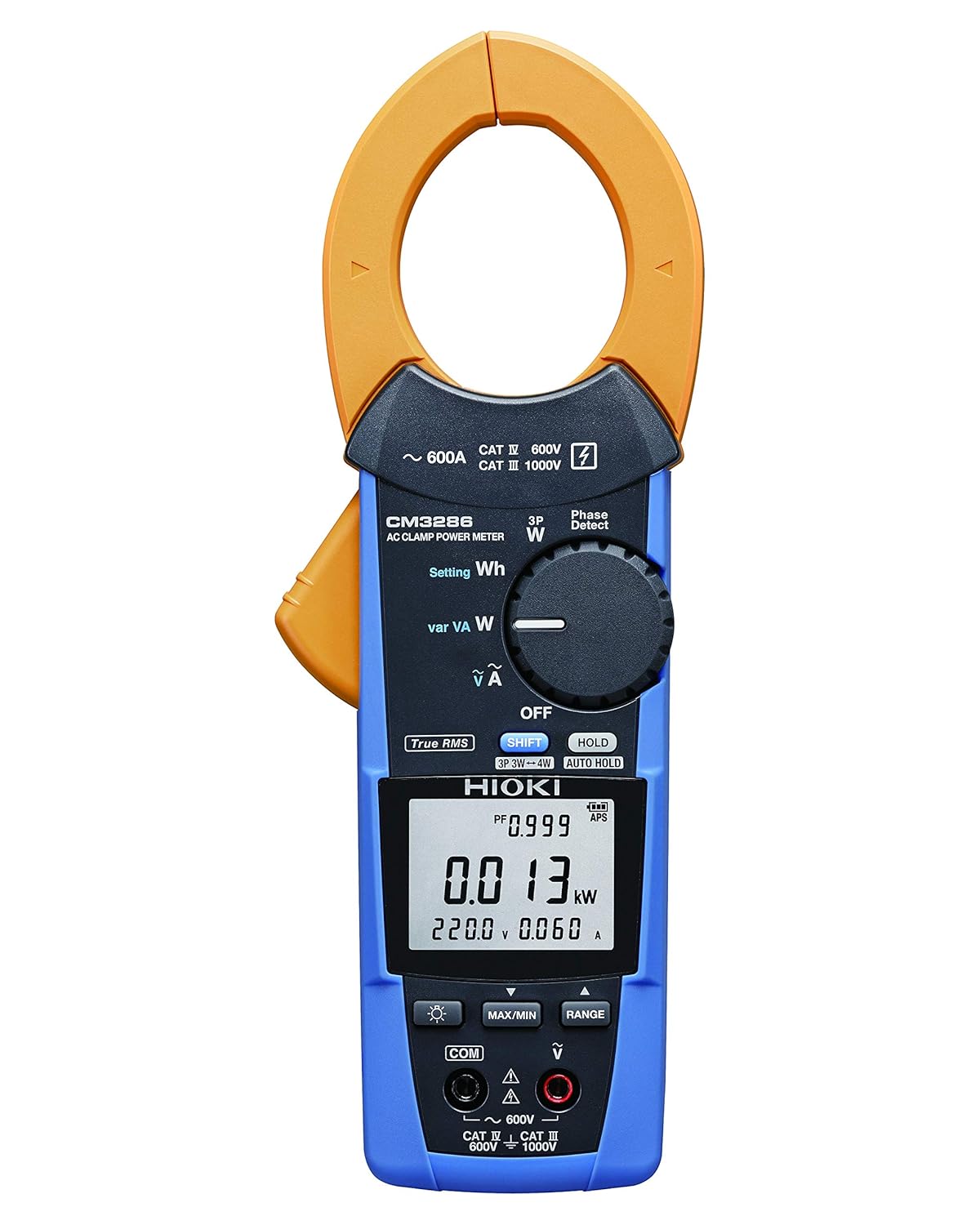
Figure 4.2: Hioki CM3286 Clamp On Power Tester (Front Panel Detail)
This image provides a closer look at the front panel of the Hioki CM3286, highlighting the digital display, the rotary function dial with various measurement settings (e.g., W, Wh, V, A), and the control buttons such as SHIFT, HOLD, MAX/MIN, and RANGE. The input terminals for voltage measurement are also visible at the bottom.
Ключові компоненти:
- Clamp щелепа: Використовується для безконтактного вимірювання змінного струму.
- Диск функцій: Selects the desired measurement mode (e.g., Voltage, Current, Power, Frequency).
- РК-дисплей: Відображає показники вимірювань, одиниці вимірювання та індикатори.
- Вхідні клеми: Для підключення вимірювальних щупів для об'ємуtage and other measurements.
- Кнопка HOLD: Заморожує поточне значення на дисплеї.
- Кнопка MAX/MIN: Записує максимальні та мінімальні показники.
- Кнопка RANGE: Manually selects the measurement range.
- Кнопка SHIFT: Accesses secondary functions marked in blue on the dial.
5. Налаштування
5.1. Встановлення батареї
- Переконайтеся, що пристрій вимкнено.
- Знайдіть кришку відсіку для батарейок на задній панелі пристрою.
- Use a screwdriver (if necessary) to open the cover.
- Вставте дві (2) батарейки типу AAA, дотримуючись правильної полярності (+/-), як зазначено всередині відсіку.
- Встановіть на місце кришку батарейного відсіку та закріпіть її.
5.2. Початкове увімкнення
After battery installation, turn the function dial from "OFF" to any measurement setting to power on the device. The display should illuminate, indicating readiness for use.
6. Інструкція з експлуатації
6.1. Увімкнення/вимкнення живлення
- To power on, rotate the function dial from the "OFF" position to the desired measurement function.
- To power off, rotate the function dial back to the "OFF" position.
6.2. Вимірювання змінного струму (Clamp)
- Rotate the function dial to the "A" (Current) setting.
- Відкрийте клamp jaw by pressing the lever.
- Enclose only one conductor (live or neutral) within the clamp щелепу. Переконайтеся, що щелепа повністю закрита.
- Прочитайте поточне значення на РК-дисплеї.
6.3. Випtage Вимірювання (В)
- Rotate the function dial to the "V" (Voltagд) налаштування.
- Connect the red test lead to the "V" input terminal and the black test lead to the "COM" input terminal.
- Підключіть вимірювальні щупи паралельно до кола або компонента, що вимірюється.
- Прочитайте томtagзначення e на РК-дисплеї.
6.4. Power Measurement (W, Wh, var, VA)
The CM3286 can measure various power parameters. Select the appropriate setting on the function dial (W for active power, Wh for energy, var for reactive power, VA for apparent power). Connect test leads for voltagе і клamp the jaw around the current conductor as per the specific measurement method outlined in the full manual (not provided here, but implied by the device's capabilities).
6.5. Вимірювання частоти (Гц)
Select the "Hz" setting on the function dial. Connect test leads across the circuit where frequency is to be measured, similar to voltagе вимірювання.
6.6. Phase Sequence Detection
The device features a "Phase Detect" function. Refer to the detailed instructions in the complete manual for proper connection and interpretation of phase sequence on single-phase or three-phase circuits.
6.7. Using Buttons (HOLD, MAX/MIN, RANGE, SHIFT)
- ТРИМАТИ: Натисніть, щоб зафіксувати поточне значення на дисплеї. Натисніть ще раз, щоб відпустити.
- МАКС./ХВИЛИНА: Press to enter Max/Min recording mode. The display will show the maximum or minimum value recorded since activation. Press again to cycle through Max, Min, and current readings.
- РЯД: Press to switch between auto-ranging and manual ranging. In manual ranging, press repeatedly to cycle through available ranges.
- SHIFT: Press to access secondary functions indicated in blue text next to the primary function on the dial.
7. Технічне обслуговування
7.1. прибирання
Протріть пристрій м’якою, damp тканиною. Не використовуйте абразивні засоби для чищення або розчинники. Переконайтеся, що пристрій повністю сухий перед зберіганням або наступним використанням.
7.2. Заміна батареї
When the low battery indicator appears on the display, replace the batteries promptly to ensure accurate measurements. Follow the battery installation steps outlined in Section 5.1.
7.3. Зберігання
Store the device in its carrying case in a cool, dry place, away from direct sunlight and extreme temperatures. If storing for extended periods, remove the batteries to prevent leakage.
8. Вирішення проблем
| проблема | Можлива причина | Рішення |
|---|---|---|
| Пристрій не включається. | Розряджені або неправильно встановлені батареї. | Перевірте полярність батарейок; замініть батарейки. |
| Немає інформації на дисплеї. | Incorrect function selected; open circuit; test leads not connected properly. | Select correct function; ensure circuit is complete; check test lead connections. |
| "OL" or "OVER" displayed. | Measurement exceeds selected range or device maximum. | Select a higher range (if manual ranging) or ensure measurement is within device limits. |
| Неточні показання. | Low battery; environmental interference; damaged test leads. | Replace batteries; move away from strong electromagnetic fields; inspect and replace test leads if damaged. |
9. Технічні характеристики
| Параметр | Значення |
|---|---|
| Номер моделі | CM3286 |
| Бренд | Хіокі |
| Розміри упаковки | 9.92 x 2.76 x 2.05 дюймів |
| Вага товару | 0.45 кілограма (15.87 унції) |
| Акумулятори | 2 батарейки AAA (входять в комплект) |
| Джерело живлення | Corded Electric (Note: This refers to the type of power it measures, not its own power source. The device is battery-powered.) |
| Виробник | Хіокі |
| Дата першої доступності | 20 серпня 2020 р |
10. Гарантія та підтримка
For detailed warranty information, please refer to the warranty card included with your product or visit the official Hioki website. Hioki provides comprehensive customer support for its products.
If you encounter any issues not covered in this manual or require technical assistance, please contact Hioki customer support through their official channels. Ensure you have your product model number (CM3286) and purchase details ready when contacting support.
Примітка: Умови гарантії можуть відрізнятися залежно від регіону.