1. Вступ
This manual provides instructions for the setup, operation, and maintenance of the Avaya 1616 IP Telephone (Model 700450190). The Avaya 1616 is designed for users who require a robust and feature-rich communication device, supporting 16 line appearances and a high-quality speakerphone. This guide will help you maximize the functionality of your IP telephone.
2. Налаштування
Follow these steps to properly set up your Avaya 1616 IP Telephone.
2.1 Розпакування та ідентифікація компонентів
Carefully remove all components from the packaging. Ensure all parts are present before proceeding with the setup.
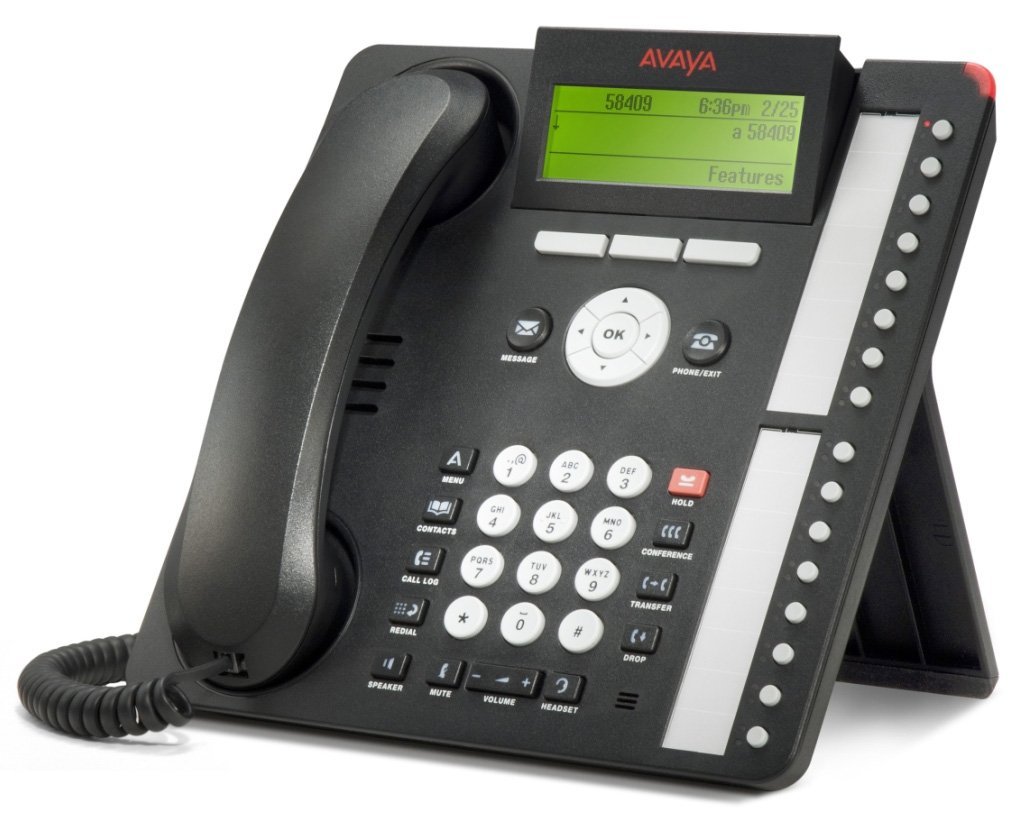
малюнок 1: Avaya 1616 IP Telephone components. This image displays the main telephone unit, the handset, the coiled handset cord, an Ethernet cable, and the desk stand. The main unit features a display screen, a numeric keypad, and various function buttons. The desk stand is designed to elevate the phone for easier viewінг і експлуатація.
- Telephone Base Unit: The main body of the phone with keypad, display, and function buttons.
- Трубка: The receiver for voice communication.
- Handset Cord: Coiled cord connecting the handset to the base unit.
- Кабель Ethernet: Для підключення до мережі.
- Настільна підставка: For positioning the phone on a desk.
- Power Adapter (Sold Separately): A 5V local power supply may be required if Power over Ethernet (PoE) is not available.
2.2 Фізичні з'єднання
- Прикріпіть настільну підставку: Securely attach the desk stand to the bottom of the telephone base unit.
- Підключіть телефон: Plug one end of the coiled handset cord into the handset and the other end into the designated handset port on the side or back of the telephone base unit.
- Підключення до мережі: Insert one end of the Ethernet cable into the "LAN" port on the back of the telephone and the other end into a network switch or router. The phone supports dual Ethernet ports for connection of the phone and a collocated PC with VLAN separation.
- Підключіть живлення:
- Живлення через Ethernet (PoE): If your network switch supports 802.3af PoE, the phone will receive power through the Ethernet cable. No separate power adapter is needed.
- Local Power Supply: If PoE is not available, connect a 5V local power supply (sold separately) to the power port on the back of the telephone and then to an electrical outlet.
Once connected, the phone will power on and begin its boot sequence. This may take a few moments.
3. Інструкція з експлуатації
This section covers the basic operation of your Avaya 1616 IP Telephone.
3.1 Основні характеристики
- 16 Line Appearances/Feature Keys: Programmable buttons with dual LEDs for line status and feature access.
- High-Quality 2-Way Speakerphone: Для зв'язку без використання рук.
- Ідентифікатор абонента: Відображає інформацію про вхідного абонента.
- Багаторядкова операція: Supports multiple active lines.
- Можливість конференц-дзвінка: Basic conferencing features.
3.2 Основні функції викликів
- Здійснення дзвінка:
- Підніміть слухавку або натисніть кнопку динаміка.
- Наберіть потрібний номер за допомогою клавіатури.
- Press the "Call" or "Dial" softkey, or wait for automatic dialing.
- Відповідь на дзвінок:
- Lift the handset, or press the Speaker button, or press the flashing line appearance button.
- Завершення дзвінка:
- Replace the handset, or press the Speaker button again if using speakerphone, or press the "End Call" softkey.
- Переведення виклику на утримання:
- During an active call, press the "Hold" button. The line appearance LED will flash.
- Щоб відновити виклик, натисніть кнопку появи миготливої лінії.
- Переведення виклику:
- During an active call, press the "Transfer" button. The current call is put on hold.
- Dial the number of the party to whom you wish to transfer the call.
- Wait for the party to answer (consulted transfer) or press "Transfer" again to complete the transfer (blind transfer).
- Ініціювання конференц-дзвінка:
- During an active call, press the "Conference" button. The current call is put on hold.
- Наберіть номер третьої особи.
- Once the third party answers, press the "Conference" button again to join all parties.
4. Технічне обслуговування
Proper maintenance ensures the longevity and optimal performance of your Avaya 1616 IP Telephone.
4.1 Очищення
- Використовуйте м’який, злегка damp cloth to clean the exterior surfaces of the phone.
- Avoid using abrasive cleaners, solvents, or strong chemicals, as these can damage the finish and electronic components.
- Do not spray cleaning liquids directly onto the phone. Apply to the cloth first.
- Ensure the phone is disconnected from power before cleaning.
4.2 Загальний догляд
- Тримайте телефон подалі від надмірного тепла, прямих сонячних променів та вологи.
- Уникайте падіння телефону та сильних ударів.
- Ensure cables are not pinched or strained.
5. Вирішення проблем
This section provides solutions to common issues you might encounter with your Avaya 1616 IP Telephone.
| проблема | Можлива причина | Рішення |
|---|---|---|
| Телефон не вмикається. | Немає живлення або несправне з'єднання. |
|
| Немає тону набору. | Network connectivity issue or service problem. |
|
| Не вдається здійснювати або приймати дзвінки. | Network configuration, service issue, or phone registration problem. |
|
| Погана якість звуку. | Network congestion, faulty cable, or handset issue. |
|
If the problem persists after attempting these solutions, please contact your IT department or Avaya support for further assistance.
6. Технічні характеристики
Key technical specifications for the Avaya 1616 IP Telephone (700450190).
| Особливість | Деталь |
|---|---|
| Номер моделі | 700450190 |
| Зовнішній вигляд ліній | 16 with dual LEDs |
| гучний зв'язок | High-quality 2-way |
| Варіанти монтажу | Desk or wall mountable (with optional adapter) |
| Порти Ethernet | Dual (for phone and collocated PC w/VLAN separation) |
| Джерело живлення | 802.3af Power over Ethernet (PoE) or optional 5V local power supply |
| Тип дозвону | Одна клавіатура |
| Тип автовідповідача | цифровий |
| Сумісні пристрої | Computers, Telephone Networks, VoIP Services |
| Можливість конференц-дзвінків | Базовий |
| Багаторядкова робота | Багатолінійна робота |
| Ідентифікатор абонента | так |
| Колір | чорний |
| Розміри продукту | 9.8 x 7.9 x 2.8 дюйми (приблизно) |
| Розміри упаковки | 16.8 x 10 x 3.3 дюймів |
| вага | 2.9 фунта (вага упаковки) |
7. Інформація про гарантію
This Avaya 1616 IP Telephone (700450190) is typically offered with a 90-денна обмежена гарантія. This warranty covers defects in materials and workmanship under normal use. For specific terms and conditions, please refer to the warranty documentation provided at the time of purchase or contact your vendor.
Note: As a renewed product, warranty terms may vary from new products. Always confirm warranty details with your supplier.
8. Підтримка
For technical assistance, further troubleshooting, or inquiries regarding your Avaya 1616 IP Telephone, please contact your system administrator or the vendor from whom you purchased the device. Avaya's official support channels can also provide resources and documentation for their products.
For general information about Avaya products, you may visit the official Avaya webсайт.


