1. Вступ
The Aligator T100 is a GSM mobile phone designed in a classic desk phone style, offering convenient operation with large buttons and essential mobile phone functions. It serves as an excellent replacement for a fixed-line phone, providing the independence and flexibility of a mobile device. Its high-performance antenna ensures reliable reception even in areas with weak GSM signals.
2. Інформація про безпеку
- Попередження про акумулятор: Use only the original battery provided with the device. Using non-original batteries may cause damage to the phone or lead to battery explosion.
- Тримайте пристрій подалі від води та вологи.
- Do not attempt to disassemble or repair the phone yourself. Refer to qualified service personnel for any repairs.
- Уникайте впливу екстремальних температур на телефон.
3. Вміст упаковки
Перевірте наявність усіх елементів в упаковці:
- Aligator T100 GSM Mobile Phone unit
- Трубка зі спіральним шнуром
- High-performance external antenna
- Зарядний пристрій від мережі
- Li-ion 800 mAh battery
- User manual (English, German, Czech, Slovak)

Figure 3.1: Contents of the Aligator T100 package.
4. Продукт закінчивсяview
The Aligator T100 features a robust design with a clear monochrome graphic display and a user-friendly keypad. Key components include the main unit, handset, and an external antenna for enhanced signal reception.

Малюнок 4.1: Спереду view of the Aligator T100.
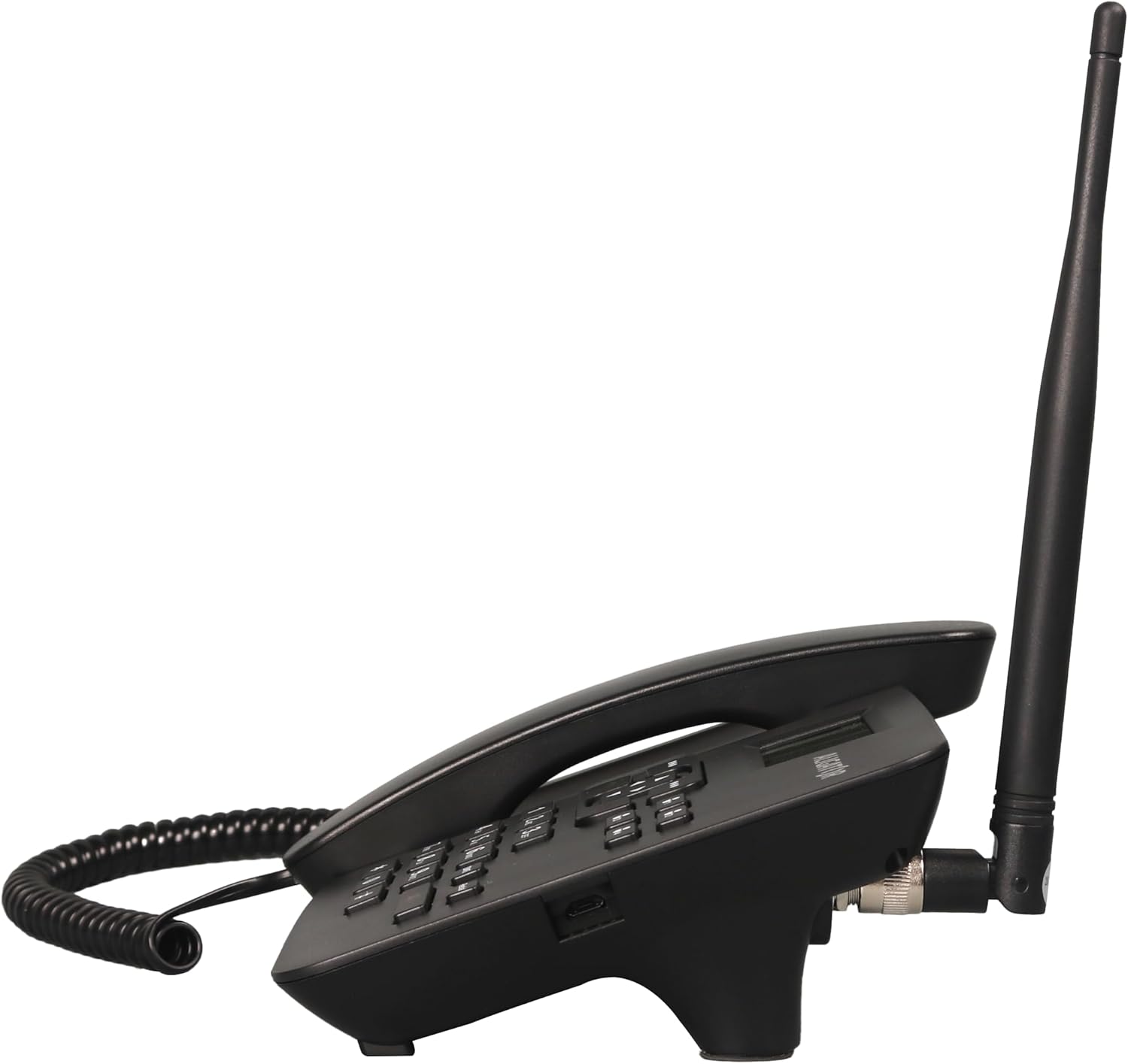
Малюнок 4.2: Сторона view showing the antenna connection.

Малюнок 4.3: Задня частина view of the Aligator T100.
4.1 Клавіатура та дисплей
The keypad features large, easy-to-read buttons. The monochrome graphic display (128 x 64 points, 53 x 25 mm) has a green background illumination for clear visibility.

Figure 4.4: Close-up of the display and keypad.
5. Налаштування
5.1 Встановлення батареї
- Remove the battery compartment cover on the back of the phone.
- Insert the provided Li-ion 800 mAh battery, ensuring the contacts align correctly.
- Замініть кришку батарейного відсіку.
5.2 Встановлення SIM -карти
- Вийнявши акумулятор, знайдіть гніздо для SIM-картки.
- Insert your GSM SIM card into the designated slot, ensuring proper orientation as indicated by the diagram near the slot.
- Встановіть назад акумулятор і кришку акумуляторного відсіку.
5.3 Підключення антени
- Locate the TNC-Female connector on the side/back of the phone unit.
- Screw the high-performance external antenna onto this connector until it is securely fastened.
5.4 Початкове заряджання та увімкнення
- Connect the mains charger to the phone's charging port and plug it into a power outlet.
- Allow the phone to charge fully before first use. The display will indicate charging status.
- To power on, press and hold the power button (if available) or simply ensure the battery is inserted and the phone is connected to power.
6. Інструкція з експлуатації
6.1 Здійснення та отримання дзвінків
- Здійснення дзвінка: Lift the handset. You will hear a classic dial tone. Dial the phone number using the keypad. The call will be initiated automatically after a short delay or upon pressing the call button.
- Отримання дзвінка: When the phone rings, simply lift the handset to answer the call.
- Завершення дзвінка: Place the handset back onto the cradle to end the call.
6.2 Using the Keypad and Navigation
The keypad includes standard numeric keys (0-9, *, #) and dedicated function buttons. Use the navigation buttons (up, down, left, right) to navigate through menus on the display.

Figure 6.1: Display and navigation controls.
6.3 Speed Dial / Quick Dial
The Aligator T100 features four quick dial buttons (labeled 1-4) for frequently called numbers. You can program these buttons to dial a contact directly.
- Programming Quick Dial: Refer to the phone's menu for
Пов'язані документи - T100

ALIGATOR S6700 Посібник користувача для старших користувачів
Інструкція користувача для мобільного телефону ALIGATOR S6700 Senior, що охоплює налаштування, такі функції, як DUAL SIM та SOS Locator, ОС Android, підключення, безпеку та екологічну утилізацію.
Інструкція з експлуатації та посібник користувача Aligator Watch Pro X
Вичерпний посібник користувача для смарт-годинника Aligator Watch Pro X, що охоплює налаштування, функції, підключення, сповіщення, циферблати, інтеграцію з телефоном та усунення несправностей.
Návod k použití chytrých hodinek ALIGATOR Watch Amoled Pro AW14
Kompletní návod k použití chytrých hodinek ALIGATOR Watch Amoled Pro AW14. Zjistěte, jak ovládat hodinky, připojit je k telefonu, využívat funkce a řešit problémy.
ALIGATOR A930 GPS Senior 4G: Návod k užití
Повний навід для використання для мобільного телефону ALIGATOR A930 GPS Senior 4G, підтримується для старших із функцією GPS і SOS для швидкого керування та безпеки.
Інструкція з використання та посібник користувача смарт-годинника Aligator Watch Lady
Вичерпний посібник користувача для смарт-годинника Aligator Watch Lady, що охоплює налаштування, функції, підключення, усунення несправностей та інформацію про безпеку.
Інструкція з використання та посібник користувача годинника Aligator GPS
Вичерпний посібник користувача для смарт-годинника Aligator Watch GPS, що охоплює налаштування, функції, сполучення, відстеження даних, налаштування, усунення несправностей та інформацію про безпеку.