1. Вступ
This manual provides comprehensive instructions for the setup, operation, and maintenance of your RCA OEM 228892 TV/VCR Combo Remote Control. This remote is designed to control various functions of compatible RCA, Mitsubishi, and Sharp TV/VCR combo units. Please read this manual thoroughly to ensure proper use and to maximize the functionality of your remote control.
2. Продукт закінчивсяview
The RCA OEM 228892 remote control features a standard layout for TV and VCR functions. Familiarize yourself with the button layout as shown in the image below.
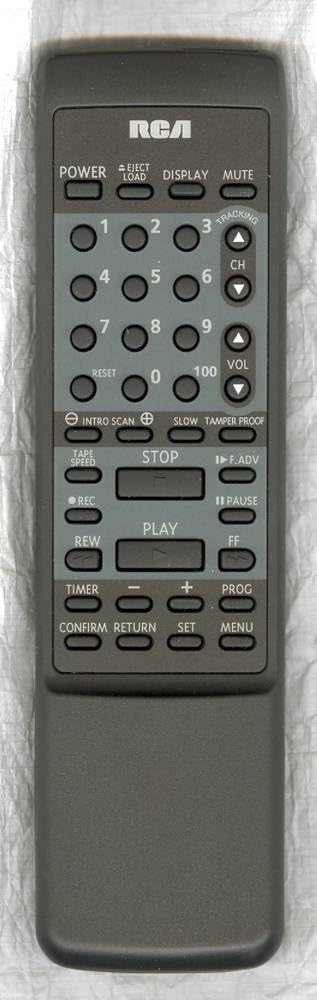
Функції кнопок:
- ПОТУЖНІСТЬ: Вмикає або вимикає комбінований блок телевізора/відеомагнітофона.
- EJECT/LOAD: Ejects or loads a VCR tape.
- ДИСПЛЕЯ: Shows on-screen information such as channel number, time, or VCR status.
- МУК: Вимикає звук аудіо.
- Цифрові кнопки (0-9, 100): Використовується для безпосереднього вибору каналів або введення числових значень.
- СКИДАТИ: Resets certain settings or counters, often for VCR functions.
- CH (перемикання каналів вгору/вниз): Змінює телеканал вгору або вниз.
- VOL (Збільшення/зменшення гучності): Збільшує або зменшує гучність звуку.
- INTRO SCAN: Scans the beginning of each recorded program on a tape.
- ПОВІЛЬНИЙ: Activates slow-motion playback for VCR.
- TAMPER PROOF: A security feature, often related to VCR recording.
- ШВИДКІСТЬ СТРІЧКИ: Adjusts the VCR tape playback or recording speed.
- СТІЙ: Stops VCR playback or recording.
- F.ADV (Frame Advance): Advances the VCR playback frame by frame.
- ЗАПИС (REC): Initiates VCR recording.
- ПАУЗА: Pauses VCR playback or recording.
- ГРАТИ: Starts VCR playback.
- REW (Перемотування назад): Rewinds the VCR tape.
- FF (швидке перемотування вперед): Fast forwards the VCR tape.
- ТАЙМЕР: Accesses timer settings for recording or power on/off.
- МІНУС (-): Decreases a value or navigates backward in menus.
- ПЛЮС (+): Increases a value or navigates forward in menus.
- ПРОГ (Програма): Accesses programming functions, often for VCR recording or channel setup.
- ПІДТВЕРДИТИ: Підтверджує вибір або налаштування.
- ПОВЕРНЕННЯ: Повернення до попереднього меню або екрана.
- НАСТРОЙКА: Enters setup mode or confirms a setting.
- МЕНЮ: Opens the on-screen menu for TV or VCR settings.
3. Налаштування
3.1 Встановлення батареї
The remote control requires two (2) AA batteries for operation.
- Знайдіть кришку батарейного відсіку на задній панелі пульта дистанційного керування.
- Посуньте кришку вниз або натисніть на засувку та підніміть, щоб відкрити.
- Вставте дві батарейки типу АА, переконавшись, що позитивний (+) та негативний (-) полюси правильно збігаються з позначками всередині відсіку.
- Встановіть кришку відсіку для батарейок, засунувши її на місце до клацання.
Примітка: Always replace both batteries at the same time. Do not mix old and new batteries or different types of batteries. Remove batteries if the remote will not be used for an extended period.
4. Основна операція
4.1 Увімкнення/вимкнення живлення
- Натисніть ПОТУЖНІСТЬ button to turn your TV/VCR combo unit on or off.
4.2 Вибір каналу
- To change channels sequentially, press the CH ▲ (Channel Up) or CH ▼ (Channel Down) buttons.
- To directly select a channel, use the Цифрові кнопки (0-9). For two-digit channels, enter both digits. For channel 100, press the 100 кнопку.
4.3 Регулювання гучності
- Натисніть ГУЧНІСТЬ ▲ (Volume Up) or VOL ▼ (Volume Down) buttons to adjust the audio level.
4.4 Функція вимкнення звуку
- Натисніть ВИМКНЕНО button to temporarily silence the audio. Press it again to restore the sound.
5. Робота відеомагнітофона
5.1 Tape Playback
- Insert a VHS tape into the VCR.
- Натисніть ГРАТИ щоб почати відтворення.
- Щоб призупинити відтворення, натисніть ПАУЗА. Прес ГРАТИ знову відновити.
- Щоб зупинити відтворення, натисніть СТІЙ.
- To rewind the tape, press REW.
- To fast forward the tape, press FF.
- To eject the tape, press EJECT/LOAD.
5.2 Запис
- Вставте записувану VHS-касету.
- Select the desired input source or channel.
- Натисніть REC кнопку, щоб почати запис.
- Прес СТІЙ щоб завершити запис.
5.3 Special VCR Functions
- INTRO SCAN: Press this button to play the first few seconds of each recorded program on a tape, allowing you to quickly find specific content.
- ШВИДКІСТЬ СТРІЧКИ: Use this button to cycle through available tape speeds (e.g., SP, LP, EP) for recording or playback, if supported by your VCR.
- ПОВІЛЬНИЙ: During playback, press this button to activate slow-motion.
- F.ADV (Frame Advance): During pause or slow-motion, press to advance the video one frame at a time.
- TAMPER PROOF: This function is typically used to prevent accidental recording or erasure on certain VCR models. Refer to your VCR's specific manual for details on its use.
6. Розширені функції
- ДИСПЛЕЯ: Press to show on-screen information such as current channel, time, or VCR status.
- СКИДАТИ: Used to reset the VCR's tape counter or other temporary settings.
- ТАЙМЕР: Accesses the VCR's timer programming menu to set up future recordings.
- ПРОГ (Програма): Used in conjunction with the Timer function to program recording events or to access channel programming menus.
- МЕНЮ: Opens the main on-screen menu for your TV/VCR combo unit, allowing access to various settings (picture, sound, VCR options, etc.).
- НАСТРОЙКА: Used to confirm selections within menus or to enter setup modes.
- ПІДТВЕРДИТИ: Confirms a selection or action, similar to 'Enter'.
- ПОВЕРНЕННЯ: Navigates back to the previous menu screen or exits a current menu without saving changes.
7. Сумісність
The RCA OEM 228892 remote control is compatible with a range of TV/VCR combo units. Below is a list of known compatible models and any specific feature limitations:
7.1 OEM Compatibility:
- RCA: T25004BC, T25204BC
7.2 Full Feature Support:
- RCA: 221359, RRMCG1139PESA, T25001, T25001GY, T25003, T25003BC
- MITSUBISHI: RRMCG1166PESA, G1166PESA, CV-20125, RRMCG1166PESB, CV-20126
- РІЗКИЙ: RRMCG1103PESA, G1103PESA, 13VT-G60, 20VT-G60, 25VT-G60, RRMCG1242PESA, G1242PESA, 13VT-CH6, 13VT-H60, 20VT-CH6, 20VT-H60, 25VT-H60
7.3 Partial Feature Support:
- Supports all features except CH GUIDE and VIEW LIMIT for:
РІЗКИЙ: RRMCG1144PESA, G1144PESA, 20VT-G200, 25VT-G200, 25VT-G50, 27VS-G300, RRMCG1113PESA, G1113PESA, 13VT-G100, 13VT-G120, 20VT-G100, 25TV-G100, 25VT-G100, RRMCG1112PESA, G1112PESA, 13VT-G80, 25VT-G80 - Supports all features except CATV for:
РІЗКИЙ: RRMCG1244PESA, G1244SA, 13VT-H100, 13VT-H150, 20VT-H200, 25VT-H80 - Supports all features except WAKE-UP TIMER and SLEEP TIMER for:
РІЗКИЙ: RRMCG1032PESA, G1032PESA, 13VT-F40, 20VT-F40 - Supports all features except INPUT and FLASHBACK for:
РІЗКИЙ: RRMCG1330PESB, G1330SB, 13VT-J150, 13VT-K150, 13VT-L150, 13VT-N150, 13VT-R150, RRMCG1330PESA, G1330SA, 13VT-CJ10, 13VT-CK10, 13VT-CL10, 13VT-CN10, 13VT-CR10, 13VT-J100, 13VT-K100, 13VT-L100, 13VT-N100, 13VT-R100, 20VT-J100, 25VS-J250, 25VT-CJ10, 25VT-CK10, 25VT-J100, 25VT-K100, RRMCG1331PESA, G1331SA, 13VT-L200, 13VT-N200
8. Вирішення проблем
Якщо у вас виникли проблеми з пультом дистанційного керування, будь ласка, зверніться до наступних поширених кроків усунення несправностей:
- Пульт не відповідає:
- Ensure the remote has fresh AA batteries installed correctly (check polarity).
- Make sure there is a clear line of sight between the remote control and the TV/VCR combo unit's infrared sensor. Obstructions can block the signal.
- Confirm that the remote is pointed directly at the unit. - Певні кнопки не працюють:
- Some buttons may only function with specific models or modes (e.g., VCR buttons only work when the unit is in VCR mode). Refer to the compatibility section and your unit's manual.
- Clean the remote control buttons and surface to remove any dirt or debris that might be interfering with button presses. - Переривчаста робота:
- Weak batteries can cause inconsistent performance. Replace them.
- Strong ambient light (like direct sunlight) can sometimes interfere with infrared signals. Try operating the remote in different lighting conditions.
If problems persist after trying these steps, consult the user manual for your specific TV/VCR combo unit or contact customer support.
9. Технічні характеристики
- Номер моделі: 228892 (also T25004BC, T25204BC)
- Бренд: RCA
- Технологія підключення: Інфрачервоний
- Тип контролера: Кнопкове керування
- Сумісні пристрої: TV/VCR Combo Units (refer to compatibility list)
- Потрібні батареї: 2 батарейки АА
- Особливість: Ергономічний дизайн
- Виробник: RCA Parts
- Дата першої доступності: 12 квітня 2018 р
10. Технічне обслуговування
- Прибирання: Використовуйте м’яку суху тканину для очищення пульта дистанційного керування. Для стійкого бруду злегкаampПротріть тканину водою або м’яким миючим розчином, а потім негайно витріть насухо. Не використовуйте абразивні засоби для чищення та не занурюйте пульт дистанційного керування в рідину.
- Догляд за акумулятором: Remove batteries if the remote will not be used for an extended period (e.g., one month or more) to prevent leakage and damage.
- Зберігання: Зберігайте пульт дистанційного керування в прохолодному сухому місці подалі від прямих сонячних променів і екстремальних температур.
11. Інформація для підтримки
For further assistance or inquiries regarding your RCA OEM 228892 TV/VCR Combo Remote Control, please refer to the support resources provided by your retailer or the manufacturer, RCA. You may also consult the user manual specific to your TV/VCR combo unit for detailed operational instructions related to your device.
Інтернет-ресурси: For general information about RCA products, you may visit the official RCA webсайту або зв’яжіться зі своїм відділом обслуговування клієнтів.


