1. Продукт закінчивсяview
The ViewSonic PS501X is a short throw projector designed for versatile use in educational and small business environments. It features 3,400 lumens brightness and native XGA (1024 x 768) resolution, ensuring clear image projection even in smaller rooms. The projector incorporates SuperColor technology for accurate color reproduction and offers flexible connectivity options.
Ключові характеристики:
- Універсальна проекція: Advanced visual features suitable for education and small business settings.
- Можливість великого екрана: Projects a 120-inch image from a distance of 4 feet 10 inches with 3400 lumens.
- Просте налаштування: Designed for easy plug-and-play operation for presentations, videos, and images.
- Розширений Лamp життя: SuperEco mode extends lamp термін служби до 15,000 XNUMX годин.
- Гнучке підключення: Supports various media players, PCs, Macs, and mobile devices via HDMI, USB, and VGA inputs.
2. Посібник із налаштування
2.1 Розпакування
Обережно розпакуйте вміст коробки. Переконайтеся, що всі предмети присутні:
- ViewSonic PS501X Projector
- Кабель живлення
- Кабель VGA
- Пульт дистанційного керування
- Посібник користувача (цей документ)
2.2 Фізичне розміщення
Place the projector on a stable, flat surface. For optimal short-throw projection, position the projector approximately 4 feet 10 inches from the screen to achieve a 120-inch image. Ensure adequate ventilation around the projector.
Малюнок 2.2.1: Спереду view of the PS501X projector, showing the lens and top-mounted control panel.
2.3 Підключення пристроїв
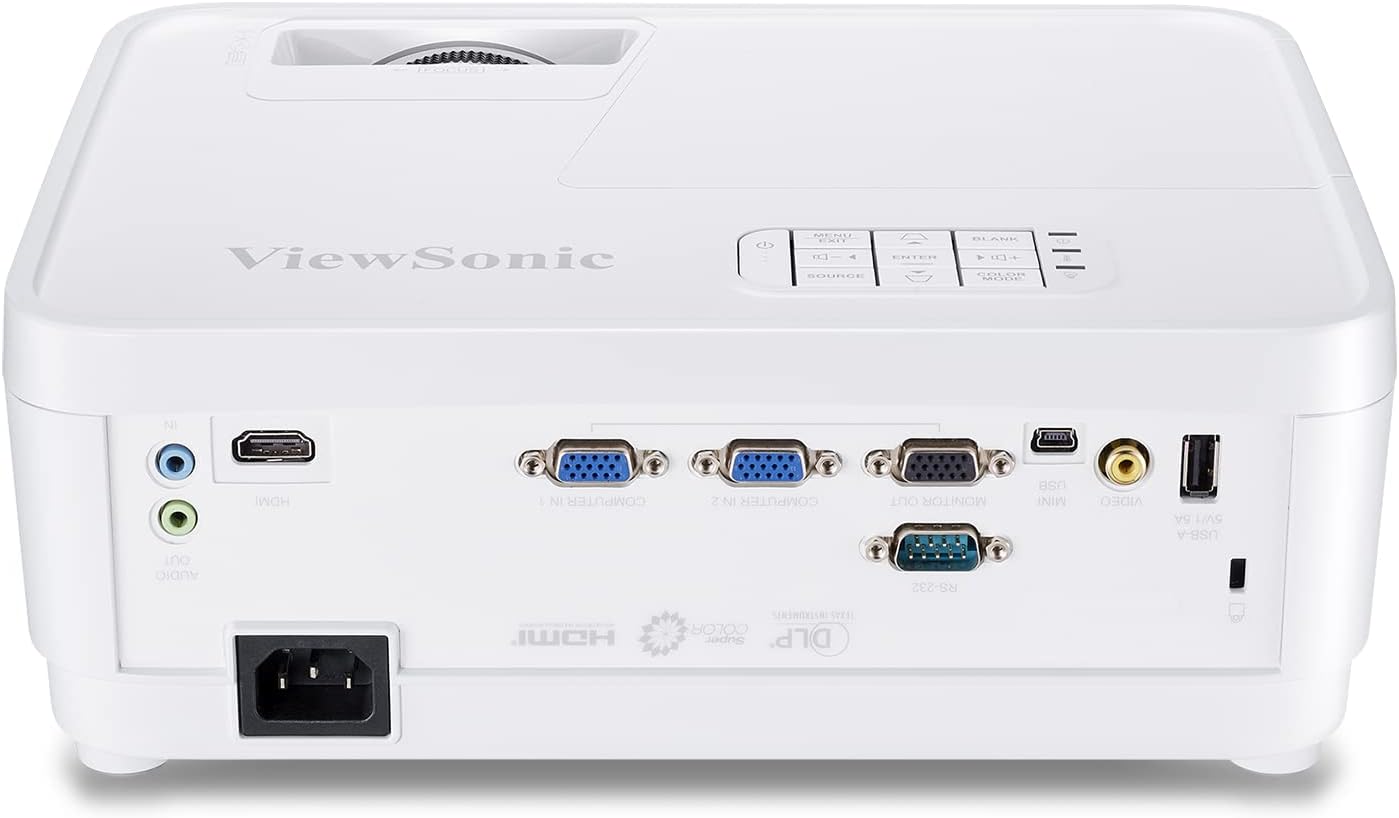
Connect your source devices (PC, Mac, media player) to the projector using the appropriate cables. The PS501X offers multiple input options:
- HDMI: Для цифрового відео та аудіо високої чіткості.
- VGA: Для аналогового відеовходу з комп'ютерів.
- USB: For connecting compatible devices.
- RS232: Для інтеграції системи управління.

Figure 2.3.1: Rear panel of the PS501X projector, highlighting HDMI, VGA, and other connectivity ports.
After connecting, plug the power cable into the projector and a power outlet.
3. Інструкція з експлуатації
3.1 Увімкнення/вимкнення живлення
Press the power button on the projector or the remote control to turn the unit on or off. Allow a few moments for the lamp to warm up or cool down.
3.2 Вибір джерела вхідного сигналу
Use the 'Source' button on the projector's control panel or remote to cycle through available input sources (HDMI, VGA, etc.) until your desired source is displayed.
3.3 Налаштування зображення
- Фокус: Повертайте кільце фокусування на об'єктиві проектора, доки зображення не стане чітким і різким.
- Корекція трапецеїдальних спотворень: If the image appears trapezoidal, use the keystone correction function (usually found in the OSD menu or dedicated buttons on the remote) to adjust the image geometry. The PS501X supports horizontal and vertical keystone correction.
- Параметри кольору: Access the On-Screen Display (OSD) menu to adjust settings such as brightness, contrast, color temperature, and color effects (e.g., Movie, Photo, Vivid, User, Standard, Game modes) to suit your viewсередовище та зміст.
- Співвідношення сторін: Adjust the aspect ratio (e.g., Full) via the OSD menu to match your content and prevent distortion.

Figure 3.3.1: Illustration of horizontal and vertical keystone correction for adjusting image shape.

Малюнок 3.3.2: Впрample of vibrant color accuracy provided by SuperColor technology.
4. Технічне обслуговування
4.1 XNUMX лamp Life Management
The PS501X features a SuperEco mode that can extend the lamp life up to 15,000 hours. Utilizing this mode can significantly reduce power consumption and prolong the life of your projector lamp.

Figure 4.1.1: Visual representation of the extended lamp life in SuperEco mode.
4.2 Вентиляція
To prevent overheating and ensure optimal performance, always ensure that the air vents on the projector are clear and unobstructed. Do not place the projector in an enclosed space without proper airflow.
4.3 Очищення
Regularly clean the projector's exterior with a soft, dry cloth. For the lens, use a specialized lens cleaning cloth and solution to avoid scratches. Avoid using abrasive cleaners or solvents.
5. Вирішення проблем
Якщо у вас виникли проблеми з вашим ViewSonic PS501X projector, refer to the following common troubleshooting steps:
- Зображення не відображається:
- Переконайтеся, що проектор увімкнено, аamp освітлюється.
- Verify that the input source is correctly selected and the cable connections are secure.
- Check the source device (PC, media player) to ensure it is outputting a signal.
- Зображення розмите:
- Відрегулюйте кільце фокусування на об’єктиві проектора.
- Переконайтеся, що поверхня проекції рівна, а проектор стійкий.
- Зображення спотворене (трапецієподібне):
- Use the keystone correction function in the OSD menu to adjust the image shape.
- Ensure the projector is positioned directly in front of the screen as much as possible.
- Без звуку:
- Check the audio cable connections (if using analog audio).
- Ensure the volume on both the projector and the source device is turned up and not muted.
- If using HDMI, verify that the audio output is correctly configured on the source device.
- Перегрів проектора:
- Ensure all air vents are clear of obstructions.
- Використовуйте проектор у добре провітрюваному приміщенні.
- If the issue persists, power off the projector and allow it to cool down before restarting.
6. Технічні характеристики
| Номер моделі | PS501X |
| Бренд | ViewСоник |
| Роздільна здатність дисплея | 1024 x 768 (XGA Native) |
| Яскравість | 3400 люменів |
| Технологія підключення | HDMI, USB, VGA |
| Особливість | Короткий кидок |
| Рекомендоване використання | Бізнес, Освіта, Домашній кінотеатр |
| Lamp Wattage | 190 Вт |
| Розміри продукту | 4.53 x 11.5 x 9.29 дюймів |
| Вага товару | 5.72 фунта |
| Потрібні батареї | 2 батарейки типу AAA (для пульта дистанційного керування) |
| Перша доступна дата | 3 березня 2018 р |
7. Гарантія та підтримка
7.1 Інформація про гарантію
For detailed warranty information regarding your ViewSonic PS501X projector, please refer to the warranty card included in your product packaging or visit the official ViewСоник webсайт. Зберігайте чек про покупку для гарантійних претензій.
7.2 Підтримка клієнтів
If you require further assistance or have questions not covered in this manual, please contact ViewSonic customer support. Contact details can be found on the ViewСоник webсайті або в документації до вашого продукту.


