1. Вступ
Дякуємо за покупкуasing the Sharp HT-SB140MT 2.0 150W Soundbar. This soundbar is designed to enhance your audio experience, providing clear and powerful sound for your television, music, and other media. With its sleek design and versatile connectivity options, including Bluetooth, HDMI ARC/CEC, Optical, and Auxiliary inputs, it integrates seamlessly into any home entertainment setup. This manual provides essential information for safe and effective use, including setup, operation, maintenance, and troubleshooting.
2. Інформація про безпеку
- Джерело живлення: Переконайтеся, що блок живлення обtage matches the requirements specified on the soundbar. Use only the provided power cable.
- Вентиляція: Не блокуйте вентиляційні отвори. Залишайте достатньо місця навколо саундбара для належної циркуляції повітря.
- Вода і вологість: Do not expose the soundbar to dripping or splashing water. Do not place objects filled with liquids, such as vases, on the apparatus.
- Тепло: Do not place the soundbar near heat sources such as radiators, heat registers, stoves, or other apparatus (including ampліфікатори), які виробляють тепло.
- Прибирання: Unplug the soundbar from the power outlet before cleaning. Use a dry, soft cloth for cleaning. Do not use liquid cleaners or aerosol cleaners.
- Обслуговування: Не намагайтеся самостійно обслуговувати цей виріб. Зверніть усі послуги до кваліфікованого обслуговуючого персоналу.
- Акумулятори: The remote control uses a CR2 battery. Ensure correct polarity when inserting batteries. Do not mix old and new batteries.
3. Вміст упаковки
Будь ласка, перевірте наявність усіх предметів у упаковці:
- Sharp HT-SB140MT Soundbar
- Пульт дистанційного керування
- Кабель живлення
- Посібник користувача (цей документ)
4. Продукт закінчивсяview

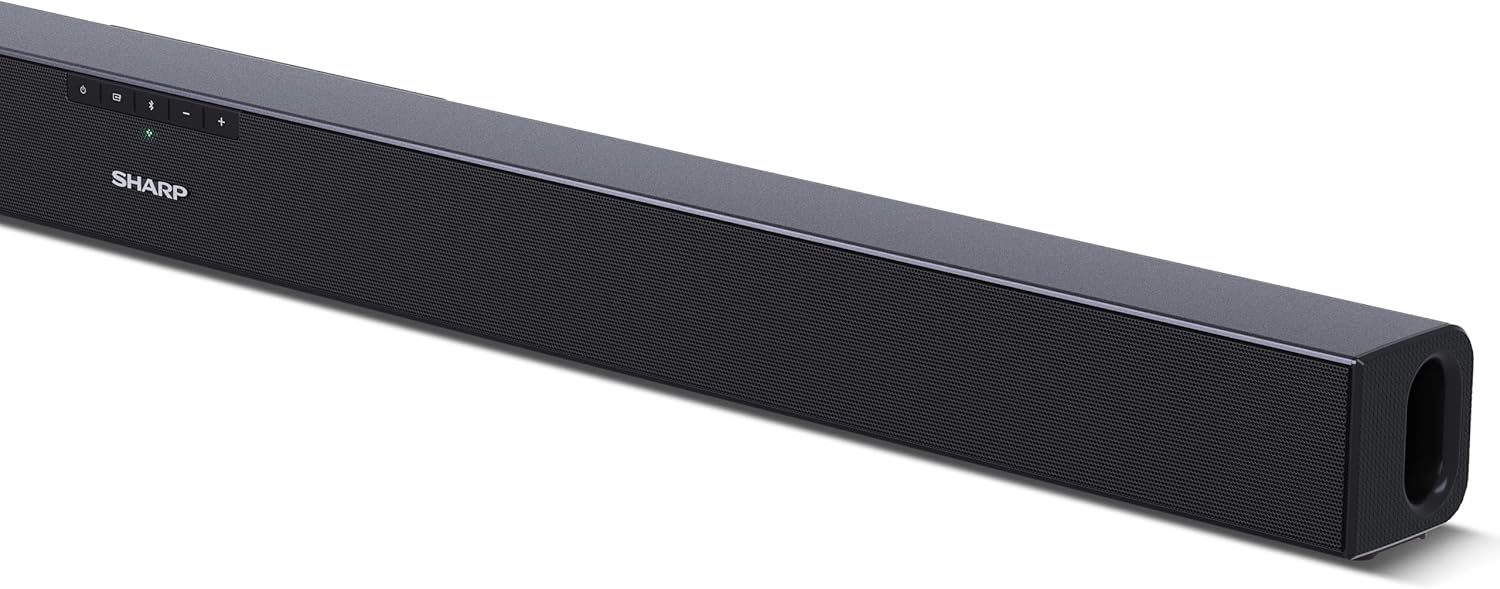
Малюнок 4.1: Спереду View
The front of the soundbar features the Sharp logo and LED indicators for source selection and status. Control buttons for power, input, and volume are located on the top panel.
Малюнок 4.2: Задня частина View (З'єднання)
The rear panel provides all necessary connection ports: HDMI ARC, Optical (S/PDIF), and Auxiliary (3.5mm) input, along with the power input.

Рисунок 4.3: Пульт дистанційного керування
The included remote control allows for convenient operation of the soundbar, including power, input selection, volume, bass, and treble adjustments.
5. Налаштування
5.1 Розміщення
The Sharp HT-SB140MT Soundbar can be placed on a flat surface, such as a TV stand, or wall-mounted. Its slim profile of 6 cm allows it to fit easily under most TV screens without obstructing the view.

Figure 5.1: Soundbar Placement
The soundbar is ideally positioned directly in front of your television for optimal sound projection.
5.2 Підключення до телевізора
Виберіть один із наступних способів підключення:
- HDMI ARC/CEC (рекомендовано): Connect an HDMI cable (not included) from the HDMI ARC port on your TV to the HDMI ARC port on the soundbar. This allows your TV remote to control the soundbar's volume and power. Ensure HDMI ARC/CEC is enabled in your TV's settings.
- Digital Optical Audio (S/PDIF): Connect an optical cable (not included) from the Optical Out port on your TV to the OPTICAL IN port on the soundbar. Select the Optical input on the soundbar.
- Допоміжний (AUX): Connect a 3.5mm audio cable (not included) from the headphone jack or AUX Out port on your TV to the AUX IN port on the soundbar. Select the AUX input on the soundbar.
5.3 Підключення живлення
After connecting the audio cable, plug the power cable into the soundbar's power input and then into a wall outlet (220-240V / 50Hz).
6. Інструкція з експлуатації
6.1 Увімкнення/вимкнення живлення
Натисніть кнопку живлення на саундбарі або на пульті дистанційного керування, щоб увімкнути або вимкнути пристрій.
6.2 Вибір джерела
Press the Input button on the soundbar or the remote control repeatedly to cycle through the available input sources: HDMI ARC, Optical, AUX, and Bluetooth. The LED indicator on the soundbar will change to reflect the selected source.
6.3 Регулювання гучності
Використовуйте кнопки збільшення гучності (+) та зменшення гучності (-) на саундбарі або пульті дистанційного керування, щоб налаштувати рівень звуку.
6.4 Створення пари Bluetooth
Щоб підключити пристрій Bluetooth:
- Select Bluetooth input on the soundbar. The Bluetooth LED indicator will flash, indicating pairing mode.
- На вашому смарт-пристрої (смартфоні, планшеті тощо) увімкніть Bluetooth та виконайте пошук доступних пристроїв.
- Select "SHARP HT-SB140MT" from the list of devices.
- Once connected, the Bluetooth LED indicator will stop flashing and remain solid. You can now stream audio wirelessly to the soundbar.
6.5 Sound Modes (Equalizer)
The soundbar features an equalizer with different sound modes to optimize audio for various content types. Use the EQ button on the remote control to cycle through these modes (e.g., Movie, Music, News). You can also adjust Bass and Treble levels using dedicated buttons on the remote.
7. Технічне обслуговування
7.1 Очищення
To clean the soundbar, unplug it from the power outlet. Use a soft, dry, lint-free cloth to wipe down the surfaces. Do not use abrasive cleaners, waxes, or solvents as they may damage the finish.
7.2 Зберігання
If you plan to store the soundbar for an extended period, disconnect it from the power supply and store it in a cool, dry place, away from direct sunlight and extreme temperatures.
8. Вирішення проблем
Якщо у вас виникли проблеми із саундбаром, зверніться до наступних поширених проблем та способів їх вирішення:
| проблема | Можлива причина | Рішення |
|---|---|---|
| Немає звуку звукової панелі. | Саундбар вимкнено або звук вимкнено. Вибрано неправильне джерело вхідного сигналу. Кабелі підключені неправильно. Налаштування аудіовиходу телевізора неправильні. | Переконайтеся, що саундбар увімкнено та не вимкнено звук. Select the correct input source (HDMI ARC, Optical, AUX). Перевірте всі кабельні з'єднання (HDMI, оптичний, AUX). Verify your TV's audio output settings are set to external speakers or the correct digital output. |
| Пристрій Bluetooth не може підключитися. | Soundbar is not in pairing mode. Пристрій поза зоною дії. Перешкоди від інших пристроїв. | Ensure the soundbar is in Bluetooth input mode and the LED is flashing. Move your Bluetooth device closer to the soundbar (within 10 meters). Turn off other Bluetooth devices nearby. Try unpairing and re-pairing. |
| Пульт дистанційного керування не працює. | Battery is low or inserted incorrectly. Перешкода між пультом дистанційного керування та саундбаром. Remote control is faulty. | Replace the CR2 battery and ensure correct polarity. Remove any obstructions between the remote and the soundbar's sensor. Якщо проблеми не зникнуть, зверніться до служби підтримки клієнтів. |
9. Технічні характеристики
| Назва моделі | HT-SB140(MT) |
| Тип динаміка | Саундбар |
| Конфігурація каналу об’ємного звуку | 2.0 |
| Максимальна вихідна потужність динаміка | 150 Вт |
| АЧХ | 60 Гц |
| Технологія підключення | Bluetooth, HDMI ARC/CEC, Digital Optical Audio (S/PDIF), 3.5mm Auxiliary (AUX) |
| Технологія бездротового зв'язку | Bluetooth |
| Максимальний радіус дії (Bluetooth) | 10 метрів |
| Спосіб контролю | Пульт дистанційного керування |
| Джерело живлення | AC (Mains) |
| Вхідний об'ємtage | 220-240 Вольт |
| Колір | чорний |
| матеріал | Пластик, Метал |
| Тип монтажу | Настінне кріплення, настільне |
| Розміри продукту (Д x Ш x В) | 95 х 6 х 6 см |
| Вага товару | 1.5 кілограма |
| Включені компоненти | Пульт дистанційного керування |
| Потрібен акумулятор | 1 батарея CR2 |
| Водостійкий | немає |
| Наявність запасних частин | 5 років |
| Гарантія оновлень програмного забезпечення до | Інформація недоступна |
10. Гарантія та підтримка
The Sharp HT-SB140MT Soundbar comes with a Limited Warranty. Please refer to the warranty card included in your package for specific terms and conditions. Spare parts are available for up to 5 years from the date of purchase.
For technical support, service, or warranty claims, please contact Sharp customer service through their official website or the contact information provided in your product documentation. When contacting support, please have your product model number (HT-SB140(MT)) and purchase details ready.


