вступ
This manual provides comprehensive instructions for the Xfinity Comcast XR15 Voice Control Remote. Designed for seamless interaction with Xfinity X1, Xi6, Xi5, and XG2 equipment, this remote enhances your entertainment experience with intuitive voice commands and convenient features.
Продукт закінченийview
The Xfinity XR15 Voice Control Remote is engineered for ease of use and efficient control of your Xfinity entertainment system. Key features include voice control, a backlit keypad, Aim Anywhere functionality, and easy access to accessibility features like Closed Captioning, video description, and voice guidance.
Remote Layout and Button Functions
Familiarize yourself with the remote's buttons and their corresponding functions:

Figure 1: Xfinity XR15 Remote Button Functions
- ТВ вхід: Switches to the next available input on your TV.
- Потужність: Turns the TV on or off. When programmed, it can also control the TV Box and certain audio devices. The X1 TV Box is designed to remain on.
- ГУЧНІСТЬ +/-: Increases or decreases the volume when programmed with a valid TV or AV receiver code.
- Вимкнути звук: Turns sound off or on.
- CH +/-: Selects the next channel up or down.
- Відтворення/пауза: Plays or pauses live TV, XFINITY On Demand, or DVR content.
- FF (швидке перемотування вперед): Fast forwards XFINITY On Demand or DVR content.
- Rew (Перемотування назад): Rewinds XFINITY On Demand or DVR content.
- Вихід: Exits on-screen guides; stops and exits XFINITY On Demand and DVR content. Returns to the "Live" point when replaying live TV.
- Record (red dot): Records the current program or saves future programs to your DVR.
- Xfinity: Displays the main menu of the guide, providing access to all guide features, including DVR and XFINITY On Demand.
- керівництво: Displays TV listings.
- Назад: Navigates back in menus or previous screens.
- Інформація (i): Displays information about programs and notifications.
- Voice Control (Microphone button): Use voice commands to search for networks, shows, set DVR recordings, and get recommendations.
- Цифрові клавіші (0-9): Use predictive text (T9) to quickly search for content or directly enter channel numbers.

Малюнок 2: Спереду view of two Xfinity XR15 Remotes
Налаштування
The Xfinity XR15 remote is designed for easy pairing with your Xfinity equipment. It is compatible with Xi6, Xi5, XG2, and X1 equipment.
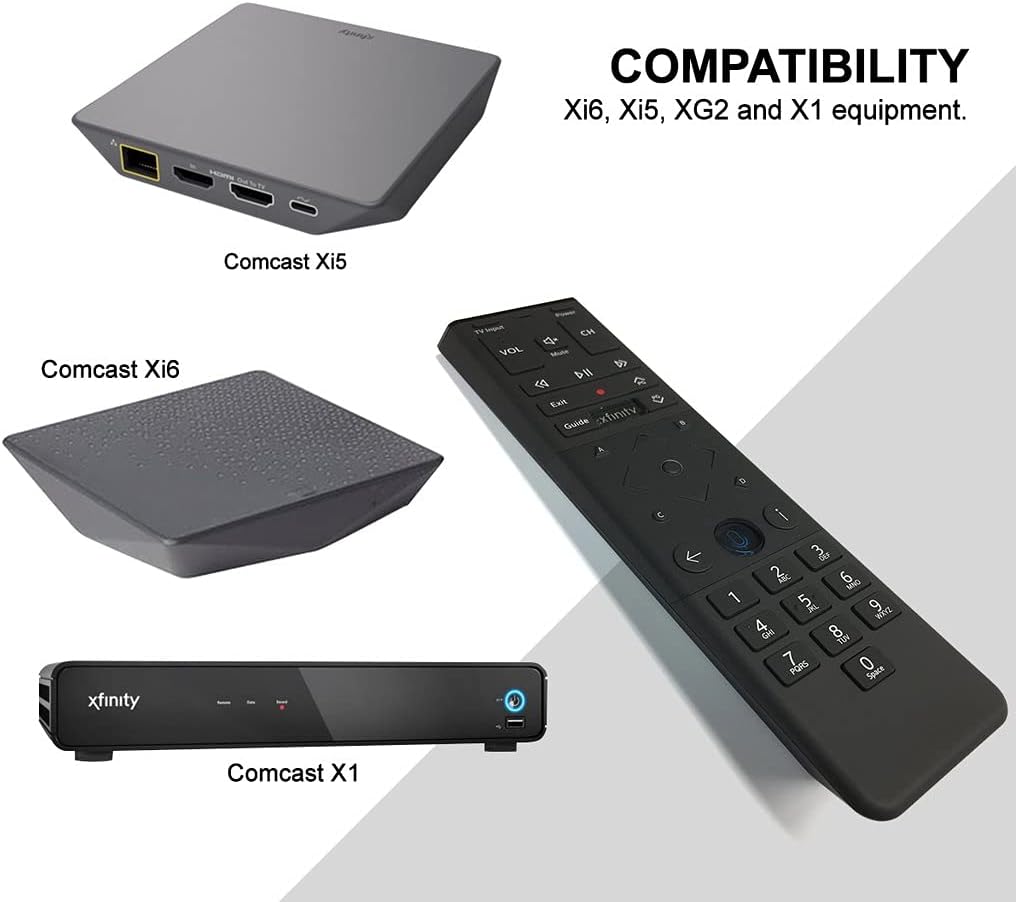
Figure 3: Xfinity XR15 Remote Compatibility
Автоматичне сполучення
For most X1 TV Boxes, the remote will automatically pair when you first use it. Simply point the remote at your TV Box and press any button. Follow any on-screen prompts to complete the pairing process.
Manual Pairing (if automatic pairing fails)
- Ensure your TV Box is powered on.
- Натисніть і утримуйте Xfinity і Інформація (i) buttons simultaneously for five seconds until the status LED on the remote changes from red to green.
- Дотримуйтеся вказівок на екрані, щоб завершити створення пари.
Pairing with your TV for Volume and Power Control
To control your TV's volume and power, you will need to program the remote:
- Turn on your TV and Xfinity TV Box.
- Натисніть і утримуйте Налаштування button (usually a small, recessed button on the remote, or sometimes the Xfinity і Вимкнути звук buttons simultaneously) until the status LED on the remote changes from red to green.
- Enter the 5-digit code for your TV brand. A list of common codes can be found on the Xfinity support webсайт.
- Направте пульт на телевізор і натисніть кнопку потужність button. If the TV turns off, the remote is programmed. If not, try the next code for your TV brand.
Інструкція з експлуатації
Використання голосового управління
The voice control feature allows you to quickly find content, change channels, and control your DVR. To use voice control:

Figure 4: Voice Control Microphone Button
- Натисніть і утримуйте мікрофон button (located below the directional pad).
- Чітко говоріть у мікрофон у верхній частині пульта дистанційного керування.
- Відпустіть мікрофон кнопку, коли ви закінчите говорити.
Exampфайли голосових команд:
- "Find [Movie Title]"
- "Go to [Channel Name/Number]"
- "Record [Show Name]"
- "What's on tonight?"
- «Покажіть мені комедії»
The remote's voice recognition is highly responsive, allowing for quick navigation and content discovery.
Технічне обслуговування
Заміна батареї
The Xfinity XR15 remote requires two AA batteries (included). To replace the batteries:

Малюнок 5: Батарейний відсік
- Locate the battery cover on the back of the remote.
- Slide the cover downwards and lift it off.
- Remove the old batteries and insert two new AA batteries, ensuring correct polarity (+/-).
- Replace the battery cover by sliding it back into place until it clicks.
Для оптимальної роботи використовуйте високоякісні лужні батарейки.
Усунення несправностей
If you encounter issues with your Xfinity XR15 remote, try the following solutions:
| проблема | Рішення |
|---|---|
| Remote not responding to commands. |
|
| Голосове керування не працює. |
|
| Volume or Power buttons not controlling TV. |
|
For further assistance, please visit the official Xfinity support webсайту або зв’яжіться з їхньою службою обслуговування клієнтів.
Технічні характеристики
| Особливість | Деталь |
|---|---|
| Номер моделі | XR15 |
| Розміри | 7 x 5.3 x 1.6 дюймів |
| Вага товару | 10.2 унції |
| Акумулятори | 2 батарейки АА (входять в комплект) |
| Сумісні пристрої | X1, Xi6, Xi5, XG2 TV Boxes |
| Особливість | Voice controlled, Backlit keypad, Aim Anywhere |
| Колір | чорний |
Гарантія та підтримка
For information regarding product warranty, please refer to the documentation provided with your purchase or visit the official Xfinity support website. Xfinity provides various support resources, including online guides, FAQs, and customer service contact options.
Інтернет-підтримка: www.xfinity.com/support


