вступ
This manual provides detailed instructions for the safe and efficient operation of your Mikado MD-856 Multimedia Bluetooth Speaker system. Please read this manual thoroughly before using the product and retain it for future reference.
Інформація про безпеку
- Не піддавайте пристрій впливу дощу або вологи, щоб запобігти пожежі або ураженню електричним струмом.
- Не відкривайте casing. Звертайтеся до кваліфікованого персоналу з усіх питань технічного обслуговування.
- Забезпечте належну вентиляцію навколо пристрою.
- Використовуйте лише блок живлення, зазначений для цього пристрою.
- Тримати подалі від прямих сонячних променів, джерел тепла та сильних магнітних полів.
- Уникайте розміщення важких предметів на пристрої.
Вміст упаковки
Будь ласка, перевірте, чи всі перелічені нижче предмети входять до вашої упаковки:
- Main Subwoofer Unit
- Сателітні динаміки (5 одиниці)
- Пульт дистанційного керування
- Usage Manual (this document)
- Гарантійний талон
- RCA кабель
- Антенний кабель
Продукт закінченийview
The Mikado MD-856 is a 5.1 channel multimedia speaker system designed to deliver rich audio. It features multiple connectivity options including Bluetooth, USB, SD card, FM radio, and AUX input.
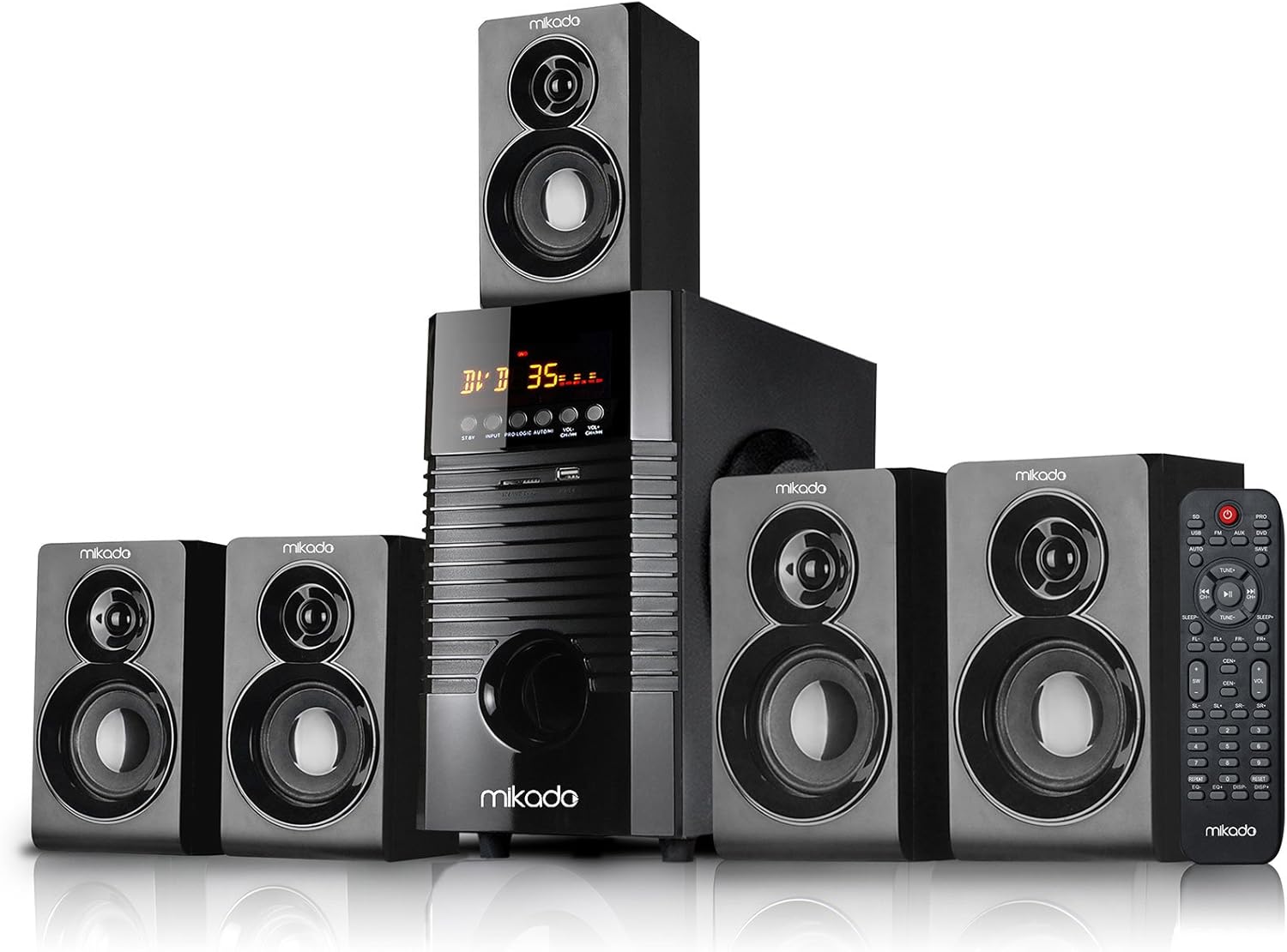
малюнок 1: Фронт view of the Mikado MD-856 5.1 Multimedia Bluetooth Speaker system, showing the central subwoofer unit, five satellite speakers, and the remote control.

малюнок 2: Rear panel of the Mikado MD-856 subwoofer, displaying various audio input and output ports, power switch, and power cable connection.
Налаштування
1. Підключення динаміка
- Connect the five satellite speakers to the corresponding output ports on the rear panel of the main subwoofer unit. Ensure correct polarity (+ to + and - to -).
- Position the speakers for optimal 5.1 surround sound experience. Typically, one center speaker, two front speakers, and two rear speakers.
2. Підключення живлення
- Переконайтеся, що вимикач живлення на задній панелі знаходиться в положенні ВИМК.
- Connect the power cable to the main subwoofer unit and then plug it into a standard electrical outlet.
3. Підключення аудіовходу
Виберіть один із наведених нижче способів підключення джерела аудіо:
- Вхід RCA (AUX): Use the provided RCA cable to connect your audio source (e.g., TV, PC, DVD player) to the "AUX AUDIO INPUT" ports on the rear panel. Match the red and white connectors.
- USB/SD-карта: Insert a USB flash drive or SD card into the respective slots on the front panel of the subwoofer.
- FM антена: Connect the included antenna cable to the FM antenna port on the rear panel for improved radio reception.
Інструкція з експлуатації
1. Увімкнення/вимкнення живлення
Flip the power switch on the rear panel to the ON position. The display on the front panel will illuminate.
2. Вибір режиму
Press the "MODE" button on the front panel or the remote control to cycle through available input modes: Bluetooth, USB, SD, FM, and AUX.
3. Регулювання гучності
Adjust the master volume using the large knob on the front panel or the volume buttons on the remote control.
4. Підключення Bluetooth
- Switch the speaker system to Bluetooth mode. The display will show "BT" or a similar indicator.
- Увімкніть Bluetooth на своєму мобільному пристрої (смартфоні, планшеті тощо) та здійсніть пошук доступних пристроїв.
- Select "MD-856" from the list of devices. Once paired, you will hear a confirmation sound.
5. Відтворення з USB/SD-карти
When a USB drive or SD card is inserted, the system will automatically switch to USB/SD mode and begin playing compatible audio files. Use the remote control for playback functions (play/pause, next/previous track).
6. FM-радіо
In FM mode, press the "SCAN" button on the remote control to automatically scan and save available radio stations. Use the "PREV/NEXT" buttons to navigate through saved stations.
Технічне обслуговування
- Прибирання: Use a soft, dry cloth to clean the surfaces of the speakers. Do not use liquid cleaners or abrasive materials.
- Зберігання: Якщо пристрій зберігатиметься протягом тривалого часу, від’єднайте його від джерела живлення та зберігайте у прохолодному сухому місці.
- Вентиляція: Переконайтеся, що вентиляційні отвори сабвуфера не заблоковані, щоб запобігти перегріву.
Усунення несправностей
| проблема | Можлива причина | Рішення |
|---|---|---|
| Немає живлення | Power cable not connected; Power switch off; Power outlet faulty | Check power cable connection; Turn power switch ON; Try a different power outlet |
| Ні звуку | Volume too low; Incorrect input mode; Audio cables not connected properly; Source device not playing | Increase volume; Select correct input mode; Check audio cable connections; Ensure source device is playing audio |
| Bluetooth не з’єднується | Speaker not in Bluetooth mode; Device too far; Bluetooth on device off | Switch to Bluetooth mode; Move device closer; Enable Bluetooth on your device |
| Поганий FM -прийом | Антена не підключена; слабкий сигнал | Connect FM antenna; Adjust antenna position for better signal |
Технічні характеристики
- модель: MD-856
- Бренд: Мікадо
- Тип динаміка: Multimedia 5.1 Channel
- Технологія підключення: Bluetooth, USB
- Максимальна вихідна потужність динаміка: 25 Вт
- Конфігурація каналу об'ємного звуку: 5.1
- Рекомендоване використання: PC - TV
- Розміри продукту: 35 х 35 х 44 см
- Вага товару: 7.9 кілограма
- колір: чорний
- Включені компоненти: Controller, Usage Manual, Warranty Certificate, RCA Cable, Antenna Cable
Гарантія та підтримка
Your Mikado MD-856 speaker system comes with a Warranty Certificate. Please refer to the certificate for details regarding warranty coverage and terms. For technical support or service inquiries, please contact your local Mikado dealer or authorized service center.


