Продукт закінченийview
The Sharkoon V1000 is a versatile Micro ATX PC case designed for various computing needs, from demanding office setups to compact multimedia stations or gaming PCs. Despite its compact dimensions of 17.7 x 7.6 x 15.8 inches, it offers ample space for components typically found in larger ATX cases. Key features include a dedicated power supply tunnel for discreet installation and improved airflow, a wireless front panel design, and removable dust filters for easy maintenance.
Ключові характеристики:
- Power supply tunnel for clean cable management and improved thermal performance.
- Wireless front panel design for easy access and maintenance.
- Removable dust filter for convenient cleaning and system longevity.
- Decoupled power supply pad to reduce vibrations and noise.
- Variable fan configuration options for optimized cooling.
- Support for a radiator in the front panel for advanced cooling solutions.

Рисунок 1: Кутова передня частина view of the Sharkoon V1000 PC Case, showcasing its sleek black design and mesh front panel.
Налаштування та встановлення
This section provides general guidelines for setting up your Sharkoon V1000 PC case and installing essential components. Always refer to your component manuals for specific installation instructions.
1. Підготовка справи
- Розпакування: Обережно вийміть футляр з упаковки. Перевірте його на наявність пошкоджень під час транспортування.
- Доступ до інтер'єру: Remove the side panels. Typically, this involves unscrewing thumbscrews at the rear of the case and sliding the panels backward.

Рисунок 2: Інтер'єр view of the Sharkoon V1000, showing the motherboard tray, drive bays, and power supply tunnel.
2. Установка джерела живлення
The V1000 features a dedicated power supply tunnel at the bottom for a clean build.
- Position the power supply unit (PSU) into the tunnel from the rear of the case.
- Закріпіть блок живлення гвинтами ззаду корпусу.
- Route necessary cables through the cutouts in the tunnel for connection to components.
3. Встановлення материнської плати
The V1000 supports mATX motherboards.
- Встановіть екран вводу/виводу в задній отвір корпусу.
- Align the motherboard with the pre-installed standoffs. Ensure all screw holes align.
- Закріпіть материнську плату за допомогою наданих гвинтів.

Малюнок 3: Задня частина view of the Sharkoon V1000, showing the I/O shield cutout, expansion slots, and power supply mounting area.
4. Встановлення диска
Install your storage drives (HDDs/SSDs) into the designated bays. Refer to the case's internal structure for specific bay locations and mounting mechanisms.
5. Підключення передньої панелі
Connect the front panel cables (USB, audio, power/reset switches, LEDs) to the appropriate headers on your motherboard. Consult your motherboard manual for header locations.

Figure 4: Top-front angled view of the Sharkoon V1000, highlighting the front I/O panel with USB ports and audio jacks.
Експлуатація корпусу ПК
Once all components are installed and connected, you can begin using your PC. The Sharkoon V1000 is designed for optimal airflow and user convenience.
Увімкнення
Press the power button located on the top front panel of the case to turn on your system. The power LED will illuminate.

Малюнок 5: Спереду view of the Sharkoon V1000, showing the mesh front panel and the top-mounted power button and I/O ports.
Конфігурація вентилятора
The V1000 offers variable fan configuration. Ensure fans are installed to create positive or negative pressure as desired for optimal cooling. The case supports 120mm fans.
Технічне обслуговування
Регулярне технічне обслуговування допомагає забезпечити довговічність та оптимальну продуктивність компонентів вашого ПК.
Очищення пилового фільтра
The Sharkoon V1000 features removable dust filters. It is recommended to clean these filters every 1-3 months, depending on your environment, to maintain good airflow and prevent dust buildup inside the case.
- Locate and carefully remove the dust filters (e.g., front, top, bottom).
- Очистіть фільтри за допомогою стисненого повітря, м’якої щітки або промийте водою (перед повторним встановленням переконайтеся, що вони повністю сухі).
- Reinstall the clean dust filters.
Генеральне прибирання
Протріть зовнішню частину корпусу м’якою тканиноюamp тканиною. Уникайте абразивних засобів для чищення або розчинників.
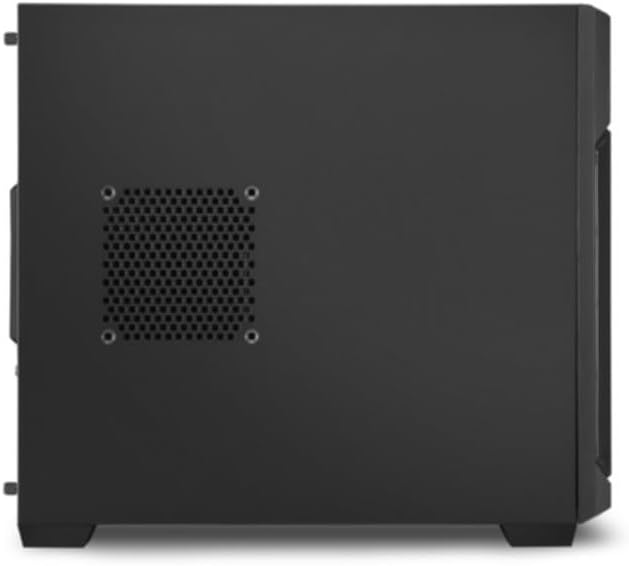
Малюнок 6: Сторона view of the Sharkoon V1000, showing the ventilation cutouts which may have associated dust filters.
Усунення несправностей
У цьому розділі розглядаються поширені проблеми, з якими ви можете зіткнутися під час використання корпусу вашого ПК.
Немає живлення / Система не запускається
- Ensure the power supply unit (PSU) is properly connected to the wall outlet and the power switch on the PSU is in the 'ON' position.
- Перевірте, чи кабель кнопки живлення на передній панелі правильно підключений до роз'єму живлення материнської плати.
- Перевірте, чи всі внутрішні роз'єми живлення (24-контактний ATX, живлення процесора, живлення відеокарти) надійно закріплені.
Надмірний шум
- Inspect all fans (CPU, GPU, case fans) for obstructions or loose mounting.
- Переконайтеся, що кабелі не заважають лопатям вентилятора.
- Check if the power supply is securely mounted and its pad is properly decoupled.
Перегрів
- Clean all dust filters and internal components to improve airflow.
- Verify that case fans are installed in the correct orientation (intake/exhaust) to create proper airflow.
- Ensure CPU cooler and GPU cooler are properly seated and functioning.
Технічні характеристики
Detailed specifications for the Sharkoon V1000 PC Case.
| Особливість | Деталь |
|---|---|
| Бренд | Шаркун |
| Виробник | Sharkoon Technologies GmbH |
| Серія | V1000 |
| колір | чорний |
| Форм-фактор | mATX |
| Висота предмета | 40.2 сантиметрів |
| Ширина елемента | 19.5 сантиметрів |
| Розміри продукту | 45 х 19.5 х 40.2 см; 4 кг |
| Кількість портів USB 2.0 | 2 |
| Кількість портів USB 3.0 | 1 |
| Сумісність материнської плати | mATX |
| Тип корпусу | Міді Тауер |
| Тип кріплення блоку живлення | Задня підвіска |
| Спосіб охолодження | повітря |
| Fan Size Supported | 120 міліметрів |
Гарантія та підтримка
For warranty information and technical support regarding your Sharkoon V1000 PC Case, please refer to the official Sharkoon website or contact Sharkoon Technologies GmbH directly.
Виробник: Sharkoon Technologies GmbH
Зберігайте підтвердження покупки для гарантійних претензій.


