1. Продукт закінчивсяview
The CHACON 54661 Set provides a convenient solution for wirelessly controlling your electrical appliances and lighting. This set includes two remote-controlled sockets and one remote control, allowing you to switch devices on or off from a distance within your home.
- Бездротове управління: Operate devices without direct access to the wall socket.
- Легка установка: Просте налаштування за принципом «підключи та працюй».
- Широка сумісність: Suitable for various household appliances.
- Робоча частота: 433.92 МГц.
- Максимальна потужність: 2000 Вт.
- Діапазон передачі: Up to 25 meters in open field conditions.

Image: CHACON remote control and a socket in a typical home environment, demonstrating wireless control.
2. Інформація про безпеку
Будь ласка, прочитайте та зрозумійте всі інструкції з безпеки перед використанням цього виробу. Недотримання цих інструкцій може призвести до ураження електричним струмом, пожежі або серйозних травм.
- Тільки для використання в приміщенні: This product is designed for indoor use in dry locations. Do not expose to rain or moisture.
- Максимальне навантаження: Do not exceed the maximum load of 2000 Watts. Overloading can cause overheating and fire.
- Вентиляція: Ensure adequate ventilation around the sockets. Do not cover them.
- Діти та домашні тварини: Зберігати в недоступному для дітей та домашніх тварин місці.
- Розбирання: Не намагайтеся відкривати, модифікувати або ремонтувати пристрій. Звертайтеся до кваліфікованого персоналу з будь-яким обслуговуванням.
- Прибирання: Disconnect from power before cleaning. Use a dry, soft cloth. Do not use liquid cleaners.
- Утилізація: Dispose of batteries and the product according to local regulations.
3. Вміст упаковки
Перевірте наявність усіх елементів в упаковці:
- 2 x CHACON Remote Controlled Sockets
- 1 x CHACON Remote Control
- 1 x Lithium-ion Battery (pre-installed in remote or supplied separately)
- 1 x Посібник користувача (цей документ)
4. Налаштування
4.1. Встановлення батареї пульта дистанційного керування
The remote control requires one Lithium-ion battery. If not pre-installed, follow these steps:
- Знайдіть батарейний відсік на задній панелі пульта дистанційного керування.
- Відкрийте кришку батарейного відсіку.
- Insert the Lithium-ion battery, ensuring correct polarity (+ and -).
- Надійно закрийте кришку батарейного відсіку.

Зображення: Крупний план view of the CHACON remote control, showing the ON/OFF buttons and channel selectors (1, 2, 3, 4).
4.2. Pairing Sockets with Remote Control
Each socket needs to be paired with the remote control to establish communication. The remote control has four channels (1, 2, 3, 4) which can be used to control individual sockets or groups of sockets.
- Plug one CHACON remote controlled socket into a standard wall outlet. The LED indicator on the socket may flash.
- Within 5 seconds of plugging in the socket, press and hold the small pairing button located on the side or front of the socket until the LED indicator starts flashing rapidly.
- While the socket's LED is flashing, press the desired "ON" button (e.g., "1 ON") on the remote control.
- The socket's LED indicator will stop flashing and remain solid for a moment, then turn off, indicating successful pairing.
- Repeat this process for the second socket, assigning it to a different channel (e.g., "2 ON") or the same channel if you wish to control both simultaneously.
- To unpair a socket, plug it in, then press and hold the pairing button until the LED flashes rapidly. Then, press the corresponding "OFF" button on the remote control.

Image: A CHACON remote controlled socket plugged into a wall outlet, ready for pairing.
5. Інструкція з експлуатації
Once your sockets are paired, you can easily control your connected devices.
- Plug the appliance you wish to control into the CHACON remote controlled socket.
- Ensure the appliance's own power switch is in the "ON" position (if applicable).
- To turn the appliance ON, press the corresponding "ON" button (1, 2, 3, or 4) on your remote control.
- To turn the appliance OFF, press the corresponding "OFF" button (1, 2, 3, or 4) on your remote control.
You can control devices individually or, if multiple sockets are paired to the same channel, control them simultaneously.
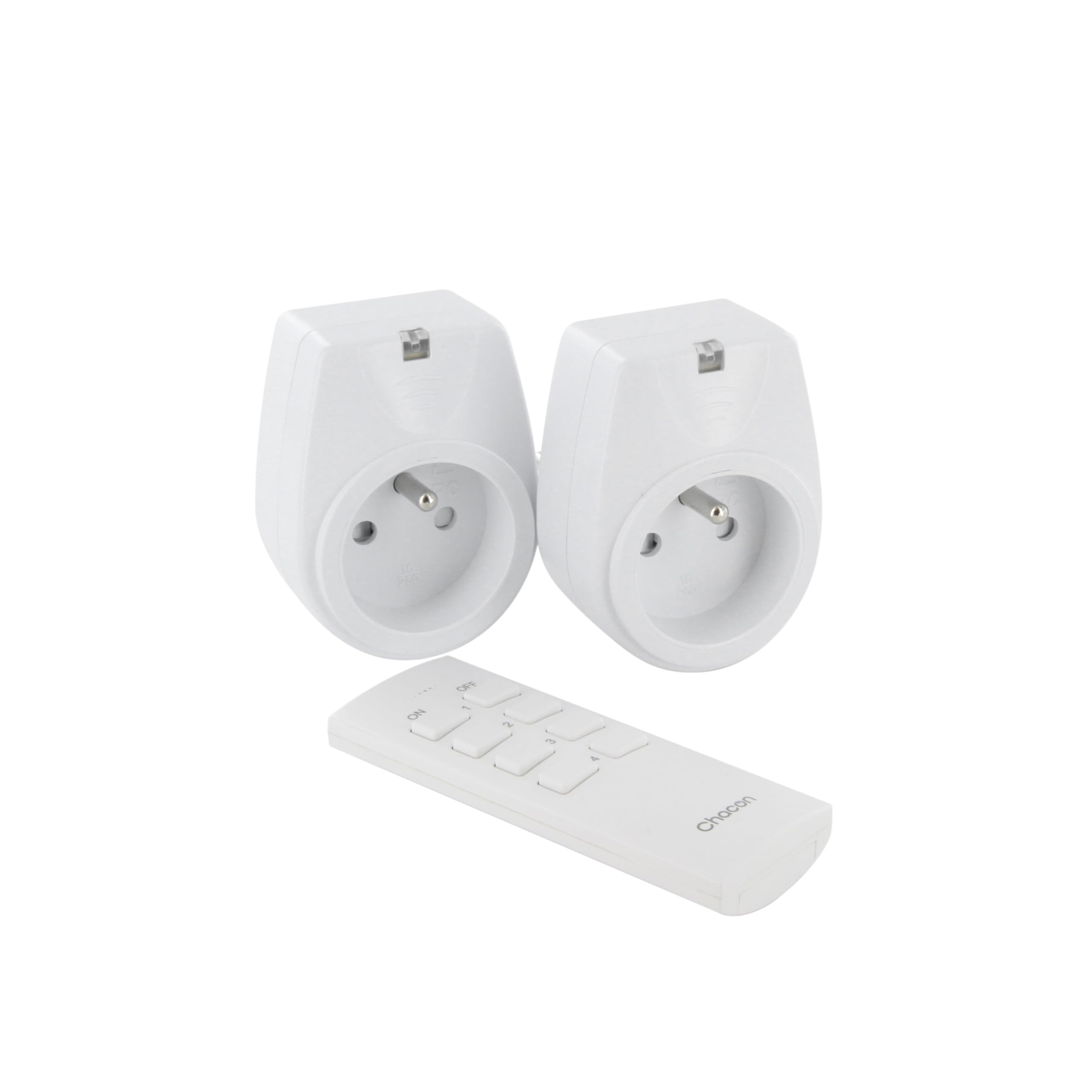
Image: A hand holding the CHACON remote control, demonstrating its use to switch on a lamp.
6. Технічне обслуговування
6.1. прибирання
To clean the sockets and remote control, ensure they are disconnected from power. Use a soft, dry cloth. Do not use abrasive cleaners, solvents, or immerse in water.
6.2. Заміна батарейки пульта дистанційного керування
If the remote control's range decreases or it stops responding, the battery may need replacement. Follow the steps in Section 4.1 to replace the Lithium-ion battery with a new one of the same type.
7. Вирішення проблем
| проблема | Можлива причина | Рішення |
|---|---|---|
| Socket does not respond to remote control. |
|
|
| Підключений прилад не вмикається/вимикається. |
|
|
| Reduced transmission range. |
|
|
8. Технічні характеристики
| Бренд | ШАКОН |
| Номер моделі | 54661 |
| Колір | Білий |
| Особливості | Бездротовий |
| Сумісні пристрої | Air conditioner, Game console, Iron, Speaker, Lamp, DVD player, MP3 player, E-reader, Coffee machine, Modem, Laptop, Heater, Router, Refrigerator, Set-top box, Smartphone, Smartwatch, Audio system, Hair dryer, Tablet, Television |
| Тип батареї пульта | Літій-іонний (1 в комплекті) |
| Максимальна потужність | 2000 Вт |
| Відстань передачі | 25 м (відкрите поле) |
| Частота | 433.92 МГц |
| томtage | 230 В |
| Кількість розеток | 2 |
| Тип вилки | FR (Type E/F) |
| матеріал | Полівінілхлорид (ПВХ) |
| Країна походження | Китай |
9. Гарантія
This CHACON product is covered by a Гарантія 2 рік з дати покупки. Ця гарантія поширюється на виробничі дефекти та дефекти матеріалів за умов нормального використання. Вона не поширюється на пошкодження, спричинені неправильним використанням, нещасним випадком, несанкціонованою модифікацією або неправильним встановленням.
Зберігайте підтвердження покупки для гарантійних претензій.
10. Підтримка
For technical assistance, troubleshooting not covered in this manual, or warranty inquiries, please contact CHACON customer support.
Visit the official CHACON webсайт, щоб отримати найактуальнішу інформацію про підтримку та контактні дані.
Note: Specific contact information may vary by region.


