1. Вступ
Thank you for choosing the Altec Lansing ALX-2824LA Portable Line Array Speaker System. This manual provides essential information for the safe and efficient setup, operation, and maintenance of your new audio system. Please read this manual thoroughly before using the product and retain it for future reference.
The ALX-2824LA is a powerful and portable professional audio solution featuring a dual 8-inch active subwoofer and two stacked speaker tops, each with dual 4-inch drivers and a 1-inch compression tweeter. Designed for versatile floor staging, its adjustable pole-mount system allows for optimal sound dispersion in various venues.
2. Інформація про безпеку
- Джерело живлення: Connect the system only to a power supply specified in this manual or on the unit. Ensure the voltage is correct for your region.
- Вентиляція: Не блокуйте вентиляційні отвори. Забезпечте достатній потік повітря навколо пристрою, щоб запобігти перегріву.
- Вода і вологість: Не піддавайте цей прилад впливу дощу або вологи. Не ставте на пристрій предмети, наповнені рідинами, такі як вази.
- Тепло: Не розміщуйте пристрій поблизу джерел тепла, таких як радіатори, обігрівачі, печі чи інші прилади (включаючи ampліфікатори), які виробляють тепло.
- Розміщення: Ensure the system is placed on a stable, level surface. Use caution when adjusting pole mounts to prevent tipping.
- Обслуговування: Не намагайтеся самостійно обслуговувати цей виріб. Зверніть усі послуги до кваліфікованого обслуговуючого персоналу.
- Захист органів слуху: Тривалий вплив високої гучності може спричинити незворотне пошкодження слуху. Будьте обережні під час роботи на високій гучності.
3. Вміст упаковки
Перевірте наявність усіх елементів в упаковці:
- 1 x ALX-2824LA Active Subwoofer
- 2 x ALX-2824LA Satellite Line Array Speakers
- 2 x Adjustable Pole Mounts
- Кабель живлення
- Audio Cables (XLR)
- Посібник користувача (цей документ)
4. Продукт закінчивсяview
The Altec Lansing ALX-2824LA system comprises an active subwoofer and two passive line array satellite speakers, designed for powerful and clear audio reproduction. The system is engineered for portability and ease of setup.

Малюнок 4.1: Спереду view of the assembled ALX-2824LA system, showing the subwoofer and two stacked satellite speakers on pole mounts.

Рисунок 4.2: Інший фронт view of the ALX-2824LA system, highlighting the compact and integrated design.
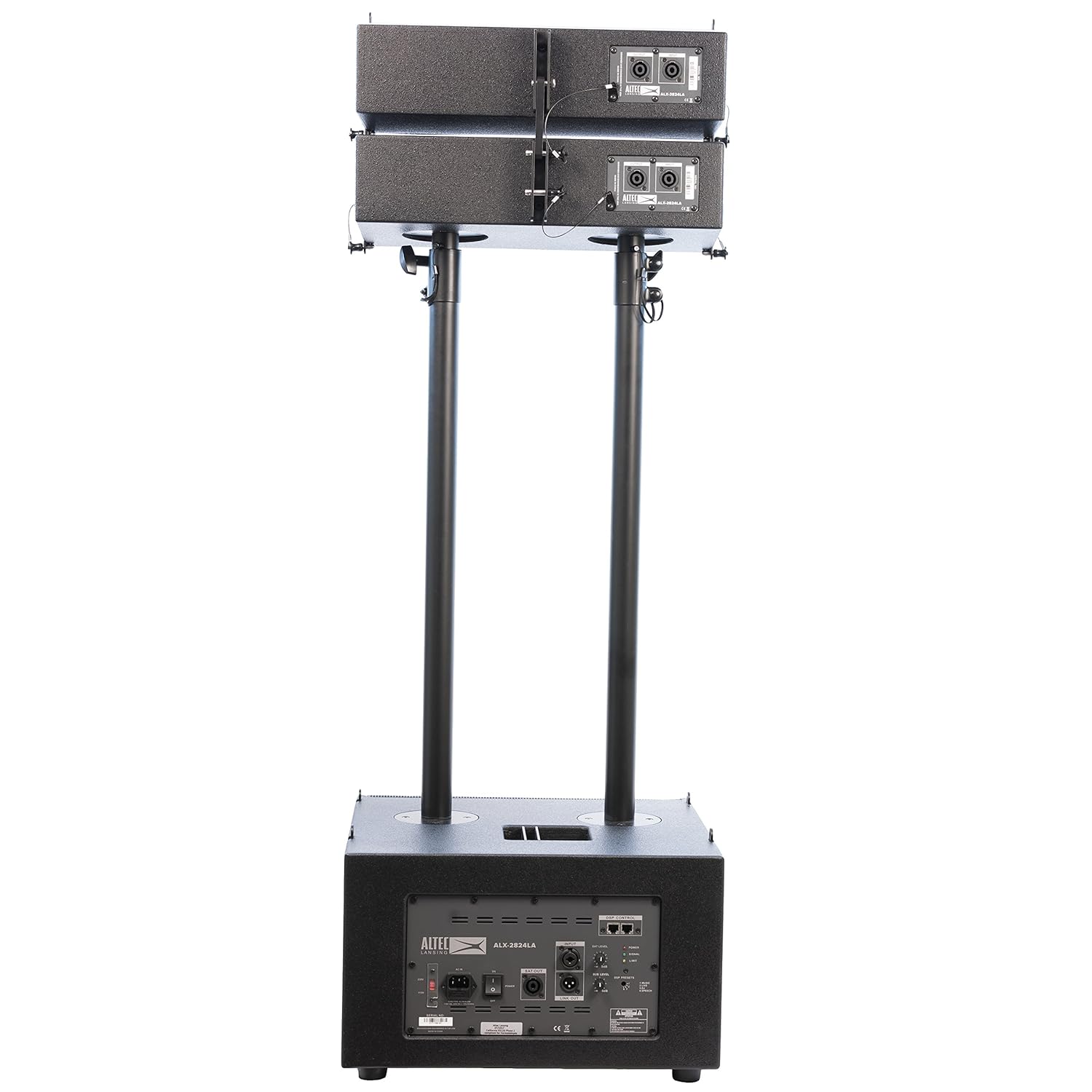
Малюнок 4.3: Задня частина view of the assembled ALX-2824LA system, showing the control panel on the subwoofer and connections on the satellite speakers.
4.1. Subwoofer (ALX-2824LA)
The active subwoofer houses the main amplifier and DSP controls. It features dual 8-inch drivers and provides the low-frequency foundation for the system. The rear panel includes power input, audio inputs/outputs, and DSP controls.

Figure 4.4: Close-up of the ALX-2824LA subwoofer rear panel, detailing power, input/output, and DSP controls.
4.2. Satellite Line Array Speakers
Each satellite speaker contains dual 4-inch drivers and a 1-inch compression tweeter, designed to deliver clear mid-range and high-frequency audio. These speakers connect to the subwoofer via XLR cables and are mounted on adjustable poles.

Figure 4.5: Close-up of the ALX-2824LA satellite speaker rear panel, showing input and output connections.
5. Налаштування
Follow these steps to assemble and set up your ALX-2824LA system:
- Розпакуйте компоненти: Обережно вийміть усі компоненти з упаковки.
- Розташування сабвуфера: Place the ALX-2824LA subwoofer on a stable, level surface in your desired location.
- Install Pole Mounts: Insert the adjustable pole mounts into the designated sockets on top of the subwoofer. Secure them firmly.
- Mount Satellite Speakers: Attach each satellite line array speaker to the top of an adjustable pole mount. Ensure they are securely fastened.
- Підключення сателітних динаміків: Using the provided XLR cables, connect the OUTPUT from the subwoofer to the INPUT of the bottom satellite speaker. Then, connect the OUTPUT of the bottom satellite speaker to the INPUT of the top satellite speaker. Repeat for the second stack. (Refer to Figure 4.3 and 4.5 for connection points).
- Підключення джерела аудіо: Connect your audio source (e.g., mixer, instrument) to the INPUT (XLR or 1/4" TRS) on the rear panel of the subwoofer (Figure 4.4).
- Підключіть живлення: Ensure the power switch on the subwoofer is in the OFF position. Connect the power cable to the AC IN socket on the subwoofer and then to a suitable power outlet.
- Adjust Speaker Angles/Height: Utilize the adjustable pole mount system to set the desired height and angle for the satellite speakers. This allows for optimal sound projection based on your venue and audience.
6. Інструкція з експлуатації
6.1. Увімкнення/вимкнення живлення
- Щоб увімкнути: Ensure all connections are secure and input levels are set to minimum. Flip the power switch on the subwoofer to the ON position. The POWER indicator light will illuminate.
- Щоб вимкнути: Turn down all volume levels. Flip the power switch on the subwoofer to the OFF position.
6.2. Audio Input and Output
- введення: The subwoofer features balanced XLR and 1/4" TRS inputs for connecting your audio source.
- Посилання: Use the LINK OUT XLR connector to send the audio signal to another ALX-2824LA system or other powered speakers.
- SAT. OUT: These XLR outputs send the processed audio signal to the satellite line array speakers.
6.3. Регулювання гучності
- SAT. LEVEL: Adjusts the output volume for the satellite speakers.
- ПІДРІВНЯ: Adjusts the output volume for the subwoofer.
- Start with both levels at their minimum and gradually increase to achieve the desired balance and overall volume.
7. DSP Control and Presets
The ALX-2824LA features integrated Digital Signal Processing (DSP) with electronic crossovers, allowing for sound customization. The DSP control panel (Figure 4.4) provides access to various presets:
- Попередні налаштування DSP: Use the DSP PRESETS button to cycle through optimized sound modes for different applications:
- 1. МУЗИКА: Optimized for general music playback, offering a balanced frequency response.
- 2. LIVE: Tailored for live performances, enhancing vocal clarity and instrument presence.
- 3. SPEECH: Designed to maximize speech intelligibility, reducing bass and emphasizing mid-range frequencies.
- Індикатори: The DSP control panel also includes indicators for POWER, SIGNAL, and LIMIT, providing visual feedback on the system's operational status.
8. Технічне обслуговування
- Прибирання: Use a soft, dry cloth to clean the exterior surfaces of the speakers and subwoofer. Do not use abrasive cleaners or solvents.
- Зберігання: When not in use, store the system in a cool, dry place, away from direct sunlight and extreme temperatures. It is recommended to use the original packaging for transport and storage.
- Огляд: Periodically check all cables and connections for signs of wear or damage. Replace any damaged components immediately.
9. Вирішення проблем
| проблема | Можлива причина | Рішення |
|---|---|---|
| Немає живлення | Power cable not connected; Power switch off; No power from outlet | Переконайтеся, що кабель живлення надійно підключено; Увімкніть живлення; Перевірте розетку з іншим пристроєм |
| Ні звуку | Input cable disconnected; Volume levels too low; Incorrect DSP preset; Satellite speakers not connected | Check all audio cable connections; Increase SAT. LEVEL and SUB LEVEL; Select appropriate DSP preset; Ensure satellite speakers are connected to SAT. OUT |
| Спотворений звук | Input signal too high; Volume levels too high; Damaged cable | Reduce input signal level from source; Lower SAT. LEVEL and SUB LEVEL; Check and replace damaged cables |
| System hums or buzzes | Ground loop issue; Faulty cable | Try connecting to a different power outlet; Use balanced cables; Replace suspected faulty cables |
10. Технічні характеристики
| Особливість | Специфікація |
|---|---|
| Модель | ALX-2824LA |
| Тип динаміка | Line Array System with Active Subwoofer |
| Максимальна потужність | 2000 Вт |
| Потужність RMS | 1000 Вт |
| Макс. SPL | 130 дБ |
| Драйвери сабвуфера | Подвійний 8-дюймовий |
| Драйвери сателітних динаміків | Dual 4-inch per speaker |
| Satellite Speaker Tweeter | 1-inch Compression Tweeter per speaker |
| Ampлібератор класу | Цифровий клас D |
| DSP | Integrated with Electronic Crossovers and Presets (Music, Live, Speech) |
| System Dimensions (Assembled) | 33.66 дюйма x 18.70 дюйма x 21.85 дюйма (85.5 x 47.5 x 55.5 см) |
| System Weight (Assembled) | 75.40 фунти (34.2 кг) |
| Колір | чорний |
11. Гарантія та підтримка
Altec Lansing products are designed and manufactured to the highest quality standards. For information regarding warranty coverage, please refer to the warranty card included with your product or visit the official Altec Lansing website. For technical support, service, or replacement parts, please contact Altec Lansing customer service through their official channels.


