1. Вступ
This manual provides essential information for setting up, operating, and maintaining your RCA 40-Inch Full HD 1080p Roku Smart LED TV. This television integrates the Roku TV platform, offering a simple and intuitive interface to access broadcast TV, streaming channels, gaming consoles, and other devices. Experience content with Full HD 1080p resolution and enjoy a user-friendly experience with the included remote and dual-band wireless connectivity.
2. Вміст упаковки
Переконайтеся, що всі предмети присутні в коробці:
- RCA 40-Inch Full HD 1080p Roku Smart LED TV
- Пульт дистанційного керування Roku
3. Фізичний overview

малюнок 3.1: Фронт view of the RCA Roku Smart TV, showcasing the intuitive home screen with quick access to streaming services and inputs.

малюнок 3.2: Сторона проfile of the television, demonstrating its sleek and slender design suitable for various placements.

малюнок 3.3: Back panel of the TV, illustrating the arrangement of input/output ports and the standard VESA mounting pattern.

малюнок 3.4: Dimensional drawing of the television, providing measurements for planning placement or wall mounting.
4. Налаштування
4.1 Встановлення підставки (додатково)
If not wall-mounting, attach the included quad-pedestal stands to the bottom of the TV using the provided screws. Ensure they are securely fastened for stability.
4.2 Настінне кріплення (додатково)
The TV is lightweight and supports VESA wall mounts. Refer to the wall mount manufacturer's instructions for proper installation. Ensure the wall mount is compatible with the TV's VESA pattern and weight.
4.3 Підключення живлення
Connect the power cord to the TV and then to a standard electrical outlet.
4.4 Початкове налаштування
- Увімкніть телевізор за допомогою пульта дистанційного керування.
- Дотримуйтесь підказок на екрані, щоб вибрати мову, країну та підключитися до мережі Wi-Fi.
- Activate your Roku account or create a new one if you don't have one.
5. Інструкція з експлуатації
5.1 Navigating the Roku TV Home Screen
The Roku TV home screen provides a centralized interface for all your entertainment. Use the directional pad on your remote to navigate between options:
- Потокові канали: Access popular streaming services like Netflix, Hulu, Prime Video, Disney+, and more.
- входи: Switch between connected devices such as cable boxes, game consoles, or an HD antenna.
- Телебачення в прямому ефірі: Access over-the-air broadcast channels if an antenna is connected.

малюнок 5.1: Детальний view of the Roku TV interface, showing various streaming applications and input selections.
5.2 Використання пульта дистанційного керування
The included Roku remote is designed for simple navigation. Dedicated buttons provide quick access to popular streaming services. The Roku mobile app (available for iOS and Android) can also be used as a remote, offering additional features like voice search.

малюнок 5.2: The physical Roku remote control, featuring dedicated buttons for popular streaming services and essential navigation.
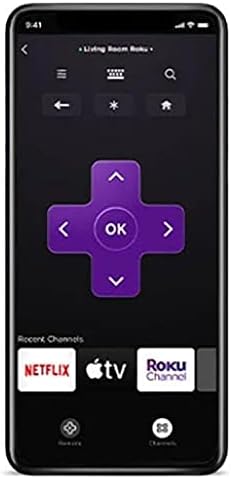
малюнок 5.3: The Roku mobile application, which can serve as an alternative remote control with voice search capabilities.
5.3 Roku Search and Voice Search
Utilize Roku Search to find movies, TV shows, and content across various streaming channels. Voice search is available through the Roku mobile app for quick and convenient content discovery.
5.4 Live TV Features
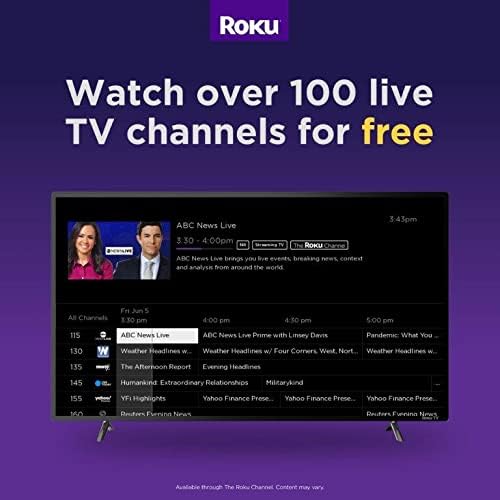
If an over-the-air antenna is connected, you can enjoy broadcast TV. The Live TV Pause feature allows you to pause and playback live antenna TV. You can also create a list of Favorite Channels for easy access.
5.5 Приватне слухання
For private viewing, use the Roku mobile app with headphones while watching streaming content on your Roku TV. This feature is exclusively for streaming content.
6. Smart TV Features & Connectivity
6.1 Потокове передавання контенту
The Roku TV platform provides access to over 500,000 streaming channels, including popular services like Netflix, Vudu, YouTube, Hulu, Prime Video, and Disney+. Enjoy a vast library of movies, TV episodes, live sports, news, and music.

малюнок 6.1: Оверview of the Roku streaming platform, highlighting the extensive content library and diverse channel offerings.
6.2 Сумісність з голосовим помічником
The RCA Roku TV is compatible with popular voice assistants such as Siri, Alexa, and Google Assistant, allowing for convenient voice control of your television.

малюнок 6.2: Visual representation of the TV's compatibility with major voice assistant platforms for enhanced control.
6.3 Casting and Screen Mirroring (AirPlay)
Share photos, videos, and music directly from your compatible smartphone or tablet to your Roku TV using the free Roku mobile app or AirPlay for Apple devices. This allows for easy viewing of personal media on the large screen.
малюнок 6.3: Explanation of AirPlay features, enabling seamless content sharing from Apple devices to your Roku TV.
6.4 Порти підключення
The TV features multiple input options for connecting various external devices:
- HDMI: Three HDMI inputs for connecting game consoles, cable boxes, Blu-ray players, etc.
- РФ: For connecting an HD antenna for over-the-air broadcasts.
- USB: Для відтворення медіафайлів з USB-накопичувачів.
- VGA: Для підключення старіших комп'ютерів або пристроїв.
- Wi-Fi: Dual-band wireless for internet connectivity.
7. Технічні характеристики
| Особливість | Специфікація |
|---|---|
| Бренд | RCA |
| Номер моделі | RTR4061 |
| Розмір екрана | 40 дюймів |
| Технологія дисплея | LED |
| роздільна здатність | 1080p Full HD |
| Частота оновлення | 60 Гц |
| Співвідношення сторін | 16:9 |
| Технологія підключення | HDMI, RF, USB, VGA, Wi-Fi |
| Тип динаміка | Вбудований |
| Колір | чорний |
| Розміри продукту | 22" Г x 22" Ш x 22" В |
| Вага товару | 0.01 унцій (приблизно 0.28 грами) |
| томtage | 110 вольт |
| Wattage | 8 Вт |
8. Вирішення проблем
If you encounter issues with your RCA Roku TV, consider the following general troubleshooting steps:
- Немає живлення: Ensure the power cord is securely connected to both the TV and the electrical outlet. Try a different outlet.
- Немає зображення/звуку: Verify that the correct input source is selected on the TV. Check all cable connections (HDMI, RF) for looseness.
- Проблеми з підключенням до мережі: Перезавантажте Wi-Fi роутер і модем. Перейдіть до меню налаштувань телевізора, щоб відновити з’єднання Wi-Fi.
- Пульт не відповідає: Замініть батарейки в пульті дистанційного керування. Переконайтеся, що між пультом дистанційного керування та телевізором немає перешкод.
- Проблеми з програмою: If a specific app is not working, try restarting the app or reinstalling it from the Roku Channel Store.
- Заводські налаштування: As a last resort, a factory reset can resolve many software-related issues. This will erase all settings and installed apps, returning the TV to its original state. Access this option through the TV's settings menu.
9. Догляд і технічне обслуговування
- Очищення екрану: Використовуйте м’яку тканину без ворсу, спеціально призначену для електроніки. Не використовуйте агресивні хімікати або абразивні матеріали.
- Очищення організму: Протріть зовнішню частину телевізора м’якою сухою тканиною.
- Вентиляція: Забезпечте достатній потік повітря навколо телевізора, щоб запобігти перегріву. Не блокуйте вентиляційні отвори.
- Вимкнення живлення: Від’єднуйте телевізор від розетки під час грози або якщо він залишатиметься без нагляду протягом тривалого часу.
10. Офіційне відео продукту
Відео 10.1: An official video introducing the features and benefits of RCA Roku TVs, provided by Curtis International LTD.
11. Гарантія та підтримка
For warranty information and technical support, please refer to the documentation included with your product or visit the official RCA support webсайт. Зберігайте чек про покупку для гарантійних претензій.


