1. Вступ
Дякуємо за покупкуasing the GPX PDB1077B Portable DVD Player. This device offers versatile entertainment with its 10.1-inch display, DVD/CD playback capabilities, and built-in Bluetooth wireless transmitter for audio streaming to compatible headphones. This manual provides detailed instructions for setup, operation, and maintenance to ensure optimal performance and longevity of your device.
2. Важлива інформація з безпеки
Будь ласка, уважно прочитайте всі попередження та інструкції з техніки безпеки перед використанням цього виробу. Зберігайте цей посібник для подальшого використання.
- Джерело живлення: Use only the specified power adapter. Incorrect voltage може пошкодити пристрій і призвести до втрати гарантії.
- Вода і вологість: Не піддавайте пристрій впливу дощу, вологи та не занурюйте його у воду.
- Тепло: Тримайте пристрій подалі від джерел тепла, таких як радіатори, обігрівачі, плити чи інші прилади (включаючи ampліфікатори), які виробляють тепло.
- Вентиляція: Забезпечте належну вентиляцію. Не блокуйте вентиляційні отвори.
- Прибирання: Чистіть тільки сухою ганчіркою. Не використовуйте рідкі чи аерозольні миючі засоби.
- Обслуговування: Не намагайтеся самостійно обслуговувати цей виріб. Зверніть усі послуги до кваліфікованого обслуговуючого персоналу.
- Безпека батареї: The device contains a rechargeable battery. Do not expose to excessive heat or direct sunlight. Dispose of batteries properly according to local regulations.
- Захист органів слуху: Уникайте прослуховування на високій гучності протягом тривалого часу, щоб запобігти пошкодженню слуху.
3. Вміст упаковки
Перевірте, чи всі перелічені нижче предмети входять до вашої упаковки:
- GPX PDB1077B Portable DVD Player
- Бездротові Bluetooth-навушники
- Пульт дистанційного керування
- Адаптер змінного/постійного струму
- Автомобільний адаптер живлення
- AV-кабель
- Посібник користувача (цей документ)
4. Продукт закінчивсяview
Familiarize yourself with the components of your GPX PDB1077B Portable DVD Player.
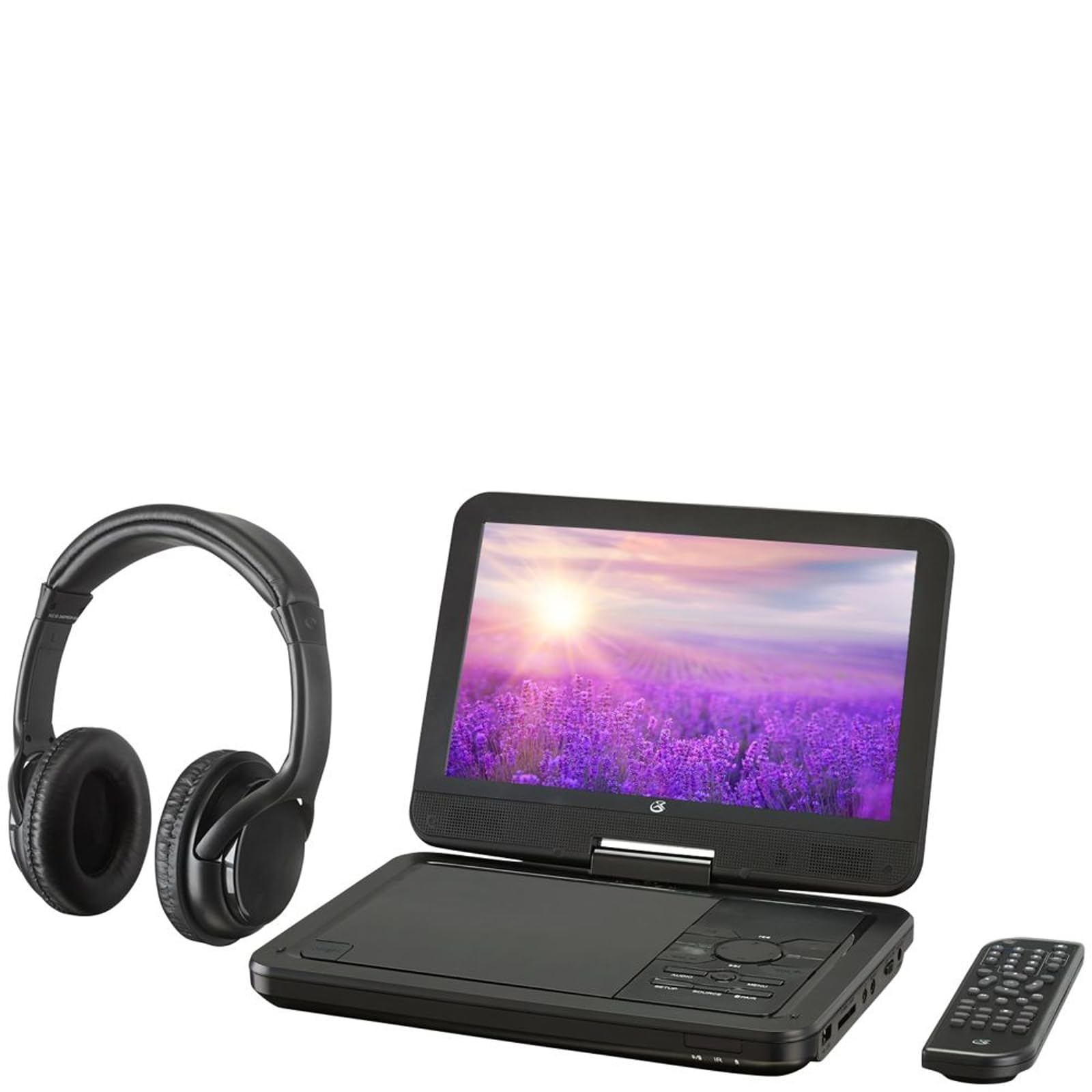
малюнок 4.1: The GPX PDB1077B Portable DVD Player, showing the 10.1-inch screen, control panel, wireless Bluetooth headphones, and remote control.
4.1 Portable DVD Player Unit
The main unit features a swivel screen, disc tray, and control buttons. Key components include:
- 10.1-дюймовий РК-дисплей: для viewing video content.
- Лоток для диска: For inserting DVDs and CDs.
- Панель керування: Buttons for playback, menu navigation, volume, and source selection.
- Порти: USB, SD card slot, AV out, headphone jack, DC in.
- Доповідачі: Вбудовані стереодинаміки.
4.2 Wireless Bluetooth Headphones
The included headphones connect wirelessly to the DVD player via Bluetooth for private listening.
малюнок 4.2: Крупний план view of the black wireless Bluetooth headphones, featuring padded earcups and an adjustable headband.
4.3 Пульт дистанційного керування
Пульт дистанційного керування забезпечує зручний доступ до всіх функцій на відстані.
малюнок 4.3: Крупний план view of the compact black remote control with various buttons for playback, menu navigation, and volume adjustment.
5. Посібник із налаштування
5.1 Зарядка пристрою
- Connect the AC/DC power adapter to the DC IN port on the DVD player.
- Підключіть адаптер до стандартної розетки.
- Індикатор заряджання засвітиться. Повна зарядка триватиме приблизно 3-4 годин.
- For in-car use, connect the car power adapter to the DC IN port and your vehicle's 12V power outlet.
5.2 Увімкнення/вимкнення
- To power on, slide the POWER switch to the ON position. The screen will light up.
- Щоб вимкнути живлення, пересуньте перемикач POWER у положення OFF.
5.3 Connecting Bluetooth Headphones
- Ensure the DVD player is powered on.
- Turn on the Bluetooth headphones and put them into pairing mode (refer to headphone manual if needed).
- On the DVD player, navigate to the Bluetooth settings menu.
- Select "Scan for Devices" or similar option.
- Choose your headphones from the list of available devices to pair.
- Once paired, audio will automatically transmit to the headphones.
5.4 Connecting to an External Display (Optional)
Use the included AV cable to connect the DVD player to a TV or monitor.
- Connect one end of the AV cable to the AV OUT port on the DVD player.
- Connect the other end to the AV IN ports (Yellow for Video, White for Left Audio, Red for Right Audio) on your external display.
- Select the correct AV input on your external display.
6. Інструкція з експлуатації
6.1 Playing DVDs and CDs
- Open the disc tray by gently lifting the screen.
- Place a DVD or CD onto the spindle with the label side facing up.
- Gently close the disc tray.
- Програвач автоматично розпізнає диск і розпочне відтворення або відобразить меню диска.
- Use the navigation buttons (Up, Down, Left, Right, Enter) on the control panel or remote to navigate menus.
- Натисніть ВІДТВОРЕННЯ/ПАУЗА щоб почати або призупинити відтворення.
- Натисніть СТІЙ , щоб зупинити відтворення.
6.2 Використання USB-накопичувачів та SD-карт
- Вставте USB-флеш-накопичувач у USB-порт або SD-карту у гніздо для SD-картки.
- Натисніть ДЖЕРЕЛО button on the control panel or remote to select "USB" or "SD".
- Переглядайте свої files using the control buttons.
- Виберіть a file (e.g., MP3, JPEG) and press ENTER грати або view.
6.3 Налаштування параметрів
Access the system settings to customize your viewвідчуття та прослуховування.
- Натисніть НАЛАШТУВАННЯ button on the remote or control panel.
- Use the navigation buttons to select options such as:
- Налаштування дисплею: Adjust brightness, contrast, color.
- Параметри звуку: Adjust volume, equalizer.
- Налаштування мови: Select OSD language, audio language, subtitle language.
- Батьківський контроль: Set rating levels for disc playback.
- Прес ENTER для підтвердження вибору та НАЛАШТУВАННЯ знову для виходу.
6.4 Використання пульта дистанційного керування
The remote control provides full functionality. Ensure batteries are correctly inserted (2 x AAA, not included).
| Кнопка | функція |
|---|---|
| ПОТУЖНІСТЬ | Вмикає або вимикає програвач. |
| НАЛАШТУВАННЯ | Доступ до меню налаштувань системи. |
| ДЖЕРЕЛО | Switches between DVD, USB, SD, and AV input modes. |
| ВІДТВОРЕННЯ/ПАУЗА | Запуск або призупинення відтворення. |
| СТІЙ | Зупинка відтворення. |
| VOL + / VOL- | Регулює рівень гучності. |
| NAVIGATE (Up/Down/Left/Right/ENTER) | Навігація по меню та підтвердження вибору. |
| МЕНЮ | Accesses the disc menu during DVD playback. |
7. Технічне обслуговування
7.1 Очищення пристрою
- Перед очищенням переконайтеся, що пристрій вимкнено та відключено від мережі.
- Використовуйте м’яку, суху тканину без ворсу для протирання зовнішніх поверхонь.
- For the screen, use a screen-specific cleaning solution and a microfiber cloth, applying gentle pressure.
- Не використовуйте абразивні засоби для чищення, віск або розчинники.
7.2 Догляд за диском
- Тримайте диски за краї, щоб уникнути відбитків пальців.
- Зберігайте диски в їхніх футлярах, коли вони не використовуються, щоб запобігти подряпинам.
- Протирайте брудні диски м’якою тканиною без ворсу, рухаючись від центру до країв.
7.3 Догляд за акумулятором
- To prolong battery life, fully charge the device before first use.
- Якщо пристрій зберігається протягом тривалого часу, заряджайте його приблизно до 50% кожні кілька місяців.
- Уникайте впливу на пристрій екстремальних температур.
8. Вирішення проблем
If you encounter issues with your GPX PDB1077B, refer to the following common problems and solutions.
| проблема | Можлива причина | Рішення |
|---|---|---|
| Немає живлення | Battery drained; Power adapter not connected properly; Power switch off. | Charge the device; Ensure power adapter is securely connected; Slide power switch to ON. |
| No Disc Playback | Диск вставлено неправильно; Диск брудний або подряпаний; Формат диска не підтримується. | Reinsert disc label-side up; Clean or replace disc; Check supported media types in specifications. |
| Немає звуку | Volume too low; Mute function active; Headphones not connected/paired correctly. | Increase volume; Deactivate mute; Reconnect or re-pair headphones. |
| Bluetooth Headphones Not Pairing | Headphones not in pairing mode; Player not in Bluetooth scan mode; Interference. | Ensure headphones are in pairing mode; Activate Bluetooth scan on player; Move closer to player, away from other devices. |
| Пульт дистанційного керування не працює | Batteries are dead or inserted incorrectly; Obstruction between remote and player; Remote sensor blocked. | Replace batteries, check polarity; Remove obstructions; Ensure remote sensor on player is clear. |
9. Технічні характеристики
Technical specifications for the GPX PDB1077B Portable DVD Player.
| Особливість | Деталь |
|---|---|
| Модель | PDB1077B |
| Розмір дисплея | 10.1 дюймів |
| Тип дисплея | ЖК |
| Рідна роздільна здатність | 1024 х 600 |
| Підтримувані носії | DVD, DVD±R/RW, CD, CD-R/RW, MP3 CD, JPEG CD |
| Підключення | Bluetooth wireless transmitter, USB port, SD card slot, AV Out, Headphone Jack, DC In |
| Джерело живлення | Built-in rechargeable battery, AC/DC adapter, Car adapter |
10. Гарантія та підтримка клієнтів
GPX products are designed for reliability and performance. For specific warranty information, please refer to the warranty card included with your purchase or visit the official GPX website. If you require technical assistance or have questions regarding your device, please contact GPX customer support.
GPX Official Webсайт: www.gpx.com
Please note that warranty terms and customer support availability may vary by region.


