1. Продукт закінчивсяview
The Klip xtreme KPM-310 Dual Monitor Desk Mount Stand is designed to optimize your workspace by securely holding two monitors, freeing up valuable desk space. This robust mount promotes an ergonomic viewing experience with its extensive adjustability.
Constructed from high-grade steel, the KPM-310 supports two screens, each up to 32 inches in size and weighing up to 17.6 lbs. It features a sturdy desktop C-clamp base for stability and a fully articulating mechanism allowing for tilt, swivel, and rotation adjustments. Integrated cable management clips help maintain a tidy setup, and a tool holder ensures the hexagonal key is always accessible for quick adjustments.

малюнок 1: The Klip xtreme KPM-310 Dual Monitor Desk Mount Stand, showing its C-clamp base and two articulating arms designed to hold monitors.
2. Вміст упаковки
Будь ласка, перевірте наявність усіх компонентів перед початком встановлення. Якщо якісь деталі відсутні або пошкоджені, зверніться до служби підтримки клієнтів.
- Main Pole with C-Clamp База
- Dual Articulating Arms
- VESA Mounting Plates (2x)
- Комплект кріпильних елементів (гвинти, шайби, проставки)
- Hexagonal Key (for adjustments)
- Кліпи для управління кабелем

малюнок 2: Фронт view of the assembled monitor mount, illustrating the main pole, dual arms, and VESA plates.
3. Налаштування та встановлення
Follow these steps to properly install your monitor desk mount.
3.1. Attaching the C-Clamp Base to Your Desk
- Place the main pole with the integrated C-clamp base onto the edge of your desk.
- Затягніть C-clamp screw securely until the mount is firmly attached to the desk surface. Ensure the desk surface is stable and can support the weight of the mount and two monitors.
3.2. Assembling the Articulating Arms
- Slide the articulating arms onto the main pole at your desired height.
- Secure the arms in place using the provided locking mechanism or screws.

малюнок 3: З верху до низу view of the monitor mount, showing the full extension of the articulating arms and the central pole.
3.3. Кріплення моніторів до пластин VESA
- Remove the VESA mounting plates from the articulating arms by loosening the securing screws.
- Align the VESA plate with the mounting holes on the back of your monitor (compatible with VESA 75x75mm or 100x100mm patterns).
- Secure the VESA plate to the monitor using the appropriate screws from the hardware kit. Do not overtighten.
- Carefully slide the monitor with the attached VESA plate back onto the articulating arm.
- Secure the VESA plate to the arm using the securing screws.
- Повторіть для другого монітора.
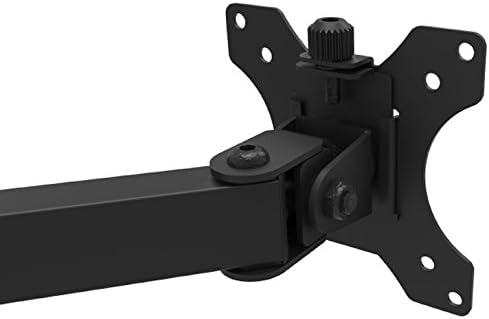
малюнок 4: Крупним планом view of a VESA mounting plate attached to an articulating arm, illustrating the connection point for a monitor.
4. Експлуатація та регулювання
The KPM-310 offers a range of adjustments to achieve optimal viewкути розташування та ергономічне розташування.
- Регулювання висоти: Loosen the collar on the main pole to slide the arms up or down. Retighten to secure.
- Регулювання нахилу: The monitor can be tilted +45° to -45° (90° total range) to reduce glare and optimize viewing angle. Use the hexagonal key to adjust the tension at the tilt joint if needed.
- Регулювання повороту: Each arm can swivel +90° to -90° (180° total range) at the pole and at the monitor connection point, allowing you to position monitors side-by-side or at an angle.
- Регулювання обертання: Monitors can be rotated 360° (+180° to -180°) from landscape to portrait orientation without removing the screen.
- Регулювання натягу: All joints can be tightened or loosened individually using the hexagonal key to control the fluidity or rigidity of movement.
After making adjustments, ensure all connections are secure to prevent monitors from shifting.
5. Технічне обслуговування
Regular maintenance ensures the longevity and proper function of your monitor mount.
- Прибирання: Протріть кріплення м’якою серветкоюamp тканиною. Уникайте абразивних засобів для чищення або розчинників, які можуть пошкодити покриття.
- Перевірка герметичності: Periodically check all screws and connections, especially the C-clamp and VESA plate screws, to ensure they remain tight and secure.
- Змащення: No lubrication is typically required for the joints. If movement becomes stiff, check for debris or overtightened screws.
6. Вирішення проблем
If you encounter issues with your monitor mount, refer to the following common problems and solutions:
- Монітори провисають або не тримають положення:
- Переконайтеся, що C-clamp надійно закріплений на столі.
- Use the hexagonal key to tighten the tension screws at the articulating joints and VESA plate connection points.
- Verify that the monitor weight does not exceed the maximum load capacity of 17.6 lbs per arm.
- Кріплення здається нестабільним:
- Confirm the C-clamp is fully tightened and the desk surface is sturdy.
- Ensure the main pole is properly seated in the base.
- Difficulty adjusting tilt/swivel/rotation:
- Loosen the tension screws at the respective joints slightly using the hexagonal key.
- Ensure no cables are obstructing movement.
7. Технічні характеристики
| Особливість | Специфікація |
|---|---|
| Номер моделі | КПМ-310 |
| Monitor Screen Size Compatibility | 13 to 32 inches (per arm) |
| Максимальна вантажопідйомність | 17.6 фунти (8 кг) на руку |
| Максимальна висота | 18.3 дюймів |
| Сумісність VESA | 75х75 мм, 100х100 мм |
| Кут нахилу | +45° to -45° (90° total) |
| Кут повороту | +90° to -90° (180° total) |
| Регулювання обертання | +180° to -180° (360° total) |
| матеріал | High-grade Steel, Plastic |
| Колір | чорний |
| Розміри продукту (Д x Ш x В) | 35.1 x 11 x 18.3 дюймів |
| Product Weight (with hardware) | 9.2 фунтів |
| Тип монтажу | C-Clamp (Стільниця) |
8. Гарантія та підтримка
The Klip xtreme KPM-310 Monitor Desk Mount Stand comes with a Довічна гарантія, що гарантує душевний спокій щодо його якості та довговічності.
For technical support, warranty claims, or inquiries about missing parts, please contact Klip xtreme customer service. Refer to the official Klip xtreme webсайт для контактної інформації.