1. Вступ
This manual provides instructions for the installation, operation, and maintenance of the Nexxt Solutions Naxos800 8-Port Fast Ethernet Network Switch. The Naxos800 is an unmanaged compact desktop switch designed for small office/home office (SOHO) environments, student dormitories, and small enterprises, offering reliable network connectivity.
2. Ключові характеристики
- 8 Fast Ethernet Ports: Provides 8 UTP/STP 10/100Mbps ports with auto MDI/MDIX.
- Plug and Play: Simple setup requiring no software configuration.
- Некерований комутатор: Operates without requiring complex management interfaces.
- Store-and-Forward Technology: Ensures efficient packet transmission.
- Вивчення MAC-адреси: Supports auto-learning and aging with a built-in 1000 MAC address table.
- Компактний дизайн: Suitable for desktop or wall mounting.
- Енергозбереження: Конструкція з низьким енергоспоживанням.
- Контроль потоку: Full duplex and half duplex back pressure flow control.
- Довговічність: Integrated lightning protection and a sturdy metal case.
- Тиха робота: Fanless design for silent performance.
3. Вміст упаковки
Переконайтеся, що ваш пакет містить такі елементи:
- One (1) Nexxt Solutions Naxos800 8-Port Fast Ethernet Switch
- Один (1) адаптер живлення

Image: The Nexxt Solutions Naxos800 switch, its power adapter, and product packaging.
4. Продукт закінчивсяview

Зображення: спереду view of the Naxos800 switch, showing the Nexxt logo and eight green LED indicators for port activity.
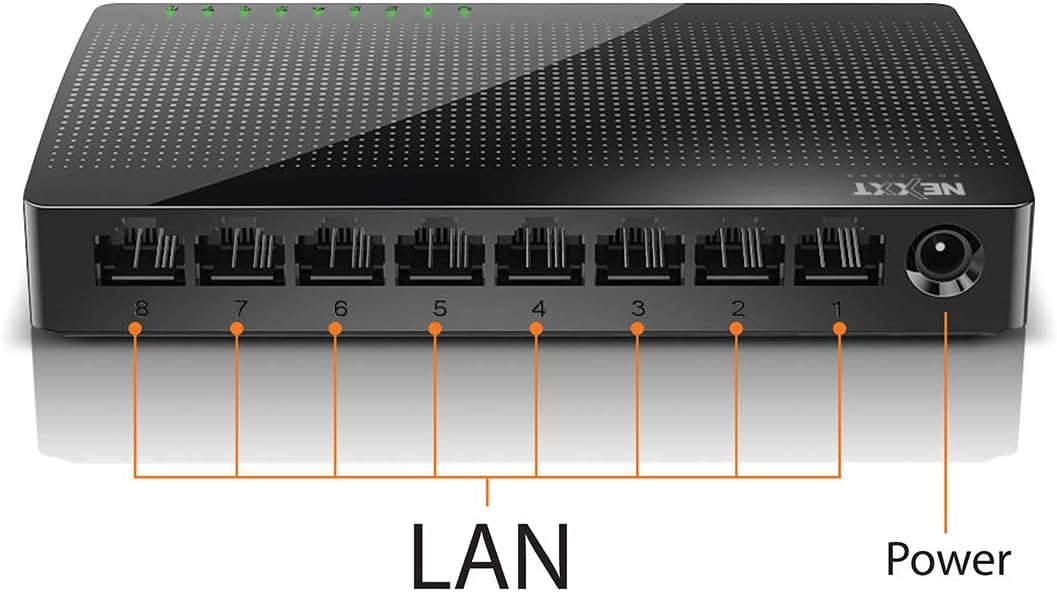
Зображення: Задня частина view of the Naxos800 switch, highlighting the eight LAN ports (numbered 1-8) and the power input port.
Світлодіодні індикатори
The front panel features LED indicators for each port, providing visual status:
- Green LED (Solid): Indicates a stable link connection.
- Зелений світлодіод (миготливий): Indicates data activity on the corresponding port.
- Світлодіод вимкнено: No link or connection detected.
5. Налаштування та встановлення
The Naxos800 switch is designed for simple plug-and-play installation. No software or complex configuration is required.
- Розміщення: Place the switch on a stable, flat surface or mount it on a wall using appropriate hardware (not included). Ensure adequate ventilation around the device.
- Підключення до живлення: Connect the provided power adapter to the power input port on the switch and then plug the adapter into a standard electrical outlet. The power LED (if present, or the port LEDs will light up) should illuminate.
- Підключення до мережі:
- Connect your router or modem to any of the 8 LAN ports on the Naxos800 switch using an Ethernet cable.
- Connect your network devices (e.g., computers, gaming consoles, IP cameras, Smart TVs, printers) to the remaining LAN ports on the Naxos800 switch using an Ethernet cable.
- Перевірте підключення: Once devices are connected, the corresponding LED indicators on the switch's front panel should light up green (solid for link, flashing for activity).

Image: Diagram illustrating a typical network setup. An ADSL or Cable Modem connects to a Router, which then connects to the Naxos800 switch. Various devices like laptops, media players, game consoles, IP cameras, Smart TVs, and IP phones are connected to the Naxos800 switch.
6. Керування комутатором
The Naxos800 is an unmanaged switch, meaning it operates automatically without user intervention once connected. It functions as an internet splitter, expanding the number of wired network connections available from your router or modem.
- Automatic Speed Detection: Each port automatically detects the speed of the connected device (10Mbps or 100Mbps) and adjusts accordingly.
- Автоматичний MDI/MDIX: Eliminates the need for crossover cables; the switch automatically detects and corrects for straight-through or crossover cable types.
- Передача даних: Data packets are forwarded between connected devices at Fast Ethernet speeds. The store-and-forward architecture ensures data integrity.
7. Технічне обслуговування
The Naxos800 switch requires minimal maintenance.
- Прибирання: Використовуйте м’яку суху тканину для очищення зовнішньої частини вимикача. Не використовуйте рідкі або аерозольні засоби для чищення.
- Вентиляція: Переконайтеся, що вентиляційні отвори не заблоковані, щоб запобігти перегріванню.
- Цикл живлення: If the device experiences issues, a simple power cycle (unplugging and replugging the power adapter) can often resolve minor problems.
8. Вирішення проблем
If you encounter issues with your Naxos800 switch, refer to the following common problems and solutions:
| проблема | Можлива причина | Рішення |
|---|---|---|
| Немає живлення / Пристрій не вмикається. | Адаптер живлення не підключений або несправний; розетка не працює. | Ensure the power adapter is securely connected to the switch and a working electrical outlet. Try a different outlet. |
| Немає індикатора зв'язку для підключеного пристрою. | Ethernet cable faulty or improperly connected; device not powered on or faulty; incorrect port. |
|
| Низька швидкість мережі. | Network congestion; faulty cable; device limitations. |
|
9. Технічні характеристики
| Атрибут | Значення |
|---|---|
| Номер моделі | ASIDT084U3 |
| Порти | 8 x 10/100Mbps Fast Ethernet (UTP/STP) |
| Пропускна здатність задньої плати | 1.6 Гбіт/с |
| Таблиця MAC-адрес | 1000 записів |
| Контроль доступу | CDMA |
| Контроль потоку | Full duplex and half duplex back pressure |
| Розміри (Д x Ш x В) | 12.4 х 5.9 х 2.3 см |
| вага | 140 г |
| Вхідна потужність | Зовнішній адаптер живлення (в комплекті) |
Примітка. Специфікації можуть бути змінені без попереднього повідомлення.
10. Гарантія та підтримка
The Nexxt Solutions Naxos800 8-Port Fast Ethernet Network Switch comes with a 5 рік обмеженої гарантії. For warranty claims or technical support, please contact Nexxt Solutions customer service. Refer to the official Nexxt Solutions website for the most current support information and contact details.
Nexxt Solutions is a US company committed to quality and customer service.


