вступ
This manual provides comprehensive instructions for the Elitech BT-3 Digital Hygrometer Thermometer. This device is designed to accurately monitor both indoor and outdoor temperature, as well as indoor humidity levels, offering essential environmental data for various settings.
Особливості продукту
- Digital Thermometer: Monitors indoor and outdoor temperature in both Fahrenheit (℉) and Celsius (℃). The measuring range is -58℉ to +158℉.
- Humidity Monitor: Measures indoor relative humidity (RH) within a range of 20% to 99%RH.
- MAX & MIN Records: Automatically stores and displays the maximum and minimum recorded values for indoor/outdoor temperature and indoor humidity.
- Clock Function and Alarming Function: Features a switchable 12 or 24-hour clock display and a settable alarm time.
- Three Mounting Options: Designed for versatility with tabletop, wall-mountable, and magnet-mountable options, allowing convenient placement.
- Індикатор комфорту повітря: Displays the comfort level (DRY/COMFORT/WET) based on current indoor humidity, providing a quick assessment of air conditions.
Схема пристрою
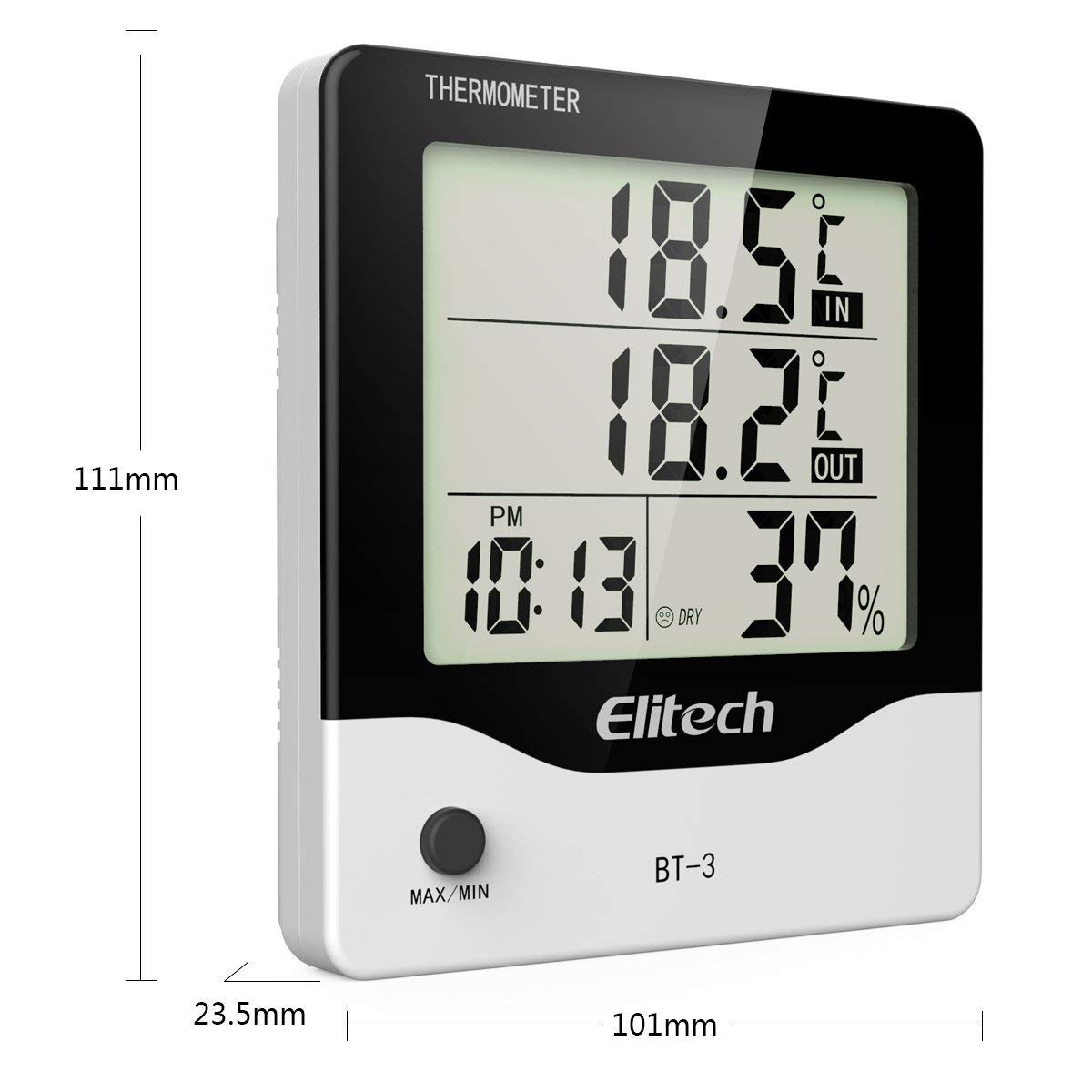
малюнок 1: Фронт view of the Elitech BT-3 unit, showing the LCD display with indoor/outdoor temperature, time, and humidity readings. Dimensions are indicated as 111mm height, 101mm width, and 23.5mm depth. A "MAX/MIN" button is visible at the bottom.

малюнок 2: Задня view of the Elitech BT-3 unit, showing the battery compartment cover and control buttons: MODE, ADJ, CLEAR, RESET, and a ℃/℉ switch. A keyhole slot for wall mounting is also visible.

малюнок 3: Задня view of the Elitech BT-3 unit, illustrating the foldable kickstand for tabletop use and the attached outdoor temperature probe with its long cable.

малюнок 4: Крупним планом view of the open battery compartment on the back of the Elitech BT-3 unit, showing the slot for a AAA battery (not included).
Налаштування
Установка батареї
- Locate the battery compartment cover on the back of the unit (refer to Figure 2).
- Slide the cover off to open the compartment (refer to Figure 4).
- Insert one AAA battery, ensuring the correct polarity (+/-) is observed. Note: Battery is not included.
- Замініть кришку батарейного відсіку, посунувши її на місце.
Розміщення зонда
The outdoor temperature probe is connected to the main unit via a long cable. For accurate outdoor temperature readings, place the probe outside in a location that is protected from direct sunlight, rain, and other extreme weather conditions. Ensure the cable is routed safely and does not interfere with windows or doors.
Варіанти монтажу
The BT-3 offers flexible placement options:
- Настільна: Extend the foldable kickstand on the back of the unit (refer to Figure 3) to place it securely on any flat surface.
- Настінний: Utilize the keyhole slot on the back of the unit (refer to Figure 2) to hang it on a screw or nail on a wall.
- Magnet-Mountable: The unit features built-in magnets, allowing it to be conveniently attached to metallic surfaces such as refrigerators or metal cabinets.
Інструкція з експлуатації
Увімкнення/вимкнення живлення
The unit powers on automatically once the battery is installed. There is no dedicated power button. To turn off, remove the battery.
Temperature Unit Selection (℃/℉)
On the back of the unit, locate the small switch labeled "℃/℉" (refer to Figure 2). Slide this switch to toggle between Celsius and Fahrenheit temperature displays.
Налаштування часу
- Натисніть РЕЖИМ button (on the back) to cycle through display modes until the current time is shown.
- Натисніть і утримуйте РЕЖИМ button until the hour digit begins to flash.
- Використовуйте ПРИСЛ button (on the back) to adjust the hour.
- Прес РЕЖИМ again to move to the minute digit, then use ПРИСЛ для регулювання хвилин.
- Продовжуйте натискати РЕЖИМ to set the 12-hour (AM/PM) or 24-hour format.
- Прес РЕЖИМ one last time to confirm settings and exit time setting mode.
Налаштування будильника
- Натисніть РЕЖИМ button until the alarm time is displayed (often indicated by an alarm clock icon).
- Натисніть і утримуйте РЕЖИМ button until the alarm hour digit flashes.
- Використовуйте ПРИСЛ кнопку для налаштування години будильника.
- Прес РЕЖИМ again to move to the alarm minute digit, then use ПРИСЛ для регулювання хвилин.
- Прес РЕЖИМ one last time to confirm and exit alarm setting mode.
- Щоб увімкнути або вимкнути будильник, натисніть кнопку ПРИСЛ button when the alarm time is displayed. An alarm icon will appear or disappear on the screen to indicate its status.
MAX/MIN Temperature and Humidity Records
Натисніть МАКС/МІН button (on the front of the unit) to view the maximum and minimum recorded indoor/outdoor temperatures and indoor humidity values.
- Натисніть МАКС/МІН button repeatedly to cycle through the current readings, maximum readings, and minimum readings.
- To clear the MAX/MIN records, press and hold the ЯСНО button (on the back of the unit) while the MAX/MIN readings are displayed.
Індикатор комфорту повітря
The display includes an indicator that categorizes the indoor air comfort level based on humidity:
- СУХИЙ: Indicates that the indoor humidity level is low.
- КОМФОРТ: Indicates that the indoor humidity level is within an optimal and comfortable range.
- МОКРИЙ: Indicates that the indoor humidity level is high.
Технічне обслуговування
- Прибирання: Clean the unit with a soft, dry cloth. Do not use abrasive cleaners, solvents, or immerse the unit in water.
- Заміна батареї: Replace the AAA battery when the low battery indicator appears on the display to ensure continuous and accurate operation.
- Догляд за зондом: Keep the outdoor probe clean and free from dirt, dust, and debris.
- Умови навколишнього середовища: Avoid exposing the unit to extreme temperatures, direct sunlight, or excessively high humidity for prolonged periods, as this can affect accuracy and lifespan.
Усунення несправностей
Неточні показання
- Розміщення зонда: Ensure the outdoor probe is correctly positioned and not exposed to direct sunlight, heat sources, or moisture, which can skew readings.
- Час стабілізації: Allow the unit sufficient time (up to 30 minutes) to stabilize and provide accurate readings after initial setup or if it has been moved to a new environment.
- Рівень заряду батареї: Check the battery level and replace it with a fresh AAA battery if the indicator shows low power.
Дисплей не працює
- Перевірка батареї: Verify that the battery is installed correctly with the proper polarity.
- Заміна батареї: Замініть батарею на нову батарею AAA.
- Заводські налаштування: If the display remains unresponsive, perform a factory reset by pressing the СКИДАННЯ button on the back of the unit. This may require a small pointed object like a paperclip.
Технічні характеристики
| Специфікація | Деталь |
|---|---|
| Номер моделі | БТ-3 |
| Колір | Білий |
| Бренд | Елітех |
| Вага товару | 0.16 кілограма (5.6 унції) |
| Тип батареї | 1 C battery required (Alkaline) |
| Низька температура | 32 градусів за Фаренгейтом |
| Верхня температура | 122 градусів за Фаренгейтом |
| Тип монтажу | Настільне, настінне кріплення |
| томtage | 1.5 вольт |
| Точність температури | 0.1 ℃ |
| Розміри продукту | 4.25 x 5.82 x 1.1 дюймів |
Гарантія та підтримка
Elitech is committed to providing excellent customer service. The product comes with 24/7 US Technician Support available via email and phone.
For warranty claims, technical assistance, or any product-related inquiries, please contact Elitech customer service directly. Refer to the Elitech official webсайт або упаковку продукту для отримання найактуальнішої контактної інформації.
Elitech Company Overview
Це відео надає загальний оглядview of Elitech Technology Inc., its vision, and its range of HVAC/R tools and manufacturing capabilities. It is not specific to the BT-3 product operation but offers insight into the brand's commitment to innovation.
Відео 1: Elitech AI HVAC/R Tools Create Green Future - An overview of Elitech's technology and manufacturing.


