вступ
This manual provides essential instructions for the safe and effective use of your Sky Viper Drone Battery USB Charger. Please read this manual thoroughly before operating the charger to ensure proper function and longevity of your drone batteries.

Image: A set of two black USB chargers for Sky Viper drone batteries, each with a USB-A plug on one end and a small two-pin connector on the other, connected by a black cable.
Налаштування
Виконайте такі кроки, щоб підготувати USB-зарядний пристрій до використання:
- Розпакувати: Обережно вийміть USB-зарядний пристрій з упаковки.
- Оглянути: Check the charger for any visible damage. Do not use if damaged.
- Джерело живлення: Connect the USB-A plug of the charger to a compatible USB power source (e.g., computer USB port, USB wall adapter, power bank). Ensure the power source provides a stable 5V output.
- Світловий індикатор: Once connected to a power source, the charger's indicator light (if present) may illuminate, indicating it is ready for use.
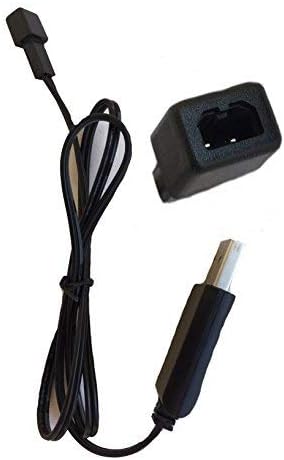
Image: A single black USB charger shown from the side, highlighting the USB-A connector and the small drone battery connector.
Video: This video demonstrates the Sky Viper USB charger, showing its components and how it can be handled. It highlights the USB-A connector and the drone battery connector.
Інструкція з експлуатації
To charge your Sky Viper drone battery:
- Підключіть акумулятор: Carefully align the two-pin connector of the charger with the corresponding port on your Sky Viper drone battery. Gently push to ensure a secure connection. Do not force the connection.
- Індикатор зарядки: The charger's indicator light will typically change color or state to indicate that charging is in progress. Refer to your specific drone battery's manual for details on its charging status indicators.
- Час зарядки: Charging times may vary depending on the battery's capacity and its current charge level. Avoid overcharging. Disconnect the battery once fully charged.
- Відключити: Once charging is complete, carefully disconnect the battery from the charger, then disconnect the charger from the USB power source.
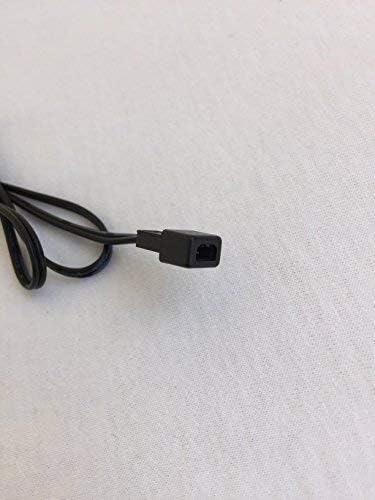
Зображення: Крупний план view of the small two-pin connector on the charger cable, which connects to the drone battery.

Image: The USB charger is displayed alongside a Sky Viper drone, illustrating the product's intended use and compatibility.
Технічне обслуговування
Щоб забезпечити довговічність та належну роботу вашого зарядного пристрою:
- Прибирання: Wipe the charger with a dry, soft cloth. Do not use liquid cleaners or solvents.
- Зберігання: Зберігайте зарядний пристрій у прохолодному сухому місці подалі від прямих сонячних променів і екстремальних температур.
- Обробка: Avoid bending or twisting the cable excessively. Do not pull on the cable to disconnect it; always grasp the plug.
- Огляд: Періодично перевіряйте кабель та роз'єми на наявність будь-яких ознак зносу або пошкоджень.
Усунення несправностей
| проблема | Можлива причина | Рішення |
|---|---|---|
| Charger indicator light does not turn on. | No power from USB source, faulty USB port, or damaged charger. | Try a different USB power source or port. Ensure the USB plug is fully inserted. If the issue persists, the charger may be faulty. |
| Акумулятор не заряджається. | Loose battery connection, incompatible battery, or battery fault. | Ensure the battery connector is securely attached to the charger. Verify the battery is compatible with this charger. Test with a different battery if available. |
| Повільна зарядка. | Джерело USB з низьким енергоспоживанням. | Use a USB power source with higher output (e.g., a wall adapter instead of a computer port). |
Технічні характеристики
- Бренд: Небесна гадюка
- Номер моделі: 00
- Вхідний об'ємtage: 240 вольт
- Вихідний випtage: 3.7 вольт
- колір: чорний
- Вага товару: 0.352 унції
- Розміри упаковки: 3.74 x 2.28 x 0.51 дюймів
- UPC: 798896225866
- Дата першої доступності: 16 вересня 2017 р
Note: The "Input Voltage: 240 Volts" specification likely refers to the AC input for a compatible wall adapter, as USB power sources typically provide 5V DC. The charger itself is designed to accept 5V DC from a USB port.
Гарантія та підтримка
For warranty information and customer support, please refer to the official Sky Viper website or contact the retailer where the product was purchased. Specific warranty terms and support contact details are not provided in this manual.


