1. Вступ
This manual provides instructions for the proper use and maintenance of your KECHAODA K115 Dual SIM mobile phone. Please read this manual carefully before operating your device to ensure optimal performance and longevity.

Малюнок 1: Спереду view of the KECHAODA K115 mobile phone, showing the display and keypad.

Малюнок 2: Сторона view of the KECHAODA K115 mobile phone, illustrating its slim profile.
2. Вміст упаковки
Перевірте наявність усіх елементів в упаковці:
- 1 KECHAODA K115 Mobile Phone
- 1 Акумулятор
- USB-кабель 1
- 1 гарантійний талон
Note: Earphones/headphones and a wall charger are not included with this product.

Figure 3: Illustration indicating that earphones are not included.

Figure 4: Illustration indicating that a wall charger is not included.
3. Налаштування
3.1. Установка батареї
- Зніміть задню кришку телефону.
- Insert the 800 mAh Lithium Ion battery into the battery compartment, ensuring the contacts align.
- Встановіть задню кришку.

Малюнок 5: Задня частина view of the KECHAODA K115, showing the battery cover and camera lens.
3.2. Installing SIM Cards
The KECHAODA K115 supports Dual SIM functionality.
- Знявши задню кришку та акумулятор, знайдіть слоти для SIM-карт.
- Insert your GSM SIM cards into the designated slots.
- Ensure the SIM cards are correctly seated.
- Встановіть назад акумулятор і задню кришку.
3.3. Зарядка батареї
Перед першим використанням повністю зарядіть акумулятор телефону.
- Connect the provided USB cable to the phone's charging port.
- Підключіть інший кінець USB-кабелю до сумісного USB-адаптера (не входить до комплекту) або USB-порту комп’ютера.
- Індикатор заряджання з’явиться на екрані.
- Від'єднайте зарядний пристрій, коли акумулятор буде повністю заряджено.
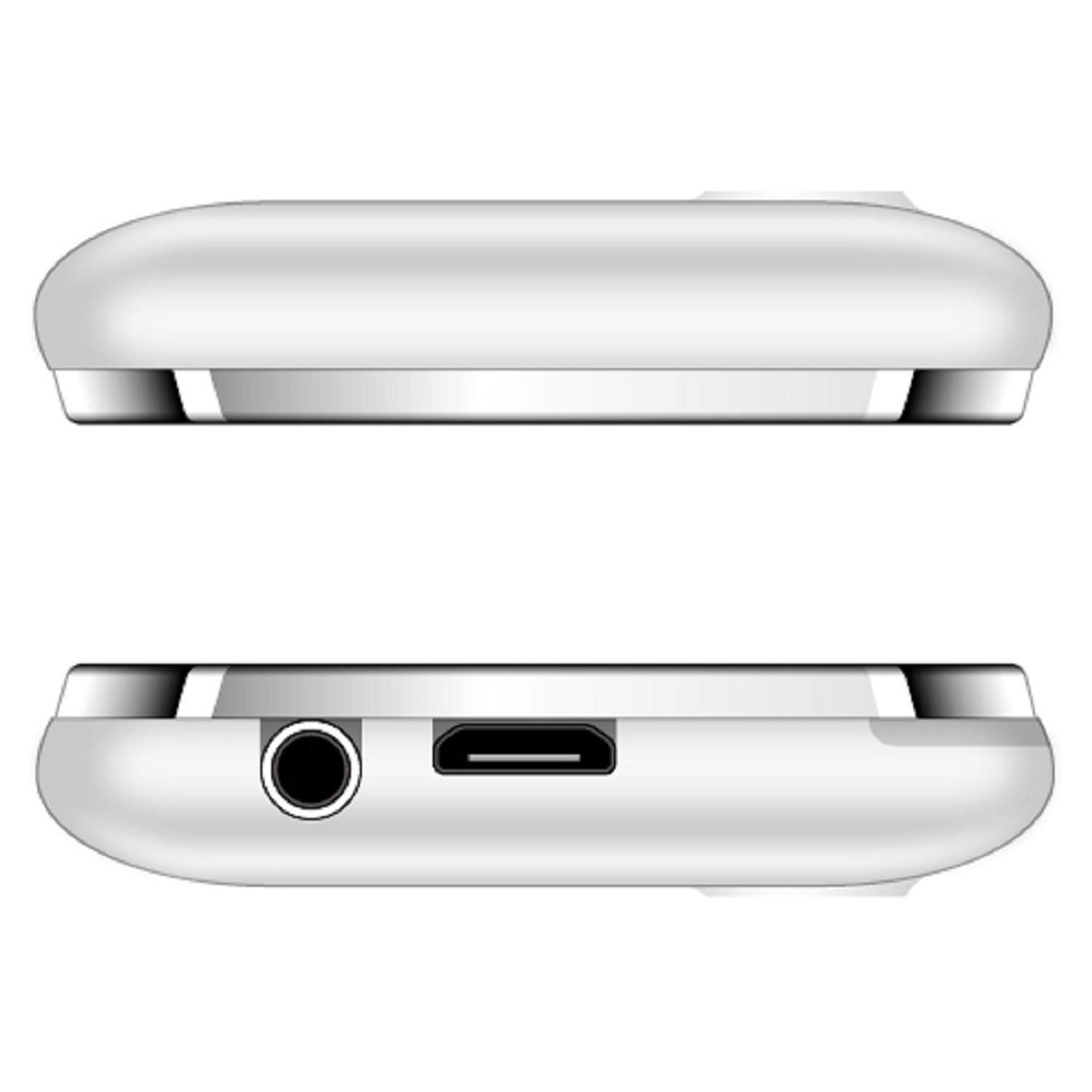
Малюнок 6: Верх і низ views of the KECHAODA K115, showing the 3.5mm audio jack and micro USB charging port.
4. Інструкція з експлуатації
4.1. Увімкнення/вимкнення живлення
- To power on, press and hold the Power/End Call key until the screen lights up.
- To power off, press and hold the Power/End Call key until the power off options appear, then select 'Power off'.
4.2. Основні функції телефону
- Здійснення дзвінків: Введіть номер телефону за допомогою клавіатури та натисніть клавішу виклику.
- Відповідь на дзвінки: Натисніть клавішу виклику, коли телефон дзвонить.
- Надсилання повідомлень: Navigate to the 'Messages' menu, select 'Write message', enter your text, and send to the desired recipient.
- Швидкий набір: Configure speed dial numbers in the phone settings for quick access.
4.3. Мультимедійні функції
- FM-радіо: Access the FM Radio application from the main menu. Ensure a 3.5mm audio device is connected to act as an antenna for optimal reception. The phone supports FM recording.
- Аудіоплеєр: Play MP3, AMR, and WAV audio files.
- Відеопрогравач: Play MP4, 3GP, and AVI video files.
- Зображення Viewер: View stored image files.
- Диктофон: Record audio using the built-in sound recorder.
4.4. Підключення
- Bluetooth: To pair with other Bluetooth devices (e.g., headsets), navigate to the Bluetooth settings, turn Bluetooth on, and search for available devices. The phone supports Bluetooth v2.1.
4.5. Інші функції
- Світовий годинник: View time in different time zones.
- EBook Reader: Читайте електронні книги.
- сигналізація: Встановіть кілька будильників.
- File менеджер: Організуйте files stored on the phone or memory card.
- Віддалений сповіщувач: Functionality for remote notifications.
- Підтримка мови: The phone supports Hindi, English, Tamil, and Kannada languages.
5. Технічне обслуговування
- Тримайте пристрій сухим. Волога може пошкодити електронні схеми.
- Не піддавайте пристрій дії екстремальних температур.
- Протирайте телефон м’якою сухою тканиною. Уникайте використання агресивних хімічних речовин.
- Handle the battery with care. Do not puncture, disassemble, or expose to high temperatures.
- Використовуйте тільки схвалені аксесуари.
6. Вирішення проблем
| проблема | Можливе рішення |
|---|---|
| Телефон не вмикається. | Переконайтеся, що акумулятор правильно встановлено та заряджено. Спробуйте заряджати телефон щонайменше 30 хвилин. |
| Погана якість звуку під час дзвінків. | Check network signal strength. Ensure the earpiece/speaker is not obstructed. Restart the phone. |
| Акумулятор швидко розряджається. | Reduce screen brightness. Close unused applications. Limit background processes. Ensure the battery is fully charged before use. |
| Cannot connect to Bluetooth device. | Ensure Bluetooth is enabled on both devices and they are within range. Make sure the other device is in pairing mode. Restart both devices. |
| FM-радіо не працює. | Ensure a 3.5mm audio device (like headphones) is connected, as it acts as the antenna. |
7. Технічні характеристики
| Особливість | Деталь |
|---|---|
| Модель | K115 |
| Дисплей | 1.44 inch QQVGA LCD |
| Операційна система | Symbian 9.1 |
| ОЗУ | 32 Мб |
| Внутрішня пам'ять | 64 Мб |
| Підтримка SIM | Dual SIM (GSM) |
| Акумулятор | 800 mAh Lithium Ion (Removable) |
| Час розмови | До 2.5 годин |
| Час очікування | До 4.5 днів |
| Підключення | Bluetooth v2.1, Cellular (GSM) |
| Аудіороз'єм | 3.5 мм |
| Особливості | Dual SIM, Light Sensor, MP3, Radio, Rear Camera, Vibration, Speed Dialing |
| Розміри продукту | 9.5 х 4 х 0.9 см |
| Вага товару | 100 г |
| Виробник | DHARAM & COMPANY, Shenzhen Kechaoda Technology Co. Ltd |
8. Гарантія та підтримка
Your KECHAODA K115 mobile phone comes with a warranty card included in the package. Please refer to the warranty card for specific terms and conditions of the warranty.
For technical support or service inquiries, please contact your retailer or the manufacturer directly using the contact information provided on the warranty card or product packaging.


